1. Киришүү
This manual provides detailed instructions for the installation, operation, and maintenance of your myTouchSmart 41381 In-Wall Motion Activated Timer. This device is designed to automatically control lighting based on detected motion, offering convenience and energy efficiency. It is compatible with LED, CFL, incandescent, and halogen bulbs.

Image 1.1: The myTouchSmart 41381 In-Wall Motion Activated Timer, showing its sleek white design and the hidden control panel.
2. Коопсуздук боюнча маанилүү маалымат
Read all instructions before installation and use. Failure to follow these instructions may result in electric shock, fire, or serious injury.
- ЭСКЕРТҮҮ: Risk of Electric Shock. Disconnect power at the circuit breaker or fuse box before installation.
- Бардык улуттук жана жергиликтүү электрдик кодекстерге ылайык орнотуңуз.
- Бул аппарат имараттын ичинде гана колдонуу үчүн.
- Do not use with dimmers or 3-way switches. This is a single-pole device.
- A neutral wire is required for installation. If you are unsure, consult a qualified electrician.
- Бардык зым байланыштары коопсуз экенин текшериңиз.
3. Пакеттин мазмуну
- myTouchSmart 41381 In-Wall Motion Activated Timer
- White faceplate door
- Light almond faceplate door
- Орнотуу бурамалар
- Neutral jumper wire
Note: A wall plate is not included and must be purchased separately.
4. Орнотуу
4.1 Электр өткөргүч схемасы
The myTouchSmart 41381 is designed for single-pole installation and requires a neutral wire. Follow these steps carefully:
- Электр кубатын өчүрүү: Алмаштырып жаткан өчүргүчкө электр энергиясын берген автоматтык өчүргүчтү же сактагычты таап, аны ӨЧҮРҮҢҮЗ. Үн күчөткүчтү колдонуп, электр энергиясынын өчүк экенин текшериңиз.tage сыноочу.
- Учурдагы которгучту алып салуу: Учурдагы дубал плитасын кылдаттык менен алып салыңыз жана дубал кутусунан которуңуз. Эски өчүргүчтөн зымдарды ажыратыңыз.
- Зымдарды аныктоо: Identify the LINE (hot), LOAD, NEUTRAL, and GROUND wires in your wall box. A neutral wire is typically white.
- Зымдарды туташтыруу:
- Connect the LINE wire from the wall box to the "Line" terminal on the motion sensor.
- Connect the LOAD wire from the wall box to the "Load" terminal on the motion sensor.
- Connect the NEUTRAL wire from the wall box to the "Neutral" terminal on the motion sensor. Use the included neutral jumper wire if necessary.
- Connect the GROUND wire from the wall box to the "Ground" terminal on the motion sensor.
- Которгучту орнотуу: Carefully place the wired motion sensor into the wall box and secure it with the provided screws.
- Беттик пластинаны орнотуу: Attach the desired white or light almond faceplate door. Note that a standard wall plate is not included.
- Күчтү калыбына келтирүү: Электрди өчүргүчтөн кайра күйгүзүңүз.

Image 4.1: Detailed wiring diagram showing connections for Line, Load, Neutral, and Ground terminals.
4.2 Өлчөмдөр
Ensure adequate space in your wall box for installation. The dimensions of the device are provided below.

Image 4.2: Product dimensions: 4.13 inches (104.90mm) height, 1.75 inches (44.45mm) width.
5. Операция
The myTouchSmart 41381 features a hidden control panel for easy adjustment of settings. Open the small door on the front of the switch to access the buttons.
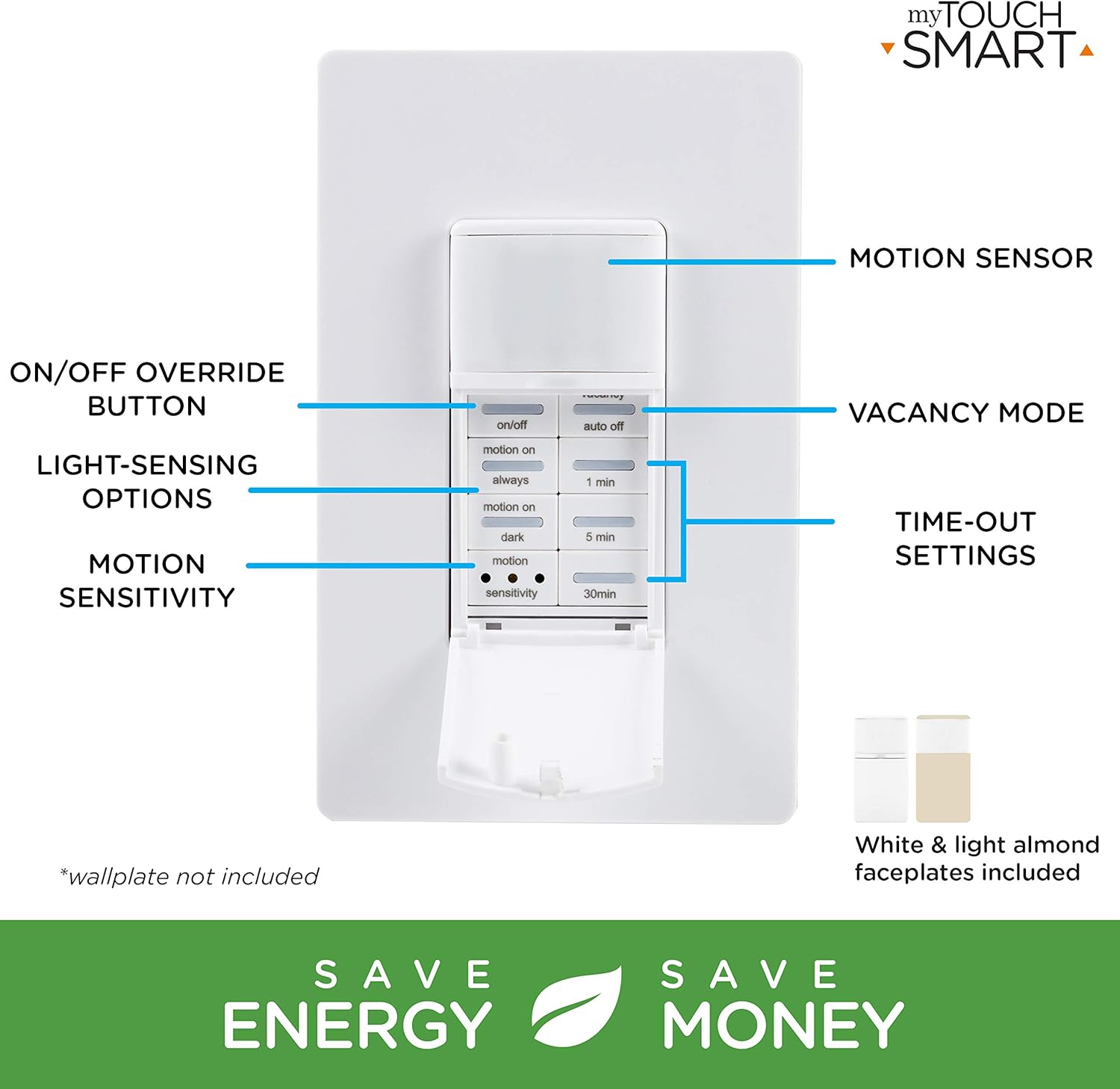
Image 5.1: The control panel with buttons for ON/OFF override, Vacancy Mode, Light-Sensing Options, Motion Sensitivity, and Time-Out Settings.
5.1 Simple Setup
Adjusting the settings is straightforward:
- Баскычтар: Open the door and press the buttons to select your desired preferences for operation mode, time-out duration, and motion sensitivity.
- Shut door: Close the door to conceal the settings.
- Кол менен башкаруу: You can push the door itself or the ON/OFF button (if exposed) to manually control the lights.

Image 5.2: Visual guide for simple setup: 1. Push buttons, 2. Shut door, 3. Push door/ON/OFF button for manual control.
5.2 Иштөө режимдери
- Occupancy Mode (Automatic ON/OFF): When motion is detected, the lights turn ON automatically. They will turn OFF after the selected time-out duration if no motion is detected.
- Vacancy Mode (Manual ON, Automatic OFF): The lights must be turned ON manually. They will turn OFF automatically after the selected time-out duration if no motion is detected.
5.3 Time-Out Settings
Select how long the lights remain ON after the last detected motion:
- 1 мүнөт
- 5 мүнөт
- 30 мүнөт
5.4 Motion Sensitivity
Adjust the sensor's responsiveness to movement:
- Төмөн
- Орто
- Жогорку
The sensor detects movement up to 30ft. away within a 150-degree coverage area.

Image 5.3: Detection zone illustration showing a 150-degree range and up to 30ft. detection distance.
5.5 Light-Sensing Options
Control when the motion sensor activates based on ambient light levels:
- Ар дайым: Motion detection is active regardless of ambient light.
- Motion On: Lights turn on with motion only if the ambient light is below a certain level.
- Караңгы: Lights turn on with motion only when it is dark.
6. Техникалык тейлөө
The myTouchSmart 41381 motion sensor requires minimal maintenance. To ensure optimal performance:
- Clean the sensor lens periodically with a soft, dry cloth to remove dust or debris that may obstruct detection.
- Do not use abrasive cleaners or solvents, as these may damage the device.
- Ensure the area around the sensor is clear of obstructions that could block its field of view.
7. Кыйынчылыктарды
| Көйгөй | Мүмкүн себеп | Чечим |
|---|---|---|
| Lights do not turn ON with motion. |
|
|
| Жарыктар өтө тез же өтө жай өчүп калат. |
|
|
| Жарыктар жымыңдайт же туруксуз иштейт. |
|
|
| Sensor does not detect motion effectively in certain areas. |
|
|
8. Техникалык шарттар
| Өзгөчөлүк | Деталь |
|---|---|
| Модель номери | 41381 |
| Operating Voltage | 120VAC, 50/60Гц |
| Учурдагы рейтинг | 15 Amps каршылык |
| Вольфрам жүк | 1200 Вт |
| Electronic Ballast/LED Load | 5A/600W |
| Мотор жүк | 1 / 2 HP |
| Кыймылды аныктоо диапазону | 30 фут чейин. |
| Камтуу аймагы | 150 градуска чейин |
| Шайкеш лампалар | LED, CFL, incandescent, halogen |
| Орнотуу түрү | Single-pole (neutral wire required) |
| Өлчөмдөрү (L x W x Y) | 2.15 x 4.3 x 6.45 дюйм |
| Элемент Салмагы | 6.1 унция |
| IP рейтинги | IP54 |
| Өндүрүүчү | Jasco Products Company, LLC |
9. Кепилдик жана колдоо
myTouchSmart products are backed by a limited warranty. For specific warranty details, product support, or to register your product, please visit the manufacturer's webсайтка же кардарларды тейлөө бөлүмүнө кайрылыңыз.
Өндүрүүчү: Jasco Products Company, LLC
Кепилдик дооматтары үчүн сатып алганыңыздын далилин сактап коюңуз.


