Introduction
This manual provides essential information for the proper setup, operation, and maintenance of your NEC DTZ-12D-3 DT400 12-Button Display Phone. Please read these instructions carefully to ensure optimal performance and longevity of your device. This phone is designed for business communication environments, offering a range of features to enhance productivity.
Продукт бүттүview
The NEC DTZ-12D-3 DT400 is a corded 12-button display phone, featuring a clear LCD screen for call information and menu navigation. It is designed for efficient communication in a professional setting.
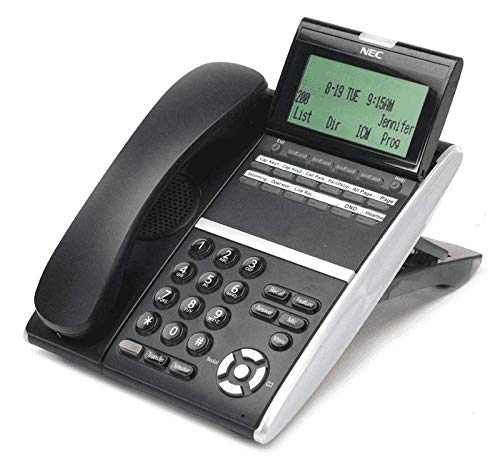
1-сүрөт: NEC DTZ-12D-3 DT400 12-Button Display Phone. This image shows the black corded desk phone with its adjustable display unit. The display shows time, date, and soft-key options. The phone features a standard dial pad, 12 programmable function keys, and dedicated buttons for speaker, transfer, redial, and navigation.
Негизги компоненттер:
- Телефон: Жеке сүйлөшүүлөр үчүн.
- Дисплей экраны: Shows call status, time, date, and menu options.
- Programmable Feature Keys (12): Customizable buttons for speed dials, line access, or specific functions.
- Терүү тактасы: Терүү үчүн стандарттуу сандык баскычтар (0-9, *, #).
- Чабыттоо баскычтары: For scrolling through menus and lists.
- Динамик баскычы: Activates the speakerphone function.
- Өткөрүү баскычы: Used to transfer an active call to another extension.
- Кайра терүү баскычы: Акыркы чалган номерди терет.
- DND (Do Not Disturb) Button: Activates/deactivates the Do Not Disturb feature.
Жайгашуу
1. таңгактан чыгаруу
- Бардык компоненттерди таңгактан кылдаттык менен алып салыңыз.
- Verify that all items are present: phone unit, handset, coiled handset cord, and telephone line cord.
2. Телефонду туташтыруу
Connect one end of the coiled handset cord to the handset and the other end to the handset jack located on the side or back of the phone unit.
3. Connecting to the Telephone Line
Plug one end of the telephone line cord into the LINE jack on the phone unit and the other end into a standard telephone wall jack.
4. Кубатты туташтыруу
This phone is designed for corded electric operation. Ensure it is connected to a compatible telephone system that provides power, or use the appropriate power adapter if supplied separately (check your system's requirements).
Иштөө нускамалары
Чакыруу
- Телефонду көтөрүңүз же басыңыз Баяндамачы баскычы.
- Dial the desired telephone number using the dial pad.
- Чалуу туташуу үчүн күтө туруңуз.
Чалууга жооп берүү
- Телефон шыңгыраганда, телефонду көтөрүңүз же басыңыз Баяндамачы баскычы.
Using Programmable Feature Keys
The 12 programmable keys can be configured for various functions such as speed dialing, line access, or system features. Consult your system administrator for specific programming details and assigned functions.
Caller Identification (Caller ID)
If subscribed to Caller ID service, the incoming caller's number and name (if available) will be displayed on the screen before you answer the call.
Чалууну өткөрүү
- Активдүү чалуу учурунда, басыңыз Transfer баскычы.
- Dial the extension or number to which you want to transfer the call.
- Wait for the recipient to answer, then announce the call and hang up. Alternatively, you may hang up immediately for an unsupervised transfer.
Акыркы номерди кайра терүү
Телефонду көтөрүңүз же басыңыз Баяндамачы баскычын, андан кийин басыңыз Кайра терүү акыркы терилген номерге чалуу үчүн баскыч.
Тынчымды алба (DND)
басыңыз DND button to activate or deactivate the Do Not Disturb feature. When active, incoming calls may be redirected to voicemail or a busy signal, depending on system configuration.
Техникалык тейлөө
Тазалоо
- Телефондун сыртын жумшак менен сүртүңүз, гamp кездеме.
- Do not use harsh chemicals, abrasive cleaners, or excessive moisture.
- Ensure the phone is disconnected from the power source before cleaning.
Сактагыч
Телефонду узак убакыт бою колдонбогон учурда, аны салкын, кургак жерде, күндүн түз тийген нурларынан жана өтө жогорку температурадан алыс сактаңыз.
Проблемаларды чечүү
Терүү үнү жок
- Check all cable connections, especially the telephone line cord.
- Ensure the phone system is operational.
- Test with another phone if available to rule out line issues.
Дисплей иштебей жатат
- Verify the phone is properly connected to the system and receiving power.
- Adjust the display contrast if applicable (refer to system administrator).
Чалууларды жасоо же кабыл алуу мүмкүн эмес
- Check if the DND feature is accidentally activated.
- Телефон линиясынын иштеп турганын текшериңиз.
- Contact your system administrator for assistance with line configuration.
Техникалык шарттар
| Өзгөчөлүк | Деталь |
|---|---|
| Модел | DTZ-12D-3 DT400 |
| Бренд | NEC Co |
| Телефон түрү | жоон |
| Түс | Кара |
| Материал | Пластик |
| Элемент Салмагы | 2.9 фунт |
| Пакеттин өлчөмдөрү | 12.28 x 9.21 x 4.61 дюйм |
| Power Source | Электр зымдары |
| Терүүчү түрү | Single Keypad (tone dialing) |
| Жооп берүү системасынын түрү | Санарип |
| Көп линия операциясы | Бир линиялык операция |
| Чалуучунун идентификациясы | Ооба |
| Шайкеш түзмөктөр | Traditional telephone networks (PSTN, ISDN), potential integration with other communication devices. |
Кепилдик жана колдоо
For warranty information and technical support, please refer to the documentation provided by your system vendor or contact your NEC authorized dealer. As this product may be a renewed item, specific warranty terms may vary from new products. Please consult your purchase agreement for details.
For further assistance, it is recommended to contact your IT department or the telecommunications system administrator responsible for your NEC phone system.


