Продукт бүттүview
The Wipro B22 12.5W Wi-Fi Smart LED Bulb offers advanced lighting control and customization for your home. This smart bulb integrates seamlessly with your Wi-Fi network, allowing for remote control, voice commands, and dynamic lighting effects. It is designed to enhance your living space with versatile illumination options.

Image: The Wipro B22 12.5W Wi-Fi Smart LED Bulb shown alongside its product packaging, highlighting its smart features and compatibility.
Негизги өзгөчөлүктөрү:
- Музыканы синхрондоштуруу функциясы: Synchronize your light's colors with the rhythm of your favorite music for an immersive experience.
- Каалаган жерден башкаруу: Manage your lights remotely using the Wipro Smart Home App, ensuring control even when you're away.
- 16 миллион түс параметрлери: Explore a vast spectrum of 16 million colors to create the perfect ambiance for any occasion, from parties to movie nights.
- Үн менен башкаруу: Seamlessly control your smart bulb using voice commands through Amazon Alexa and Google Assistant.
- Өчүрүүчү: Adjust the brightness from 10% to 100% to save energy and set the desired light intensity.
Орнотуу колдонмосу
Follow these steps to set up your Wipro Wi-Fi Smart LED Bulb and connect it to your smart home system:
- Лампаны орнотуу: Screw the Wipro Smart LED Bulb into a standard B22D bulb holder.
- Колдонмону жүктөп алыңыз: Install and open the "Wipro Next Smart Home" app on your mobile device. Ensure your device is in pairing mode.
- Катталуу/Кирүү: Register with your email ID and follow the on-screen instructions to log in to the app.
- Түзмөк кошуу: Tap on "Add Device" or the "+" icon in the top right corner of the app.
- Түзмөктү аныктоо: The app will automatically detect the smart bulb. Select the appropriate device from the available options.
- Толук орнотуу: Tap on "Done" and open the "Smart world of Wipro" to finalize the setup.

Image: Visual representation of the six-step setup process for the Wipro Smart LED Bulb, from app installation to device connection.
Иштөө нускамалары
Түсү жана жарыктыгын көзөмөлдөө
The Wipro Smart LED Bulb offers extensive control over its light output. You can choose from 16 million colors to match your mood or decor, and adjust the brightness from a subtle glow (10%) to full illumination (100%). The bulb also supports tunable white light, allowing you to select various shades of white, from warm to cool (2700K to 6500K).

Image: An illustration of the Wipro Smart LED Bulb highlighting its capabilities such as 16 million color options and brightness adjustment.
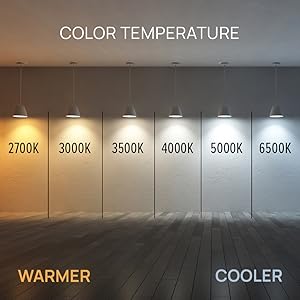
Image: A visual guide demonstrating the range of color temperatures available, from warm (2700K) to cool white (6500K).
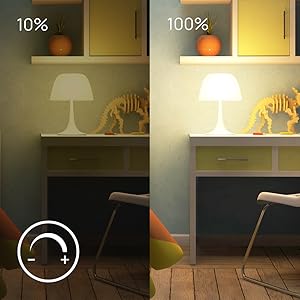
Image: A comparison showing the light output at 10% brightness versus 100% brightness, illustrating the dimmable feature.
Музыканы синхрондоштуруу функциясы
Activate the music sync feature through the Wipro Smart Home App to make your bulb's colors change dynamically with the beat of your music. This creates an engaging and vibrant atmosphere for parties or casual listening.

Image: A living room scene demonstrating the music sync feature, with lights changing colors in rhythm with music.
Үн менен башкаруу
The Wipro Smart LED Bulb is compatible with Amazon Alexa and Google Assistant, allowing for convenient hands-free control. Simply use voice commands to turn the light on/off, change colors, adjust brightness, or set scenes.

Image: A woman relaxing, demonstrating voice control of the Wipro Smart Light using an Amazon Alexa device.

Image: A collage of four images showing different individuals interacting with smart lights using voice commands like "Alexa, brighten smart light by 30%" or "Alexa, turn off the smart lights."
Remote Control and Scheduling
Control your Wipro Smart LED Bulb from anywhere in the world using the Wipro Smart Home App on your smartphone. You can also set schedules and timers for your lights to turn on or off automatically, providing convenience and energy savings.

Image: A smartphone displaying the Wipro Smart Home app interface, showing a color wheel for light control and various settings.
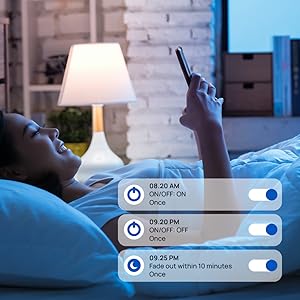
Image: A screenshot from the Wipro Smart Home app showing options to set schedules for turning lights on/off or fading them over time.
Техникалык тейлөө
The Wipro Smart LED Bulb requires minimal maintenance. To ensure optimal performance and longevity:
- Тазалоо: Ensure the bulb is switched off and cool before cleaning. Wipe with a soft, dry cloth. Do not use liquid or abrasive cleaners.
- Сактагыч: Эгерде лампочканы узак убакытка сактасаңыз, аны күн нурунан жана экстремалдык температурадан алыс, салкын, кургак жерде сактаңыз.
- Программалык камсыздоонун жаңыртуулары: Regularly check the Wipro Smart Home App for any available firmware updates to ensure your bulb has the latest features and security enhancements.
Проблемаларды чечүү
If you encounter issues with your Wipro Smart LED Bulb, try the following troubleshooting steps:
- Лампочка жооп бербей жатат:
- Лампанын розеткага бекем буралып бекитилгенин жана кубат которгучу күйүк экенин текшериңиз.
- Check your Wi-Fi connection. The bulb requires a stable 2.4GHz Wi-Fi network.
- Restart the bulb by turning it off and on from the power switch.
- Wi-Fi роутериңизди өчүрүп күйгүзүңүз.
- Жупташуу кыйынчылыгы:
- Make sure your mobile device is connected to the same 2.4GHz Wi-Fi network as the bulb.
- Ensure the bulb is blinking rapidly (pairing mode). If not, cycle the power off/on three times until it blinks.
- Жупташтыруу процессинде Wi-Fi роутериңизге жакындаңыз.
- Үн менен башкаруу маселелери:
- Verify that your Amazon Alexa or Google Assistant device is properly linked to your Wipro Smart Home account.
- Интернет байланышыңызды текшериңиз.
- Ensure your voice commands are clear and precise.
- Music Sync Not Working:
- Ensure the music sync feature is enabled in the Wipro Smart Home App.
- Check the microphone access for the app if it relies on your phone's microphone for music detection.
Техникалык мүнөздөмөлөр

Image: The Wipro Smart LED Bulb displaying its physical dimensions for reference.
| Спецификация | Деталь |
|---|---|
| Бренд | Wipro |
| Модель аты | Wipro Garnet 9W Color Changing Bulb (Note: Product title indicates 12.5W, model name from specs says 9W. Using 12.5W as per title for consistency.) |
| Жарык түрү | LED |
| Ватtage | 12.5 Watts (Power Consumption) / 22 Watts (Listed Wattage) |
| Кызытуу эквиваленти Ватtage | 12.5 Ватт |
| Лампанын базасы | B22D |
| Жарыктык | 1200 Lumen |
| Түс температурасы | 6500 Келвин (Муздак Ак) |
| Түс параметрлери | CCT+RGB with Music Sync (16 Million Colors) |
| Dimmable | Ооба (10%-100%) |
| Байланыш технологиясы | Wi-Fi |
| Controller Type | Google Жардамчысы, Amazon Alexa |
| Тtage | 240 вольт |
| Материал | Поликарбонат (PC) |
| Өлчөмдөрү (LxWxH) | 6 x 6 x 13 сантиметр |
| Элемент Салмагы | 91 грамм |
| Камтылган компоненттер | Лампочка |
Расмий продукт Videos
Watch these official videos for a comprehensive overview and demonstration of the Wipro Smart LED Bulb's features.
Продукт бүттүview Video
Video: A detailed product overview видео шоуcasing the Wipro Wi-Fi Smart LED Bulb's design, features, and smart capabilities. (Duration: 33 seconds)
360 градус View
Видео: 360 градус view of the Wipro Wi-Fi Smart LED Bulb, allowing you to see the product from all angles. (Duration: 75 seconds)
Кепилдик жана колдоо
This Wipro Smart LED Bulb comes with a standard brand warranty. For specific warranty details, replacement policies, and further information, please refer to the product's official documentation or the Amazon product detail page.
For customer support or technical assistance, you can contact the manufacturer:
- Өндүрүүчү: Wipro, Wipro Enterprises Private Ltd
- Дарек: Bangaluru-560 034 KA
- Кардарларды тейлөө: 1-800-425-1971 (as per manufacturer details)
You can also visit the official Wipro Lighting and Appliances store on Amazon for more products and information: Wipro Store


