Introduction
This manual provides comprehensive instructions for setting up, operating, maintaining, and troubleshooting your Mercusys MR50G AC1900 Dual-Band Wi-Fi 5 Router. The MR50G is designed to deliver high-speed wireless connectivity with AC1900 speeds, Gigabit Ethernet ports, and advanced features like MU-MIMO and Beamforming.

Сүрөт: алдыңкы view of the Mercusys MR50G router, illustrating its dual-band capabilities with 5GHz (1300 Mbps) and 2.4GHz (600 Mbps) speeds.
Орнотуу колдонмосу
1. Пакеттин мазмуну
Пакетиңизде төмөнкү заттар бар экенин текшериңиз:
- Mercusys MR50G AC1900 Dual-Band Wi-Fi 5 Router
- Кубаттуу адаптер
- Ethernet кабели
- Quick Installation Guide (User Guide)
2. Физикалык байланыш
Роутериңизди туташтыруу үчүн бул кадамдарды аткарыңыз:
- Өчүрүү: Модемиңизден жана роутериңизден электр кубатын ажыратыңыз (эгер бар болсо).
- Модемди роутерге туташтыруу: Connect one end of the provided Ethernet cable to the WAN port (usually blue) on your MR50G router and the other end to your modem's Ethernet port.
- Түзмөктөрдү туташтыруу (кошумча): For wired connections, connect your computer or other devices to the LAN ports (yellow) on the MR50G router using Ethernet cables.
- Күйгүзүү: Connect the power adapter to the router's power port and plug it into a power outlet. Power on your modem, then power on the MR50G router.
- Индикаторлорду күтүңүз: Wait for the router's LED indicators to stabilize. The Power LED should be solid green.
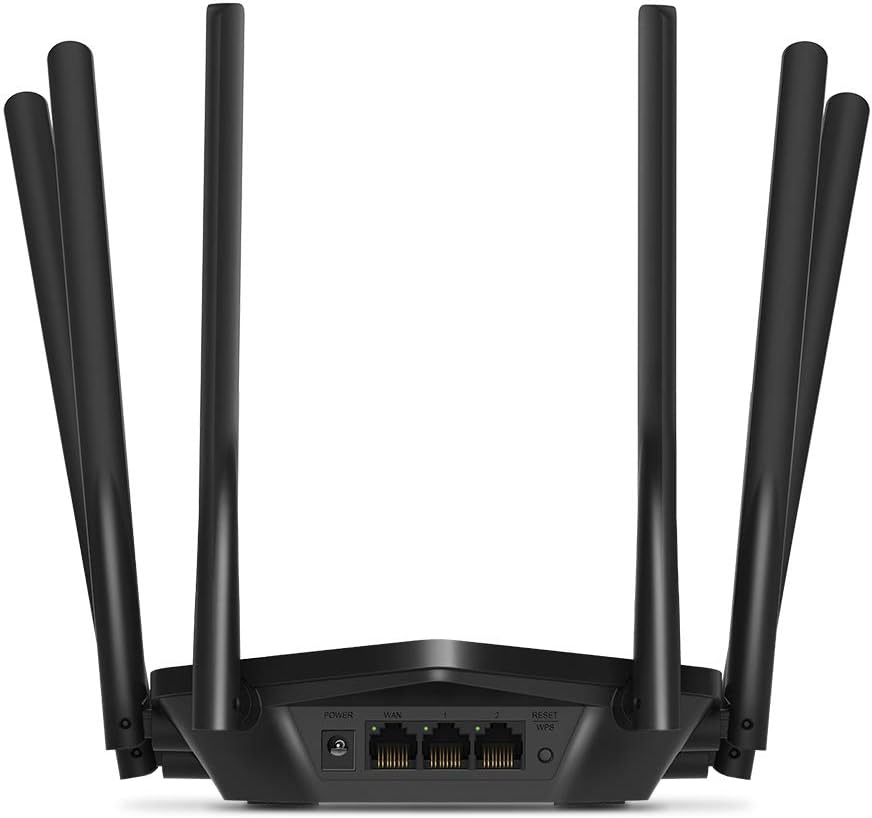
Сүрөт: Арткы view of the Mercusys MR50G router, illustrating the power input, WAN port (blue), and three LAN ports (yellow) for wired connections, along with the Reset/WPS button.
3. Баштапкы конфигурация
Роутериңизди биринчи жолу конфигурациялоо үчүн:
- Wi-Fi'га туташуу: Connect your computer or mobile device to the router's default Wi-Fi network (SSID and password are typically printed on a label on the bottom of the router).
- Мүмкүнчүлүк Web Интерфейс: ачуу а web браузер жана түрү
mwlogin.netor192.168.1.1дарек тилкесине. - Кирүү сырсөзүн түзүү: Follow the on-screen instructions to create a login password for the router's management page.
- Тез орнотууну аткарыңыз: The Quick Setup wizard will guide you through basic internet and wireless settings.
Иштөө нускамалары
1. Basic Wi-Fi Settings
киргенден кийин web интерфейс:
- Тармактын аталышы (SSID): Navigate to the Wireless settings to change your Wi-Fi network names (SSIDs) for both 2.4 GHz and 5 GHz bands.
- Купуя сөз: Set a strong, unique password for your Wi-Fi networks. The MR50G supports WPA3 for enhanced security.
- Коопсуздук түрү: It is recommended to use WPA2-PSK/WPA3-Personal for optimal security.
2. Dual-Band Operation
The MR50G operates on two frequency bands:
- 2.4 ГГц: Кеңири камтууну жана дубалдар аркылуу жакшыраак кирүү мүмкүнчүлүгүн камсыз кылат, жалпы интернет колдонуу жана эски түзмөктөр үчүн ылайыктуу.
- 5 ГГц: Offers faster speeds and less interference, ideal for bandwidth-intensive activities like 4K streaming and online gaming, but with a shorter range.
You can configure separate SSIDs for each band or use Smart Connect to combine them into a single SSID, allowing the router to automatically assign devices to the optimal band.
3. Кирүү чекитинин режими
To use the MR50G as an Access Point (AP) to extend an existing wired network:
- Туташуу: Connect an Ethernet cable from your existing router's LAN port to one of the MR50G's LAN ports (not the WAN port).
- Тарамдоо: Log into the MR50G's web interface, navigate to the Operation Mode settings, and select "Access Point Mode". Follow the prompts to complete the setup.
4. Өркүндөтүлгөн функциялар
- MU-MIMO: Көп колдонуучу, бир нече киргизүү, бир нече чыгаруу технологиясы роутерге бир эле учурда бир нече түзмөктөр менен байланышууга мүмкүндүк берип, тармактын натыйжалуулугун жогорулатат.
- Beamforming: Wi-Fi сигналдарын туташкан түзмөктөргө багыттап, сигналдын күчүн жана диапазонун жакшыртат.
- VPN колдоо: The router supports VPN functionality, allowing for secure remote access or connection to VPN services. Refer to the router's web interface for specific VPN client/server configurations.
- Ата-энелик көзөмөл: Белгилүү бир түзмөктөр же колдонуучулар үчүн интернетке кирүүнү башкаруу жана чектөө.
- Коноктор тармагы: Негизги тармагыңыздын коопсуздугун камсыз кылуу менен коноктор үчүн өзүнчө Wi-Fi тармагын түзүңүз.
Техникалык тейлөө
1. Микропрограмманы жаңыртуу
Regularly check for and install firmware updates to ensure optimal performance, security, and access to new features. Firmware updates can typically be found in the router's web interface under System Tools or Advanced settings.
2. Роутерди баштапкы абалга келтирүү
If you encounter persistent issues or forget your login password, you may need to reset the router to its factory default settings:
- With the router powered on, press and hold the Reset/WPS button on the back panel for approximately 5-10 seconds until the LED indicators flash.
- Баскычты коё берип, роутердин кайра жүктөлүшүн күтүңүз. Бардык жөндөөлөр заводдук демейки жөндөөлөргө кайтарылат.
3. Оптималдуу жайгаштыруу
For the best Wi-Fi coverage and performance:
- Place the router in a central location in your home or office.
- Аны Wi-Fi сигналдарына тоскоол боло турган калың дубалдар, металл буюмдар же чоң шаймандар (микротолкундар, муздаткычтар) сыяктуу тоскоолдуктардын жанына койбоңуз.
- Мүмкүн болсо роутерди көтөрүңүз, анткени Wi-Fi сигналдары ылдый тарапка тарайт.

Image: Mercusys MR50G router positioned on a table, demonstrating a typical placement for optimal signal distribution within a living space.
Проблемаларды чечүү
1. Интернетке кирүү жок
- Байланыштарды текшерүү: Бардык Ethernet кабелдери туура портторго (WANдан модемге, LANдан түзмөктөргө) бекем туташтырылганын текшериңиз.
- Түзмөктөрдү кайра иштетүү: Power cycle your modem, then the router, and then your connected devices.
- WAN LEDин текшериңиз: Verify that the WAN LED on the router is lit, indicating a connection to the modem.
- ISP статусу: Эч кандай кызмат жок экенин тастыктоо үчүн Интернет Кызмат Провайдериңизге (ISP) кайрылыңызtagсиздин аймакта.
2. Slow Wi-Fi Speeds
- Маршрутизатордун жайгашуусу: Ensure the router is placed optimally (refer to "Optimal Placement" section).
- Интерференция: Маршрутизаторду тоскоолдук жаратышы мүмкүн болгон башка электрондук түзүлүштөрдөн алыс жылдырыңыз.
- Топтун тандоосу: For speed-critical applications, ensure your device is connected to the 5 GHz band.
- Каналды оптималдаштыруу: Маршрутизатордо web интерфейси үчүн, 2.4 ГГц жана 5 ГГц тилкелери үчүн тең Wi-Fi каналын азыраак тыгынга алмаштырып көрүңүз.
- Микропрограмма: Роутериңиздин микропрограммасы жаңыртылганын текшериңиз.
3. Cannot Access Router Management Page
- IP дареги: Ensure you are using the correct address (
mwlogin.netor192.168.1.1). - Зымдуу туташуу: Try accessing the page from a computer connected directly to the router via an Ethernet cable.
- Браузер кэшин тазалоо: Өзүңүздү тазалаңыз web браузердин кэшин жана cookie файлдарын же башка браузерди колдонуп көрүңүз.
- Firewall/Антивирус: Компьютериңиздеги кирүүгө бөгөт коюп жаткан брандмауэрди же антивирустук программаны убактылуу өчүрүңүз.
- Маршрутизаторду баштапкы абалга келтирүү: If all else fails, perform a factory reset (refer to "Resetting the Router" section).
Техникалык шарттар
| Модел | MR50G (EU) |
| Зымсыз стандарттар | IEEE 802.11a/b/g/n/ac |
| Жыштык | 2.4 ГГц жана 5 ГГц (Эки тилкелүү) |
| Маалымат ылдамдыгы | AC1900 (2.4 ГГцде 600 Мбит/сек, 5 ГГцде 1300 Мбит/сек) |
| Ethernet порттору | 1 гигабиттик WAN порту, 3 гигабиттик LAN порту |
| Антенналар | 6x Fixed Omni-Directional Antennas |
| Коопсуздук | WPA-PSK / WPA2-PSK / WPA3-Personal |
| Өлчөмдөрү (W x D x H) | 15.72 x 17.56 x 4.5 см |
| Салмагы | 450 г |
| Өзгөчөлүктөр | MU-MIMO, Beamforming, Access Point Mode, VPN Support, Parental Controls, Guest Network |
| Power Input | 100-240V ~ 50/60Hz |
Кепилдик жана колдоо
Mercusys products come with a limited warranty. For detailed warranty information, please refer to the warranty card included with your product or visit the official Mercusys webсайт.
For technical support, firmware updates, and additional resources, please visit the Mercusys support webсайт. Адатта, байланыш маалыматын жана көп берилүүчү суроолорду ал жерден таба аласыз.
Official Mercusys Webсайт: www.mercusys.com


