Introduction and Overview
The Technical Pro H502URBT is a versatile digital hybrid amplifier designed to deliver powerful and clear audio performance. It integrates a preamp tuner, USB and SD card playback, Bluetooth connectivity, and FM radio, making it suitable for a wide range of audio applications from home entertainment to professional setups. This manual provides detailed instructions for setting up, operating, and maintaining your ampоптималдуу аткарууну жана узак өмүрдү камсыз кылуу үчүн lifier.

Сүрөт 1: Алдыңкы view of the H502URBT Ampөмүрлүү.

2-сүрөт: Арткы view of the H502URBT Amplifier, showing connections.
Негизги өзгөчөлүктөрү
The H502URBT amplifier is equipped with a comprehensive set of features to enhance your audio experience:
- Жогорку кубаттуулугу: 3500 watts peak power for robust sound delivery.
- Бир нече аудио киргизүүлөр: RCA (2 audio sources), USB, SD Card, MP3 (3.5mm) for diverse connectivity.
- Ар тараптуу натыйжалар: Banana binding post (4 speakers), push button (surround sound speakers), RCA (record line, preamp, 2 mono to subwoofer), Headphone (3.5mm).
- Digital Media Playback: Plays .mp3, .wav, .wma files from USB drives and SD Cards (max 32GB).
- iPod/iPhone Compatibility: USB input allows direct connection for iPods.
- Жазуу функциясы: Records .wav files onto USB Flash Drive or SD Card from Tuner & RCA inputs (128 kbps / 44.1 KHz sampлинг чен).
- Bluetooth байланышы: Features Bluetooth v2.0 with EDR (2.4 GHz) for wireless connection to A2DP stereo Bluetooth devices, with a range of 30 feet.
- Integrated Tuner: AM/FM digital tuner.
- Микрофон кириштери: Dual 1/4'' mic inputs with independent volume, echo, bass, and treble controls.
- Аудио башкаруу каражаттары: Bass, treble, and balance controls, separate gain control for preamp and subwoofer outputs.
- Дисплей: Digital FL readout with spectrum display.
- Ыңгайлуулугу: Built-in Speaker selector, cooling speed fan, removable rack-mount brackets, wireless remote included.
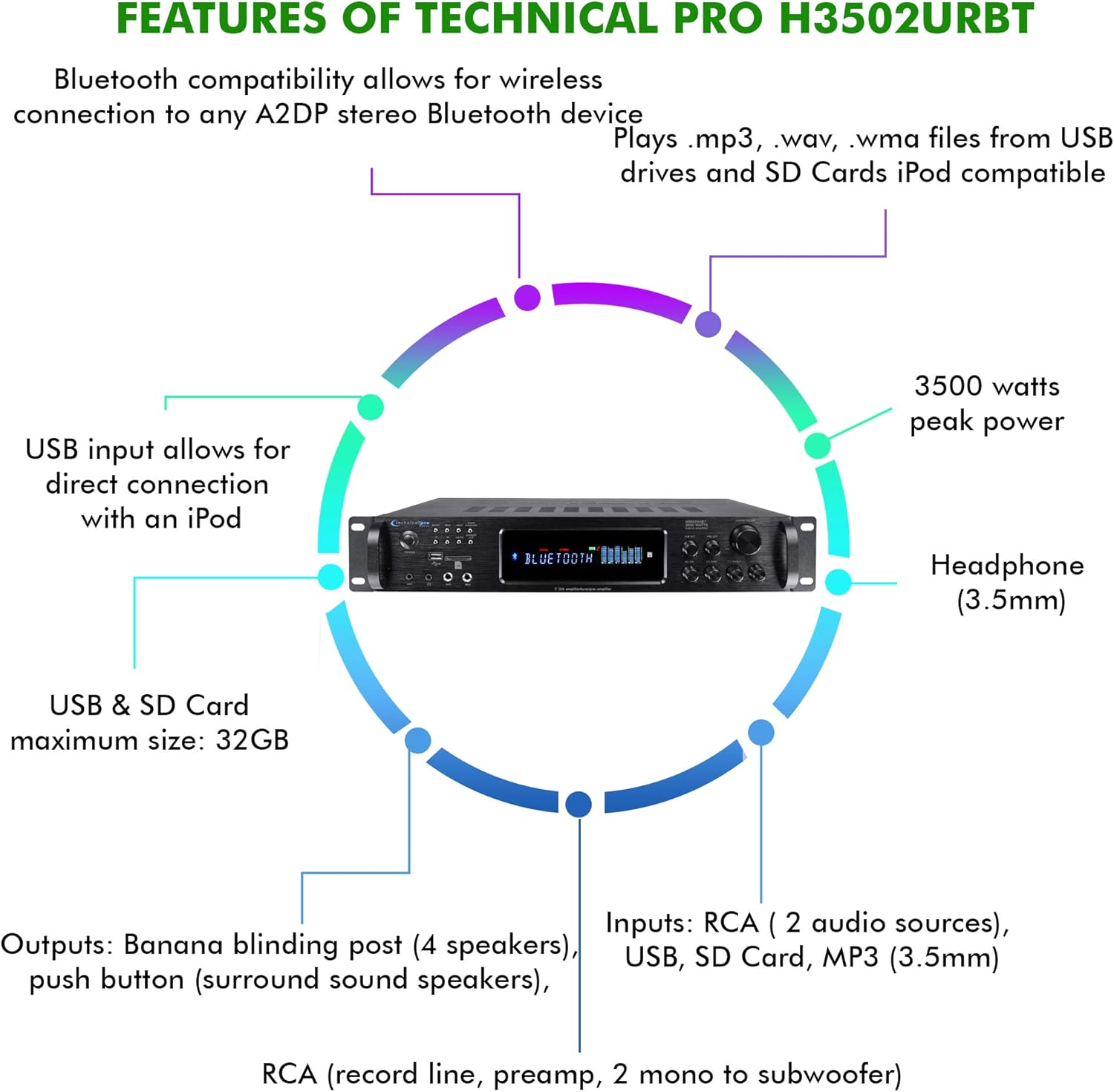
Figure 3: Key features and connectivity options.
Физикалык бүттүview
Алдыңкы панелдин башкаруу элементтери жана көрсөткүчтөрү
4-сүрөт: Алдыңкы панелдин жайгашуусу.
- Кубат баскычы: Агрегатты күйгүзөт же өчүрөт.
- Киргизүү тандагыч: Cycles through RCA, USB, SD, MP3, Bluetooth, and FM inputs.
- USB/SD карта уячалары: Медиа ойнотуу үчүн fileUSB дисктерден жана SD карталардан алынган s.
- MP3 Input (3.5mm): Тышкы аудио түзмөктөрдү туташтыруу.
- Гарнитуранын чыгышы (3.5 мм): Жеке угуу үчүн.
- Microphone Inputs (1/4''): Эки микрофонго чейин туташтырыңыз.
- Mic Volume/Echo/Bass/Treble Controls: Adjust microphone audio.
- Негизги том: Жалпы чыгаруу көлөмүн көзөмөлдөйт.
- Бас/Жогору жыштыктар/Баланс башкаруу элементтери: Adjust audio tone and channel balance.
- Digital FL Readout: Displays current status, track information, and spectrum analysis.
Арткы панелдик байланыштар
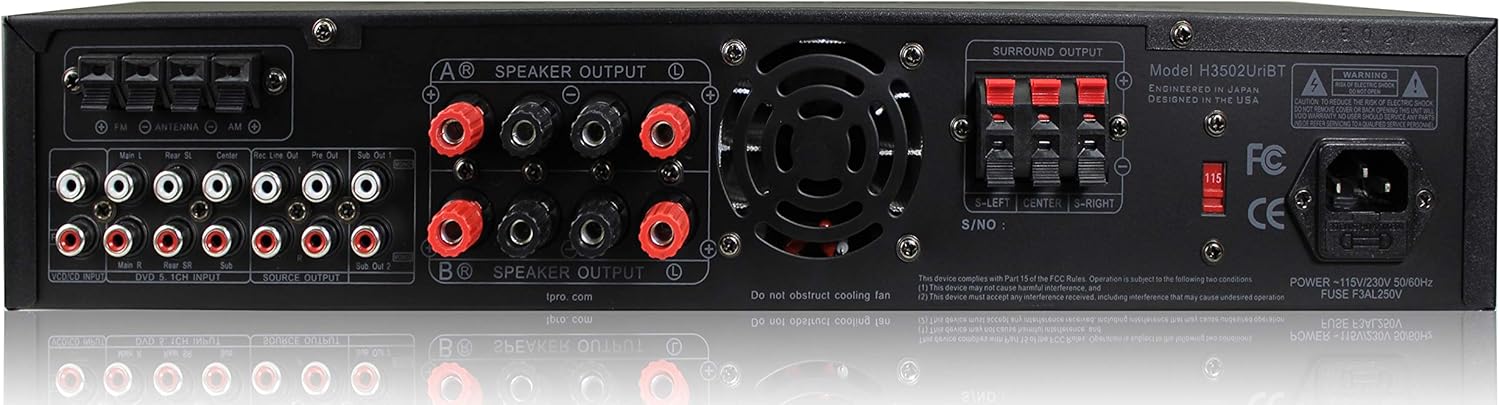
5-сүрөт: Арткы панелдин туташуулары.
- RCA Audio Inputs (L/R): Connect external audio sources like CD players, DVD players, or other audio devices.
- Speaker Outputs (Banana Binding Post): Connect main speakers.
- Surround Sound Speaker Outputs (Push Button): Connect surround sound speakers.
- RCA Record Line Output: Жаздыруучу түзмөккө туташтыруу үчүн.
- RCA Preamp Чыгуу: Тышкы кубатка туташуу үчүн ampөмүрлүү.
- RCA Subwoofer Outputs (Mono): Connect to powered subwoofers.
- FM антенна киргизүү: Радио кабыл алуу үчүн комплекттеги FM антеннасын туташтырыңыз.
- Кубат киргизүү: AC кубат шнурын туташтырыңыз.
Жайгашуу
1. Динамиктерди бириктирүү
- камсыз кылуу ampкөтөргүч өчүрүлгөн жана электр розеткасынан ажыратылган.
- Connect your main speakers to the "SPEAKER OUTPUT" banana binding posts on the rear panel. Ensure correct polarity (red to red, black to black).
- If using surround sound speakers, connect them to the "SURROUND OUTPUT" push button terminals, observing polarity.
- For powered subwoofers, connect them to the "SUB OUT" RCA outputs.
2. Аудио булактарын туташтыруу
- For external audio devices (e.g., CD player, TV), connect their RCA audio outputs to the "RCA INPUT" jacks on the rear panel.
- For portable devices, use the 3.5mm MP3 input on the front panel.
- For USB drives or SD cards, insert them into the respective slots on the front panel.
- Connect the FM antenna to the "FM ANTENNA" terminal for radio reception.
3. Power Connection
- Once all audio and speaker connections are made, plug the amplifier's power cord into a standard AC power outlet.
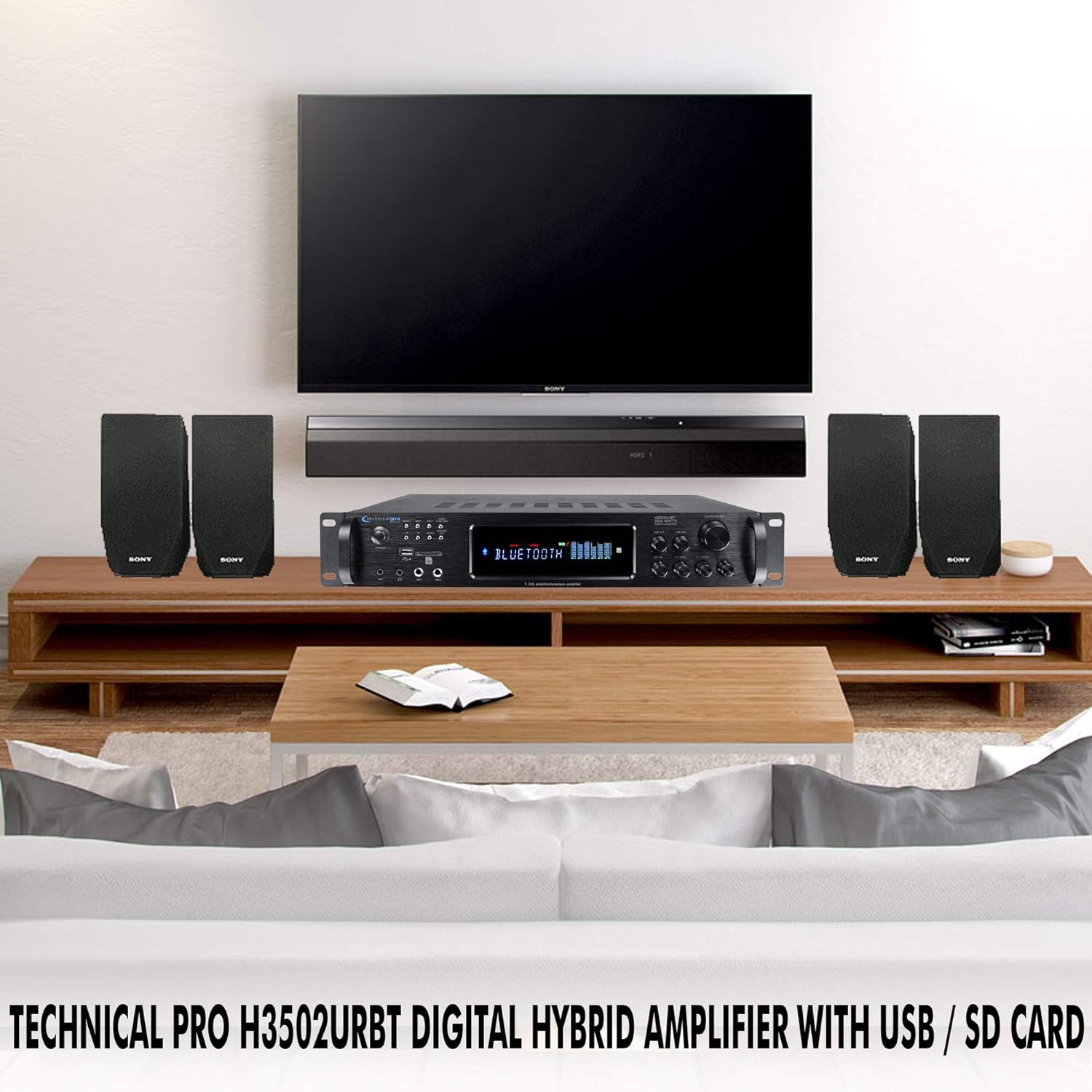
6-сүрөт: Мисample of a typical home audio setup.
Иштөө нускамалары
1. Күйгүзүү/өчүрүү
басыңыз КҮЧ күйгүзүү үчүн алдыңкы панелдеги же алыстан башкаруу пультундагы баскычты басыңыз amplifier on or off. The digital display will illuminate when the unit is powered on.
2. Киргизүүнү тандоо
басыңыз INPUT button on the front panel or the remote control to cycle through the available audio sources: RCA, USB, SD, MP3, Bluetooth, and FM. The selected input will be displayed on the digital readout.
3. Bluetooth операциясы
- тандаңыз Bluetooth input using the Input Selector.
- Bluetooth иштетилген түзмөгүңүздө (мисалы, смартфон, планшет) Bluetooth'ду иштетиңиз жана жеткиликтүү түзмөктөрдү издеңиз.
- Select "Technical Pro H502URBT" from the list of devices to pair.
- Жупташтырылгандан кийин, сиз түзмөгүңүздөн аудиону зымсыз түрдө төмөнкүгө агылта аласыз ampөмүрлүү.
4. USB/SD ойнотуу
- Insert a USB flash drive or SD card (up to 32GB) containing .mp3, .wav, or .wma fileалдыңкы панелдеги тиешелүү уячага салыңыз.
- тандаңыз USB or SD киргизүү.
- The amplifier will automatically begin playing the media. Use the playback controls (Play/Pause, Next/Previous Track) on the front panel or remote. Track title, number, and elapsed time will be displayed.
5. Микрофонду колдонуу
- Plug 1/4'' microphones into the MIC1 or MIC2 алдыңкы панелдеги киргизүүлөр.
- тууралаңыз MIC VOL, MIC ECHO, MIC BASS, жана MIC TREBLE knobs to achieve the desired sound.
6. Жазуу функциясы
The amplifier can record audio from the Tuner or RCA inputs directly to a connected USB flash drive or SD card as .wav files. To record, ensure a USB drive or SD card is inserted, select the desired input source, and initiate recording via the appropriate control (refer to the full manual for specific recording button location if not explicitly labeled).
7. Tone and Volume Controls
колдонуу МАСТЕР ТОМУ knob to adjust the overall sound level. The БАС, ҮЧЧҮ, жана БАЛАНС knobs allow you to fine-tune the audio output to your preference.
Техникалык тейлөө
Туура тейлөө сиздин узак жана оптималдуу иштешин камсыз кылат ampөмүрлүү.
- Тазалоо: Disconnect the power before cleaning. Use a soft, dry cloth to wipe the exterior of the unit. Do not use liquid cleaners or aerosol sprays, as they may damage the finish or internal components.
- Вентиляция: Желдетүү тешиктери ampАшыкча ысып кетүүнүн алдын алуу үчүн жетиштүү аба агымы абдан маанилүү.
- Сактагыч: Эгерде түзмөктү узак убакытка сактасаңыз, аны салкын, кургак жерде, күндүн нуру түз тийген жана өтө жогорку температурадан алыс сактаңыз.
Проблемаларды чечүү
Эгер сиз менен көйгөйлөр пайда болсо amplifier, төмөнкү жалпы көйгөйлөрдү жана чечимдерди карагыла:
| Көйгөй | Мүмкүн себеп | Чечим |
|---|---|---|
| Күч жок | Power cord not securely connected; Power outlet not active; Unit fuse blown. | Check power cord connection; Test outlet with another device; Consult a qualified technician for fuse replacement. |
| Үн чыгышы жок | Туура эмес киргизүү тандалды; Динамиктин зымдары бош же туура эмес туташтырылган; Үнү өтө төмөн; Үнсүз режим функциясы иштеп турат. | Select correct input; Check all speaker connections and polarity; Increase Master Volume; Ensure unit is not muted. |
| Bluetooth туташпай жатат | AmpКөтөргүч Bluetooth режиминде эмес; Түзмөк өтө алыс; Түзмөк мурунтан эле башка түзмөк менен жупташтырылган. | камсыз кылуу amplifier is on Bluetooth input; Move device closer; Disconnect device from other Bluetooth connections and try again. |
| USB/SD ойнотуу көйгөйлөрү | Колдоого алынбайт file format; USB/SD card corrupted; Card size exceeds 32GB. | камсыз кылуу files are .mp3, .wav, or .wma; Try a different USB/SD card; Use a card within the 32GB limit. |
| Бурмаланган үн | Volume too high; Speaker impedance mismatch; Poor cable connection. | Үнүн азайтуу; Баяндамачылардын дал келишин камсыз кылуу amplifier impedance; Check all audio cable connections. |
Техникалык шарттар
Detailed technical specifications for the Technical Pro H502URBT Digital Hybrid Ampөмүр берүүчү:
| Өзгөчөлүк | Деталь |
|---|---|
| Чоку күч | 3500 Ватт |
| Продукциянын өлчөмдөрү | 19.1 x 14 x 18 дюйм |
| Элемент Салмагы | 14.9 фунт |
| Модель номери | H502URBT |
| Байланыш технологиясы | RCA, Bluetooth, USB |
| Controller Type | Android (шайкеш) |
| Шайкеш түзмөктөр | Speaker, iPod, iPhone |
| Аудио чыгаруу режими | Mono (for subwoofer), Stereo |
| Көлөмдүү үн каналынын конфигурациясы | 7.2 Channel up conversion |
| USB & SD Card Max Size | 32 ГБ |
| Жазуу форматы | .wav (128 kbps / 44.1 KHz) |
| Bluetooth версиясы | v2.0 with EDR |
| Bluetooth диапазону | 30 Фут |
| Түс | Кара |
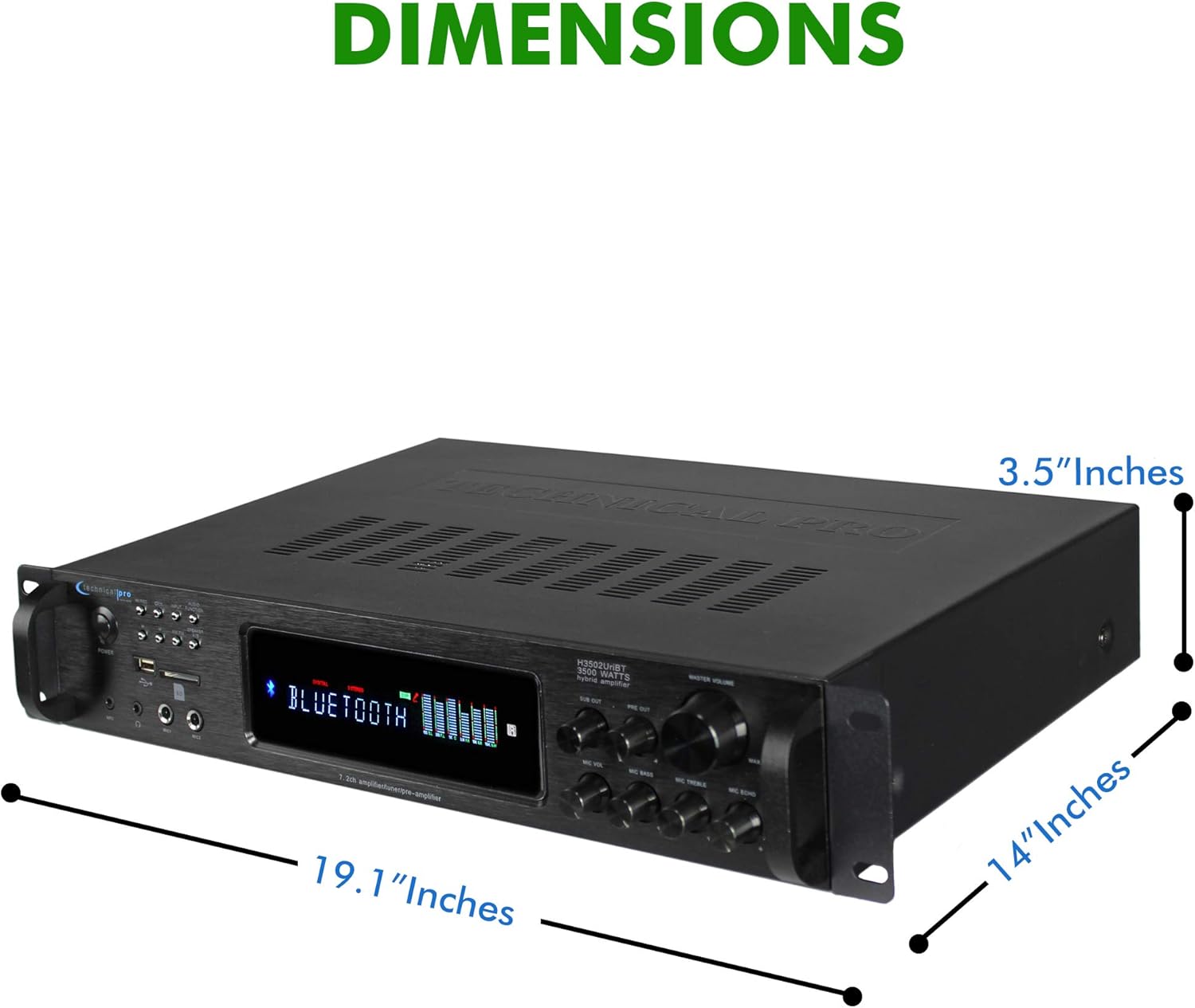
Сүрөт 7: Продукциянын өлчөмдөрү.
Кепилдик жана колдоо
Technical Pro products are manufactured with high standards and undergo rigorous quality control. This product is covered by a manufacturer's warranty against defects in materials and workmanship. For specific warranty terms and conditions, please refer to the warranty card included with your purchase or visit the official Technical Pro webсайт.
For technical support, troubleshooting assistance, or service inquiries, please contact Technical Pro customer service. Contact information can typically be found on the Technical Pro webсайтында же продуктунун таңгагында.


