1. Киришүү
This manual provides essential instructions for the safe and efficient use of your Epson TM-T20III thermal receipt printer. Please read this manual thoroughly before operating the printer and keep it for future reference. The Epson TM-T20III is designed for reliable, high-speed receipt printing in various business environments.
2. Коопсуздук маалыматы
- Always use the power supply provided with the printer.
- Принтерди сууга же ашыкча нымдуулукка дуушар кылбаңыз.
- Принтерди күн тийген жерге же жылуулук булактарынын жанына коюудан алыс болуңуз.
- Принтердин айланасында туура желдетүүнү камсыз кылыңыз.
- The paper cutter is sharp; exercise caution when handling or performing maintenance.
- Unplug the printer from the power outlet before cleaning or performing any maintenance.
3. Пакеттин мазмуну
Пакетте бардык буюмдар бар экенин текшериңиз:
- Epson TM-T20III Thermal Receipt Printer
- Электр менен жабдуу бирдиги
- USB кабели
- Starter Paper Roll (may vary by region)
- Орнотуу колдонмосу (бул документ)
4. Продукт бүтүп калдыview
Familiarize yourself with the main components of your Epson TM-T20III printer.
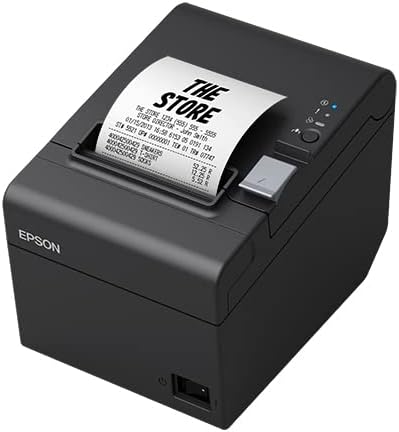
4.1-сүрөт: Алдыңкы жана каптал View of the Epson TM-T20III Printer with Receipt
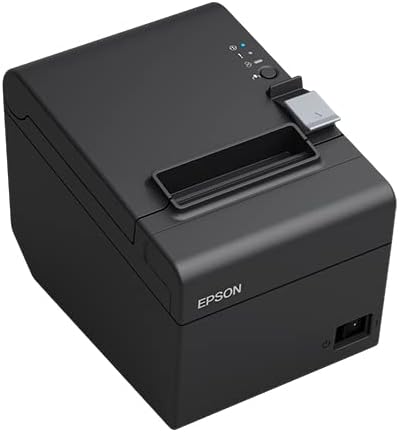
4.2-сүрөт: Алдыңкы жана каптал View of the Epson TM-T20III Printer
Башкаруу панели
- Кубат баскычы: Принтерди күйгүзөт же өчүрөт.
- Кагаз берүү баскычы: Manually feeds paper.
- Статус көрсөткүчтөрү: LEDs for Power, Error, and Paper Out.
Арткы панель

4.3-сүрөт: Арткы View of the Epson TM-T20III Printer
- Электр порту: Электр менен камсыздоо блогуна туташат.
- USB порт: Connects to a host device via USB cable.
- RS-232 (Serial) Port: Connects to a host device via serial cable.
5. Орнотуу
5.1 Пакеттен чыгаруу
- Принтерди жана бардык аксессуарларды таңгактан алып салыңыз.
- Таңгакты келечекте ташуу же сактоо үчүн сактаңыз.
5.2 Кубатты туташтыруу
- Connect the power supply unit to the power port on the rear of the printer.
- Электр шнурын стандарттуу электр розеткасына сайыңыз.
5.3 Хост түзмөккө туташуу
The TM-T20III supports both USB and RS-232 (Serial) connections.
USB туташуу
- Принтер өчүрүлгөнүн текшериңиз.
- Connect one end of the USB cable to the USB port on the rear of the printer.
- USB кабелинин экинчи учун компьютериңиздеги же хост түзмөгүңүздөгү жеткиликтүү USB портуна туташтырыңыз.
- Power on the printer. Your operating system may automatically detect the printer and prompt for driver installation.
RS-232 (Serial) Connection
- Принтер өчүрүлгөнүн текшериңиз.
- Connect one end of the RS-232 serial cable to the serial port on the rear of the printer.
- Connect the other end of the serial cable to an available serial port on your computer or host device.
- Power on the printer. You may need to configure serial port settings on your host device to match the printer's settings (e.g., baud rate, data bits, parity, stop bits).
5.4 Кагазды жүктөө
- Push the cover open lever to open the printer's roll paper cover.
- Insert a new roll of thermal paper into the paper compartment, ensuring the paper feeds from the bottom of the roll.
- Кесүүчүнүн жанынан бир аз кагазды тартып чыгарыңыз.
- Close the roll paper cover firmly until it clicks into place. The printer will automatically feed the paper to the correct position.
6. Операция
6.1 Күйгүзүү/өчүрүү
- To turn on: Press the power button. The power indicator will light up.
- To turn off: Press and hold the power button until the power indicator turns off.
6.2 Индикатор жарыктары
- Power (Blue): Принтердин күйүп турганын көрсөтөт.
- Error (Red): Indicates a printer error (e.g., paper jam, print head error). Refer to the Troubleshooting section.
- Paper Out (Orange): Indicates the paper roll is empty or nearly empty. Replace the paper roll.
6.3 Сыноо басып чыгаруу
Өзүн-өзү сыноо үчүн басып чыгарууну аткаруу үчүн:
- Принтердин өчүрүлгөнүн жана кагаз жүктөлгөнүн текшериңиз.
- While holding down the paper feed button, press the power button to turn on the printer.
- Release the paper feed button once the printer starts printing. The printer will print a self-test page, including firmware version and interface settings.
7. Техникалык тейлөө
7.1 Принтерди тазалоо
Үзгүлтүксүз тазалоо басып чыгаруунун сапатын сактоого жана принтердин иштөө мөөнөтүн узартууга жардам берет.
- Сырткы: Wipe the printer's exterior with a soft, damp кездеме. Абразивдүү тазалагычтарды же эриткичтерди колдонбоңуз.
- Басма башчысы: If print quality degrades, gently wipe the thermal print head with an alcohol swab. Ensure the printer is powered off and cooled down before cleaning.
- Кагаз жолу: Жумшак щетка же кысылган аба аркылуу кагаз жолундагы бардык кагаз чаңын же калдыктарын алып салыңыз.
7.2 Кагаз түрмөгүн алмаштыруу
Follow these steps when the paper out indicator lights up or when the paper roll is depleted.
- Push the cover open lever to open the printer's roll paper cover.
- Бош кагаз өзөгүн алып салыңыз.
- Insert a new roll of thermal paper into the paper compartment, ensuring the paper feeds from the bottom of the roll.
- Кесүүчүнүн жанынан бир аз кагазды тартып чыгарыңыз.
- Close the roll paper cover firmly until it clicks into place. The printer will automatically feed the paper to the correct position.
8. Кыйынчылыктарды
Бул бөлүм сиз кабылышы мүмкүн болгон жалпы көйгөйлөрдү карайт.
| Көйгөй | Мүмкүн себеп | Чечим |
|---|---|---|
| Принтер күйбөй жатат. | Электр кабели туташкан эмес; розетка туура эмес. | Электр кабелинин туташуусун текшерүү; башка розеткага аракет кылып көрүңүз. |
| No printing occurs. | No paper; data cable disconnected; incorrect driver/settings. | Load paper; check data cable connection; verify driver installation and printer settings. |
| Error indicator is lit. | Paper jam; print head error; cover open. | Open cover, clear any jammed paper; ensure cover is closed properly; power cycle the printer. |
| Басып чыгаруу сапаты начар. | Low quality paper; dirty print head. | Use recommended thermal paper; clean the print head as per Maintenance section. |
9. Техникалык шарттар
Key technical specifications for the Epson TM-T20III printer.
- Бренд: Epson
- Модель аты: EPSON TM-T20III
- Модель номери: C31CH51011
- Басып чыгаруу технологиясы: Термикалык линия басып чыгаруу
- Басып чыгаруу ылдамдыгы: 250 мм/сек
- Принтердин чыгышы: Монохромдуу
- Байланыш технологиясы: USB, RS-232 (Serial)
- Аппараттык интерфейс: USB
- Элемент Салмагы: 1.7 килограмм
- Шайкеш түзмөктөр: PCs, Smartphones (with appropriate drivers/SDKs)
- Түсү: Glossy Black
10. Кепилдик жана колдоо
Кепилдик жөнүндө толук маалымат алуу үчүн, өнүмүңүз менен кошо берилген кепилдик картасын караңыз же расмий Epson дүкөнүнө баш багыңыз webсайты. Техникалык колдоо, драйверлерди жүктөп алуу жана кошумча жардам алуу үчүн, сураныч, сайтка кириңиз Epson дүкөнү or the main Epson support portal.


