Introduction
Thank you for choosing the MEGATEK T8 Bluetooth Portable Speaker. This manual provides essential information for the proper setup, operation, and maintenance of your new speakers. The MEGATEK T8 speakers feature True Wireless Stereo (TWS) technology for an immersive audio experience, vibrant LED lighting, and a durable, waterproof design, making them ideal for various environments.
Пакеттин мазмуну
Сураныч, пакетте төмөнкү нерселерди текшериңиз:
- 2 x MEGATEK T8 Bluetooth Portable Speakers
- 1 x USB Charging Cable (designed to charge both speakers simultaneously)
- 1 x User Manual
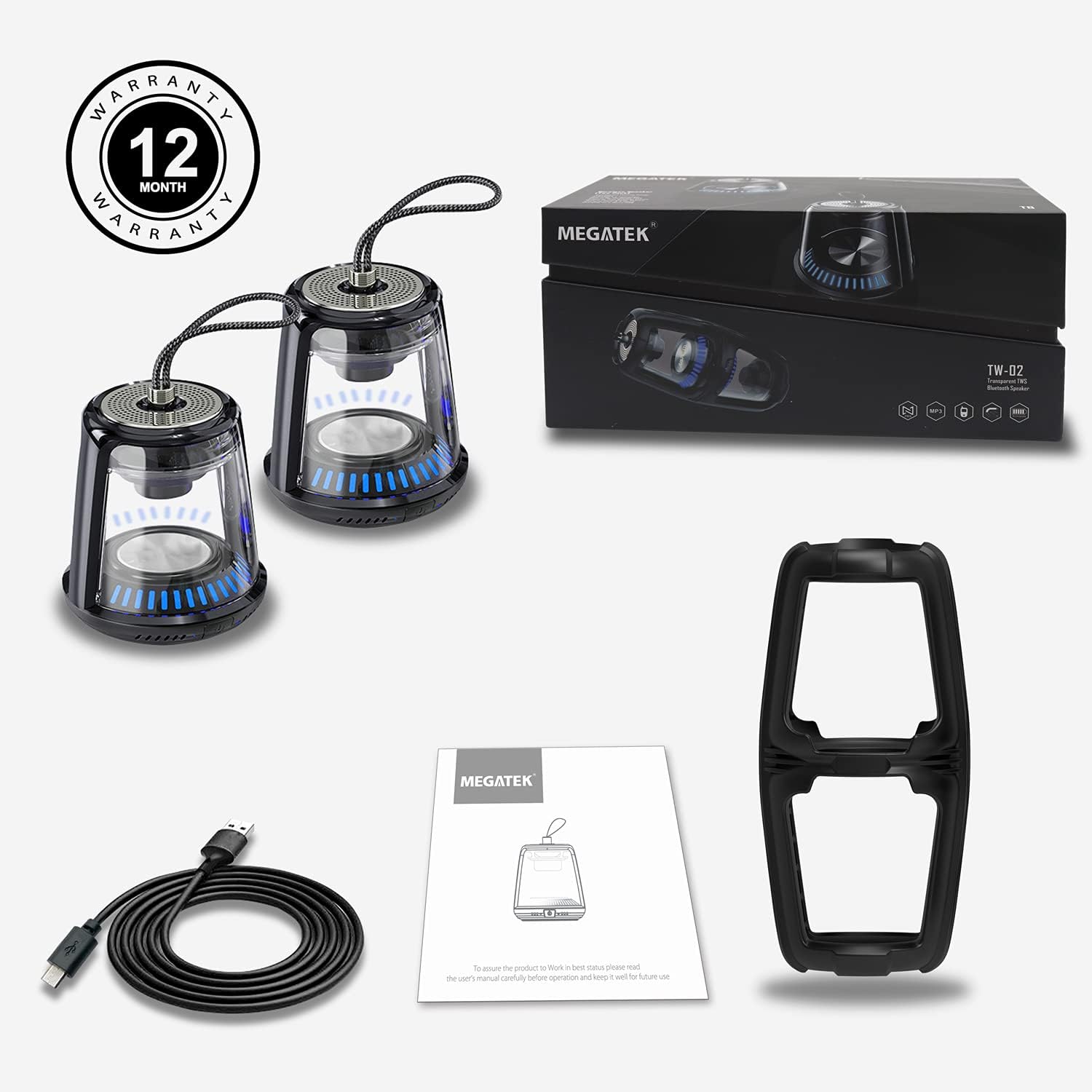
The package includes two MEGATEK T8 speakers, a USB charging cable for simultaneous charging, and this instruction manual.
Продукт өзгөчөлүктөрү
- Bluetooth байланышы: Түзмөктөрүңүзгө үзгүлтүксүз зымсыз туташуу.
- Чыныгы зымсыз стерео (TWS): Pair two speakers for a synchronized stereo sound experience.
- LED жарык режимдери: Dynamic LED lighting to enhance ambiance.
- Камтылган микрофон: Үнсүз чалууну колдойт.
- IPX5 суу өткөрбөйт рейтинги: Protected against water splashes and light rain.
- Магниттик база: Металл беттерине ыңгайлуу бекитүүгө мүмкүндүк берет.
- Компакт жана портативдик дизайн: Easy to carry and place anywhere.
- Кайра заряддалуучу батарея: Provides portable power for on-the-go use.
Жайгашуу
1. Динамиктерди заряддоо
Before initial use, fully charge both speakers. Connect the provided USB charging cable to the charging port on each speaker and then to a USB power adapter (not included) or a computer's USB port. The LED indicator will show charging status and turn off when fully charged.
2. Күйгүзүү / Өчүрүү
To power on the speaker, press and hold the power button for approximately 3 seconds until you hear an audible prompt and the LED lights illuminate. To power off, press and hold the power button again for 3 seconds until you hear a power-off prompt and the LED lights turn off.
3. Bluetooth жупташтыруу (бир динамик)
- Динамик кубатталып, күйгүзүлгөнүн текшериңиз.
- Смартфонуңузда, планшетиңизде же башка Bluetooth иштетилген аспабыңызда Bluetooth'ду жандырыңыз.
- Издөө available devices and select "MEGATEK T8" from the list.
- Туташкандан кийин динамиктен ырастоо үнүн угасыз.

The speaker connects easily to your device via Bluetooth for wireless music streaming.
4. Чыныгы зымсыз стерео (TWS) жупташтыруу (эки динамик)
To enjoy true stereo sound, you can pair two MEGATEK T8 speakers together:
- Эки динамик тең толук заряддалганын жана өчүрүлгөнүн текшериңиз.
- Эки динамикти бир убакта күйгүзүңүз.
- On бир of the speakers (this will become the primary speaker), quickly double-press the power button. The speakers will begin searching for each other.
- Ийгиликтүү жупташтырылгандан кийин, сиз ырастоо үнүн угасыз жана эки динамиктеги LED индикаторлору синхрондолот.
- Now, connect your Bluetooth device to the primary speaker (the one you double-pressed the button on) as described in the "Bluetooth Pairing (Single Speaker)" section.

This image illustrates the True Wireless Stereo (TWS) functionality, allowing two speakers to connect for an enhanced stereo sound experience.
Иштеп жатат
1. Музыка ойноо
After successful Bluetooth pairing, you can play music from your connected device. Control playback (play/pause, next/previous track, volume) directly from your device.
2. Hands Free Чалуу
When connected to a smartphone, the built-in microphone allows for hands-free calling. Press the power button once to answer an incoming call, and press it again to end the call. Press and hold the power button to reject an incoming call.
3. LED жарык режимдери
The speakers feature integrated LED lights. To cycle through different light modes or turn them off, short press the LED light button (if available, otherwise refer to the power button for multi-functionality). The lights can create a dynamic visual experience.

The speaker features multiple LED light modes to enhance your listening experience with visual effects.
4. Магниттик монтаждоо
The base of the speaker is magnetic, allowing it to be securely attached to compatible metal surfaces. This provides versatile placement options.

The magnetic base allows for convenient placement on metal surfaces, such as a refrigerator.
Техникалык тейлөө
1. Тазалоо
Wipe the speakers with a soft, dry cloth. Do not use abrasive cleaners, alcohol, or chemical solvents, as these may damage the surface or internal components.
2. Сууга туруктуулук (IPX5)
The MEGATEK T8 speakers are IPX5 waterproof, meaning they are protected against low-pressure water jets from any direction. They are suitable for use in environments where they might encounter splashes, such as by a pool or in a bathroom. Do not submerge the speakers in water. Сууга туруштук берүү үчүн заряддоо портунун капкагы бекем жабылганын текшериңиз.

With an IPX5 waterproof rating, the speakers are protected against splashes, making them suitable for poolside or bathroom use.
3. Сактоо
When not in use for extended periods, store the speakers in a cool, dry place away from direct sunlight and extreme temperatures. It is recommended to charge the speakers periodically to maintain battery health.
Проблемаларды чечүү
- Speaker will not turn on: Ensure the battery is charged. Connect the speaker to the charging cable and allow it to charge for at least 30 minutes before attempting to power on again.
- Bluetooth аркылуу жупташтыруу мүмкүн эмес:
- Түзмөгүңүздө Bluetooth иштетилгенин текшериңиз.
- Make sure the speaker is in pairing mode (LED indicator blinking).
- Ensure your device is within the Bluetooth range (approximately 33 feet or 10 meters).
- Түзмөгүңүздүн Bluetooth жөндөөлөрүнөн динамикти ажыратып, кайра жупташтырып көрүңүз.
- Үн жок же үнү төмөн:
- Динамиктин жана туташкан түзмөгүңүздүн үнүнүн деңгээлин текшериңиз.
- Динамик Bluetooth аркылуу туура туташканын текшериңиз.
- TWS жупташтыруу ишке ашпай калды:
- Ensure both speakers are powered off before initiating TWS pairing.
- Make sure both speakers are within close proximity to each other (within a few feet).
- TWS жупташуу кадамдарын кылдаттык менен кайталаңыз.
Техникалык шарттар
| Модель номери | T8 |
| Бирдик саны | 2 Баяндамачылар |
| Түс | Кара |
| Продукциянын өлчөмдөрү | 4"D x 4.7"W x 8.7"H |
| Элемент Салмагы | 0.6 фунт (ар бир динамик үчүн) |
| Сууга туруктуулук деңгээли | IPX5 суу өткөрбөйт |
| Байланыш технологиясы | Bluetooth, USB |
| Аудио чыгаруу режими | Стерео, айлана |
| Монтаж түрү | Freestanding, Magnetic |
| Өзгөчөлүктөр | Stereo Pairing (TWS), Auto EQ, Auto Speaker Setup, LED Light |
| Өндүрүүчү | Мегатек Электроника |
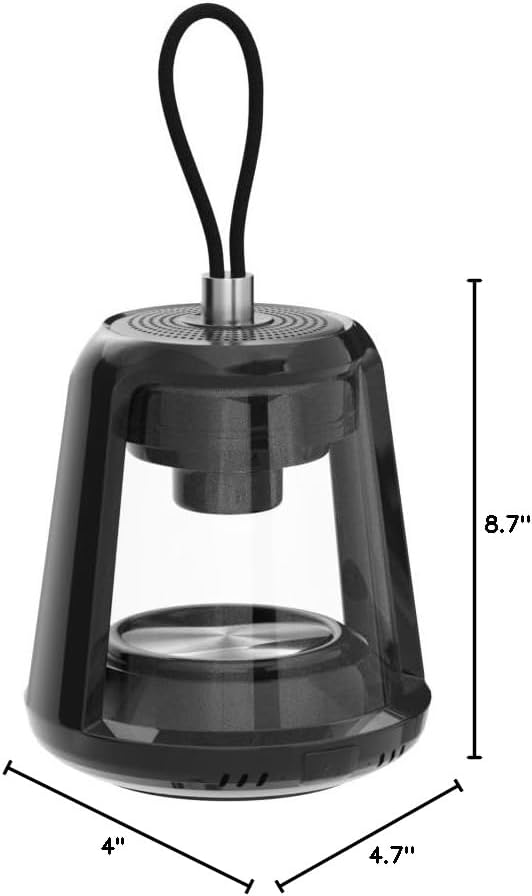
This image provides the physical dimensions of the MEGATEK T8 speaker: 4"D x 4.7"W x 8.7"H.
Кепилдик жана колдоо
1. Кепилдик маалыматы
The MEGATEK T8 Bluetooth Portable Speakers come with a 12 айлык кепилдик сатып алынган күндөн тартып. Бул кепилдик өндүрүш кемчиликтерин камтыйт жана нормалдуу колдонууда буюмдун материалдык жана жасалгалоо кемчиликтери жок экенин камсыз кылат.
2. Кардарларды колдоо кызматы
For any questions, technical assistance, or warranty claims, please contact MEGATEK customer support through the retailer where you purchased the product or visit the official MEGATEK website for contact information. Please have your purchase receipt and product model number (T8) ready when contacting support.


