1. Киришүү
Thank you for choosing the VCELINK GJ668BL Professional RJ45 Network Crimping Tool. This manual provides essential information for the safe and effective use of your new tool. This versatile crimping tool is designed for Ethernet cables (CAT7, CAT6, CAT5/5e) and telephone cables, offering cutting, stripping, and crimping functionalities. It is compatible with most shielded and unshielded RJ45 CAT6, RJ45 EZ, RJ45 CAT5E, and RJ11/12 connectors.
2. Коопсуздук маалыматы
Please read all safety instructions carefully before using the tool. Failure to follow these instructions may result in injury or damage to the tool.
- Аспапты колдонууда ар дайым коргоочу көз айнек сыяктуу тиешелүү жеке коргоочу шаймандарды тагыныңыз.
- Keep hands and fingers clear of the cutting and crimping dies during operation.
- Do not use the tool for purposes other than those specified in this manual.
- Куралды кургак, коопсуз жерде, балдар жетпеген жерде сактаңыз.
- Inspect the tool for any damage before each use. Do not use if damaged.
3. Продукт бүтүп калдыview
The VCELINK GJ668BL crimping tool is engineered for durability and ease of use. Below is an illustration detailing its key components:

3.1-сүрөт: Components of the VCELINK GJ668BL Crimping Tool. This diagram highlights the 8P/RJ45 network cable connector slot, 6P/RJ11/RJ12 telephone connector slot, cutting and stripping blade, durable sharp blade, PP/TPR handle material, and the labor-saving ratchet mechanism.
- 8P/RJ45 Network Cable Connector Slot: For crimping 8-position RJ45 connectors used in Ethernet networking.
- 6P/RJ11/RJ12 Telephone Connector Slot: For crimping 6-position RJ11/RJ12 connectors used in telephone systems.
- Cutting and Stripping Blade: Integrated blade for precise cutting and stripping of cable jackets.
- Durable Sharp Blade: High-carbon steel blades ensure clean cuts and long-lasting performance.
- PP, TPR for Handle: Ergonomically designed handles with PP (Polypropylene) and TPR (Thermoplastic Rubber) for comfortable grip and reduced fatigue.
- Labor-saving Ratchet Mechanism: Provides consistent crimping force and prevents premature release until the crimp is complete.
4. Орнотуу
The VCELINK GJ668BL crimping tool is ready for use out of the box. No assembly is required. Before first use, ensure the tool is clean and free of any debris.
- Unlocking the Tool: The tool features a locking mechanism for safe storage. To unlock, gently squeeze the handles and push the small lever or tab located near the pivot point to release the jaws.
- Таанышуу: Take a moment to familiarize yourself with the different slots for RJ45 (8P) and RJ11/RJ12 (6P) connectors, as well as the cutting and stripping functions.
5. Иштөө нускамалары
5.1. Cable Compatibility
This tool is compatible with various connector types:

5.1-сүрөт: Connector Compatibility. The tool supports 6P RJ12 connectors for telephone cables and 8P8C RJ45 connectors for Ethernet cables, as well as 4P RJ11 connectors.
- Compatible with 8P8C RJ45 connectors for Ethernet cables (Cat5/5e, Cat6, Cat7).
- Compatible with 6P RJ11/RJ12 connectors for telephone cables.
- Also compatible with 4P RJ11 connectors.
5.2. Multifunctional Use (Cutting & Stripping)
The GJ668BL tool integrates cutting and stripping functions for various cable types:
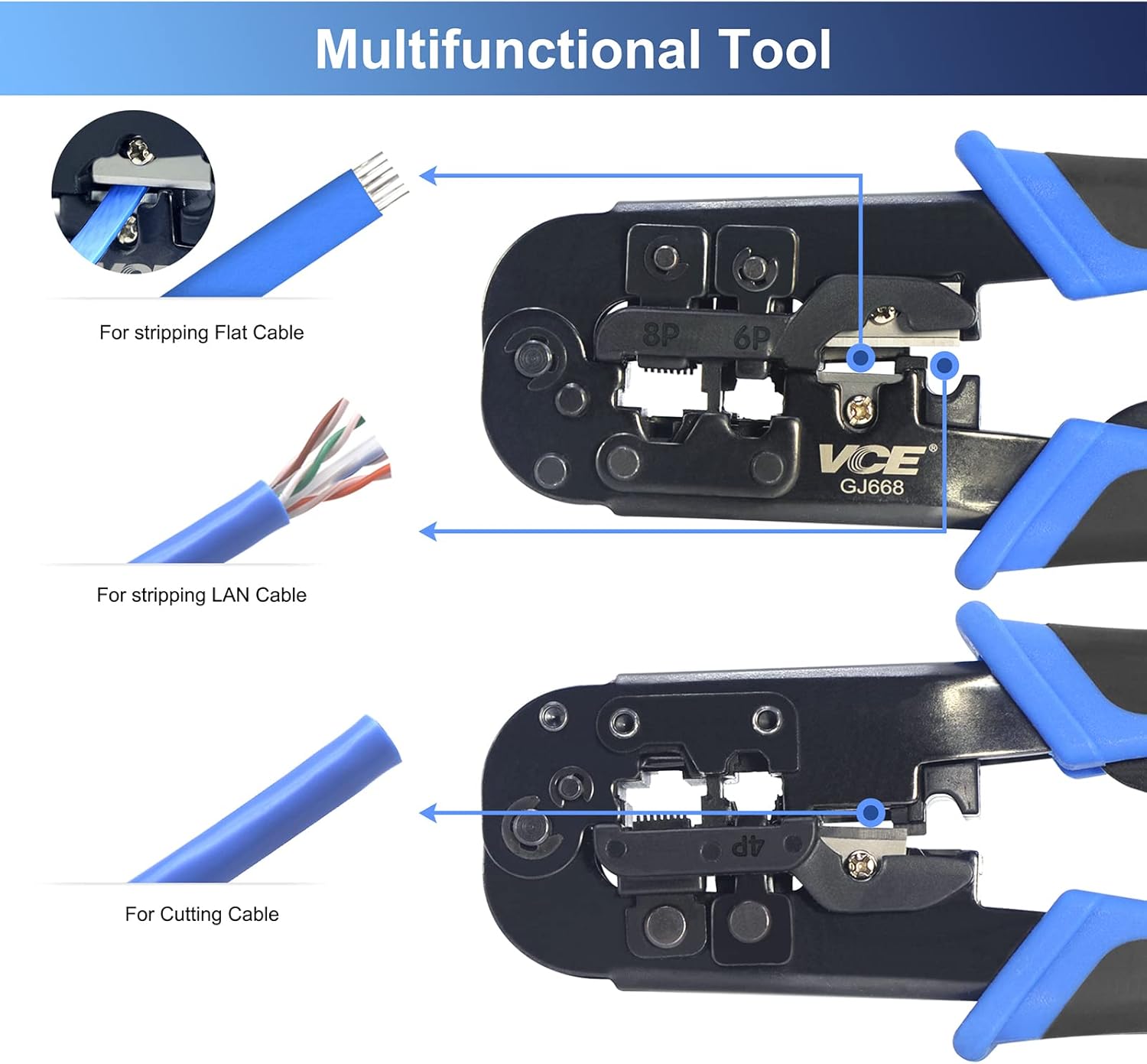
5.2-сүрөт: Multifunctional Capabilities. This image illustrates how to use the tool for stripping flat cables, stripping LAN cables, and cutting cables cleanly.
- For Stripping Flat Cable: Insert the flat cable into the designated stripping slot and squeeze the handles.
- For Stripping LAN Cable: Insert the round LAN cable into the appropriate stripping slot and squeeze the handles. Rotate the tool around the cable if necessary for a clean cut.
- For Cutting Cable: Place the cable into the cutting blade slot and squeeze the handles firmly.
5.3. Crimping Process (Step-by-Step)
Follow these steps for proper crimping of network or telephone connectors:

5.3-сүрөт: Detailed Crimping Steps. This visual guide shows the entire process from unlocking the tool to the final crimp, including cutting the cable skin, arranging wires, inserting the load bar, assembling the plug, inserting the plug into the tool, ensuring proper seating, and crimping.
- Unlock First: If the tool is locked, unlock it by squeezing the handles and releasing the lock tab.
- Cut the Skin: Use the integrated stripping blade to carefully cut and remove the outer jacket of the cable, exposing the internal wires.
- Зымдарды иретке келтириңиз: Untwist and straighten the individual wires. Arrange them according to the desired wiring standard (e.g., T568A or T568B for Ethernet).
- Put the Load Bar (if applicable): For some connectors, a load bar is used to hold the wires in place. Insert the wires into the load bar in the correct order.
- Assemble the Plug: Carefully insert the arranged wires (with or without load bar) into the RJ45 or RJ11/RJ12 connector, ensuring each wire reaches the front of the connector and is in the correct pin slot.
- Put Plug into Tool: Insert the assembled connector firmly into the appropriate crimping slot (8P for RJ45, 6P for RJ11/RJ12) on the tool.
- Ensure Pushed to the End of Holes: Verify that the connector is fully seated in the tool's slot and that the wires are pushed completely to the end of the connector's pins.
- Crimp Plug: Squeeze the handles of the crimping tool firmly and completely until the ratchet mechanism releases. This ensures a full and proper crimp.
- Бүтүрүү: Remove the crimped connector from the tool. Inspect the crimp to ensure all pins are properly seated and the cable is securely fastened.

5.4-сүрөт: Crimping Result Comparison. This image shows a cable and connector before crimping (with an alert icon indicating improper seating) and after successful crimping (with a checkmark indicating proper seating and connection).
6. Техникалык тейлөө
Тийиштүү техникалык тейлөө сиздин кысуучу шайманыңыздын иштөө мөөнөтүн узартат:
- Тазалоо: After each use, wipe down the tool with a clean, dry cloth to remove any dust, dirt, or cable debris.
- Майлоо: Periodically apply a small amount of light machine oil to the pivot points and moving parts to ensure smooth operation.
- Бычак текшерүү: Regularly check the cutting and stripping blades for sharpness and damage. Dull or damaged blades can be replaced if necessary (consult manufacturer for parts).
- Сактагыч: Store the tool in a dry environment to prevent rust. Use the locking mechanism to keep the handles closed for compact and safe storage.
7. Кыйынчылыктарды
If you encounter issues with your crimping tool, refer to the following common problems and solutions:
| Көйгөй | Мүмкүн себеп | Чечим |
|---|---|---|
| Poor crimp quality / Loose connections |
|
|
| Cable jacket not stripping cleanly |
|
|
| Tool handles are stiff or sticky |
|
|
8. Техникалык шарттар
Key technical specifications for the VCELINK GJ668BL Crimping Tool:

8.1-сүрөт: Product Dimensions. The image shows the tool's length as 185mm, height as 105mm, and width as 25mm.
| Өзгөчөлүк | Деталь |
|---|---|
| Модель номери | GJ668BL-1P-DE |
| Өндүрүүчү | VCELINK |
| Продукциянын өлчөмдөрү (L x W x Y) | 18.5 x 10.5 x 0.1 см (болжол менен 185 x 105 x 25 мм) |
| Элемент Салмагы | 315 грамм |
| Түс | Көк |
| Материал | Steel (Tool Body), Alloy Steel (Handle Material) |
| Handle Type | Ergonomic (PP, TPR) |
| Шайкештик | RJ45 (8P), RJ11/RJ12 (6P), RJ11 (4P) |
| Функциялар | Crimping, Cutting, Stripping |
9. Кепилдик жана колдоо
VCELINK is committed to providing high-quality products and excellent customer service.
- Кепилдик: This product comes with an 18-month quality guarantee. Please retain your proof of purchase for warranty claims.
- Запастык бөлүктөрдүн болушу: Spare parts are available for 5 years.
- Кардарларды колдоо: For any quality-related issues, product inquiries, or technical assistance, please contact VCELINK customer service. You can typically find contact information on the product packaging or the official VCELINK webсайт.
- Онлайн ресурстар: Visit the official VCELINK brand store for more information and product updates: VCELINK Brand Store.


