1. Киришүү
This manual provides detailed instructions for the setup, operation, maintenance, and troubleshooting of your Sceptre Curved 27" FHD 1080p Gaming Monitor. Please read this manual thoroughly before using your monitor to ensure proper functionality and safety.

Image: Sceptre Curved 27" FHD 1080p Gaming Monitor in a typical desk setup.
2. Пакеттин мазмуну
Verify that all items listed below are included in your package. If any items are missing or damaged, please contact Sceptre customer support.
- Sceptre Curved 27" FHD 1080p Gaming Monitor
- Монитор стенд (негизги жана кол)
- HDMI кабели
- Power Supply and Adapter
- Philips баш бурагычы
- Бурамалар жана жабдыктар топтому
- User Manual
- Warranty Information and Customer Service Card

Сүрөт: бүттүview of all items included in the Sceptre monitor package, including the monitor, stand components, cables, tools, and documentation.
3. Ассамблея
Монитордун стендин чогултуу үчүн бул кадамдарды аткарыңыз:
- Attach the metal stand arm to the plastic base. Align the tabs and gently twist until secure.
- Use the provided Philips head screwdriver and the designated base screw to fasten the stand arm to the base.
- Чогулган стендди монитордун артындагы монтаждоо чекиттери менен тууралаңыз.
- Insert the two remaining Philips head screws into the designated holes on the monitor's back and tighten them securely.
- Place the plastic cover over the screws on the stand arm.

Image: The Sceptre Curved 27" monitor with its dimensions labeled, showing the curved screen and the stand.
4. Байланыштар
The monitor features various ports for connectivity. Ensure proper connection for optimal performance.
- DC IN: Кубат адаптерин бул жерге туташтырыңыз.
- Аудио чыгышы: Тышкы динамиктерди же гарнитураны туташтырыңыз.
- Аудио кирүү: Connect an audio source for the built-in speakers.
- VGA: Connect to a computer's VGA port. Supports up to 75Hz refresh rate.
- HDMI 1.4 (x2): Connect to devices with HDMI output. Supports up to 75Hz refresh rate.
- Кенсингтон коопсуздук кулпусу: For securing the monitor.
Сүрөт: деталдуу view of the monitor's rear panel, highlighting the DC IN, Audio In/Out, VGA, and two HDMI 1.4 ports.
5. Иштөө нускамалары
The On-Screen Display (OSD) menu allows you to adjust various monitor settings. Use the buttons on the back of the monitor to navigate.
Экрандык меню навигациясы
- Тез баштоо: Adjust basic settings like preset modes, aspect ratio, source, volume, Blue Light Shift, and Adaptive Sync.
- Сүрөт: Fine-tune image settings including brightness, contrast, DCR, aspect ratio, and sharpness.
- Түсү: Adjust color temperature, gamma, tint, saturation, and Blue Light Shift.
- Система: Configure overdrive, Adaptive Sync, sleep mode, language, OSD position, timer, transparency, mute, and factory reset.
Video: A user demonstrates the Sceptre monitor's OSD menu, showing navigation through settings like volume and input source while displaying gameplay.
6. Дисплей өзгөчөлүктөрү
- 1500R ийри дисплей: The 1500R curvature immerses you into the content, providing a comfortable viewтажрыйбасы.
- 100Hz жаңыртуу ылдамдыгы: Experience smoother visuals with a refresh rate of up to 100Hz, reducing screen tearing.
- 98% sRGB: Offers a wider color gamut for deeper and more accurate colors.
- Көк жарыктын жылышы: Reduces blue light emission to protect your eyes from fatigue and strain during extended use.
- Адаптивдүү синхрондоштуруу: Экрандын айрылышын жана кекечтенүүсүн жок кылуу үчүн монитордун жаңыртуу жыштыгын видеокартаңыздын кадр жыштыгы менен синхрондоштурат.
- FPS-RTS Game Modes: Pre-set display modes optimized for First Person Shooter (FPS) and Real-Time Strategy (RTS) games.
- Камтылган динамиктер: Integrated speakers provide audio without needing external devices.

Image: Visual representation of the 1500R curvature, highlighting its immersive design.

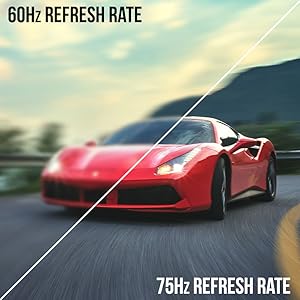
Image: A side-by-side comparison demonstrating the visual smoothness of 75Hz refresh rate versus 60Hz.

Image: A visual comparison highlighting the enhanced color accuracy of 98% sRGB compared to a conventional display.

Image: Split-screen view demonstrating the visual enhancements provided by FPS and RTS game modes.
7. Техникалык тейлөө
Мониторуңуздун узак мөөнөттүү иштешин жана оптималдуу иштешин камсыз кылуу үчүн, төмөнкү тазалоо көрсөтмөлөрүн аткарыңыз:
- Тазалоодон мурун ар дайым электр кабелин сууруп алыңыз.
- Бир аз жумшак, түксүз кездемени колдонуңуз dampсуу же жумшак, абразивдик тазалоочу каражат менен тазалаңыз.
- Avoid using alcohol, ammonia, or abrasive cleaners, as these can damage the screen surface.
- Gently wipe the screen and exterior surfaces. Do not spray cleaner directly onto the screen.
8. Кыйынчылыктарды
If you encounter any issues with your monitor, refer to the following common solutions:
- Кубат жок: Ensure the power cable is securely connected to both the monitor and a working power outlet. Check the power adapter and outlet.
- Сүрөт жок: Verify that the video cable (HDMI or VGA) is securely connected to both the monitor and your computer/device. Ensure the correct input source is selected in the OSD menu.
- Жаркылдаган/Бурмаланган сүрөт: Check the video cable for damage. Try a different cable or port. Ensure your graphics card drivers are up to date. Adjust refresh rate settings in your device's display settings.
- Аудио жок: Check the volume settings in the OSD menu and on your connected device. Ensure external speakers are properly connected if used.
- Баскычтар жооп бербейт: Perform a factory reset through the OSD menu if accessible.
For further assistance, please refer to the full user manual or contact Sceptre customer support.
9. Техникалык шарттар
| Өзгөчөлүк | Спецификация |
|---|---|
| Screen Size | 27 дюйм |
| Резолюция | 1920 x 1080 (FHD 1080p) |
| Жаңыртуу ылдамдыгы | Up to 100Hz (75Hz via HDMI/VGA) |
| Ийрилик | 1500R |
| Жооп убактысы | 3 мс (GtG) |
| Панел түрү | VA |
| Жарыктык | 280 нит |
| Түс гаммасы | 98% sRGB |
| Video Inputs | 2x HDMI 1.4, 1x VGA |
| Аудио порттор | Audio In, Audio Out |
| Баяндамачылар | Камтылган |
| VESA тоосу | 100мм x 100мм |
| Өлчөмдөрү (LxWxH) | 15.09 x 19.97 x 7.02 дюйм |
| Салмагы | 5.5 фунт |
10. Оюн тажрыйбасы
The Sceptre Curved 27" monitor is designed to enhance your gaming experience with its high refresh rate, low response time, and immersive curvature.
Video: An official Sceptre video showcasing various gaming monitors, including the Curved 27" model, highlighting their features and performance in gaming scenarios.
For optimal gaming performance, ensure your device's display settings match the monitor's capabilities (e.g., 1920x1080 resolution at 75Hz).
11. Кепилдик жана колдоо
Your Sceptre monitor comes with a 1 жылдык чектелген продукт кепилдик. For detailed terms and conditions, please refer to the included warranty information card in your package.
For technical support, troubleshooting, or warranty claims, please contact Sceptre Customer Service. Contact information is provided on the customer service card included with your monitor.


