1. Киришүү
The KODAK Mini 2 Retro 4PASS Portable Photo Printer is designed for convenient, high-quality photo printing directly from your smartphone or tablet. Its compact and lightweight design makes it an ideal companion for capturing and sharing memories on the go. Utilizing advanced 4PASS technology, this printer produces vibrant, durable photos that are resistant to fingerprints and water, ensuring your cherished moments last for generations.

Figure 1.1: The compact and portable KODAK Mini 2 Retro printer.
2. Эмнелер камтылган
Upon unboxing your KODAK Mini 2 Retro printer, please ensure all components are present:
- KODAK Mini 2 Retro Photo Printer
- Initial Cartridge (8 Sheets)
- 60 Sheets of 2.1x3.4 inch Photo Paper (2x 30-sheet cartridges)
- Ыкчам баштоо боюнча колдонмо
- USB-C Type Charging Cable (Note: Charging adapter not included)

Figure 2.1: Included items in the KODAK Mini 2 Retro package.
3. Орнотуу
3.1 Принтерди заряддоо
Before initial use, fully charge your KODAK Mini 2 Retro printer using the provided USB-C cable. Connect the cable to the printer's charging port and a compatible USB power adapter (not included).
3.2 Loading the Photo Paper Cartridge
- Принтердин капталындагы картридж эшигин ачыңыз.
- Insert a KODAK 2.1x3.4 inch cartridge into the slot. Ensure it is fully inserted.
- Push the cartridge in until you hear a distinct "click" sound, indicating it is securely locked in place.
- Картридждин эшигин жабыңыз.

Figure 3.1: Step 1 - Insert the paper.

Figure 3.2: Step 2 - Pull out & Push In.

Figure 3.3: Step 3 - Hear the "Click" Sound.
3.3 Колдонмону орнотуу жана Bluetooth жупташтыруу
Download the "Kodak Instant Printer" application from Google Play Store (for Android) or Apple App Store (for iOS). Once installed, enable Bluetooth on your smartphone/tablet and pair with the printer. The printer's product code for pairing can be found on the cartridge door.

Figure 3.4: Connecting the printer to your device via Bluetooth.
4. Принтерди иштетүү
4.1 Басып чыгаруу процесси
Once connected via Bluetooth, open the Kodak Instant Printer app. Select the desired photo from your device's gallery. You can choose between border and borderless photo types. The printer uses 4PASS technology, applying colors in layers (Yellow, Magenta, Cyan) and then a protective laminate layer for superior quality and durability.

Figure 4.1: Understanding 4PASS technology for layered printing.

Figure 4.2: Comparison of image quality with 4PASS technology.
4.2 Колдонмонун өзгөчөлүктөрү
The Kodak Photo Printer app offers various editing features to personalize your photos before printing. You can apply filters, adjust brightness and contrast, and add decorative frames or stickers. This allows for creative expression, perfect for scrapbooking or journaling.

4.3-сүрөт: Мисamples of creative editing features available in the app.

Figure 4.4: Choose between borderless or bordered photo types.
4.3 Расмий продукт Video
Video 4.1: Official KODAK Mini 2 Retro User Guide. This video provides a comprehensive overview of the printer's features and operation, including setup, app usage, and printing demonstrations.
5. Техникалык тейлөө
The KODAK Mini 2 Retro printer utilizes 4PASS technology which includes a laminating process, making prints fingerprint-proof and water-resistant. This significantly reduces the need for extensive maintenance of the printed photos. For the printer itself, keep it clean and free from dust. Avoid exposing the printer to extreme temperatures or direct sunlight. When replacing cartridges, handle them carefully to prevent damage.
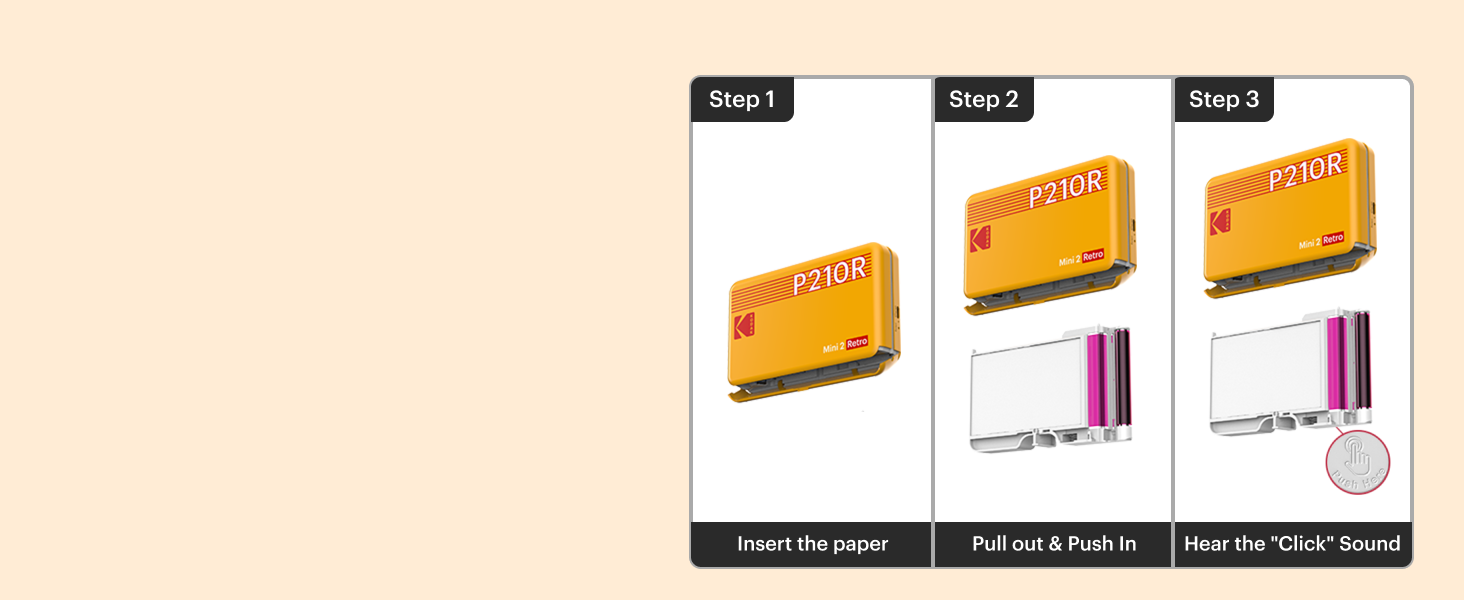
Figure 5.1: The 4PASS technology ensures prints are water-resistant and durable.
6. Кыйынчылыктарды
If you encounter issues with your KODAK Mini 2 Retro printer, consider the following common solutions:
- Принтер туташпай жатат: Ensure Bluetooth is enabled on your device and the printer is powered on. Verify you are connecting to the correct product code in your device's Bluetooth settings.
- Начар басып чыгаруу сапаты: Check if the photo cartridge is correctly inserted. Ensure the photo paper is not damaged or expired. Using original, high-resolution photos from your smartphone camera is recommended, as filtered or low-pixel images may result in lower print quality.
- Кагаз тыгылыштары: Carefully open the cartridge door and remove any jammed paper. Ensure the cartridge is properly seated before closing the door and attempting to print again.
- Колдонмонун иштөө маселелери: Try restarting the app or your smartphone. Ensure the app is updated to the latest version.
7. Техникалык шарттар
| Өзгөчөлүк | Спецификация |
|---|---|
| Продукциянын өлчөмдөрү | 3"D x 5"W x 1"H |
| Элемент Салмагы | 7.1 унция (200 грамм) |
| Модель аты | Mini 2 Retro |
| Модель номери | CAR-P210RW |
| Байланыш технологиясы | Bluetooth |
| Басма технологиясы | Dye Sublimation (4PASS) |
| Басма маалымат каражаттары | Жылтырак фото кагаз |
| Барактын өлчөмү | 2.1 x 3.4 дюйм |
| Максималдуу киргизүү барагынын сыйымдуулугу | 60 |
| Принтердин чыгышы | Түс |
| Макс басып чыгаруу ылдамдыгы (түстүү) | 1 промилле |
| Шайкеш түзмөктөр | Смартфондор, Планшеттер (iOS, Android) |
| Башкаруу ыкмасы | Колдонмо |
| Өзгөчөлүктөр | Portable, APP Control, Waterproof, Anti-Fingerprint |
8. Кепилдик жана колдоо
For detailed warranty information and further support, please refer to the official user manual provided with your product or visit the manufacturer's support website. A digital version of the user manual can be accessed via this link: KODAK Mini 2 Retro User Manual (PDF).
For customer service inquiries, please contact Kodak Photo Printer, the seller of this product.