Introduction
Сатып алганыңыз үчүн рахматasing the Crown 32-inch HD Ready Smart TV. This manual provides essential information for setting up, operating, maintaining, and troubleshooting your new television. Please read this manual thoroughly before using the product and retain it for future reference.
This television features HD Ready resolution, a 178-degree viewing angle, and an Android operating system for smart functionalities. It includes Dolby Audio for an enhanced sound experience.
Пакеттин мазмуну
Төмөндө тизмеленген нерселердин баары пакетиңизге камтылганын текшериңиз:
- 1 LED TV Unit
- 1 Table Stand Pair
- 1 Алыстан башкаруу
- 1 Кепилдик картасы
- 1 Колдонуучунун колдонмосу (бул документ)
Орнотуу нускамалары
1. Пакеттен чыгаруу жана жайгаштыруу
Телевизорду таңгагынан этияттык менен чыгарыңыз. Телевизорду туруктуу, тегиз жерге коюңуз же дубалга орнотууга даярдаңыз. Телевизордун айланасында жетиштүү желдетүүнү камсыз кылыңыз.
2. Стол стендин орнотуу
- Place the TV face down on a soft, clean cloth to prevent screen damage.
- Align the table stand pair with the corresponding holes on the bottom of the TV.
- Берилген бурамалар менен тирөөчтөрдү бекитиңиз. Өтө катуу тартпаңыз.
Note: If wall mounting, refer to the wall mount kit instructions. The TV supports VESA standard wall mounts.
3. Кубатты туташтыруу
Plug the power cord into the TV's power input, then into a standard electrical outlet. Ensure the power outlet is easily accessible.
4. Тышкы түзмөктөрдү туташтыруу
Сыналгы ар кандай байланыш параметрлерин сунуш кылат:
- HDMI порттору (x2): Приставкаларды, Blu-ray ойноткучтарды, оюн консолдорун туташтырыңыз.
- USB порттору (x2): Connect USB drives for media playback, or other USB devices.
- VGA Port (x1): Ноутбукту же компьютерди туташтырыңыз.
- Аудио киргизүү: For external audio sources.
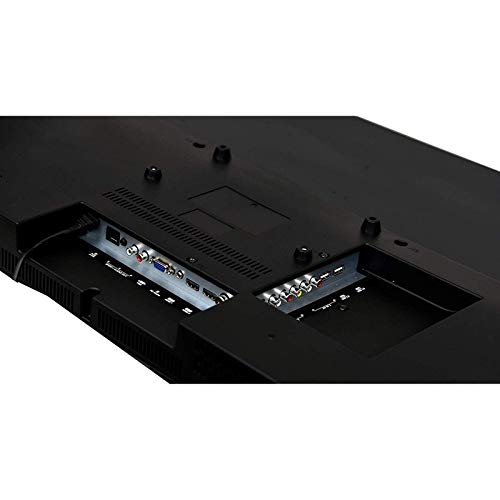
Image: Rear panel of the TV displaying HDMI, USB, and VGA ports for connecting external devices.
Иштөө нускамалары
1. First Time Setup and Initial Power On
- басыңыз Күч button on the remote control or on the TV.
- Follow the on-screen instructions to select your language, country, and connect to a Wi-Fi network.
- Complete the initial Android TV setup, including signing in with your Google account for full smart TV functionality.

Image: The TV displaying its smart interface with various application shortcuts.
2. Телевизордун негизги функциялары
- Күйгүзүү/өчүрүү: Пульттагы же телевизордогу кубат баскычын колдонуңуз.
- Үндү көзөмөлдөө: колдонуу VOL +/- пульттагы баскычтар.
- Канал тандоо: колдонуу CH +/- buttons or number pad on the remote.
- Киргизүү булагы: басыңыз Булак or Киргизүү button on the remote to switch between HDMI, USB, VGA, and TV inputs.
- Меню навигациясы: Жебе баскычтарын колдонуңуз жана OK менюларда өтүү үчүн баскыч.
3. Smart TV Features (Android OS)
Your Crown Smart TV runs on the Android operating system, providing access to a wide range of applications and features:
- Колдонмого мүмкүндүк алуу: Navigate to the home screen to access pre-installed apps like YouTube, or download new apps from the Google Play Store.
- Интернет байланышы: Connect to your home Wi-Fi network for online streaming and browsing.
- Bluetooth: The TV supports Bluetooth technology for connecting compatible wireless devices.
Техникалык тейлөө жана кам көрүү
- Экранды тазалоо: Экранды жумшак, түксүз чүпүрөк менен акырын сүртүңүз. өжөр белгилери үчүн, бир аз гampчүпүрөккө суу же атайын экран тазалоочу каражат. Суюктукту экранга түз чачпаңыз.
- Кабинетти тазалоо: Телевизордун шкафын сүртүү үчүн жумшак, кургак чүпүрөктү колдонуңуз. Абразивдүү тазалагычтарды же эриткичтерди колдонуудан алыс болуңуз.
- Вентиляция: Ашыкча ысып кетүүнүн алдын алуу үчүн сыналгыдагы желдетүү тешиктери жабылбагандыгын текшериңиз.
- Электр кабели: Электр шнурунун кандайдыр бир бузулууларын үзгүлтүксүз текшерип туруңуз. Эгерде бузулган болсо, алмаштыруу үчүн кардарларды колдоо кызматына кайрылыңыз.
- Өчүрүү: Чагылган бороондо же ал узак убакыт бою колдонулбай турганда телевизорду розеткадан сууруп алыңыз.
Кыйынчылыктарды табуу боюнча колдонмо
| Көйгөй | Мүмкүн себеп | Чечим |
|---|---|---|
| Күч жок | Электр зымы туташкан эмес; розетка иштебей жатат | Электр шнурунун бекем сайылганын текшериңиз; Розетканы башка түзмөк менен текшериңиз. |
| Сүрөт жок, бирок үн бар | Incorrect input source selected; External device not connected properly | басыңыз Булак button to select the correct input; Check HDMI/VGA cable connections. |
| Үн жок, бирок сүрөт бар | Volume is muted or too low; Audio cables not connected; External audio system issue | Increase volume; Check if mute is active; Ensure audio cables are connected correctly; If using external audio, check its settings. |
| Пульт иштебей жатат | Батареялар өлүп калган же туура эмес салынган; Пульт менен телевизордун ортосундагы тоскоолдук | Replace batteries; Ensure correct polarity; Remove any obstructions; Point remote directly at the TV's IR sensor. |
| Smart TV apps not loading or slow | Poor Wi-Fi connection; App cache issues; Outdated software | Check Wi-Fi signal strength; Restart router; Clear app cache in TV settings; Check for system software updates. |
If the problem persists after trying these solutions, please contact Crown customer support.
Техникалык мүнөздөмөлөр
| Бренд | Crown (Generic) |
| Модель аты | 24DJ |
| Модель номери | Crown-SmartTv-32-inch |
| Screen Size | 32 дюйм |
| Дисплей технологиясы | LED |
| Резолюция | HD даяр (1366 x 768 пиксел) |
| Жаңыртуу ылдамдыгы | 60 Гц |
| Viewбурч | 178 градус |
| Операция системасы | Android |
| Аудио чыгаруу | 150 Ватт |
| Колдоого алынган аудио форматтары | MP3, WAV, MKA |
| Байланыш | 2 HDMI, 2 USB, 1 VGA |
| Bluetooth колдоо | Ооба |
| Продукциянын өлчөмдөрү (LxWxH) | 7 x 55.5 x 33 сантиметр |
| Элемент Салмагы | 4 кг |
| Монтаж түрү | Дубалга орнотуу, стол тирөөчү |
| Өзгөчөлүктөр | Flat Panel, Dolby Audio, 178-degree viewing angle, dot noise reduction, A+ grade panel, reduced motion blur, enhanced skin tone, real colors, moisture resistant and dust resistant. |
Кепилдик жана колдоо
Your Crown 32-inch HD Ready Smart TV comes with a 1 жылдык кепилдик сатып алынган күндөн тартып. Сураныч, толук шарттар жана шарттар үчүн камтылган Кепилдик картасын караңыз.
For technical assistance, troubleshooting beyond this manual, or warranty claims, please contact Crown customer support. Keep your purchase receipt and warranty card handy when contacting support.
Contact information for support is typically found on the warranty card or the manufacturer's official webсайт.


