Introduction
Сатып алганыңыз үчүн рахматasing the EARISE M15 Karaoke Machine. This portable PA loudspeaker system is designed to provide high-quality audio for various entertainment and public address needs. Featuring powerful sound output, versatile connectivity options, and vibrant LED lights, the M15 is perfect for parties, gatherings, and karaoke sessions. Please read this manual thoroughly before operating the device to ensure proper use and to maximize its lifespan.
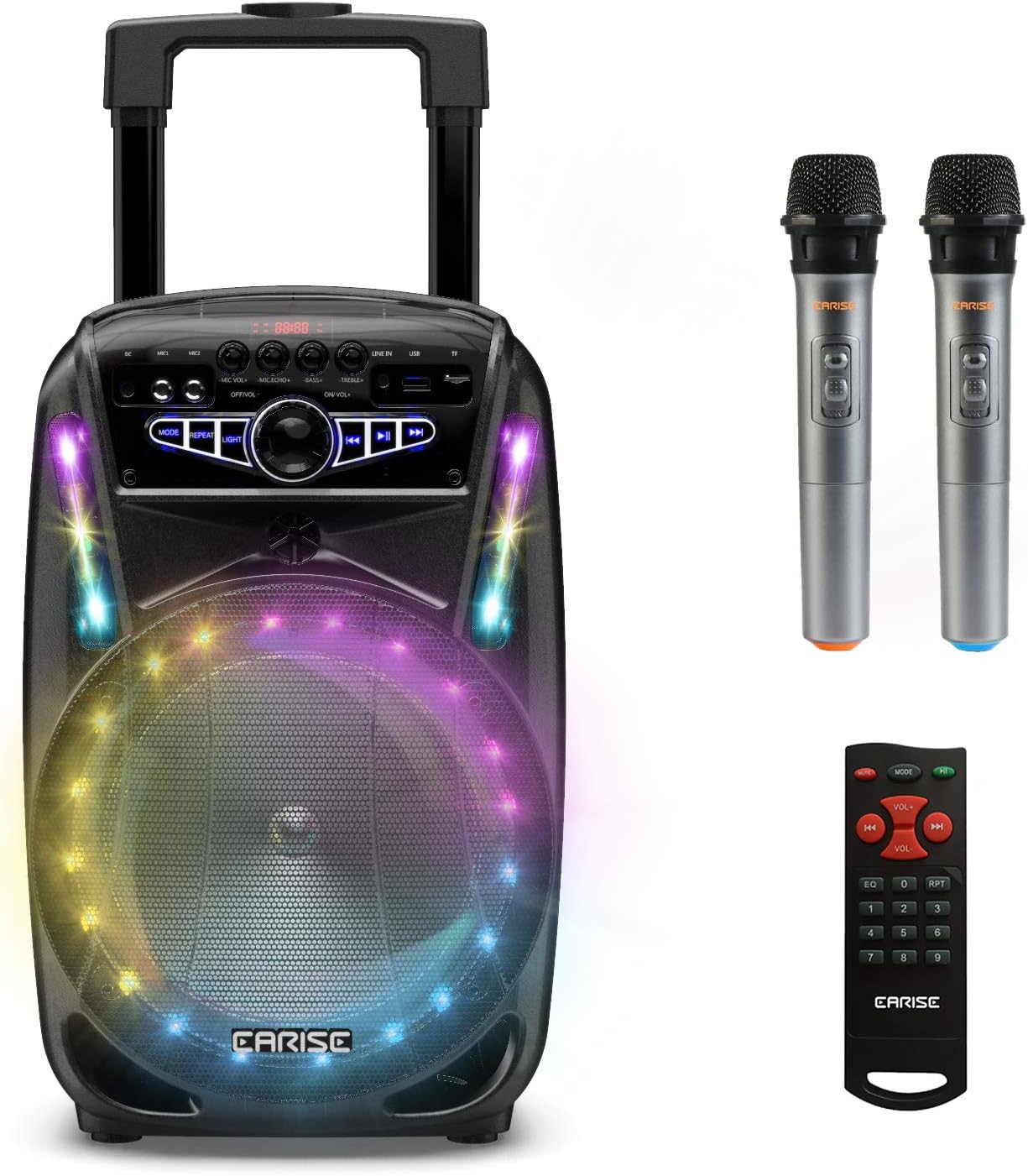
Image: The EARISE M15 Karaoke Machine, a black portable speaker with colorful LED lights on the front, shown with two wireless microphones and a remote control.
Кутуда эмне бар
Сураныч, пакетиңиздин мазмунун текшериңиз, бардык буюмдар бар жана жакшы абалда.
- 1 x M15 троллейбус PA системасы
- 2 х зымсыз микрофондор (Батарейкалар камтылган эмес)
- 1 x Алыстан башкаруу
- 1 х Кубат кабели
- 1 х AUX кабели
- 1 х Колдонуучунун колдонмосу (бул документ)

Image: A visual representation of the package contents, showing the M15 speaker, two wireless microphones, a remote control, an AUX cable, and a charging cable.
Орнотуу колдонмосу
1. Бирдикти кубаттоо
Before first use, fully charge the M15 Karaoke Machine. The built-in 3600mAh 7.4V Lithium rechargeable battery provides portability. A full recharge takes approximately 3 hours.
- Connect the included power cord to the DC Charging Port (6) on the back of the unit.
- Plug the other end of the power cord into a standard AC 100-240V power outlet.
- The charging indicator light will illuminate. Once fully charged, the light may change color or turn off depending on the unit's design.
2. Микрофондун батареяларын орнотуу
The wireless microphones require batteries (not included). Open the battery compartment of each microphone and insert the required batteries, ensuring correct polarity.
3. Баштапкы күйгүзүү
Locate the Power On/Off switch (15) on the control panel. Turn the switch to the "ON" position to power on the unit.
Иштөө нускамалары
Башкаруу панелиview
Оптималдуу иштөө үчүн башкаруу панели менен таанышып алыңыз.

Image: Close-up of the M15's control panel, highlighting various buttons and ports with corresponding numbers for easy identification.
- Дисплей экраны: Shows current mode, track number, and other information.
- Микрофондун үнү: Туташкан микрофондордун үнүн тууралайт.
- Микрофондун жаңырыгы: Микрофондор үчүн жаңырык эффектин көзөмөлдөйт.
- Бас: Аудио чыгышынын басс деңгээлин тууралайт.
- Үч кабат: Аудио чыгышынын жогорку деңгээлин тууралайт.
- DC заряддоо порту: For connecting the power adapter to charge the unit.
- Mic 1 Port: Зымдуу микрофон үчүн киргизүү.
- Mic 2 Port: Input for a second wired microphone.
- Line In Port (AUX): AUX кабели аркылуу тышкы аудио түзмөктөрдү туташтыруу үчүн.
- USB Flash Drive Slot: Аудио ойнотуу үчүн fileUSB дисктен.
- TF/SD карта уячасы: Аудио ойнотуу үчүн files from a TF or SD card.
- Режим: Switches between Bluetooth, USB, TF, AUX, and FM Radio modes.
- Кайталоо: Учурдагы тректи же ойнотмо тизмесин кайталайт.
- Жарык: Toggles or changes the LED light patterns.
- Power On/Off, Master Volume: Turns the unit on/off and adjusts the overall volume.
- Мурунку трек: Мурунку трекке өтүшөт.
- Ойнотуу/тындыруу: Учурдагы тректи ойнойт же тындырат.
- Кийинки трек: Кийинки трекке өтүү.
1. Bluetooth Жупташтыруу
Connect your smartphone, tablet, or other Bluetooth-enabled device to the M15 for wireless audio streaming.
- Power on the M15 unit.
- басыңыз Mode button (12) until "Bluetooth" or "BT" appears on the Display Screen (1).
- Enable Bluetooth on your device and search for "EARISE M15" in the list of available devices.
- Select "EARISE M15" to pair. A confirmation sound will indicate successful pairing.
- You can now play audio from your device through the M15.

Image: A person sitting outdoors, connecting their smartphone to the EARISE M15 speaker via Bluetooth, indicated by the Bluetooth logo.
2. USB/TF картасын ойнотуу
Аудио ойнотуу files directly from a USB flash drive or TF/SD card.
- Insert a USB flash drive into the USB Flash Drive Slot (10) or a TF/SD card into the TF/SD Card Slot (11).
- The unit should automatically switch to USB or TF mode and begin playing compatible audio fileс. Болбосо, басыңыз Mode button (12) to select the correct mode.
- колдонуу Мурунку трек (16), Ойнотуу/Тыныгуу (17), жана Кийинки трек (18) ойнотууну башкаруу үчүн баскычтар.
3. AUX киргизүү
Connect external audio devices that do not have Bluetooth capability using the AUX cable.
- Connect one end of the included AUX cable to the Line In Port (9) on the M15.
- Connect the other end of the AUX cable to the audio output jack of your external device (e.g., MP3 player, laptop).
- басыңыз Mode button (12) until "AUX" or "LINE" appears on the Display Screen (1).
- Тышкы түзмөгүңүздөн ойнотууну көзөмөлдөө.
4. Микрофонду колдонуу
The M15 supports up to two wireless microphones and two wired microphones simultaneously for karaoke fun.
- Зымсыз микрофондор: Turn on the wireless microphones. They should automatically connect to the M15.
- Зымдуу микрофондор: Plug wired microphones into Mic 1 Port (7) or Mic 2 Port (8).
- Adjust the Microphone Volume (2) and Microphone Echo (3) knobs to achieve desired sound effects.

Image: A group of people enjoying karaoke, with the EARISE M15 speaker providing sound and multiple microphones in use, demonstrating its multi-user capability.
5. Жарык диоддору
Enhance your party atmosphere with the M15's colorful LED disco lights.
- басыңыз Жарык button (14) to toggle the LED lights on/off or to cycle through different light patterns.

Image: The EARISE M15 speaker with its front-facing LED lights glowing in multiple colors, creating a vibrant visual effect.
6. Алыстан башкарууну колдонуу
Комплекттеги пульт алыстан ыңгайлуу башкарууну камсыз кылат.
- Алыстан башкаруу пультунда иштеген батарейкалар бар экенин текшериңиз.
- Point the remote control towards the front of the M15 unit.
- Use the buttons on the remote to control volume, mode, track selection, EQ, and other functions.
Техникалык тейлөө
Proper maintenance will ensure the longevity and optimal performance of your EARISE M15 Karaoke Machine.
- Тазалоо: Use a soft, dry cloth to wipe the exterior of the unit. Do not use abrasive cleaners, waxes, or solvents as they may damage the finish.
- Батареяга кам көрүү: To prolong battery life, avoid fully discharging the battery frequently. If storing the unit for an extended period, charge it to about 50% every few months.
- Сактагыч: Агрегатты күн нурунан, өтө температурадан жана жогорку нымдуулуктан алыс салкын, кургак жерде сактаңыз.
- Колдонуу: While the unit is portable with wheels and a handle, avoid dropping or subjecting it to strong impacts.

Image: A person demonstrating the portability of the EARISE M15 by pulling it with its retractable handle and built-in wheels.
Проблемаларды чечүү
If you encounter issues with your M15, please refer to the following common problems and solutions.
| Көйгөй | Мүмкүн себеп | Чечим |
|---|---|---|
| Кубат жок / Бирдик күйбөйт. | Батарея түгөнүп калды. Электр шнуру туура эмес туташтырылган. | Аппаратты толук заряддаңыз. Ensure power cord is securely connected to both the unit and the power outlet. |
| Динамиктен үн жок. | Үн өтө төмөн. Туура эмес режим тандалган. External device volume is low. | Increase the Master Volume (15). басыңыз Mode button (12) to select the correct input source (Bluetooth, USB, AUX). Increase volume on the connected external device. |
| Микрофон иштебей жатат. | Microphone batteries are dead or incorrectly inserted. Микрофондун үнү өтө төмөн. Wireless microphone not paired. | Replace microphone batteries, ensuring correct polarity. Increase Microphone Volume (2). Ensure wireless microphones are turned on and within range. |
| Bluetooth жупташтыруу ишке ашкан жок. | M15 is not in Bluetooth mode. Device is too far from M15. Түзмөктөгү Bluetooth өчүк. | Басыңыз Mode button (12) to select Bluetooth mode. Move your device closer to the M15. Түзмөгүңүздө Bluetooth'ду иштетиңиз. |
| USB/TF картасы ойнотулбай жатат. | Туура эмес file формат. Card/drive not inserted correctly. Unit not in USB/TF mode. | аудиону камсыз кылуу fileлар шайкеш форматта (мисалы, MP3). Re-insert the USB drive or TF card firmly. Басыңыз Mode button (12) to select USB or TF mode. |
Техникалык шарттар
Detailed technical specifications for the EARISE M15 Karaoke Machine.
| Өзгөчөлүк | Спецификация |
|---|---|
| Модел | M15 |
| Power Output | 400W Макс. |
| R.Frequency | 90Гц-20КГц |
| Li-ion Батарея | 3.7V / 2600mAh (Built-in) |
| Иштеткич | 8" 4Ω*1 + 1" tweeter*1 |
| S/N катышы | ≥60дБ |
| Электр камсыздоо | AC 100-240V |
| Продукциянын өлчөмдөрү (L x W x Y) | 27.94 x 25.4 x 40.64 см (11 x 10.4 x 16.3 дюйм) |
| Элемент Салмагы | 4.08 кг |
| Байланыш технологиясы | Bluetooth, USB, AUX |
| Шайкеш түзмөктөр | Ноутбук, смартфон |

Image: A diagram illustrating the physical dimensions of the EARISE M15 speaker, showing its height, width, and depth.
Кепилдик жана колдоо
For warranty information or technical support, please refer to the contact details provided with your purchase documentation or visit the official EARISE webсайт. Сатып алуу квитанциясын кепилдик дооматтары үчүн сатып алуунун далили катары сактаңыз.


