Introduction
This manual provides comprehensive instructions for setting up, operating, and maintaining your Macally Bluetooth Keyboard. Designed for multi-device compatibility, this wireless keyboard features a built-in stand, a rechargeable battery, and 78 keys for efficient typing across various devices including tablets, smartphones, and computers.

Image: The Macally Bluetooth Keyboard in white, with a tablet securely docked in its integrated stand, showcasing its compact design and functionality.
Кутуда эмне бар
Upon unboxing your Macally Bluetooth Keyboard, please ensure all the following items are present:
- Macally Bluetooth Keyboard
- USB заряддоо кабели
- Колдонуучунун Колдонмосу (бул документ)
If any items are missing or damaged, please contact Macally customer support.
Продукт өзгөчөлүктөрү
The Macally Bluetooth Keyboard is designed for versatility and convenience, offering several key features:
- Көп түзмөк байланышы: Seamlessly switch between up to 3 Bluetooth-enabled devices (e.g., tablet, smartphone, computer).
- Интеграцияланган түзмөк стенди: Features a built-in 10.5-inch slot to securely hold your smartphone or tablet.
- Компакт жана көчмө: Small enough to fit into most bags, making it ideal for on-the-go use.
- Кайра заряддалуучу батарея: Equipped with a 280mAh rechargeable battery for extended use.
- Efficient Layout: Includes 78 quiet scissor-switch keys and 13 convenient shortcut/media keys for enhanced productivity.

Image: The keyboard demonstrating seamless Bluetooth connectivity with a 30ft wireless range, compatible with Apple, Windows, iOS, and Android operating systems.

Image: A visual representation of the keyboard's multi-device capability, showing it paired with a laptop, a desktop computer, and a smartphone simultaneously.

Image: The keyboard positioned on a desk, with both a tablet and a smartphone docked in its integrated 10.5-inch stand, highlighting its "setup anywhere" convenience.
Жайгашуу
Баскычтопту заряддоо
Before first use, fully charge your Macally Bluetooth Keyboard. Connect the provided USB charging cable to the keyboard's charging port and the other end to a USB power source (e.g., computer USB port, USB wall adapter). The charging indicator light will show the charging status.

Image: The keyboard with its charging cable connected, illustrating the rechargeable 280mAh battery and the included charging cable.
Bluetooth Жупташтыруу
Follow these steps to pair your keyboard with a device:
- Баскычтоптун кубатталганын жана күйүп турганын текшериңиз. Кубат баскычы баскычтоптун жогорку оң бурчунда жайгашкан.
- On your device (tablet, smartphone, computer), enable Bluetooth.
- басып, кармап туруңуз Fn баскычын жана Bluetooth канал баскычтарынын бири (B1, B2, же B3) simultaneously for a few seconds until the corresponding Bluetooth indicator light starts blinking rapidly. This indicates the keyboard is in pairing mode.
- On your device, search for "Macally Keyboard" or a similar name in the Bluetooth device list and select it to connect.
- Once connected, the indicator light will stop blinking and remain solid for a moment before turning off, indicating successful pairing.
To pair additional devices, repeat steps 3-5 using a different Bluetooth channel key (B1, B2, or B3).
Иштөө нускамалары
Түзмөктөрдүн ортосунда которулуу
Жупташтырылган түзмөктөр арасында которулуу үчүн жөн гана басыңыз Fn тиешелүү Bluetooth канал баскычы менен бирге баскычын (B1, B2, же B3) for the desired device. The keyboard will quickly connect to the selected device.
Жарлык баскычтарын колдонуу
The keyboard features 13 dedicated shortcut/media keys for quick access to common functions. These keys are typically located on the top row (F1-F12 and an additional key). Functions may vary slightly depending on the operating system of your connected device.
Жалпы жарлык функцияларына төмөнкүлөр кирет:
- Медиа ойнотууну башкаруу элементтери (ойнотуу/тындыруу, кийинки/мурунку трек)
- Үндү башкаруу (үнсүз, үндү жогорулатуу/төмөндөтүү)
- Экрандын жарыктыгын жөндөө
- Home screen/desktop access
- Издөө функциясы
Refer to your device's operating system documentation for specific compatibility and functionality of these keys.

Сүрөт: деталдуу view of the keyboard's layout, emphasizing its 78 quiet scissor-switch keys and the 13 dedicated shortcut/media keys for efficient use.
Техникалык тейлөө
To ensure the longevity and optimal performance of your Macally Bluetooth Keyboard, follow these maintenance guidelines:
- Тазалоо: Клавиатуранын бетин тазалоо үчүн жумшак, кургак, түксүз чүпүрөктү колдонуңуз. Өтө катуу кир үчүн, бир аз сүртүңүз.ampчүпүрөктү суу же жумшак, абразивдүү тазалагыч менен жууп салыңыз. Ашыкча нымдуулуктан сактаныңыз.
- Сактагыч: Узак мөөнөткө колдонулбаганда, клавиатураны салкын, кургак жерде, тике күндүн нурунан жана өтө температурадан алыс сактаңыз.
- Батареяга кам көрүү: To preserve battery life, avoid fully discharging the keyboard frequently. Recharge it when the low battery indicator appears. If storing for a long time, charge it to about 50% every few months.
- Төгүлгөндөн сактаныңыз: Keep liquids away from the keyboard to prevent internal damage.
Проблемаларды чечүү
If you encounter issues with your Macally Bluetooth Keyboard, try the following solutions:
| Көйгөй | Мүмкүн чечим |
|---|---|
| Баскычтоп күйбөйт. | Ensure the keyboard is charged. Connect it to a power source using the USB cable. |
| Unable to pair the keyboard. |
|
| Клавиатура тез-тез өчүп калат. |
|
| Ачкычтар жооп бербей жатат. |
|
If these solutions do not resolve the issue, please contact Macally customer support for further assistance.
Техникалык шарттар
| Өзгөчөлүк | Деталь |
|---|---|
| Модель номери | БТТАБКЕЙБАТ |
| Байланыш технологиясы | Bluetooth |
| Ачкычтардын саны | 78 |
| Батарея түрү | 1 литий-иондук батарейка (кошулган) |
| Элемент Салмагы | 1.92 фунт |
| Пакеттин өлчөмдөрү | 13.98 x 7.91 x 2.48 дюйм |
| Өндүрүүчү | Mace Group Inc / Macally Перифериялык түзүлүштөрү |
| Шайкеш түзмөктөр | PC, Tablet, Apple devices, Windows Desktop/Laptop, Surface, Chromebook, Smartphones, TVs (any device with Bluetooth) |
| Сунушталган Колдонуулар | Office, School, Everyday Use, Personal, Education, Business |
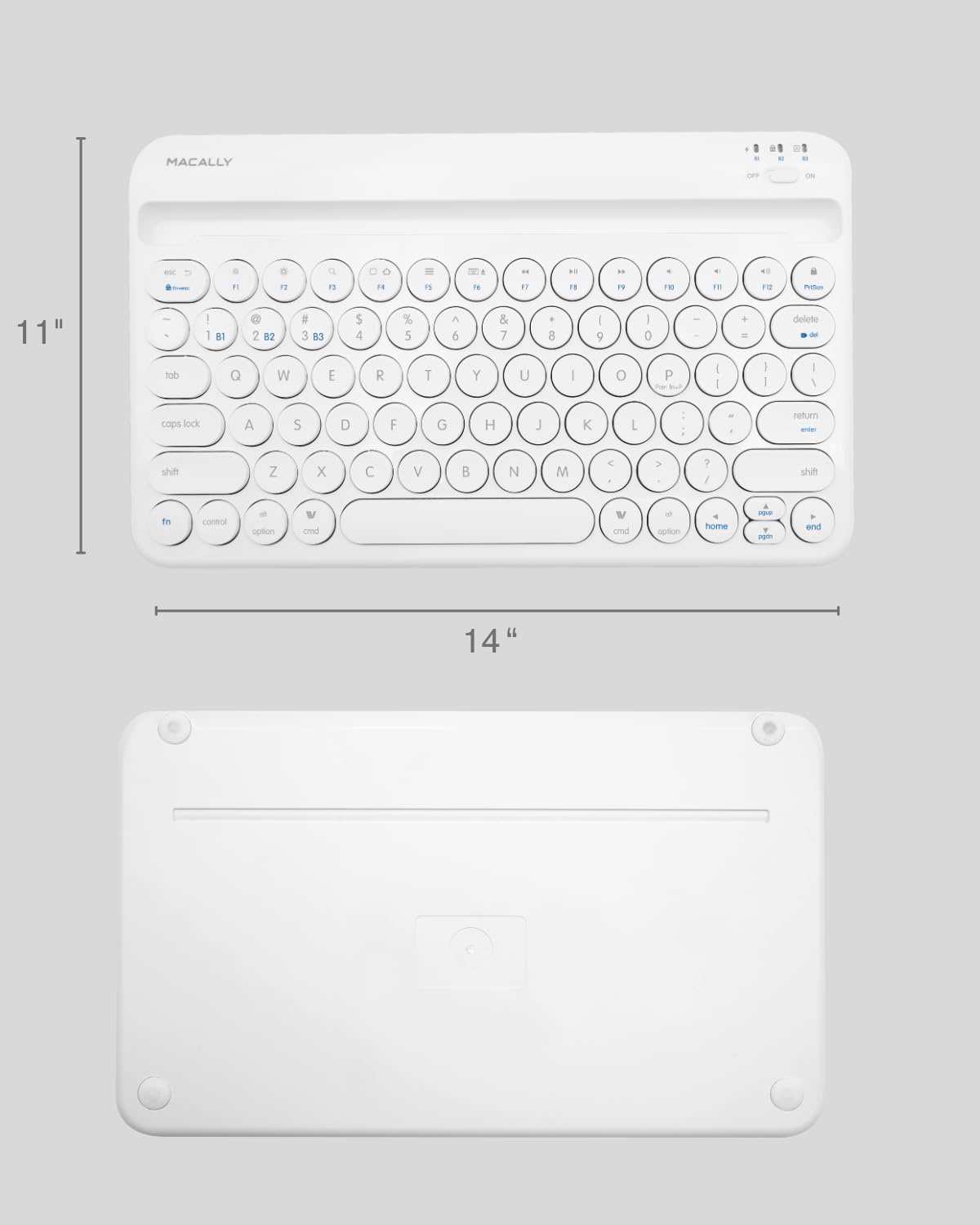
Image: The physical dimensions of the keyboard, measuring approximately 11 inches in width and 14 inches in length.

Image: The keyboard fitting easily into a backpack, demonstrating its compact size and suitability for travel and on-the-go use.
Кепилдик жана колдоо
Macally products are designed for quality and reliability. For information regarding product warranty, technical support, or service, please visit the official Macally webсайтка же кардарларды тейлөө бөлүмүнө кайрылыңыз. Сатып алуу квитанциясын кепилдик дооматтары үчүн сатып алуунун далили катары сактаңыз.
Көбүрөөк маалымат жана колдоо таба аласыз Macally дүкөнү Amazon'до.


