1. Киришүү
The Viatom SleepU is a rechargeable wrist pulse oximeter designed for continuous monitoring of blood oxygen saturation (SpO2) and heart rate. It provides advanced sleep analysis and real-time data, making it a valuable tool for personal health management. This manual provides detailed instructions for the proper use, maintenance, and troubleshooting of your SleepU device.

Image: The Viatom SleepU device, highlighting its lightweight and comfortable design, and its ability to monitor blood oxygen, pulse rate, and movement.
2. Продукт бүтүп калдыview
2.1 Компоненттер
The Viatom SleepU package typically includes the following items:
- SleepU Wrist Unit (Oximeter)
- Comfortable Ring Sensor
- USB заряддоо кабели
- User Manual
2.2 Негизги өзгөчөлүктөрү
- реалдуу убакыт мониторинг: Provides continuous SpO2 and heart rate data.
- Тынымсыз жаздыруу: Records trends of SpO2 and heart rate over extended periods, unlike traditional finger oximeters.
- Ыңгайлуу дизайн: Lightweight wrist unit with a soft, comfortable silicone ring sensor that stays securely in place during sleep.
- Adjustable Vibration Alert: Can be configured via the app to vibrate if oxygen saturation levels fall below a preset threshold.
- Integrated Memory: Stores up to 4 sets of 10-hour data, allowing standalone operation without a smartphone.
- App for Android and iOS: The Vihealth app supports detailed data analysis and reporting.
- Кайра заряддалуучу батарея: Offers up to 16 hours of battery life on a single charge.
- Apple Health Synchronization: Integrates with Apple Health for a comprehensive view of your health data.
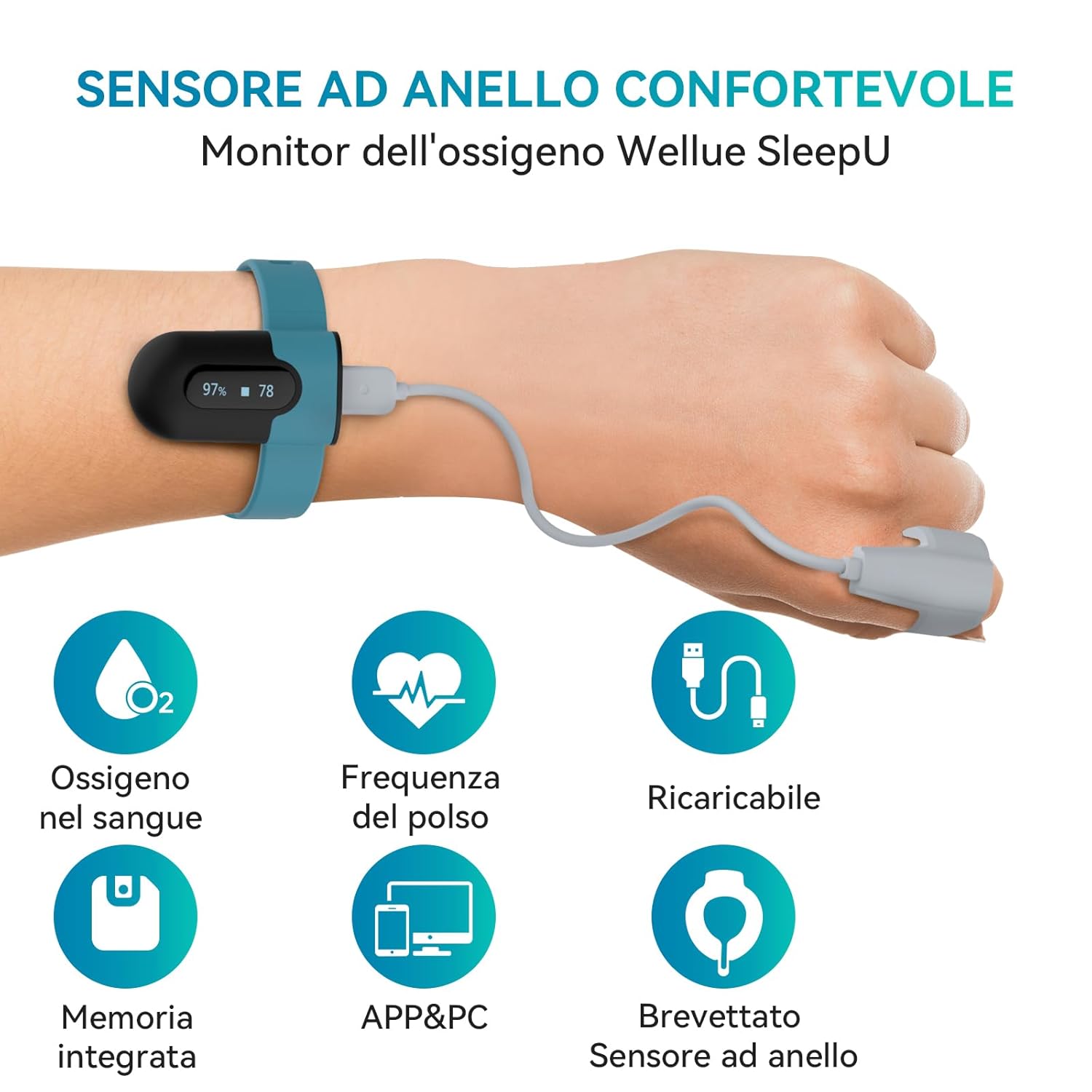
Image: The SleepU device worn on the wrist, illustrating its comfortable ring sensor and key functionalities like blood oxygen and pulse monitoring.

Image: A visual comparison highlighting the benefits of the unique ring sensor over traditional designs, emphasizing comfort and effective vibration alerts for improved sleep quality.
3. Коопсуздук маалыматы
Please read all safety information carefully before using the device. Improper use may result in inaccurate readings or device damage.
- This device is intended for general wellness and health management. It is not a medical device and should not be used for diagnosis or treatment of any medical condition.
- Consult a healthcare professional for interpretation of results and before making any medical decisions.
- Аппаратты балдар жана үй жаныбарлары жетпеген жерде сактаңыз.
- Do not use the device in an MRI environment or in areas with high electromagnetic interference.
- Avoid vigorous exercise during measurement, as this may lead to inaccurate readings.
- Аппаратты демонтаждабаңыз, оңдоого же өзгөртүүгө болбойт.
- Заряддоо үчүн берилген USB кабелин гана колдонуңуз.
4. Орнотуу
4.1 Аппаратты заряддоо
Before first use, fully charge the SleepU device. Connect the USB charging cable to the wrist unit and a standard USB power adapter (not included) or a computer USB port. The device display will indicate charging status. A full charge typically takes a few hours and provides up to 16 hours of continuous use.
4.2 Түзмөктү тагынуу
The SleepU device consists of a wrist unit and a ring sensor. For accurate readings, follow these steps:
- Place the wrist unit comfortably on your wrist, similar to a watch.
- Insert your thumb or index finger into the silicone ring sensor. Ensure the sensor is snug but not too tight, allowing for comfortable blood circulation.
- Connect the ring sensor cable to the wrist unit. The device will automatically power on and begin measurement once the sensor is properly connected and placed on a finger.

Image: Step-by-step guide on wearing the sensor, connecting to the app, and important usage tips.
4.3 Колдонмону орнотуу жана жупташтыруу
To access detailed data and reports, download the Vihealth App Store (iOS) же Google Play Дүкөнүнөн (Android) колдонмо.
- Download and install the Vihealth app on your smartphone.
- Смартфонуңузда Bluetooth'ду иштетиңиз.
- Open the Vihealth app and follow the on-screen instructions to add your device. Select "SleepU" from the list of available devices.
- The app will automatically pair with your SleepU device.
5. Иштөө нускамалары
5.1 Starting Monitoring
Once the device is charged and worn correctly with the ring sensor connected, it will automatically begin monitoring. The small display on the wrist unit will show real-time SpO2 percentage and heart rate (BPM).
5.2 Окуу материалдарын түшүнүү
The device continuously tracks your blood oxygen levels and pulse rate. Normal SpO2 levels are typically between 95% and 100%. Pulse rate varies by individual and activity level.

Image: The SleepU device tracking blood oxygen and pulse rate throughout the day, providing continuous health insights.
5.3 Vibration Alerts
The SleepU device features an integrated vibration alert system. You can set custom SpO2 thresholds within the Vihealth app. If your oxygen level drops below the set threshold, the device will vibrate to alert you. This feature is particularly useful for monitoring during sleep.

Image: Real-time notification feature, where the device vibrates to alert the user if oxygen levels fall below a preset threshold.
5.4 Үзгүлтүксүз мониторинг
The SleepU is designed for continuous monitoring, especially during sleep. It records data throughout the night, providing a comprehensive overview of your SpO2 and heart rate trends. This data is crucial for understanding sleep patterns and potential health concerns.

Image: The SleepU device providing smart adjustable vibration alerts to help improve sleep quality by monitoring SpO2 levels.
6. App and PC Software
6.1 Vihealth App (iOS & Android)
The Vihealth app offers a user-friendly interface for viewing, analyzing, and managing your health data. It provides detailed reports, multi-parameter analysis, and unlimited storage for your readings.
- Реалдуу убакыттагы маалыматтар: View current SpO2 and heart rate.
- Тарыхый дата: Access all recorded data, with options to view weekly, monthly, and yearly trends.
- O2 Score: Provides an O2 score and trends based on your oxygen levels.
- Толук отчеттор: Generates comprehensive reports with graphs and statistics, including time spent below certain SpO2 levels.

Image: The free Vihealth app for iOS and Android, offering detailed reports, multi-parameter analysis, and a user-friendly interface.

Image: App interface displaying device battery status, oxygen level alert settings, and data collection intervals.

Image: App interface allowing users to view all historical data and O2 score trends over different time periods.

Сүрөт: деталдуу view within the app, showing specific SpO2 and pulse rate data, including distribution and time spent below critical oxygen levels.
6.2 PC Software and Reports
The SleepU device also supports PC software for more in-depth analysis and report generation. You can download the software from the official ViATOM webсайт.
- Маалыматтарды жүктөп алуу: Connect your device to a PC to download recorded data.
- Комплекстүү отчеттор: Generate detailed sleep reports in PDF or CSV format.
- Professional Analysis: The software provides advanced graphical representations of SpO2 and heart rate trends, O2 score, and other relevant metrics.

Image: The SleepU device seamlessly integrates with both smartphone apps and PC software for comprehensive sleep report generation.

Image: The free PC software allows users to export sleep reports in PDF or CSV format for unlimited analysis and sharing.

Сүрөт: мурункуample of the Oxygen Level Report, detailing blood oxygen and heart rate trends, O2 score, and duration of specific oxygen levels.
7. Техникалык тейлөө
7.1 Тазалоо
- Wipe the wrist unit and ring sensor with a soft, dry cloth.
- Зарыл болсо, чүпүрөктү жеңил колдонуу dampened with water or a mild disinfectant. Do not immerse the device in liquid.
- Абразивдүү тазалагычтарды же эриткичтерди колдонуудан алыс болуңуз.
7.2 Сактоо
- Аппаратты салкын, кургак жерде, тике күн нурунан жана экстремалдык температурадан алыс сактаңыз.
- Keep the device in its original packaging or a protective case when not in use.
7.3 Батареяга кам көрүү
- Батареянын ден соолугун сактоо үчүн аппаратты тез-тез колдонбосо дагы, дайыма заряддаңыз.
- Батареянын узак убакыт бою толугу менен түгөнүп калышынан алыс болуңуз.
8. Кыйынчылыктарды
If you encounter issues with your Viatom SleepU device, please refer to the following common problems and solutions:
| Көйгөй | Мүмкүн себеп | Чечим |
|---|---|---|
| Түзмөк күйбөй жатат | Low battery; Sensor not connected properly | Charge the device; Ensure the ring sensor is securely connected to the wrist unit. |
| Так эмес окуулар | Improper sensor placement; Movement during measurement; Cold fingers | Ensure the sensor is snug on the finger; Remain still during measurement; Warm your hands if they are cold. |
| Cannot connect to app (Bluetooth) | Bluetooth off; Device not in pairing mode; App issues | Ensure Bluetooth is enabled on your phone; Restart the SleepU device and the app; Try re-pairing the device in the app settings. |
| No data recorded | Device not worn correctly; Battery drained; Memory full | Ensure proper wearing and sensor connection; Charge the device; Sync data to app/PC to clear memory. |
9. Техникалык шарттар
| Өзгөчөлүк | Деталь |
|---|---|
| Бренд | ViATOM |
| Модель аты | SB-SleepUA02 |
| Measurement Range (SpO2) | 0% - 100% |
| Батареянын иштөө мөөнөтү | 16 саатка чейин |
| Батарея түрү | 1 Литий Полимердик батарейка (кошулган) |
| Өлчөмдөрү (L x W x Y) | 9L x 7W x 9H см |
| Өндүрүүчү | Viatom |
| Келип чыккан өлкө | Кытай |
10. Кепилдик жана колдоо
10.1 Кепилдик
The Viatom SleepU device comes with a 2 жылдык өндүрүүчүнүн кепилдиги сатып алынган күндөн тартып. Бул кепилдик нормалдуу колдонуудагы материалдардагы жана жасалгадагы кемчиликтерди камтыйт. Бул туура эмес колдонуудан, кырсыктардан, уруксатсыз өзгөртүүлөрдөн же кадимки эскирүүдөн келип чыккан зыянды камтыбайт.
Кепилдик дооматтары үчүн сатып алганыңыздын далилин сактап коюңуз.
10.2 Кардарларды колдоо
For technical assistance, warranty claims, or any questions regarding your SleepU device, please contact ViATOM customer support through their official webсайты же продуктунун таңгагында берилген байланыш маалыматы.
Сиз да зыярат кылсаңыз болот ViATOM brand store on Amazon көбүрөөк маалымат жана ресурстар үчүн.


