Introduction
This user manual provides comprehensive instructions for the installation, operation, and maintenance of your NDS Sun Control 2 MPPT 12V-320W charge controller. Please read this manual carefully before using the device to ensure safe and efficient operation. This MPPT (Maximum Power Point Tracking) charge controller is designed to optimize the energy harvest from your solar panels and efficiently charge your 12V battery system.
Продукт бүттүview
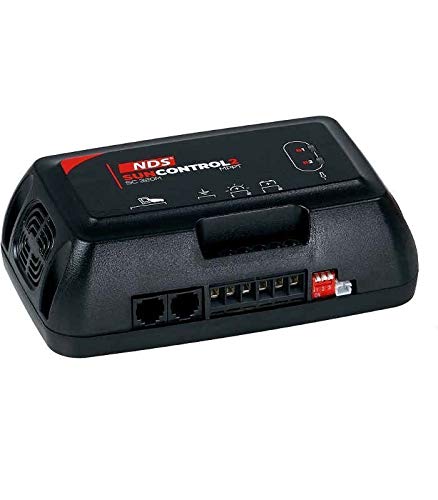
This image displays the NDS Sun Control 2 MPPT 12V-320W charge controller. It is a compact, black rectangular device with the 'NDS SUNCONTROL 2 MPPT' logo visible on the top surface. The front panel features various connection ports, including two RJ45 ports and several screw terminals for wiring. A small red and white switch is also visible on the right side. The device has a fan vent on the left side for cooling.
The NDS Sun Control 2 MPPT 12V-320W is an advanced solar charge controller that utilizes MPPT technology to maximize the power output from your solar array. It is suitable for 12V battery systems and can handle up to 320W of solar input. The controller features robust construction and is designed for reliable performance in various applications, including RVs, boats, and off-grid systems.
Орнотуу жана орнотуу
Коопсуздук чаралары
- Орнотуудан мурун бардык кубат булактары ажыратылганын текшериңиз.
- Тиешелүү жеке коргоочу шаймандарды (ЖКК), анын ичинде коопсуздук көз айнектерин жана кол каптарды кийиңиз.
- Use insulated tools to prevent short circuits.
- Verify correct polarity for all connections. Reverse polarity can damage the controller and battery.
- Контроллерди күйүүчү материалдардан жана тике күндүн нурунан алыс, жакшы желдетилген жерге орнотуңуз.
Монтаждоо
Mount the NDS Sun Control 2 MPPT controller vertically on a flat, non-flammable surface. Ensure there is adequate clearance around the unit for proper ventilation, especially around the fan vent. Use appropriate screws for secure mounting. Avoid mounting in areas exposed to moisture or extreme temperatures.
Зымдарды туташтыруу
Follow these steps for wiring the charge controller. Refer to the labels on the device for specific terminal identification.
- Батарея туташуу: Connect the battery cables to the designated battery terminals on the controller. Ensure correct polarity (positive to positive, negative to negative). This connection must be made first.
- Күн панелинин туташуу: Connect the solar panel cables to the designated PV input terminals. Ensure correct polarity. Do not exceed the maximum input voltage or current ratings of the controller.
- Туташуу жүктөө (милдеттүү эмес): If your model supports a direct load output, connect your DC loads to the designated load terminals. Ensure the total load current does not exceed the controller's rating.
- Remote Display/Communication (Optional): Use the RJ45 ports for connecting compatible remote displays or communication modules, if applicable.
Once all connections are secure, double-check all wiring for correct polarity and tightness before applying power.
Иштөө нускамалары
Баштапкы кубаттуулук
After all connections are made, the controller will automatically power on. The LED indicators on the unit will illuminate to show the status of the battery, solar input, and charging process. Refer to the indicator legend on the device or in this manual for specific meanings.
Мониторинг
The NDS Sun Control 2 MPPT controller provides visual indicators for its operational status. These typically include:
- Solar Input Status: Indicates if solar power is being received.
- Батарея зарядынын абалы: Shows the current charging stage (e.g., bulk, absorption, float).
- Батарея деңгээли: May indicate approximate battery charge level.
- Ката көрсөткүчтөрү: Alerts to potential issues such as over-voltage, over-current, or short circuits.
For detailed monitoring and configuration, a compatible remote display or mobile application (if available for your model) can be connected via the communication ports.
Заряддоо Сtages
The MPPT controller employs a multi-stagБатареянын иштөө мөөнөтүн жана ден соолугун оптималдаштыруу үчүн электрондук кубаттоо алгоритми:
- Жапырт акы: Delivers maximum current to rapidly charge the battery to approximately 80% of its capacity.
- Абсорбция заряды: Батареяны туруктуу вольт менен кубаттайтtage to bring it to 100% charge, reducing current as the battery fills.
- Float акысы: Батареянын кубаттуулугун кичинекей, туруктуу көлөмүн камсыз кылуу менен толук кубаттуулукта кармап туратtage, өзүн-өзү бошотуу үчүн компенсация.
Техникалык тейлөө
Regular maintenance ensures the longevity and optimal performance of your NDS Sun Control 2 MPPT charge controller:
- Тазалык: Keep the controller clean and free from dust and debris. Use a dry, soft cloth for cleaning. Do not use liquid cleaners.
- Вентиляция: Ensure the ventilation openings and fan (if present) are not obstructed. Periodically check for dust buildup in the fan area and clean if necessary.
- Байланыштары: Periodically check all wiring connections for tightness. Loose connections can cause overheating and poor performance.
- Курчап турган чөйрө: Иштөө чөйрөсү белгиленген температуранын жана нымдуулуктун чегинде сакталышын камсыз кылыңыз.
- Батареянын ден соолугу: Monitor your battery's health regularly. A faulty battery can affect the controller's performance.
Проблемаларды чечүү
| Көйгөй | Мүмкүн себеп | Чечим |
|---|---|---|
| Кубат/LED өчүк эмес | No battery connection or reverse polarity; Blown fuse; Faulty wiring. | Check battery connections and polarity; Check inline fuse on battery cable; Verify all wiring. |
| Батарея заряддалбай жатат | No solar input; Solar panel disconnected or faulty; Overcast weather; Controller in fault mode. | Check solar panel connections; Verify solar panel output; Wait for better sunlight; Check controller error indicators. |
| Заряддоо тогу төмөн | Partial shading on solar panels; Dirty solar panels; Battery already near full charge. | Clear shading; Clean solar panels; This is normal behavior if battery is nearly full. |
| Көлөмүtage/Over-current error | Күн панели тtage/current too high; Short circuit. | Ensure solar panel specifications match controller limits; Check for short circuits in wiring. |
Техникалык мүнөздөмөлөр
| Өзгөчөлүк | Спецификация |
|---|---|
| Модел | SC320M |
| Бренд | NDS |
| System Voltage | 12 вольт (ток) |
| Макс. Күн энергиясы | 320 Вт |
| Иштөө температурасы | Up to 60 ℃ |
| Түс | Кара |
| ASIN | B08GG7GFDT |
Кепилдик жана колдоо
NDS products are manufactured to high-quality standards. For specific warranty terms and conditions, please refer to the warranty card included with your product or visit the official NDS website. In case of technical issues or questions not covered in this manual, please contact NDS customer support or your authorized dealer. When contacting support, please have your product model (SC320M) and purchase information ready.
For the latest information and support resources, please visit the official NDS webсайт: www.ndsenergy.it


