1. Киришүү
This manual provides detailed instructions for the IPEGA PG-SW023 Bluetooth Wireless Game Controller. This versatile controller is designed to enhance your gaming experience across multiple platforms, including N-S consoles, PlayStation 3 (PS3), Android devices, and personal computers running Windows 7, 8, or 10.
Please read this manual carefully before using the product to ensure proper operation and to maximize its features.
2. Продукциянын өзгөчөлүктөрү
- Көп платформа шайкештиги: Suitable for gaming on N-S consoles, PS3, Android devices, and PCs (Windows 7/8/10).
- Жакшыртылган оюн тажрыйбасы: Supports vibration feedback and a six-axis gyroscope function for immersive gameplay and precise control.
- Customizable Macro Function: Rear buttons can be configured as common keys or combination keys for simplified actions.
- Continuous TURBO Function: Features a dedicated TURBO button for rapid-fire actions, compatible with N-S Pro gamepads.
- Эргономикалык дизайн: Engineered for comfort during extended gaming sessions, fitting securely in the palm.

Image: The IPEGA PG-SW023 Wireless Game Controller highlighting its key features: two vibrating motors, six-axis design, high-sensitive buttons, and Turbo function.
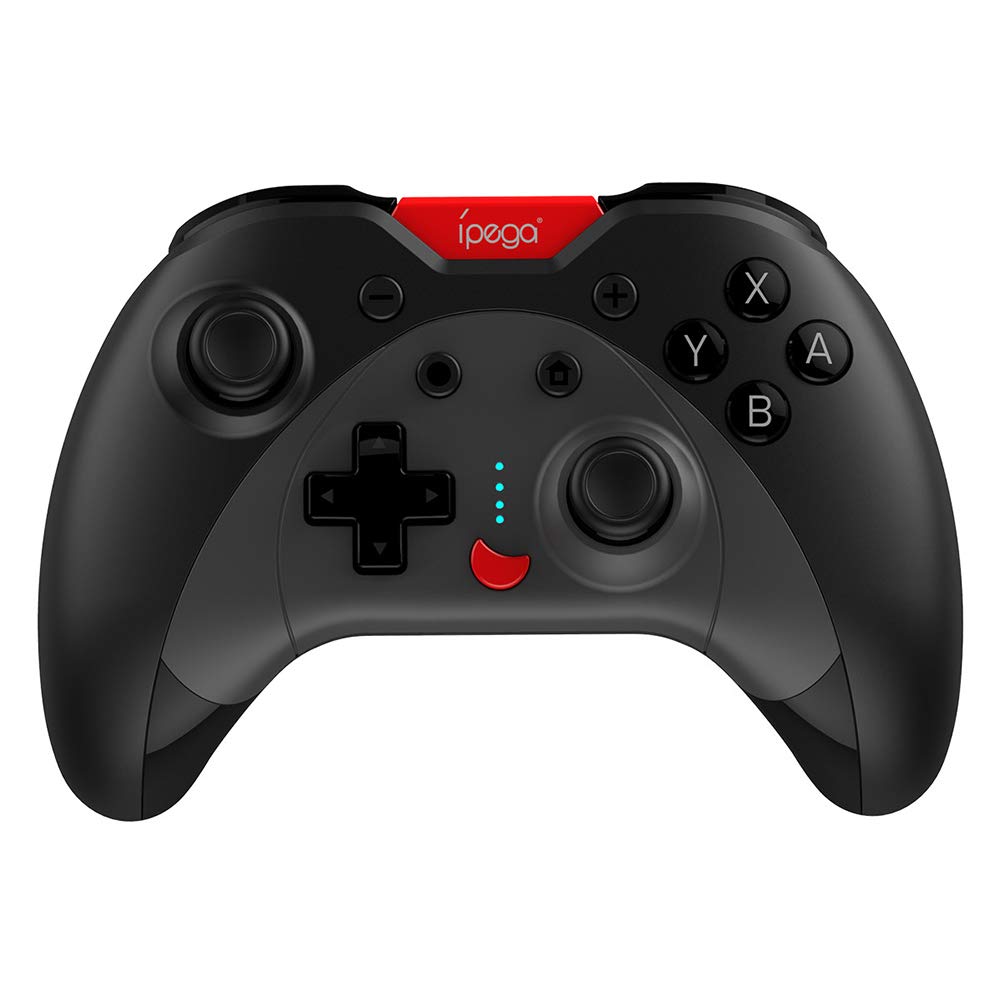
Image: A green IPEGA PG-SW023 controller illustrating its built-in six-axis gyroscope design for improved body feeling and accurate targeting.
3. Пакеттин мазмуну
Пакетте бардык буюмдар бар экенин текшериңиз:
- 1 x IPEGA PG-SW023 Wireless Game Controller
- 1 x Type-C заряддоо кабели
- 1 x User Manual
4. Техникалык шарттар
| Өзгөчөлүк | Спецификация |
|---|---|
| Бренд | Ipega |
| Модел | PG-SW023 |
| Түс параметрлери | Black, Green, Blue, Yellow |
| Operating Voltage | DC 3.7V |
| Иштөө агымы | <30мА |
| Статикалык Current | <20уА |
| Үзгүлтүксүз ойноо убактысы | Болжол менен 15 саат |
| Киргизүү көлөмүtage/Current | DC 5V/500mA |
| Заряддоо убактысы | Болжол менен 2 саат |
| Bluetooth версиясы | 3.0 |
| Өткөрмө аралык | ≤8 метр |
| Батарея сыйымдуулугу | 400mAh |
| Продукциянын өлчөмдөрү | 15 x 10 x 5.5 см (5.91 x 3.94 x 2.17 дюйм) |
| Продукт Салмагы | Болжол менен 215г (7.58 унция) |
| Шайкеш түзмөктөр | N-S Console, PS3, Android, PC (Win 7/8/10) |
| Байланыш | Зымсыз (Bluetooth) |
| Power Source | Батарея менен иштейт |
5. Орнотуу
5.1 Контроллерди заряддоо
- Connect the provided Type-C charging cable to the controller's charging port.
- Кабелдин экинчи учун USB кубат булагына туташтырыңыз (мисалы, компьютерге, USB адаптерине).
- The indicator lights on the controller will show charging status. Once fully charged (approx. 2 hours), the lights will indicate completion or turn off.
5.2 Түзмөктөр менен жупташтыруу
The pairing method varies slightly depending on the device. Ensure the controller is sufficiently charged before attempting to pair.

Image: A blue IPEGA PG-SW023 controller positioned in front of a Nintendo Switch, PlayStation 3, and a laptop, illustrating its multi-platform compatibility.
5.2.1 Pairing with N-S Console
- On your N-S console, go to the HOME Menu.
- 'Controllers' > 'Change Grip/Order' тандаңыз.
- Press and hold the pairing button on the IPEGA controller (refer to controller diagram for exact location) until the indicator lights begin to flash rapidly.
- The console will detect the controller. Once paired, the indicator light will become solid.
5.2.2 PS3 менен жупташуу
- Type-C кабелин колдонуп контроллерди PS3 консолуна туташтырыңыз.
- Контроллердеги HOME баскычын басыңыз.
- Once recognized, you can disconnect the cable and the controller should remain paired wirelessly.
5.2.3 Android түзмөктөрү менен жупташуу
- Android түзмөгүңүздө Bluetooth'ду иштетиңиз.
- On the controller, press and hold the Android pairing button combination (refer to controller diagram or quick start guide for specific button combination, usually 'A' + HOME or 'X' + HOME) until the indicator lights flash rapidly.
- On your Android device, search for new Bluetooth devices and select 'IPEGA PG-SW023' (or similar name) from the list.
- Жупташкандан кийин контроллердогу индикатор жарыгы катуу болуп калат.
5.2.4 Компьютер менен жупташтыруу (Windows 7/8/10)
- Компьютериңизде Bluetooth иштетилгенин текшериңиз.
- Go to 'Settings' > 'Devices' > 'Bluetooth & other devices' and click 'Add Bluetooth or other device'.
- "Bluetooth" тандаңыз.
- On the controller, press and hold the PC pairing button combination (refer to controller diagram or quick start guide for specific button combination, usually 'L1' + HOME or 'Y' + HOME) until the indicator lights flash rapidly.
- Select 'IPEGA PG-SW023' (or similar name) from the list of available devices on your PC.
- Жупташкандан кийин контроллердогу индикатор жарыгы катуу болуп калат.
6. Иштөө нускамалары
6.1 Баскычтын негизги функциялары
The controller features standard gaming buttons including directional pad, analog sticks, action buttons (A, B, X, Y), shoulder buttons (L1, R1), and triggers (L2, R2). Specific button mapping may vary by game and platform.

Image: Hands comfortably gripping a black IPEGA PG-SW023 controller, showcasing its ergonomic design for comfortable and convenient use.
6.2 TURBO функциясы
The TURBO function allows for continuous rapid input of a selected button. This can be useful in games requiring fast, repeated button presses.
- To activate TURBO: Press and hold the desired action button (e.g., A, B, X, Y) and then press the TURBO button simultaneously. The button will now continuously input as long as it's held down.
- To deactivate TURBO: Repeat the same process (press the action button and TURBO button simultaneously).

Image: A yellow IPEGA PG-SW023 controller with its prominent TURBO button, shown with a Nintendo Switch console, illustrating the auto-fire feature.
6.3 Макрофункция
The macro function allows you to assign a sequence of button presses or a single common button to the programmable rear buttons. This can simplify complex in-game actions.
- Refer to the specific instructions provided in the quick start guide or on the manufacturer's website for detailed steps on programming macro buttons, as this process can vary.
6.4 Vibration and Gyroscope
The controller features dual motors for vibration feedback, providing tactile sensations that correspond to in-game events. The built-in six-axis gyroscope allows for motion control in supported games, offering a more immersive and precise aiming experience.

Image: A blue IPEGA PG-SW023 controller in use, with visual cues indicating its double motor vibrating design for immersive feedback during gameplay.
7. Техникалык тейлөө
Туура кам көрүү контроллериңиздин иштөө мөөнөтүн узартат:
- Тазалоо: Башкаргычты тазалоо үчүн жумшак, кургак чүпүрөктү колдонуңуз. Өтө кир болсо, бир аз сүртүңүзampчүпүрөктү суу же жумшак тазалоо эритмеси менен жууп салыңыз. Катуу химиялык заттардан алыс болуңуз.
- Сактагыч: Контроллерди түз күн нурунан жана экстремалдык температурадан алыс салкын, кургак жерде сактаңыз.
- Таасирден качуу: Башкаргычты түшүрүп албаңыз же катуу соккуга дуушар кылбаңыз, анткени бул ички компоненттерге зыян келтириши мүмкүн.
- Суюктук таасири: Keep the controller away from liquids. If it comes into contact with liquid, power it off immediately and allow it to dry completely before attempting to use it again.
8. Кыйынчылыктарды
If you encounter issues with your IPEGA PG-SW023 controller, try the following solutions:
- Контроллер туташпай жатат:
- Контроллердин толук заряддалганын текшериңиз.
- Түзмөгүңүздө Bluetooth иштетилгенин текшериңиз.
- Try re-pairing the controller by following the setup instructions for your specific device.
- Move the controller closer to the device to ensure it is within the 8-meter transmission range.
- Контроллерди да, оюн түзмөгүңүздү да өчүрүп-күйгүзүңүз.
- Баскычтар жооп бербейт:
- Check if the controller is properly connected and paired.
- Test the controller with another game or application to rule out software-specific issues.
- Баскычтардын астына таштанды калбагандыгын текшериңиз.
- Вибрация иштебей жатат:
- Verify that the game or system settings have vibration enabled.
- Айрым оюндар титирөө кайтарым байланышын колдобошу мүмкүн.
- Кыска батареянын иштөө мөөнөтү:
- Колдонуудан мурун контроллердин толук заряддалганын текшериңиз.
- Battery life can vary based on usage intensity (e.g., continuous vibration).
- Өтө ысык же муздак чөйрөдө заряддоодон алыс болуңуз.
9. Кепилдик жана колдоо
For warranty information, technical support, or service inquiries regarding your IPEGA PG-SW023 Bluetooth Wireless Game Controller, please refer to the product packaging or contact the manufacturer directly through their official webсайт же кардарларды тейлөө каналдары. Кепилдик боюнча дооматтар үчүн сатып алуунун далили катары сатып алуу квитанцияңызды сактап коюңуз.


