1. Киришүү
Thank you for choosing the Infinix iRocker XE15 True Wireless Earbuds. This manual provides essential information on how to set up, operate, and maintain your earbuds to ensure optimal performance and longevity. Please read this manual carefully before using the product.
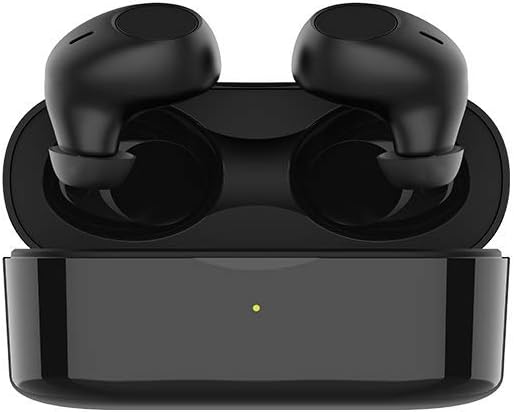
Image 1.1: Infinix iRocker XE15 True Wireless Earbuds and Charging Case. The image displays the black earbuds securely placed within their matching black charging case, which features a small LED indicator light.
2. Пакеттин мазмуну
Пакетиңизде бардык буюмдар бар экенин текшериңиз:
- Infinix iRocker XE15 True Wireless Earbuds (Left and Right)
- Заряддоо кутусу
- USB заряддоо кабели
- User Manual
- Multiple Sizes of Eartips (typically S, M, L)
3. Продукт бүтүп калдыview
The Infinix iRocker XE15 earbuds are designed for comfort and high-quality audio. They feature a 'Goose Egg Design' for a secure fit and are equipped with multifunctional button controls.

Image 3.1: Ergonomic 'Goose Egg Design' of the Infinix iRocker XE15 Earbuds. This image highlights the unique shape of the earbuds, emphasizing their comfortable and secure fit for extended wear.
4. Орнотуу
4.1. Кулакчындарды жана кутуну кубаттоо
Before first use, fully charge the charging case and earbuds. Place the earbuds into the charging case. Connect the USB charging cable to the charging case and a power source. The LED indicator on the case will show charging status.
- Each earbud provides up to 4 hours of playback or call time on a single charge.
- The charging case provides an additional 16 hours of battery life, totaling up to 20 hours of combined playtime.

Image 4.1: Playtime capabilities of the Infinix iRocker XE15 Earbuds. The graphic illustrates the total battery life, indicating 4 hours from the earbuds and an additional 16 hours from the charging case, for a combined 20 hours.
4.2. Түзмөк менен жупташтыруу
- Заряддоо кутучасын ачыңыз. Кулакчындар жупташтыруу режимине автоматтык түрдө кирет.
- Түзмөгүңүздө (смартфон, планшет ж.б.) Bluetooth иштетиңиз.
- Издөө available Bluetooth devices and select "Infinix iRocker XE15" from the list.
- Туташкандан кийин, сиз ырастоо үнүн угасыз жана кулакчындар колдонууга даяр болот.
The earbuds utilize Bluetooth v5.0 for a stable and seamless connection.

Image 4.2: Bluetooth v5.0 connectivity for the Infinix iRocker XE15 Earbuds. This image visually represents the advanced Bluetooth technology ensuring a stable and efficient wireless connection.
5. Иштөө нускамалары
5.1. Башкаруу баскычтары
The Infinix iRocker XE15 earbuds feature a multifunctional button on each earbud for easy control of music playback and calls.
- Музыканы ойнотуу/тындыруу: Кулакчынга бир жолу басыңыз.
- Кийинки трек: Оң кулакчынды эки жолу басыңыз.
- Мурунку трек: Сол кулакчынды эки жолу басыңыз.
- Чалууга жооп берүү/аяктоо: Кулакчынга бир жолу басыңыз.
- Чакырууну четке кагуу: Кулакчындын экисин тең 2 секунд басып туруңуз.

Image 5.1: Multifunctional button control on the Infinix iRocker XE15 Earbuds. The image depicts a user interacting with the earbud's button, illustrating the ease of controlling music and calls with simple presses.
5.2. Үн жардамчысы
Activate your device's voice assistant (Google Assistant for Android, Siri for Apple) by pressing and holding the multipurpose button on either earbud for approximately 2 seconds.

Image 5.2: Google Assistant activation on Infinix iRocker XE15 Earbuds. This graphic shows an earbud near a speech bubble with the Google Assistant logo, indicating voice command functionality.
5.3. Single/Dual Mode
Thanks to independent chip designs, the earbuds can be used in either single (mono) or dual (stereo) mode. Simply take one earbud out of the case to use it individually, or both for a stereo experience.
6. Техникалык тейлөө
6.1. Тазалоо
Кулакчыныңызды жана кубаттоочу кутучаңызды жумшак, кургак, мамыксыз чүпүрөк менен үзгүлтүксүз тазалап туруңуз. Катуу химиялык заттарды же абразивдүү материалдарды колдонбоңуз. Кубаттоочу контакттардын таштандылардан тазаланганын текшериңиз.
6.2. Сактоо
Колдонулбаганда, кулакчындарды чаңдан жана бузулуудан коргоо үчүн кубаттоочу кутуга салып сактаңыз. Салкын, кургак жерде, экстремалдык температурадан алыс сактаңыз.
6.3. Сууга туруктуулук
The earbuds have an IPX4 sweat- and splash-proof rating. This means they are resistant to splashes of water from any direction, making them suitable for workouts and light rain. They are not designed for swimming or submersion in water.

Image 6.1: IPX4 Sweatproof rating for the Infinix iRocker XE15 Earbuds. The image shows a person exercising, with text indicating the earbuds' resistance to sweat and splashes.
7. Кыйынчылыктарды
If you encounter issues with your Infinix iRocker XE15 earbuds, try the following solutions:
- Үн жок: Кулакчындар кубатталганын, туура жупташтырылганын жана кулакчындар менен түзмөгүңүздүн үнү жогору экенин текшериңиз.
- Жупташуу мүмкүн эмес: Түзмөгүңүздө Bluetooth күйгүзүлгөнүн жана кулакчындар жупташтыруу режиминде экенин текшериңиз. Түзмөктү телефонуңузда унутуп, кайра жупташтырып көрүңүз.
- Үзгүлтүксүз туташуу: Кулакчындар менен түзмөгүңүздүн ортосунда эч кандай тоскоолдуктар жок экенин текшериңиз. Түзмөгүңүзгө жакыныраак жылыңыз.
- Бир кулакчын иштебей жатат: Place both earbuds back in the charging case, close the lid, wait a few seconds, then take them out again to reset the connection.
- кубаттоо маселелери: Check the charging cable and power adapter. Ensure the charging contacts on the earbuds and case are clean.
8. Техникалык шарттар
| Өзгөчөлүк | Спецификация |
|---|---|
| Модель аты | XE15 |
| Байланыш технологиясы | Зымсыз (Bluetooth v5.0) |
| Форма фактору | Кулакта |
| Наушниктин батареясынын иштөө мөөнөтү | Up to 4 hours (40 mAh per earbud) |
| Жалпы ойноо убактысы (капка менен) | 20 саатка чейин |
| Сууга туруктуулук рейтинги | IPX4 (Sweat- and Splash-proof) |
| Башкаруу түрү | Multifunctional Button, Voice Assistant (Siri, Google Assistant) |
| Материал | Пластик |
| Өндүрүүчү | infinix |

Image 8.1: Powerful Bass with Hi-Fi Speakers. This image emphasizes the audio quality of the earbuds, highlighting their capability to deliver strong bass and clear sound.
9. Коопсуздук маалыматы
- Продукцияны ажыратпаңыз же өзгөртпөңүз.
- Ашыкча температурадан, түз күндүн нурунан жана ачык оттон алыс кармаңыз.
- Avoid exposing the product to excessive moisture or liquids beyond its IPX4 rating.
- Do not use abrasive cleaners or sharp objects to clean the earbuds.
- Угууга зыян келтирбөө үчүн орточо үн менен угуңуз.
10. Кепилдик жана колдоо
Кепилдик жөнүндө маалымат жана кардарларды колдоо үчүн, өнүмүңүздүн таңгагында камтылган кепилдик картасын караңыз же расмий Infinix веб-сайтына кириңиз website. If you experience any issues not covered in this manual, please contact customer service for assistance.


