Продукт бүттүview
The Refoss Wireless Garage Door Keypad provides keyless entry for your garage, offering convenience and security. This keypad is designed to work specifically with garage door openers featuring a purple learn button, operating on a 315 MHz frequency. It supports control of up to three individual garage doors with unique PINs.

Image: Refoss Wireless Garage Door Keypad. This image displays the keypad with its protective cover lifted, revealing the numeric buttons and the specific compatibility label for purple learn buttons.
Шайкештик
This Refoss Wireless Garage Door Keypad is only compatible with garage door openers that have a PURPLE learn button. It works with Security+ 315 MHz Chamberlain, LiftMaster, and Craftsman garage openers manufactured between 2006 and 2014. Please verify your garage door opener's learn button color before proceeding with installation or programming.
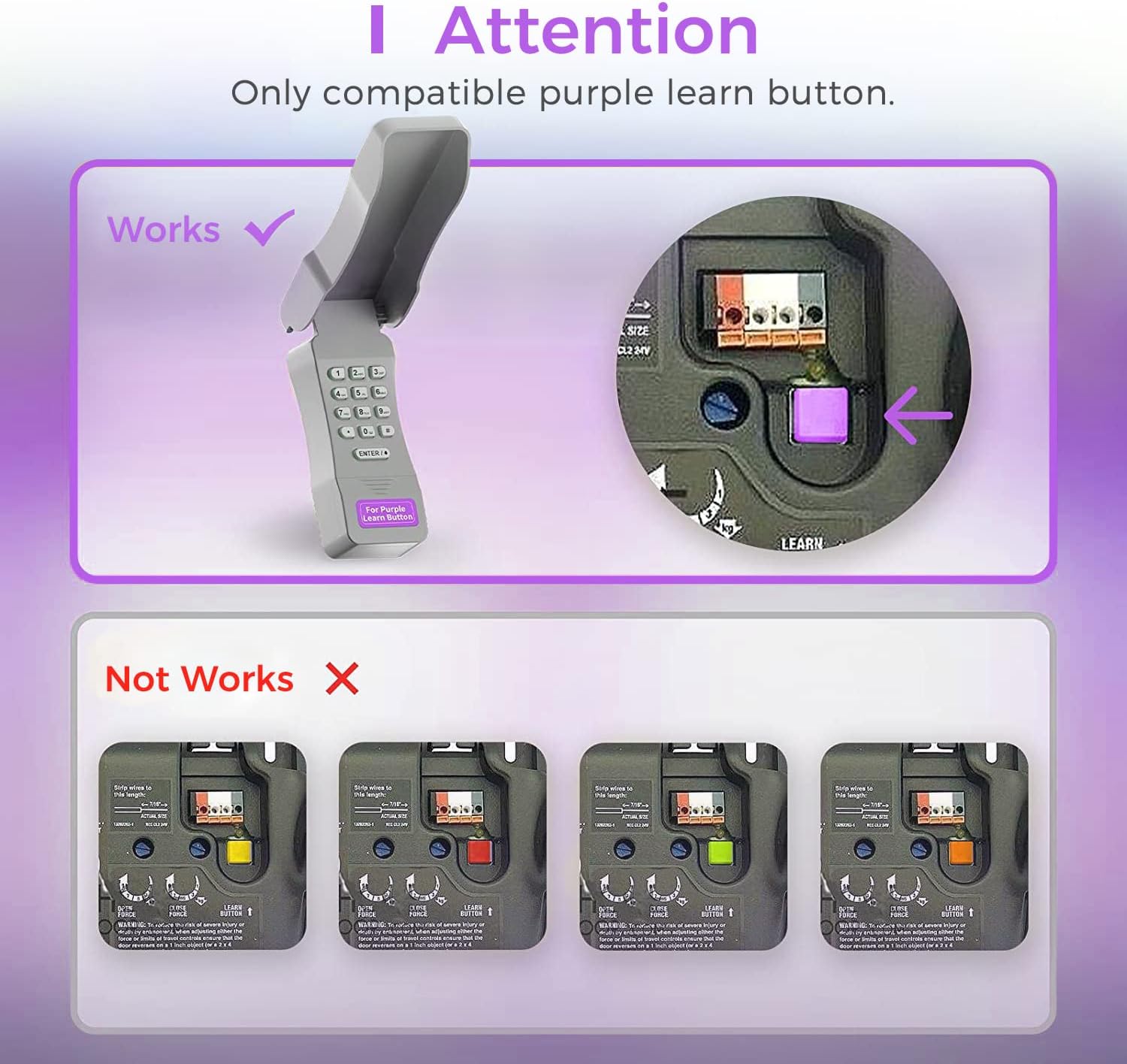
Image: Compatibility Diagram. This visual guide illustrates the correct purple learn button for compatibility and shows examples of incompatible learn button colors (red, orange, green, yellow).
Пакеттин мазмуну
Орнотууну баштоодон мурун, пакетте бардык компоненттер бар экенин текшериңиз:
- 1 x Refoss Wireless Keypad
- 1 х Колдонуучунун колдонмосу (бул документ)
- 4 х бурамалар
- 4 x Screw Anchors
- 4 x 3M эки тараптуу лента
- 1 x 9V батарея

Image: Package Contents. This illustration details all items included in the product box, ensuring users can verify they have everything needed for installation.
Орнотуу жана программалоо
The Refoss Wireless Keypad is designed for easy, wireless programming. Follow these steps carefully to set up your keypad and program it to your garage door opener.
1-кадам: Батареяны орнотуу
- Open the battery compartment on the back of the keypad.
- Туура полярдуулукту камсыз кылуу үчүн, комплекттеги 9V батареяны салыңыз.
- Батарея отсегин бекем жабыңыз.
2-кадам: Баскычтопту программалоо
This keypad can control up to three garage doors. Each door requires its own unique PIN.
- табыңыз PURPLE Learn Button on your garage door opener motor unit. This button is typically found on the back or side panel of the motor.
- басып, дароо коё бериңиз PURPLE Learn Button. The learn indicator light on the opener will glow steadily for 30 seconds.
- Within 30 seconds, enter your desired 4-digit PIN on the Refoss keypad.
- басып, кармап туруңуз ENTER / # Гараждын эшигин ачуучу жарыктар күйүп-өчкөнгө же эки чыкылдатуу угулганга чейин баскычтоптогу баскычты басыңыз. Бул ийгиликтүү программалоону билдирет.
- Test the keypad by entering your PIN and pressing ENTER / #Гараждын эшиги иштетилиши керек.
To program additional garage doors (up to three), repeat Step 2 for each door, using a different 4-digit PIN for each.
Иштөө нускамалары
Opening/Closing a Garage Door
- Enter your 4-digit PIN for the desired garage door.
- басыңыз ENTER / # баскычы.
- The garage door will open or close.
Controlling Multiple Doors
The keypad supports individual PINs for up to three garage doors. Simply enter the specific PIN for the door you wish to operate.

Image: One Keypad for Three Doors. This image visually represents the keypad's capability to manage up to three distinct garage doors using individual access codes.
Техникалык тейлөө
Батареяны алмаштыруу
The keypad uses one 9V alkaline battery. When the keypad backlight dims or the keypad becomes unresponsive, it is time to replace the battery.
- Open the battery compartment on the back of the keypad.
- Эски 9V батареясын алып салыңыз.
- Туура полярдуулукту камсыз кылуу үчүн жаңы 9V щелочтуу батарейканы салыңыз.
- Батарея отсегин бекем жабыңыз.
Тазалоо
Клавиатуранын бетин жумшак, d менен сүртүңүзamp кездеме. Абразивдүү тазалагычтарды же эриткичтерди колдонбоңуз.
Аба ырайын коргоо
The keypad features a weatherproof protective cover designed to shield it from various weather conditions. Ensure the cover is properly closed when not in use to maximize its protective capabilities.

Image: Weatherproof and Fluorescent Features. This image demonstrates the keypad's durability against outdoor elements and its illuminated keys for visibility in low-light conditions.
Проблемаларды чечүү
| Көйгөй | Мүмкүн себеп | Чечим |
|---|---|---|
| Баскычтоп жооп бербейт. | Өлгөн же аз батарея. | 9V батарейканы алмаштырыңыз. |
| Garage door does not open/close after entering PIN. | Keypad not programmed correctly or incompatible opener. |
|
| Keypad backlight is dim. | Батарея аз. | 9V батарейканы алмаштырыңыз. |
| Cannot program multiple doors. | Incorrect programming sequence for additional doors. | Ensure you are using a unique PIN for each door and repeating the programming steps for each. |
Техникалык шарттар
- Модел: RGR545
- Шайкештик: Chamberlain, LiftMaster, Craftsman garage door openers with PURPLE learn button (Security+ 315 MHz, manufactured 2006-2014)
- Жыштыгы: 315 МГц
- Number of Doors Supported: 3ге чейин
- Кубат булагы: 1 x 9V щелочтуу батарея
- Өлчөмдөрү: Болжол менен 2 x 6 x 1 дюйм
- Салмагы: Болжол менен 7.8 унция
- Өзгөчөлүктөр: Weatherproof, Fluorescent Keypad
Кепилдик маалымат
This Refoss Wireless Garage Door Keypad comes with a 1 жылдык кепилдик сатып алынган күндөн тартып. Бул кепилдик нормалдуу колдонуудагы материалдардагы жана жасалгадагы кемчиликтерди камтыйт. Бул туура эмес колдонуудан, кырсыктан, уруксатсыз өзгөртүүдөн же туура эмес орнотуудан келип чыккан зыянды камтыбайт.
Кепилдик дооматтары үчүн сатып алганыңыздын далилин сактап коюңуз.
Кардарларды колдоо
For any questions, technical assistance, or support regarding your Refoss Wireless Garage Door Keypad, please contact our customer support team. We offer caring customer support 7 days a week.
Refer to the product packaging or the Refoss official webакыркы байланыш маалыматы үчүн сайт.


