Introduction
Thank you for choosing the WEKOME D6 Desktop Mini Bluetooth Speaker. This compact and portable speaker delivers clear sound quality and offers versatile connectivity options. This manual provides detailed instructions on how to set up, operate, and maintain your speaker to ensure optimal performance.
Продукт бүттүview

1-сүрөт: Фронт view of the WEKOME D6 Mini Bluetooth Speaker, highlighting its compact cylindrical design and control panel.
The WEKOME D6 is a palm-sized desktop speaker designed for portability and ease of use. It features Bluetooth connectivity for wireless audio streaming and a TF card slot for direct music playback. Its robust design ensures clear audio output for various compatible devices.
Негизги өзгөчөлүктөрү:
- Bluetooth байланышы: Seamless wireless pairing with smartphones, tablets, and laptops.
- Компакт дизайн: Palm-sized for easy portability.
- Таза үн сапаты: Delivers crisp and clear audio.
- Батареянын узак иштөө мөөнөтү: 500 mAh battery provides approximately 4-5 hours of playback.
- Кеңейтилген диапазон: Bluetooth transmission distance of up to 10 meters (33 feet).
- TF картасын колдоо: Maximum support for 32GB TF (MicroSD) cards for direct music playback.
- Чыгуу күчү: Speaker maximum output power of 10 Watts.
Пакеттин мазмуну
Сураныч, пакетте төмөнкү нерселерди текшериңиз:
- WEKOME D6 Desktop Mini Bluetooth Speaker
- USB заряддоо кабели
- Колдонуучунун Колдонмосу (бул документ)
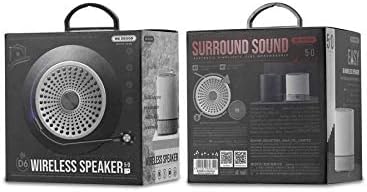
2-сүрөт: Retail packaging of the WEKOME D6 Mini Bluetooth Speaker, illustrating the product's branding and key information on the box.
Жайгашуу
1. Динамикти заряддоо:
- USB заряддоо кабелинин кичинекей учун динамиктеги заряддоо портуна туташтырыңыз.
- USB кабелинин экинчи учун USB кубат адаптерине (кошумча эмес) же компьютердин USB портуна туташтырыңыз.
- The charging indicator light will illuminate during charging and turn off once fully charged. A full charge typically takes 2-3 hours.
2. Күйгүзүү/өчүрүү:
- Күйгүзүү үчүн: басып, кармап туруңуз Кубат баскычы for a few seconds until you hear an audible prompt or see an indicator light.
- Өчүрүү үчүн: басып, кармап туруңуз Кубат баскычы again for a few seconds.
3. Bluetooth жупташтыруу:
- Ensure the speaker is powered on and in Bluetooth pairing mode (it will usually enter this mode automatically upon first power-on or if no device is connected). The indicator light will typically flash rapidly.
- Түзмөгүңүздө (смартфон, планшет, ноутбук) Bluetooth иштетиңиз жана жеткиликтүү түзмөктөрдү издеңиз.
- Select "WEKOME D6" from the list of found devices.
- Once paired, the speaker will provide an audible confirmation, and the indicator light will stop flashing and remain solid.
- The speaker will automatically reconnect to the last paired device when powered on, if the device's Bluetooth is enabled and within range.
4. TF Card Insertion:
- Locate the TF card slot on the speaker.
- Gently insert a TF (MicroSD) card (up to 32GB) with pre-loaded music files into the slot until it clicks into place.
- The speaker will automatically switch to TF card playback mode if a card is detected.
Спикерди иштетүү
Башкаруу баскычтары:
Refer to Figure 1 for the location of the control buttons.
- Кубат баскычы: Күйгүзүү/өчүрүү үчүн басып туруңуз.
- Volume Up / Next Track Button (+):
- Кыска басуу: Үнүн жогорулатуу.
- Long press: Skip to the next track.
- Ойнотуу/тындыруу баскычы (||): Музыканы ойнотуу же тындыруу үчүн кыска басыңыз.
- Volume Down / Previous Track Button (-):
- Кыска басуу: Үндү азайтуу.
- Көпкө басып туруу: Мурунку трекке өтүү.
- Mode Button (Dot between + and Play/Pause): Short press to switch between Bluetooth mode and TF card mode (if a TF card is inserted).
Техникалык тейлөө
- Тазалоо: Use a soft, dry cloth to clean the speaker's surface. Do not use abrasive cleaners, alcohol, or other chemical solvents, as these may damage the finish.
- Сактагыч: Динамикти түз күн нурунан жана өтө температурадан алыс салкын, кургак жерде сактаңыз.
- Батареяга кам көрүү: To prolong battery life, avoid fully discharging the speaker frequently. Charge the speaker regularly, even if not in use for extended periods.
- Суу каршылык: Бул динамик суу өткөрбөйт. Суюктуктарга тийгизбеңиз.
Проблемаларды чечүү
| Көйгөй | Мүмкүн себеп | Чечим |
|---|---|---|
| Динамик күйбөйт. | Батарея аз. | Динамикти толук заряддаңыз. |
| Үн жок. | Volume too low; Speaker not paired; Incorrect mode. | Increase volume; Ensure speaker is paired; Switch to correct mode (Bluetooth/TF card). |
| Bluetooth түзмөгү менен жупташтыруу мүмкүн эмес. | Динамик жупташтыруу режиминде эмес; Түзмөктүн Bluetooth функциясы өчүк; Динамиктен өтө алыс. | Ensure speaker is in pairing mode; Turn on device Bluetooth; Move device closer to speaker (within 10M). |
| Music stops playing from TF card. | TF card not inserted correctly; Corrupted files; Unsupported format. | Reinsert TF card; Check TF card for errors; Ensure music fileлар колдоого алынган форматта (мисалы, MP3). |
Техникалык шарттар
| Бренд | WEKOME |
| Модель аты | D6 |
| Байланыш технологиясы | Bluetooth |
| Динамик түрү | Desktop Mini Speaker |
| Динамиктин максималдуу чыгаруу күчү | 10 Ватт |
| Батарея сыйымдуулугу | 500 mAh (approx. 4-5 hours playback) |
| Өткөрмө аралык | 10 метр (33 фут) |
| TF картасын колдоо | 32 ГБ чейин |
| Шайкеш түзмөктөр | Ноутбук, смартфон, планшет |
| Монтаж түрү | Стол үстү |
| Пакеттин өлчөмдөрү | 12.4 x 11.4 x 7.6 см |
| Салмагы | 210 г |
Кепилдик жана колдоо
For warranty information and technical support, please refer to the warranty card included with your product or contact WEKOME customer service through their official website or authorized retailers. Keep your purchase receipt as proof of purchase for warranty claims.


