1. Киришүү
The Pyle PDA9HBU is a versatile home audio amplifier and stereo receiver designed to enhance your home theater experience. It features multiple input options including HDMI, optical, coaxial, phono, USB, SD, and auxiliary, along with Bluetooth connectivity for wireless audio streaming. This manual provides detailed instructions for setting up, operating, and maintaining your device to ensure optimal performance.
2. Коопсуздук нускамалары
- Кубат булагы: кубат менен камсыз кылуу Voltage requirements of the unit (115V/230V switchable).
- Вентиляция: Do not block ventilation openings. Allow adequate space around the unit for proper airflow.
- Суу жана ным: Түзмөктү жамгырдын, нымдуулуктун же ашыкча нымдуулуктун таасирине дуушар кылбаңыз.
- Жылуулук булактары: Түзмөктү радиаторлор, жылыткычтар, мештер же башка жылуулук чыгаруучу шаймандар сыяктуу жылуулук булактарынан алыс кармаңыз.
- Тазалоо: Тазалоодон мурун блокту розеткадан сууруп алыңыз. Тазалоо үчүн кургак чүпүрөктү колдонуңуз.
- Тейлөө: Агрегатты өзүңүз тейлөөгө аракет кылбаңыз. Бардык тейлөөлөрдү квалификациялуу тейлөө кызматкерлерине тапшырыңыз.
3. Пакеттин мазмуну
Сураныч, төмөнкү нерселер үчүн кутучаны белгилеңиз:

Image: Contents of the Pyle PDA9HBU package, showing the amplifier, remote control, and FM antenna.
- Pyle PDA9HBU Stereo Ampөмүрлүү
- Алыстан башкаруу
- FM антеннасы
4. Продукт бүтүп калдыview
4.1 Алдыңкы панелдин башкаруу элементтери

Image: Front panel of the Pyle PDA9HBU amplifier, displaying the power button, input selector, volume knob, microphone inputs, and tone controls.
- Кубат баскычы: Агрегатты күйгүзөт же өчүрөт.
- Киргизүү тандагыч: Rotates to choose between different audio sources (HDMI, Optical, Coaxial, Phono, CD/DVD, MP3/BT/AUX, USB/SD).
- Үндү көзөмөлдөө: Башкы үн деңгээлин тууралайт.
- MIC/VOL & ECHO Controls: Adjusts microphone volume and echo effect for karaoke.
- Bass & Treble Controls: Adjusts the low and high frequency response.
- Баланс көзөмөлдөө: Сол/оң канал балансын тууралайт.
- USB/SD карта уячалары: Аудио ойнотуу үчүн fileUSB флэш-дисктерден же SD эстутум карталарынан.
- AUX киргизүү (3.5 мм): Тышкы аудио түзүлүштөрдү туташтыруу үчүн.
- LCD санариптик дисплей: Shows current input, track information, FM station, and other status indicators.
4.2 Арткы панелдин туташуулары
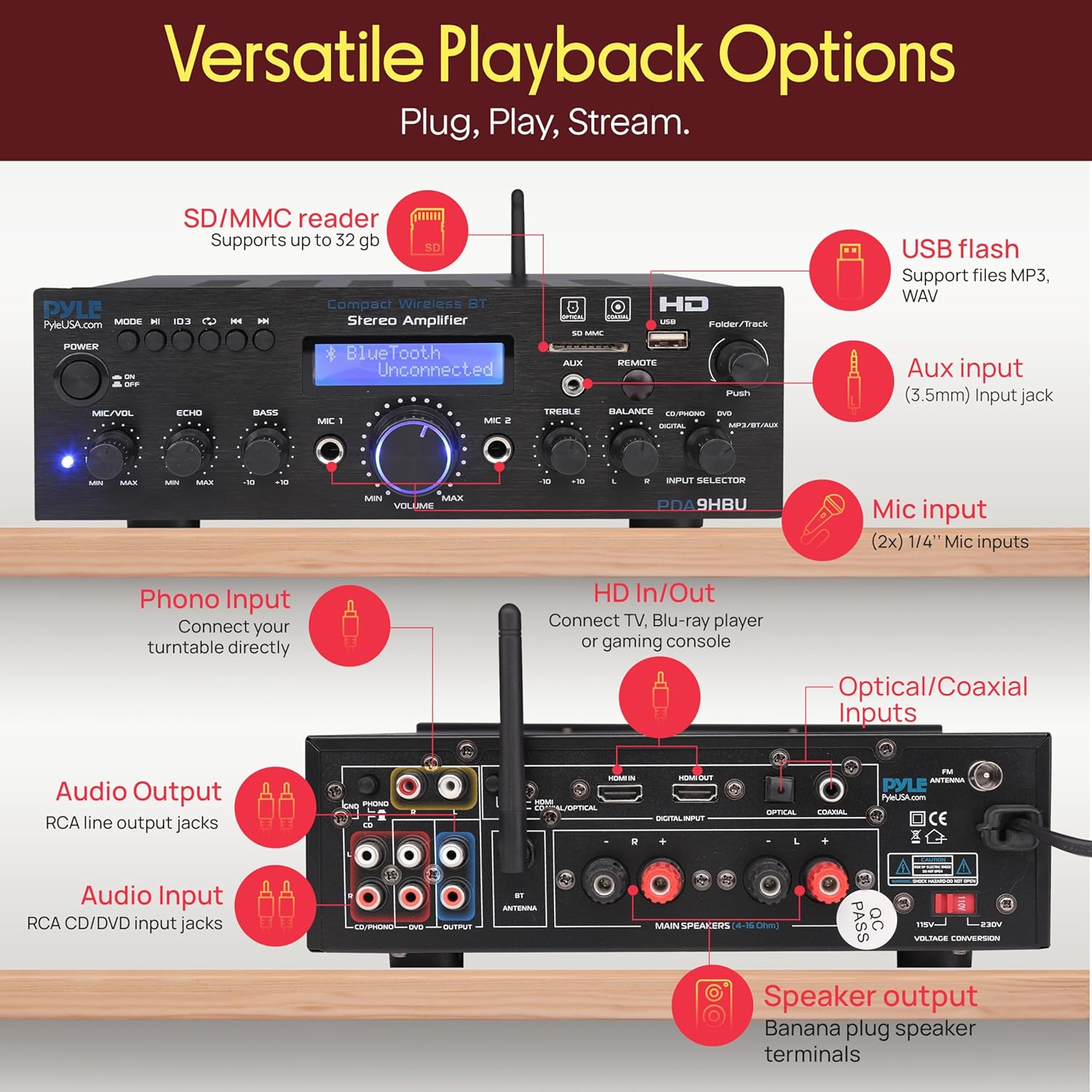
Image: Rear panel of the Pyle PDA9HBU amplifier, detailing HDMI, optical, coaxial, phono, RCA, and speaker output connections.
- HDMI IN/OUT: For connecting HDMI-enabled devices like TVs, Blu-ray players, or gaming consoles.
- Оптикалык/коаксиалдык киргизүүлөр: Санариптик аудио туташуулар үчүн.
- Фоно киргизүү: Айланма табакчаны туташтыруу үчүн.
- Аудио киргизүү (RCA L/R): For connecting analog audio sources (e.g., CD/DVD players).
- Audio Output (RCA L/R): For connecting to other audio devices or recorders.
- Динамик чыгаруу терминалдары: For connecting passive speakers (4-8 Ohm).
- FM антенна туташтыргычы: Камтылган FM антеннасын туташтыруу үчүн.
- Кубат киргизүү: Электр кабелин туташтыруу үчүн.
5. Орнотуу
5.1 Динамиктерди бириктирүү
- камсыз кылуу ampкөтөргүч өчүрүлгөн жана электр розеткасынан ажыратылган.
- Connect your passive speakers to the speaker output terminals on the rear panel. Match the positive (+) terminal of the amplifier to the positive (+) terminal of the speaker, and the negative (-) to the negative (-).
- Кыска туташуулардын алдын алуу үчүн бардык туташуулардын коопсуз экенин текшериңиз.
5.2 Аудио булактарын туташтыруу
Connect your desired audio sources to the appropriate input ports on the rear or front panel:
- HDMI: Use an HDMI cable to connect your TV, Blu-ray player, or gaming console to the HDMI IN port. If connecting to a TV, use the HDMI OUT port to send video to the TV.
- Оптикалык/коаксиалдык: For digital audio from devices like TVs or media players, use an optical or coaxial cable.
- Фоно: Connect your turntable to the PHONO input.
- RCA (L/R): For analog audio devices (e.g., CD player), connect to the AUDIO INPUT (CD/DVD) ports.
- AUX (3.5 мм): For portable devices, connect to the AUX input on the front panel.
5.3 Кубат туташтыруу
- сайуудан мурун, үнүн текшериңизtage selector switch (if present) on the rear panel is set to your local voltage (115V же 230V).
- Connect the power cable to the power input on the rear panel and then plug it into a wall outlet.
6. Иштөө нускамалары
6.1 Күйгүзүү/өчүрүү
басыңыз Күч аппаратты күйгүзүү же өчүрүү үчүн алдыңкы панелдеги же алыстан башкаруудагы баскычты басыңыз.
6.2 Киргизүүнү тандоо
айлантыңыз Киргизүү тандагыч knob on the front panel or use the corresponding buttons on the remote control to choose your desired audio source (e.g., HDMI, Bluetooth, USB/SD, FM).
6.3 Үндү башкаруу
тууралаңыз Көлөм knob on the front panel or use the volume buttons on the remote control to set the overall sound level.
6.4 Bluetooth жупташтыруу

Image: A smartphone displaying music playback, with concentric circles indicating a wireless Bluetooth connection to the Pyle PDA9HBU ampөмүрлүү.
- Select the 'MP3/BT/AUX' input using the Input Selector. The LCD display will show 'Bluetooth Unconnected'.
- Мобилдик түзмөгүңүздө Bluetooth'ду иштетиңиз (смартфон, планшет, ноутбук).
- Издөө Bluetooth devices and select 'PDA9HBU' from the list.
- Once connected, the LCD display will show 'Bluetooth Connected'. You can now stream audio wirelessly.
- The wireless range is approximately 40 feet (12 meters).
6.5 USB/SD ойнотуу

Сүрөт: деталдуу view -ныкы amplifier's front panel, highlighting the USB and SD card slots, and demonstrating a smartphone charging via the USB port.
- USB флэш-дискти же SD картаны алдыңкы панелдеги тиешелүү уячага салыңыз.
- Select the 'USB/SD' input. The unit will automatically begin playing compatible audio files (MP3/WAV).
- Use the Folder/Track knob or remote control buttons to navigate tracks and folders.
- The USB port also functions as a charging port for compatible devices.
6.6 FM радиосунун иштеши
- Connect the included FM antenna to the FM ANTENNA connector on the rear panel.
- Select the 'FM' input.
- Use the automatic station search scan function (refer to remote control instructions) to find and save available FM stations.
- The LCD display will show the current FM station frequency.
6.7 Микрофонду колдонуу (Караоке)

Image: Two individuals enjoying karaoke, singing into microphones connected to the Pyle PDA9HBU amplifier, which is visible in the foreground.
- Connect up to two 6.35mm microphones to the MIC 1 and MIC 2 input jacks on the front panel.
- тууралаңыз MIC/VOL микрофондун үнүн башкаруу үчүн баскыч.
- тууралаңыз ECHO knob to add an echo effect to the microphone sound.
6.8 Үндү башкаруу элементтери
колдонуу Бас жана Үч эсе knobs on the front panel to fine-tune the audio output to your preference.
6.9 Алыстан башкаруу функциялары
The included remote control provides convenient access to various functions, including power, input selection, volume, mute, track navigation, FM station tuning, and tone adjustments. Refer to the remote control diagram for specific button functions.
7. Техникалык тейлөө
- Тазалоо: Агрегаттын сыртын тазалоо үчүн жумшак, кургак чүпүрөктү колдонуңуз. Суюк тазалагычтарды же аэрозолдук спрейлерди колдонбоңуз.
- Вентиляция: Мезгил-мезгили менен желдетүү тешиктери чаңдан жана таштандыдан таза экенин текшерип туруңуз.
- Сактагыч: Эгерде аппаратты узак убакытка сактасаңыз, аны розеткадан сууруп, салкын, кургак жерде сактаңыз.
8. Кыйынчылыктарды
- Кубат жок:
- Check if the power cable is securely connected to the unit and the wall outlet.
- Электр розеткасынын иштешин текшериңиз.
- Томду ырастаңызtage selector switch (if applicable) is set correctly.
- Үн жок:
- Check all speaker connections.
- Туура киргизүү булагы тандалганын текшериңиз.
- Башкы үнүн жогорулатуу.
- Үнсүз функция иштетилгенин текшериңиз.
- Verify audio cables from source devices are properly connected.
- Bluetooth туташуу маселелери:
- камсыз кылуу ampкөтөргүч Bluetooth режиминде.
- Make sure Bluetooth is enabled on your device and it's within range (approx. 40 ft).
- Түзмөктү жупташып, кайра жупташып көрүңүз.
- Экөөнү тең кайра иштетиңиз ampкөтөргүч жана Bluetooth түзмөгүңүз.
- USB/SD ойнотуу каталары:
- Ensure the USB drive or SD card is inserted correctly.
- Аудио экенин текшериңиз files are in a supported format (MP3/WAV).
- Башка USB дискти же SD картаны колдонуп көрүңүз.
- Алыстан башкаруу иштебейт:
- Пульттун батареяларын текшерип, алмаштырыңыз.
- Пульт менен пульттун ортосунда эч кандай тоскоолдук жок экенин текшериңиз ampкөтөргүчтүн инфракызыл сенсору.
9. Техникалык шарттар
| Өзгөчөлүк | Спецификация |
|---|---|
| Бренд | Pyle |
| Модел | PDA9HBU |
| Чыгуу кубаттуулугу (Max) | 25W (@ 4 Ohm) |
| Чыгуу күчү (RMS) | 20W x 2 (@ 8 Ohm) |
| Frequency Response | 20 Гц - 20 кГц |
| Tone Control (Bass) | f = 100 Hz +/-8 dB |
| Tone Control (Treble) | f = 10 kHz +/-8 dB |
| Ызы-чуунун катышы | > 71 дБ |
| Жалпы гармоникалык бурмалоо (THD) | 48 дБ |
| Bluetooth версиясы | 2.1 |
| Bluetooth зымсыз диапазону | 40 ft (approx. 12m) |
| Электр камсыздоо | 115V/230V (Switchable) |
| Продукциянын өлчөмдөрү (L x W x Y) | 9.8" x 9.8" x 3.15" (24.89 x 24.89 x 8 см) |
| Элемент Салмагы | 2.97 килограмм |
| Шайкеш түзмөктөр | Smartphones, tablets, laptops, computers, TVs, gaming consoles, Blu-ray players, speakers |
| Байланыш технологиясы | HDMI, RCA, Auxiliary, Bluetooth, Optical, Coaxial, USB, SD |
| Аудио чыгаруу режими | Стерео |
| Көлөмдүү үн каналынын конфигурациясы | 2.0 |
10. Кепилдик жана колдоо
Pyle products are designed for reliability and performance. For warranty information or technical support, please refer to the documentation included with your purchase or visit the official Pyle webсайт. Кепилдик дооматтар үчүн сатып алганыңыздын далилин сактаңыз.


