1. Киришүү
This manual provides detailed instructions for the installation, operation, and maintenance of your Cooler Master MasterFan MF200R ARGB 200mm fan. This fan is designed to provide efficient cooling for your PC system while offering customizable Addressable RGB lighting effects.

Сүрөт 1.1: Алдыңкы view of the Cooler Master MasterFan MF200R ARGB 200mm fan, showcasing its customizable lighting.
2. Продукциянын өзгөчөлүктөрү
- Addressable RGB Lighting: Experience full color customization with Addressable RGB (ARGB) technology. Compatible with popular motherboard ARGB software such as Asus Aura Sync, ASRock Polychrome Sync, and MSI Mystic Light Sync. Note: Requires a +5V, 3-pin ARGB header.
- Үнсүз муздатуу технологиясы: Engineered with noise reduction technologies and sound-absorbing materials to ensure quiet operation, even under heavy workloads. Features a durable rifle bearing for an extended lifespan.
- Hybrid Blade Design: A unique combination of jet engine and helicopter blade designs provides optimal static air pressure without compromising airflow, ensuring effective heat dissipation.
- Smart Fan Sensor for Jam Protection: Integrated sensors protect your cables and internal components by automatically stopping the fan rotation if an obstruction is detected, preventing damage.

Image 2.1: Multiple MasterFan MF200R ARGB fans demonstrating various lighting effects.

Image 2.2: Illustration of the fan's hybrid blade design, combining jet engine and helicopter blade elements.
3. Пакеттин мазмуну
Пакетиңизде бардык буюмдар бар экенин текшериңиз:
- 1 x Cooler Master MasterFan MF200R ARGB Cooling Fan
- 4 x Монтаждоо бурамалар
- Small mounting accessories (e.g., additional screws, 3-pin to 4-pin adapter, small instruction sheet)
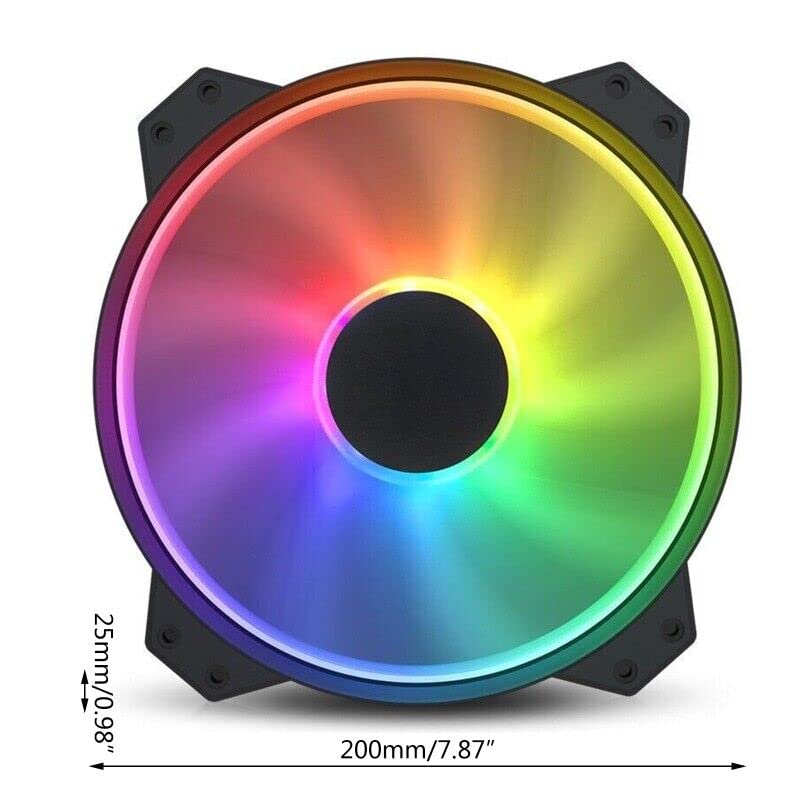
Image 3.1: Included accessories with the MasterFan MF200R ARGB fan.
4. Техникалык шарттар
| RGB Profile | Addressable RGB (+5V, 3-pin) |
| Fan өлчөмдөрү | 200 x 200 x 25 мм (7.9 x 7.9 x 1 дюйм) |
| Күйөрман Салмагы | 259g (0.57 фунт) |
| Fan Speed | 800 ± 150 RPM |
| Желдетүүчү аба агымы | 90.3 CFM ± 10% |
| Желдетүүчү аба басымы | 0.88 мм H2O |
| Желдетүүчү ызы-чуу деңгээли | 28 дБА |
| MTTF (Ийгиликсиздикке чейинки орточо убакыт) | 160,000 саат |
| Подшипник түрү | Мылтык подшипник |
| Power Connector | 3-Pin (4-pin with 3rd pin blocked) |
| Fan Rated Voltage | 12V DC |
| Күйөрмандардын номиналдык агымы | 0.3A |
| Энергияны керектөө | 4.08 ± 0.2 Вт |

Image 4.1: Technical specifications of the MasterFan MF200R ARGB.
5. Шайкештик боюнча маанилүү эскертүүлөр
- The Addressable RGB (ARGB) lighting function КЕРЕК be connected to an Addressable RGB (+5V, 3-pin) capable motherboard header or a compatible Addressable RGB (+5V, 3-pin) controller.
- Бул күйөрман ЖОК compatible with 4-pin RGB or standard RGB+12V headers. Connecting to an incompatible header may cause damage to the fan or motherboard.
- For Gigabyte RGB Fusion Addressable RGB capable motherboards, an additional Gigabyte Adapter Cable may be required. This adapter is Өзүнчө САТЫЛАТ.
- Бул күйөрман ЖОК compatible with the Cooler Master HAF XB EVO chassis.
6. Орнотуу жана орнотуу
6.1 Физикалык орнотуу
- Identify the desired mounting location for the 200mm fan within your PC case. Ensure adequate clearance.
- Align the fan's mounting holes with the corresponding screw holes on your PC case.
- Secure the fan using the four provided mounting screws. Do not overtighten.
6.2 Электрдик туташуу
- Кубат туташуу: Locate the 3-pin fan power connector on the MasterFan MF200R. Connect this to an available 3-pin or 4-pin fan header on your motherboard. If connecting to a 4-pin header, ensure the 3rd pin on the fan connector is blocked as indicated in the specifications.
- ARGB Lighting Connection: Locate the 3-pin ARGB connector on the MasterFan MF200R. Connect this to a +5V, 3-pin Addressable RGB header on your motherboard or a compatible ARGB controller. Refer to your motherboard manual for the exact location of the ARGB header.

Image 6.1: Identification of the 3-pin power and 5V 3-pin ARGB connectors.

Image 6.2: Connecting the 5V 3-pin ARGB connector to a motherboard header.

Сүрөт 6.3: Детальдуу view of a 5V 3-pin ARGB header on a motherboard.
7. Иштөө нускамалары
7.1 Желдетүүчүнүн иштеши
Once connected, the fan will operate at its rated speed of 800 ± 150 RPM, providing consistent airflow for cooling your system.
7.2 ARGB Жарыкты башкаруу
To customize the Addressable RGB lighting effects, install and use the appropriate software provided by your motherboard manufacturer. Examples камтыйт:
- Asus Aura Sync
- ASRock Polychrome Sync
- MSI Mystic Light Sync
These software applications allow you to select various lighting modes, colors, and synchronization options for your ARGB components.
8. Техникалык тейлөө
Үзгүлтүксүз техникалык тейлөө желдеткичиңиздин оптималдуу иштешин жана узак мөөнөттүү иштешин камсыз кылууга жардам берет.
- Тазалоо: Periodically inspect the fan blades and housing for dust buildup. With the PC powered off and unplugged, use compressed air or a soft, dry cloth to gently remove any dust. Avoid using liquid cleaners directly on the fan.
- Текшерүү: Check mounting screws periodically to ensure they remain secure.
9. Кыйынчылыктарды
If you encounter issues with your MasterFan MF200R ARGB, refer to the following common solutions:
- желдеткич айланбай жатат:
- Ensure the 3-pin power connector is securely plugged into a functional fan header on your motherboard.
- Желдеткичтин аталышы иштетилгенин жана туура конфигурацияланганын текшерүү үчүн энелик платаңыздын BIOS/UEFI жөндөөлөрүн текшериңиз.
- ARGB жарыктандыруу иштебейт:
- Verify that the 3-pin ARGB connector is securely plugged into a +5V, 3-pin ARGB header on your motherboard or controller.
- Confirm that you are using compatible motherboard ARGB software and that it is correctly installed and configured.
- Ensure the fan is not connected to a 4-pin RGB or +12V RGB header, as this is incompatible and can prevent lighting from functioning.
- Ашыкча ызы-чуу:
- Check for any cables or obstructions that might be interfering with the fan blades.
- Ensure the fan is securely mounted and that all mounting screws are tightened appropriately.
- Dust buildup can cause noise; clean the fan as described in the Maintenance section.
10. Кепилдик жана колдоо
For warranty information and technical support regarding your Cooler Master MasterFan MF200R ARGB fan, please refer to the official Cooler Master webсайтка же түздөн-түз кардарларды колдоо менен байланышыңыз.
For purchase-related inquiries or issues, please contact the seller, Toptekits, through your original point of purchase.


