1. Introduction and Overview
The Sonos One SL is a compact, microphone-free wireless speaker designed for rich, room-filling sound. It integrates seamlessly into the Sonos ecosystem, allowing you to build a home sound system over Wi-Fi. This manual provides essential information for its proper use and care.
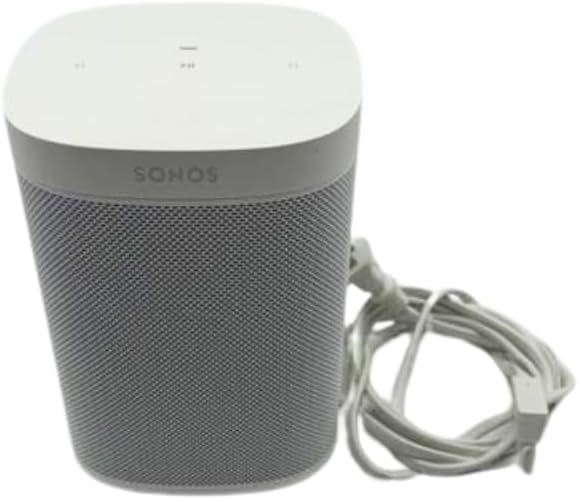
1.1-сүрөт: алдыңкы жана каптал view of the Sonos One SL Wireless Speaker in white, showing the top control panel and power cable.

1.2-сүрөт: Арткы жана каптал view of the Sonos One SL Wireless Speaker, highlighting the power input and Ethernet port.
2. Продукциянын өзгөчөлүктөрү
- Бриллиант үн: Delivers rich, room-filling audio quality.
- Компакт дизайн: Fits into various spaces, including kitchen countertops or office bookshelves. Humidity resistant for bathroom use.
- Apple AirPlay 2: Stream audio directly from Apple devices and use Siri for Apple Music control.
- Стерео жупташуу: Combine with another Sonos One or One SL for stereo separation and enhanced sound. Can also be used as rear home theater surrounds with Playbar, Playbase, or Beam.
- Кеңейтүүчү система: Easily connect multiple Sonos speakers over Wi-Fi to create a multi-room home sound system.
- Easy Setup and Control: Quick setup process and simple control via the Sonos app and Apple AirPlay 2.
3. Орнотуу нускамалары
3.1 Пакеттен чыгаруу жана жайгаштыруу
- Carefully remove the Sonos One SL speaker from its packaging.
- Place the speaker in your desired location. Ensure it is on a stable surface and within reach of a power outlet.
- For optimal sound, avoid placing the speaker in enclosed cabinets or directly against walls, unless specifically configured for such placement in the Sonos app.
3.2 Кубат туташтыруу
- Connect the power cable to the power port on the back of the Sonos One SL.
- Plug the other end of the power cable into a wall outlet. The speaker will automatically power on.
3.3 Sonos App Installation and Configuration
- Түзмөгүңүздүн колдонмолор дүкөнүнөн Sonos колдонмосун жүктөп алыңыз (iOS же Android).
- Open the Sonos app and follow the on-screen instructions to set up your Sonos system.
- The app will guide you through connecting your Sonos One SL to your home Wi-Fi network. You may need to press the Join button on the back of the speaker during this process.
- Once connected, you can name your speaker and configure additional settings within the app.
4. Иштөө нускамалары
4.1 Негизги башкаруу каражаттары
The Sonos One SL features touch controls on its top panel:
- Ойнотуу/тындыруу: Tap the Play/Pause button once to play or pause audio.
- Көлөмү: Tap the right side of the volume bar to increase volume.
- Үнүн азайтуу: Tap the left side of the volume bar to decrease volume.
- Кийинки трек: Swipe right across the touch controls to skip to the next track.
- Мурунку трек: Swipe left across the touch controls to go back to the previous track.
4.2 Using the Sonos App
The Sonos app is the primary interface for controlling your speaker and entire Sonos system:
- Музыкалык кызматтар: Add and manage various music streaming services.
- Серептөө жана ойноо: Select music from your services, local library, or radio stations.
- Group Speakers: Group multiple Sonos speakers to play the same audio in different rooms, or play different audio on each speaker.
- Trueplay Tuning: Use the app to optimize the speaker's sound for your room's acoustics (iOS devices only).
- Орнотуулар: Adjust EQ, room settings, and other preferences.
4.3 Apple AirPlay 2
With AirPlay 2, you can stream audio directly from your iPhone, iPad, or Mac to your Sonos One SL. Simply open the Control Center on your Apple device, tap the AirPlay icon, and select your Sonos One SL from the list of available speakers.
5. Техникалык тейлөө
- Тазалоо: Use a soft, dry cloth to clean the speaker. Do not use cleaning fluids or abrasive materials.
- Программалык камсыздоо жаңыртуулары: Ensure your Sonos app and speaker firmware are kept up-to-date. The Sonos app will notify you when updates are available. Regular updates provide new features and performance improvements.
- Жайгашкан жери: Динамикти күн нуру түз тийген жерге же жылуулук булактарынын жанына койбоңуз.
6. Кыйынчылыктарды
| Маселе | Мүмкүн чечим |
|---|---|
| Динамик күйбөй жатат | Кубат кабелинин динамикке да, иштеп жаткан дубал розеткасына да бекем туташтырылганын текшериңиз. Башка розетканы колдонуп көрүңүз. |
| Динамиктен үн жок | Check the volume level in the Sonos app and on the speaker. Ensure the correct audio source is selected. Verify the speaker is not muted. |
| Speaker not connecting to Wi-Fi | Restart your router and the Sonos speaker. Ensure your Wi-Fi network is active and you have entered the correct password in the Sonos app. Move the speaker closer to your router. |
| Audio dropouts or interruptions | Check for Wi-Fi interference (e.g., from other wireless devices). Ensure your Wi-Fi signal is strong. Consider using a wired Ethernet connection if available. |
| Sonos app not finding speaker | Ensure your mobile device is connected to the same Wi-Fi network as your Sonos speaker. Restart the Sonos app and your mobile device. |
7. Техникалык шарттар
| Өзгөчөлүк | Деталь |
|---|---|
| Модель аты | Акылдуу |
| Динамик түрү | Китеп текчеси |
| Сунушталган Колдонуулар | Музыка, үй театры |
| Шайкеш түзмөктөр | Smartphones, Tablets, Desktops, Laptops |
| Көлөмдүү үн каналынын конфигурациясы | 2.0 |
| Түс | Ак |
| Продукциянын өлчөмдөрү (DxWxH) | 4.69"D x 4.69"W x 6.36"H |
| Элемент Салмагы | 4.08 фунт |
| Суу өткөрбөйт | Жок |
| Башкаруу ыкмасы | Колдонмо |
| Зымсыз байланыш технологиясы | Wi-Fi |
| Динамик өлчөмү | 1 дюйм |
| Power Source | Электр зымдары |
| Аудио драйвер түрү | Динамикалык драйвер |
| Сабвуфердин туташуу технологиясы | Зымсыз |
| Динамиктин максималдуу чыгаруу күчү | 25 Ватт |
| Байланыш технологиясы | Wi-Fi |
| Аудио чыгаруу режими | Стерео |
| Монтаж түрү | Стол үстү |
| Элемент моделинин номери | ONESLUS1-cr |
| UPC | 649661084907 |
8. Кепилдик жана колдоо
8.1 Кепилдик маалыматы
This Sonos One SL speaker comes with a 90 күндүк чектелген кепилдик. Please refer to the official Sonos webТолук кепилдик шарттары жана шарттары үчүн сайтка же сатып алуу документтериңизге кайрылыңыз.
8.2 Кардарларды колдоо
Кошумча жардам, техникалык колдоо же кепилдик талаптарын алуу үчүн, расмий Sonos колдоо бөлүмүнө баш багыңыз website or contact their customer service. Keep your proof of purchase handy when contacting support.


