1. Киришүү
This manual provides instructions for the XR15 Voice Control Remote, designed for use with Xfinity and Comcast X1, Xi6, Xi5, and XG2 systems. The remote allows users to control their television and compatible TV box, offering features such as voice commands, backlit keypad, and direct access to accessibility options.

Image 1.1: The XR15 Voice Control Remote, a replacement remote for Xfinity Comcast systems.
2. Пакеттин мазмуну
Пакетте бардык буюмдар бар экенин текшериңиз:
- 1 x XR15 Voice Control Remote
- 2 x AA батарейкалар
- 1 x User's Guide (this document)
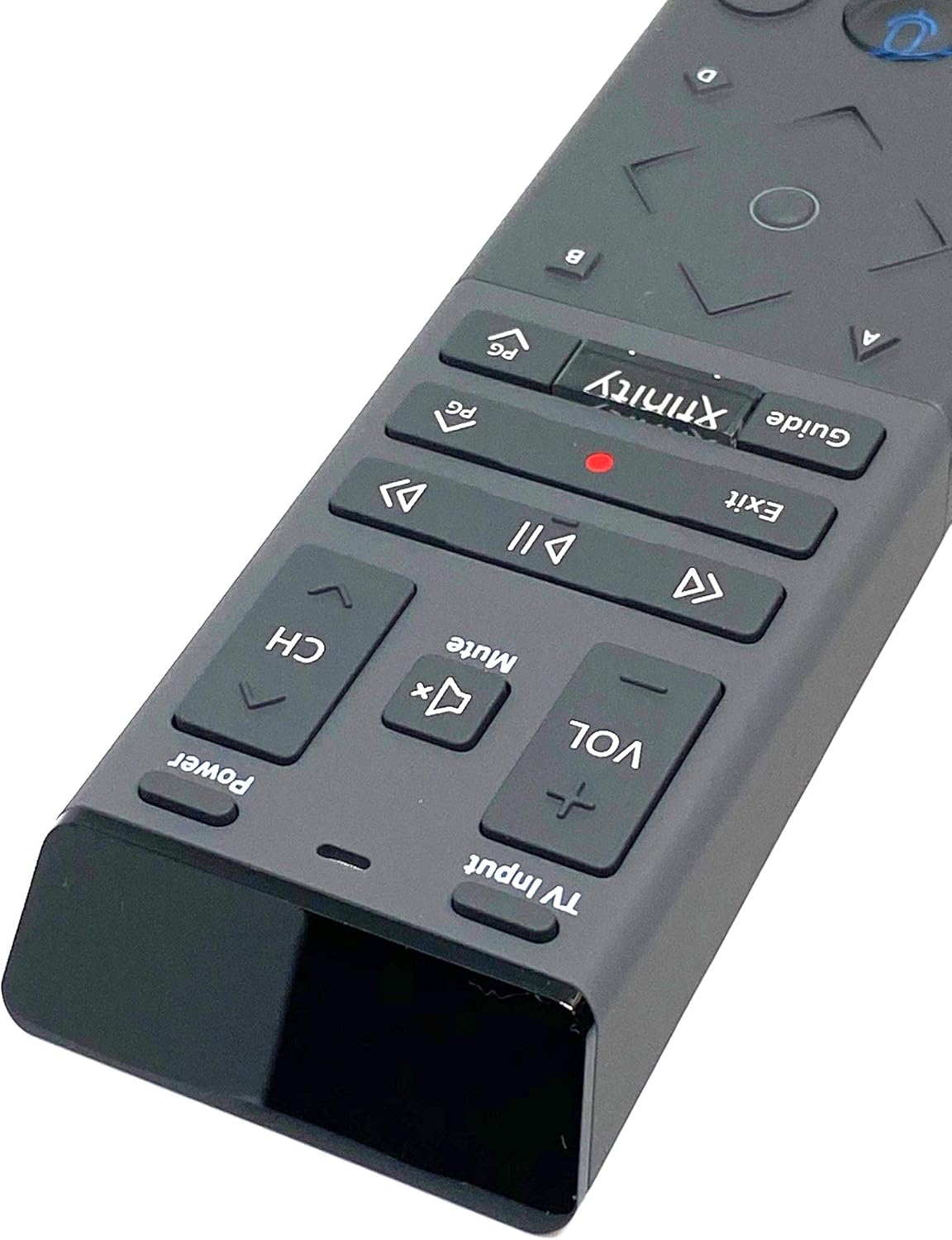
Image 2.1: The XR15 Voice Control Remote as received in its protective packaging.
3. Негизги өзгөчөлүктөрү
The XR15 Voice Control Remote offers several advanced features for an enhanced user experience:
- Үн менен башкаруу: Use voice commands to change channels, search for content, and get recommendations.
- Арткы жарык баскычтоп: Buttons illuminate for visibility in low-light conditions.
- Aim Anywhere Feature: Operates without needing to point directly at the device.
- Автоматтык жупташтыруу: Simplifies the setup process with compatible devices.
- Атайын мүмкүнчүлүктөр: Quick access to Closed Captioning, video description, and voice guidance.
- TV Input Control: Manage TV power and input settings.
4. Орнотуу
4.1 Батареяны орнотуу
To power your remote, install the two AA batteries provided:
- Пульттун артындагы батарея бөлүкчөсүн табыңыз.
- Батареянын капкагын ачуу үчүн ылдый жылдырыңыз.
- Эки AA батарейкасын салып, оң (+) жана терс (-) терминалдары бөлүмдүн ичиндеги индикаторлорго туура дал келгенин текшериңиз.
- Батареянын капкагын бекем чыккыча ордуна жылдырыңыз.

Сүрөт 4.1: Арткы view of the XR15 remote, highlighting the battery compartment area.
4.2 Жупташтыруу боюнча көрсөтмөлөр
The XR15 remote can be paired with your Xfinity X1 TV Box and television for full functionality. Follow these steps:
- Pairing with X1 TV Box:
- Ensure your TV Box is powered on.
- Point the remote at the TV Box.
- басып, кармап туруңуз Xfinity баскычы жана Маалымат (i) button simultaneously for five seconds until the status light on the remote changes from red to green.
- Жупташтыруу процессин аяктоо үчүн экрандагы көрсөтмөлөрдү аткарыңыз.
- Pairing with Television (for TV Power and Volume):
- After pairing with the TV Box, the remote may automatically attempt to pair with your TV.
- If not, or if it fails, press and hold the Жайгашуу button (usually a small, recessed button on the side or back, or a combination of buttons like Xfinity жана Үнсүз) until the status light turns green.
- Enter the TV brand code. Refer to your TV's user manual for specific codes if the Xfinity codes do not work.
- сыноо Күч жана Көлөм buttons. If they work, the pairing is successful.
5. Иштөө нускамалары
The XR15 remote features a clear layout for intuitive control. Below is a guide to its primary buttons and their functions:

Сүрөт 5.1: Жакын пландан view of the upper section of the XR15 remote, showing TV Input, Volume, Mute, Power, and Channel buttons.
5.1 Баскыч функциялары
| баскыч | Функция |
|---|---|
| Күч | Turns the TV and compatible TV Box on or off. |
| Сыналгы киргизүү | Cycles through available TV input sources. |
| VOL + / VOL- | Үнүн көбөйтөт же азайтат. |
| Үнсүз | Turns sound off or on. |
| CH+ / CH- | Кийинки же мурунку каналды тандайт. |
| Ойнотуу/Тындыруу (►▮▮) | Plays or pauses live TV, Xfinity On Demand, or DVR content. |
| FF (►►) | Fast forwards Xfinity On Demand or DVR content. |
| Rew (◄◄) | Rewinds Xfinity On Demand or DVR content. |
| Чыгыңыз | Exits on-screen guides; stops and exits Xfinity On Demand and DVR content. Returns to "Live" point during live TV replay. |
| Record (Red Dot) | Records the current program. |
| Xfinity | Displays the main menu of the guide, providing access to DVR and Xfinity On Demand. |
| Гид | Displays TV listings. |
| Voice Control (Microphone icon) | Activates voice command functionality. Press and speak into the remote. |
| Directional Pad (Up, Down, Left, Right, OK) | Navigates through menus and selects options. |
| Маалымат (i) | Displays information about the current program or selected item. |
| Сандык тактасы (0-9) | Directly enters channel numbers or other numerical inputs. |

Сүрөт 5.2: Жакын пландан view of the lower section of the XR15 remote, featuring the voice control button, directional pad, and numeric keypad.
6. Техникалык тейлөө
To ensure the longevity and optimal performance of your XR15 Voice Control Remote, follow these maintenance guidelines:
- Тазалоо: Пультту жумшак, кургак чүпүрөк менен сүртүңүз. өжөр кир үчүн, бир аз гampчүпүрөктү суу же жумшак, абразивдүү тазалагыч менен жууп салыңыз. Ашыкча нымдуулуктан сактаныңыз.
- Батареяны алмаштыруу: Replace batteries when the remote's performance degrades or the status LED indicates low power. Always use new AA batteries and dispose of old batteries responsibly.
- Сактагыч: Пультту күн нурунан жана экстремалдык температурадан алыс, салкын, кургак жерде сактаңыз.
- Тамчылардан качуу: Пультти физикалык таасирден коргоңуз, анткени тамчылар ички компоненттерге зыян келтириши мүмкүн.
7. Кыйынчылыктарды
If you encounter issues with your XR15 Voice Control Remote, refer to the following common problems and solutions:
- Алыстан жооп бербейт:
- Батареянын абалын текшерип, алардын жаңы экенине ынаныңыз.
- Verify the remote is paired correctly with your X1 TV Box and TV (refer to Section 4.2).
- Ensure there are no obstructions between the remote and the TV Box/TV.
- Үн буйруктары иштебейт:
- Ensure the remote is paired for voice control (refer to Section 4.2).
- Микрофонго так жана түз сүйлөңүз.
- Check your Xfinity X1 system settings for voice control activation.
- TV Power/Volume Not Working:
- Confirm the remote is programmed with the correct TV code (refer to Section 4.2).
- Try re-programming the TV code, potentially using codes from your TV's original manual.
- Backlight Not Illuminating:
- The backlight activates when the remote is moved or a button is pressed. If it doesn't, check batteries.
- Ensure the remote is not in a power-saving mode if such an option exists in your Xfinity settings.
8. Техникалык шарттар
| Өзгөчөлүк | Деталь |
|---|---|
| Модель номери | XR15 |
| Бренд | кабель |
| Продукциянын өлчөмдөрү | 12 x 3 x 1 дюйм |
| Элемент Салмагы | 5.9 унция |
| Батареялар талап кылынат | 2 АА батарейка |
| Өзгөчөлүктөр | Backlit, Voice Search |
| Колдоого алынган түзмөктөрдүн максималдуу саны | 1 (TV Box + TV) |
| Шайкеш түзмөктөр | Set Top Box, Television (Xfinity X1, Xi6, Xi5, XG2) |
| Байланыш технологиясы | Радио жыштыгы (RF) |
| Дата биринчи жеткиликтүү | 7-сентябрь, 2020-жыл |
9. Кепилдик жана колдоо
For warranty information or technical support, please refer to the documentation provided by your service provider (Xfinity/Comcast) or contact the product manufacturer directly. Keep your purchase receipt for warranty claims.


