1. Киришүү
Thank you for choosing the SCHWAIGER DAB400 513 Digital Radio. This device offers a superior audio experience with both digital DAB+ and analog FM radio reception. It features a vibrant color LCD display, Bluetooth connectivity for wireless audio streaming, and a convenient alarm clock function. This manual provides essential information for setting up, operating, and maintaining your radio to ensure optimal performance and longevity.
2. Коопсуздук маалыматы
- Кубат булагы: Берилген кубат адаптерин гана колдонуңуз. Voltage сиздин жергиликтүү электр камсыздооңузга дал келет.
- Суу жана ным: Do not expose the device to water, rain, or high humidity. Avoid placing liquid-filled objects on or near the radio.
- Вентиляция: Ensure adequate ventilation around the device. Do not block ventilation openings.
- Жылуулук: Keep the radio away from heat sources such as radiators, heat registers, stoves, or other heat-producing appliances.
- Батареялар: Эгерде батареяларды колдонсоңуз, алардын полярдуулугунун тууралыгын текшериңиз. Эски жана жаңы батареяларды же ар кандай типтеги батареяларды аралаштырбаңыз. Эгерде түзмөк көпкө чейин колдонулбаса, батареяларды алып салыңыз.
- Тазалоо: Disconnect the power adapter before cleaning. Use a soft, dry cloth. Do not use liquid cleaners or aerosol sprays.
- Тейлөө: Бул продуктту өзүңүз тейлөөгө аракет кылбаңыз. Бардык тейлөөнү квалификациялуу тейлөө кызматкерлерине тапшырыңыз.
3. Пакеттин мазмуну
Сураныч, пакетте төмөнкү нерселерди текшериңиз:
- SCHWAIGER DAB400 513 Digital DAB+/FM Radio
- Кубаттуу адаптер
- Instruction Manual
Эгерде кандайдыр бир буюмдар жок же бузулуп калса, сатуучуга кайрылыңыз.
4. Продукт бүтүп калдыview
Familiarize yourself with the various parts and controls of your SCHWAIGER DAB400 513 Digital Radio.

Сүрөт 4.1: Алдыңкы view of the SCHWAIGER DAB400 513 Digital Radio with dimensions. The radio measures approximately 210mm in width, 120mm in height, and 80mm in depth.
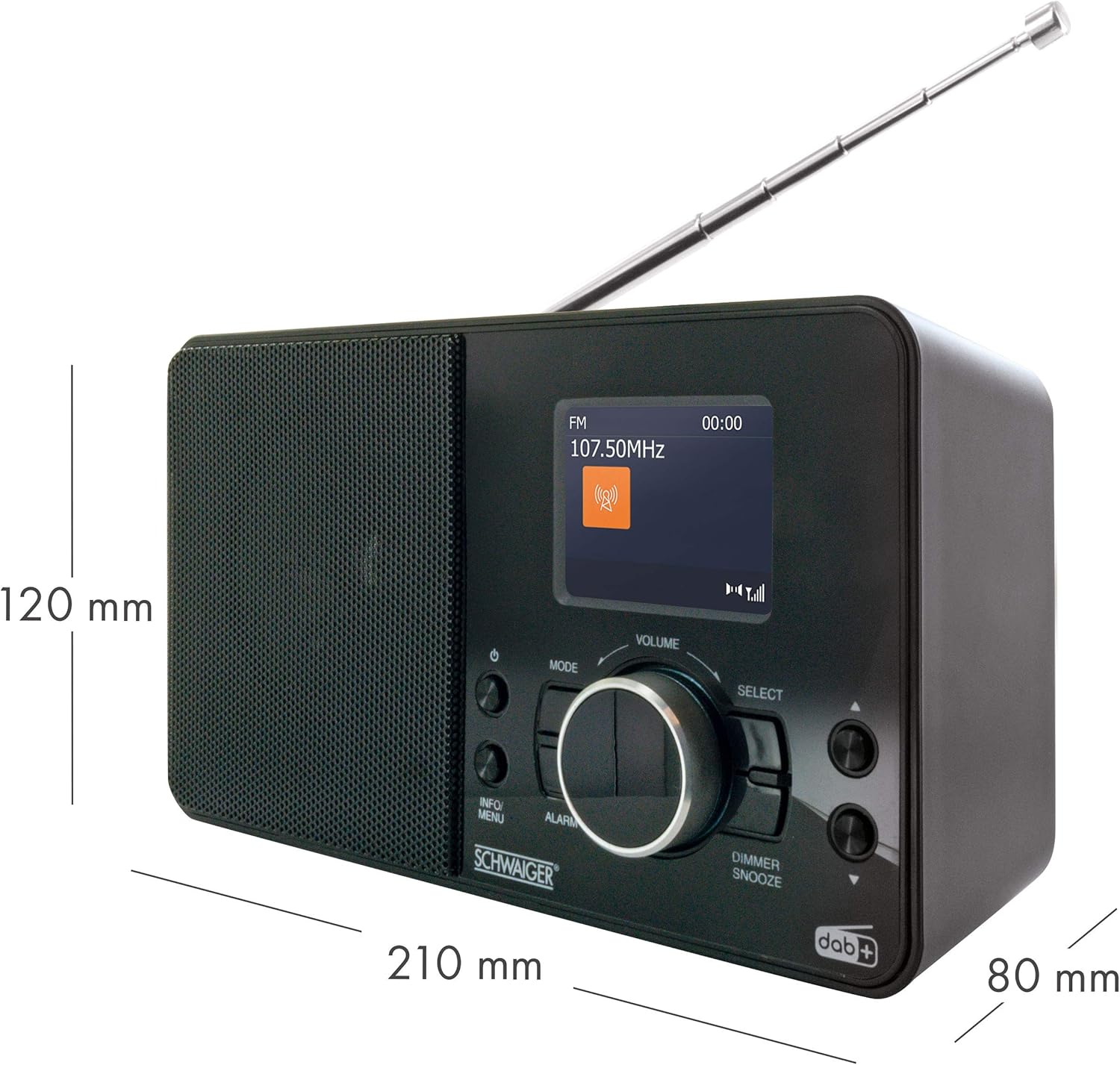
Figure 4.2: Front panel features including the 2.4" LCD color display, radio reception indicator, and wake-up function controls.

4.3-сүрөт: Детальдуу view of the control panel. Key controls include Power, Mode, Info/Menu, Alarm, Volume knob, Select button, and Dimmer/Snooze button.

Figure 4.4: Top panel showing the preset buttons (1-8+) for quick access to your favorite stations.

Figure 4.5: Rear panel with extendable antenna, battery compartment, headphone jack, and DC IN power port.
5. Орнотуу
5.1 Кубат туташтыруу
The radio can be powered by the included AC adapter or by batteries.
AC адаптерин колдонуу:
- Connect the small end of the power adapter to the DC IN port on the rear of the radio.
- Электр адаптеринин экинчи учун стандарттуу розеткага сайыңыз.
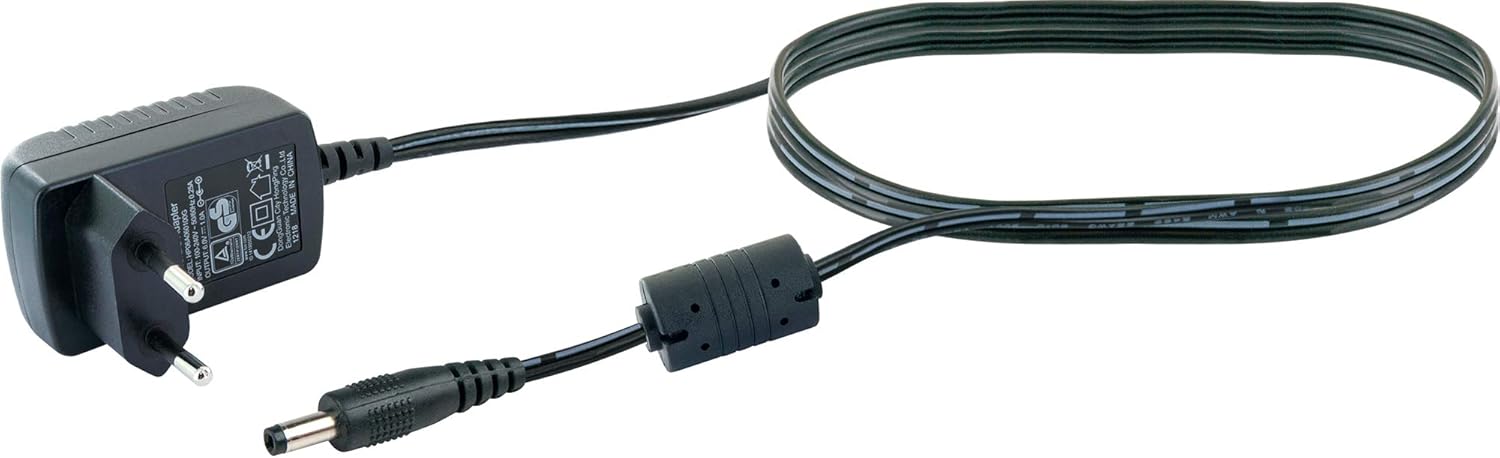
Figure 5.1: The included power adapter for mains operation.
Батареяларды колдонуу:
For portable use, the radio requires 4 x LR06 (AA) 1.5V batteries (not included).
- Open the battery compartment cover on the rear of the radio (refer to Figure 4.5).
- Бөлүмдүн ичинде көрсөтүлгөндөй туура полярдуулукту (+/-) камсыз кылып, 4 AA батарейкасын салыңыз.
- Батарея уясынын капкагын бекем жабыңыз.
5.2 Антеннаны тууралоо
Оптималдуу радио кабыл алуу үчүн, аппараттын арт жагында жайгашкан телескопиялык антеннаны толугу менен узартыңыз. Сигналдын эң жакшы сапаты үчүн анын абалын тууралаңыз.
5.3 Алгачкы күйгүзүү жана биринчи жолу орнотуу
- басыңыз Күч радиону күйгүзүү үчүн баскыч.
- Upon first use, the radio will typically initiate an automatic scan for DAB+ stations. This process may take a few minutes.
- Once the scan is complete, the radio will display the first available DAB+ station.
- Set the current time and date if prompted, using the Тандоо баскыч жана Маалымат/Меню баскычы.
6. Иштөө нускамалары
6.1 Күйгүзүү/өчүрүү
- басыңыз Күч радиону күйгүзүү же өчүрүү үчүн баскыч.
6.2 Режимди тандоо
- басыңыз Mode button repeatedly to switch between DAB+, FM, and Bluetooth modes. The current mode will be displayed on the LCD screen.
6.3 DAB+ Радио операциясы
Станцияларды издөө:
- In DAB+ mode, if no stations are found or you wish to rescan, press and hold the Маалымат/Меню менюга кирүү үчүн баскычты басыңыз.
- айлантыңыз Тандоо knob to navigate to "Full Scan" and press the Тандоо knob to confirm. The radio will scan for available DAB+ stations.
Станцияларды тандоо:
- айлантыңыз Тандоо knob to browse through the available DAB+ stations.
- басыңыз Тандоо тандооңузду ырастоо үчүн баскычты басыңыз.
Presetting DAB+ Stations:
- Каалаган DAB+ станциясына тууралаңыз.
- Press and hold one of the numbered preset buttons (1-8+) on the top of the radio until "Preset Saved" appears on the display.
- To recall a preset station, simply press the corresponding numbered preset button.
6.4 FM радиосунун иштеши
Станцияларды издөө:
- FM режиминде басып, кармап туруңуз Тандоо knob to initiate an automatic scan for FM stations. The radio will stop on the next strong signal.
- Alternatively, rotate the Тандоо жыштыкты кол менен жөндөө үчүн баскыч.
Presetting FM Stations:
- Каалаган FM станциясына коюңуз.
- Press and hold one of the numbered preset buttons (1-8+) on the top of the radio until "Preset Saved" appears on the display.
- To recall a preset station, simply press the corresponding numbered preset button.
6.5 Bluetooth операциясы
Bluetooth түзмөгү менен жупташуу:
- басыңыз Mode button to select Bluetooth mode. The display will show "Bluetooth Pairing" or similar, indicating it's ready to connect.
- Смартфонуңузда же башка аудио түзмөгүңүздө Bluetooth'ду иштетиңиз.
- Издөө "SCHWAIGER DAB400 513" (or similar device name) in your device's Bluetooth settings and select it to pair.
- Once paired, the radio will confirm the connection, and you can now stream audio wirelessly.
6.6 Ойготкуч функциясы
Ойготкуч коюу:
- басыңыз Ойготкуч ойготкуч жөндөөлөрүн киргизүү үчүн баскычты басыңыз.
- айлантыңыз Тандоо knob to adjust the alarm time (hour and minute), and press Тандоо ар бир жөндөөнү ырастоо үчүн.
- Choose the alarm source (Buzzer, DAB+, or FM) and desired volume level.
- Confirm to activate the alarm. An alarm icon will appear on the display.
Snooze and Dimmer:
- Ойготкуч басылганда, басыңыз Күңгүрт/Түндүр button to temporarily silence the alarm for a set period (e.g., 9 minutes).
- басып, кармап туруңуз Күңгүрт/Түндүр button to adjust the display brightness.

Figure 6.1: The radio displaying time and date on its color LCD screen.
7. Техникалык тейлөө
7.1 Тазалоо
- Тазалоодон мурун ар дайым радиону розеткадан сууруп алыңыз.
- Сырткы беттерди сүртүү үчүн жумшак, кургак, түксүз чүпүрөктү колдонуңуз.
- Абразивдүү тазалагычтарды, момдорду же эриткичтерди колдонбоңуз, анткени алар финишке зыян келтириши мүмкүн.
7.2 Батареяны алмаштыруу
- When the battery indicator shows low power, replace all 4 AA batteries simultaneously.
- Жаңы батарейкаларды салууда туура полярдуулукту камсыз кылыңыз.
- Колдонулган батарейкаларды жергиликтүү эрежелерге ылайык таштаңыз.
7.3 Сактоо
- Радиону узак убакытка сактасаңыз, агып кетпеш үчүн батарейкаларды алып салыңыз.
- Радиону салкын, кургак жерде, күн нуру түз тийген жана өтө жогорку температурадан алыс сактаңыз.
8. Кыйынчылыктарды
| Көйгөй | Мүмкүн себеп | Чечим |
|---|---|---|
| Күч жок | Кубат адаптери туташтырылган эмес; Батареялар түгөндү же туура эмес орнотулган. | Check power adapter connection; Replace batteries, ensuring correct polarity. |
| Радио кабыл алуу начар (DAB+/FM) | Антенна узартылган эмес же туура эмес жайгашкан; Сигнал аймагы алсыз. | Fully extend and adjust the telescopic antenna; Try moving the radio to a different location. |
| Bluetooth туташпай жатат | Radio not in Bluetooth mode; Device not in pairing mode; Device too far. | Switch radio to Bluetooth mode; Ensure your device's Bluetooth is on and in pairing mode; Move devices closer. |
| Сигнал чыкпай жатат | Alarm not activated; Volume too low. | Check alarm settings and ensure it is enabled; Increase alarm volume. |
| Дисплей бош же күңүрт | Dimmer setting too low; Power issue. | Adjust display brightness using the Dimmer/Snooze button; Check power connection. |
9. Техникалык шарттар
| Бренд | SCHWAIGER |
| Модель номери | DAB400 513 |
| Түс | Digital Radio (Black) |
| Байланыш технологиясы | Көмөкчү, Bluetooth |
| Өзгөчөлүктөр | Integrated Clock, Alarm Function, Color LCD Display |
| Шайкеш түзмөктөр | Smartphone, Mobile Playback Devices |
| Продукциянын өлчөмдөрү | 21 см (L) x 8 см (W) x 12 см (H) |
| Тюнинг технологиясы | DAB+ |
| Колдоого алынган радио тилкелери | DAB+ (174 - 240 MHz), FM (87.5 - 108 MHz) |
| Power Source | Electric Cable (DC 6V = 1A) or 4 x LR06 (AA) 1.5V Batteries |
| Камтылган компоненттер | Digital DAB+/FM Radio, Power Adapter, Instruction Manual |
10. Кепилдик жана колдоо
Warranty information for your SCHWAIGER DAB400 513 Digital Radio is typically provided with your purchase documentation or can be found on the official SCHWAIGER webсайт. Кепилдик дооматтары үчүн сатып алганыңыздын далилин сактап коюңуз.
For further support, technical assistance, or to download the latest version of this manual, please visit the official SCHWAIGER webсайтка же кардарларды тейлөө бөлүмүнө кайрылыңыз.
Өндүрүүчү: Schwaiger GmbH
Webсайт: www.schwaiger.de


