1. Продукт бүтүп калдыview
The ATUMTEK 51" Selfie Stick Tripod is a versatile accessory designed for mobile photography and videography. It combines the functionality of an extendable selfie stick and a stable tripod, featuring a detachable Bluetooth remote for convenient operation. Constructed from premium aluminum alloy and polycarbonate, this device offers durability and portability for various uses, including selfies, video recording, vlogging, and live streaming.

Image 1.1: ATUMTEK 51" Selfie Stick Tripod (Collapsed and Extended)
2. Продукциянын өзгөчөлүктөрү
- Узарылуучу Дизайн: Extends up to 51 inches (130 cm) with 7 adjustable rods for broader views.
- 360° Rotation & 180° Tilt: The phone holder supports 360° horizontal rotation and 180° vertical tilt for optimal shooting angles.
- Туруктуу штативдин негизи: Features a large 10.6-inch tripod base with three non-slip silicone pads for enhanced stability.
- Премиум материалдар: Made of aviation-grade aluminum alloy for the pole and resilient ABS+PC material for durability.
- Ажыратылуучу Bluetooth пульту: Allows hands-free operation up to 33 feet (10 meters) away.
- One-piece Ergonomic Design: Combines selfie stick and tripod into a compact, easy-to-carry unit with a lychee-textured grip.
- Кеңири шайкештик: Compatible with most iOS (7.0 and later) and Android (5.0 and later) smartphones (device width 2.2-3.9 inches).

Image 2.1: Phone Holder Orientation Adaptability

Image 2.2: Ergonomic Design and Upgraded Bluetooth Selfie Stick Features
3. Кутуда эмне бар
- ATUMTEK 51" Selfie Stick Tripod
- User Manual
- Кепилдик картасы
4. Орнотуу нускамалары
4.1. Bluetooth пультунун жупташуусу
- Long press the camera button on the remote for 2 seconds to turn it on. The green LED indicator will flash.
- Смартфонуңуздан Bluetooth жөндөөлөрүнө өтүп, жаңы түзмөктөрдү издеңиз.
- Select "ATUMTEK" from the list of available devices to pair. The green LED will turn solid when connected.
- To turn off the remote, long press the camera button for 3 seconds. The LED will turn off.
The remote will automatically enter standby mode after 10 minutes of inactivity. Press the button once to reactivate it.
4.2. Extending the Selfie Stick/Tripod
- Gently pull out the phone holder from the top of the device.
- To deploy the tripod legs, press the push button at the bottom of the handle. The legs will automatically extend. Ensure the tripod is fully opened for stability.
- Extend the telescopic pole to your desired height by pulling the sections upwards.
4.3. Смартфонуңузду тиркөө
- Release the top cap of the phone holder and carefully insert your smartphone. Ensure it is securely gripped by the holder.
- Avoid pressing your phone's buttons with the holder. Do not over-extend the phone holder to prevent damage.
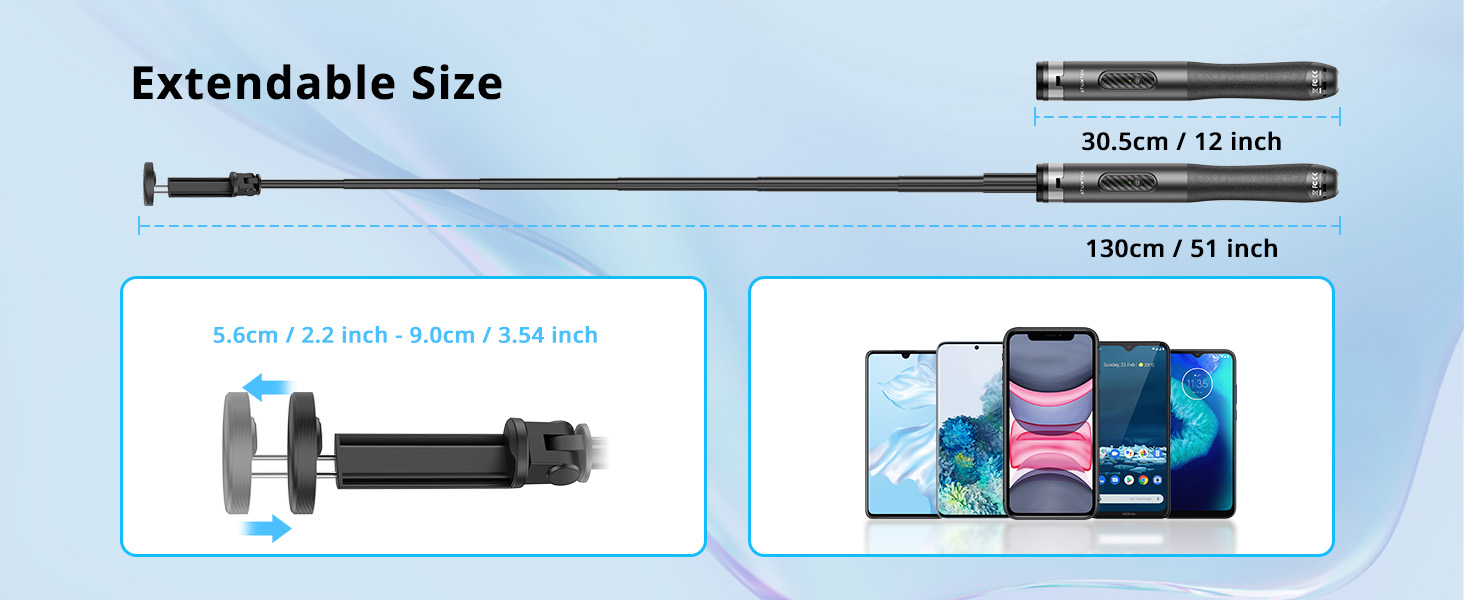
Image 4.1: Extendable Size and Phone Compatibility
5. Иштөө нускамалары
5.1. Using as a Selfie Stick or Tripod
- For selfie stick use, keep the tripod legs folded and hold the device by the ergonomic handle.
- For tripod use, deploy the legs as described in the setup section and place on a flat, stable surface.
5.2. Adjusting Phone Holder Angle
- The phone holder can be rotated 360° horizontally to switch between landscape and portrait modes.
- It also supports 180° vertical tilt to find the perfect shooting angle.
5.3. Using the Bluetooth Remote
- Once paired, open your smartphone's camera app.
- Press the camera button on the remote once to take a photo or start/stop video recording.
5.4. Android System Phones Connection Note
Some Android phones use the phone's volume button to control the camera or zoom. To ensure the Bluetooth remote functions correctly as a shutter, please reset your phone camera settings:
- Go to your camera settings.
- Find the volume key function setting.
- Set the volume key function to "Shutter" (do not select zoom or focus).

Image 5.1: Android Camera Settings for Remote Functionality
Видео 5.2: кутудан чыгаруу жана баштапкы орнотуу боюнча колдонмо
Video 5.3: Product Demonstration and Key Features
Video 5.4: Detailed Demo of Selfie Stick Tripod Functionality
6. Техникалык тейлөө
- Аппаратты жумшак, кургак чүпүрөк менен тазалаңыз. Катуу химиялык заттарды же абразивдүү материалдарды колдонуудан алыс болуңуз.
- Store the selfie stick tripod in a cool, dry place away from direct sunlight and extreme temperatures.
- Please recharge the Bluetooth remote approximately every 3 months to maintain battery health, even if not in regular use.
7. Кыйынчылыктарды
7.1. Remote Not Connecting
- Ensure the remote is charged. The red LED indicates low power.
- Turn off and on your phone's Bluetooth, then try pairing again.
- If connection issues persist, clear the Bluetooth connection history on your phone and re-pair.
- For Android phones, verify camera settings as described in Section 5.4.
7.2. Tripod Instability
- Штативдин үч бутунун баары толугу менен сунулуп, ордуна бекитилгенин текшериңиз.
- Штативди тегиз, түз жерге коюңуз.
- Avoid extending the telescopic pole to its maximum height in windy conditions or on uneven terrain.
8. Техникалык шарттар
| Өзгөчөлүк | Спецификация |
|---|---|
| Модель номери | ATSS052 |
| Максималдуу бийиктик | 51.18 дюйм (130 см) |
| Минималдуу бийиктик | 12 дюйм (30.5 см) |
| Элемент Салмагы | 11.6 унция (330 грамм) |
| Салмагы Limit | 15 килограмм |
| Материал | Алюминий, поликарбонат (PC) |
| Шайкеш түзмөктөр | iOS 7.0 and later, Android 5.0 and later (device width 2.2-3.9 inches) |
| Bluetooth алыстан башкаруу диапазону | 33 фут (10 метр) чейин |
| Пульттун батареясынын сыйымдуулугу | 50 мАч |
| Remote Charging Input | 5V/110 мАч |
| Алыскы баскычтын иштөө мөөнөтү | >15,000 XNUMX XNUMX жолу |
9. Кепилдик жана колдоо
The ATUMTEK 51" Selfie Stick Tripod comes with a worry-free 3-year warranty. For any questions, technical support, or warranty claims, please refer to the contact information provided in your product packaging or visit the official ATUMTEK webсайт.


