1. Киришүү
This manual provides detailed instructions for the proper use and maintenance of your ANCEL VD500 OBD II Diagnostic Scanner and ANCEL BST200 12V Car Battery Load Tester. The VD500 is designed for comprehensive diagnostics on VAG group vehicles (Volkswagen, Audi, Skoda, SEAT) and standard OBD II compliant vehicles. The BST200 is a dedicated tool for testing 12V lead-acid automotive batteries. Please read this manual thoroughly before operating the devices to ensure correct usage and to prevent damage.
2. Продукт бүтүп калдыview

Image: The ANCEL VD500 OBD II Diagnostic Scanner (left) and the ANCEL BST200 12V Car Battery Load Tester (right) are shown together. Both devices feature a red and black casing with an LCD screen and control buttons.
2.1 ANCEL VD500 OBD II Diagnostic Scanner
The VD500 is a handheld diagnostic tool primarily for Volkswagen, Audi, Skoda, and SEAT vehicles, offering advanced system diagnostics and service resets. It also supports standard OBD II functions for most 1996 and newer 12V vehicles.

Сүрөт: деталдуу view of the ANCEL VD500, highlighting its components: LCD Display, OBDII Connector, Scroll Up Button, Scroll Down Button, Enter Button, and Exit Button. The device has a compact, ergonomic design with anti-skid silicone grips.
2.2 ANCEL BST200 12V Car Battery Load Tester
The BST200 is a compact battery analyzer designed to quickly and accurately test 12V lead-acid batteries, including regular flooded, AGM flat plate, AGM spiral, and GEL types. It provides essential battery health information in seconds.
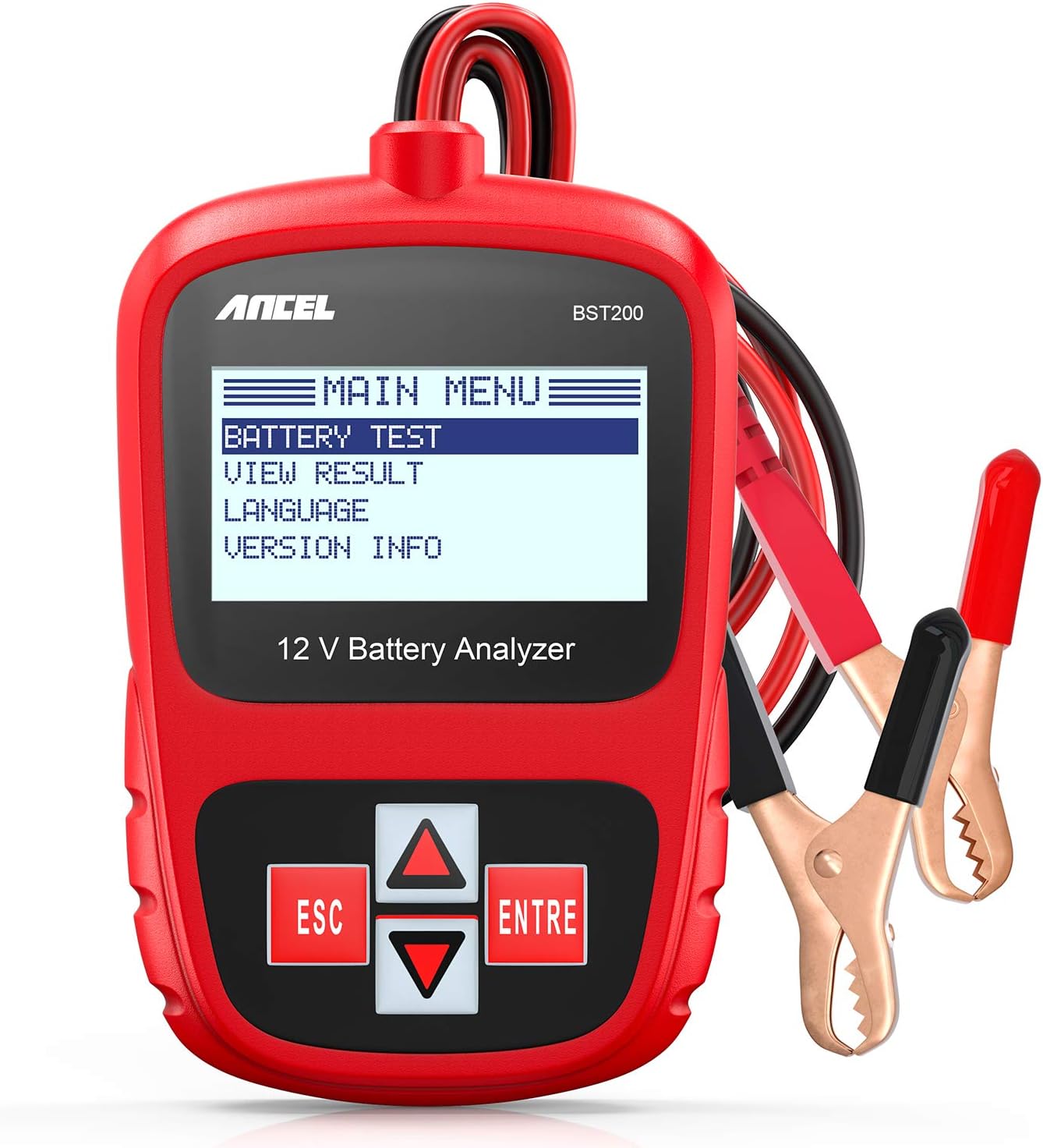
Image: The ANCEL BST200 battery tester is shown with its main menu on the screen, displaying options like 'BATTERY TEST', 'VIEW RESULT', 'LANGUAGE', and 'VERSION INFO'. The device has red and black alligator clips for connecting to a battery.
3. Орнотуу
3.1 ANCEL VD500 Setup
- Күйгүзүү: The VD500 is powered directly from the vehicle's OBD II port. Connect the 16-pin OBD II connector to the vehicle's Data Link Connector (DLC), usually located under the dashboard on the driver's side.
- Баштапкы жүктөө: Once connected, the device will power on automatically and display the main menu.
- Тил тандоо: Navigate to 'System Setup' using the scroll buttons and press 'ENTER' to select your preferred language.
3.2 ANCEL BST200 Setup
- Батареяга туташуу: Ensure the vehicle's ignition is off. Connect the red positive (+) clamp to the positive terminal of the 12V battery and the black negative (-) clamp терс терминалга.
- Күйгүзүү: The BST200 will power on automatically once correctly connected to the battery.
- Башкы меню: The main menu will appear, ready for battery testing.
4. Иштөө нускамалары
4.1 ANCEL VD500 Operation
The VD500 offers two primary diagnostic modes: VAG Diagnosis and OBDII Diagnosis.
4.1.1 VAG Diagnosis (for Volkswagen, Audi, Skoda, SEAT)
This mode allows access to various control modules within VAG vehicles for in-depth diagnostics and special functions.

Image: The ANCEL VD500 screen displays 'V/A Diagnosis' as the selected option. Icons around the screen indicate various systems that can be diagnosed, including Engine System, SRS System, ABS System, TPMS System, HVAC, SAS System, ESP System, Transmission System, Windows, Battery System, Headlight, and Immobilizer System.
- Select 'V/A Diagnosis': From the main menu, use the scroll buttons to highlight 'V/A Diagnosis' and press 'ENTER'.
- Системаны тандоо: The scanner will automatically identify the vehicle and present a list of available systems (e.g., Engine, ABS, Airbag, Transmission, EPB, SAS, TPMS, ESP). Select the desired system.
- Коддорду окуу/тазалоо: Within the selected system, you can choose to 'Read Fault Codes' to view Diagnostic Trouble Codes (DTCs) and their definitions, or 'Clear Fault Codes' to erase them after repairs.
- Атайын функциялар: The VD500 supports specific service resets for VAG vehicles:
- Май кызматын баштапкы абалга келтирүү: Resets the oil change reminder.
- Brake Pad (EPB) Reset: For vehicles with electronic parking brakes, this function allows for safe replacement of brake pads.
- Дроссельдин абалын адаптациялоо: Тазалагандан же алмаштыргандан кийин дроссель корпусунун абалын кайрадан үйрөнөт.

Image: A collage illustrating the special functions of the ANCEL VD500. Top image shows an oil change with 'Oil Service Reset'. Middle image shows a car's gear selector with 'Brake Pad (EPB) Reset'. Bottom image shows a throttle body with 'Throttle Position Adaption'.
4.1.2 OBDII Diagnosis (for all OBD II Compliant Vehicles)
This mode provides standard OBD II functions for 12V cars and light trucks manufactured in 1996 or later that are OBD II-compliant (J1850 VPM, J1850PWM, ISO9141, KWP 2000, and CAN protocols).

Image: The ANCEL VD500 screen displays 'OBDII Diagnosis'. Surrounding images illustrate its functions: 'Read Fault code', 'Erase Fault code', 'Review DTC', 'Read VIN', and 'Turns off the MIL' (Malfunction Indicator Lamp).
- Select 'OBDII Diagnosis': From the main menu, use the scroll buttons to highlight 'OBDII Diagnosis' and press 'ENTER'.
- Окуу коддору: Displays current, pending, and historic Diagnostic Trouble Codes (DTCs).
- Коддорду тазалоо: Clears DTCs from the vehicle's computer and turns off the Malfunction Indicator Lamp (МИЛ).
- I/M даярдыгы: Чыгарылыштарга байланыштуу мониторлордун абалын текшерет.
- Жандуу маалыматтар: Displays real-time sensor data from the vehicle.
- Фреймди тоңдуруу: Ката коду коюлган учурдагы иштөө шарттарынын сүрөтүн көрсөтөт.
- Унаа жөнүндө маалымат: Retrieves Vehicle Identification Number (VIN), Calibration ID (CALID), and Calibration Verification Number (CVN).
4.2 ANCEL BST200 Operation
The BST200 performs various tests to assess the health of a 12V battery.

Image: The ANCEL BST200 screen displays 'BAT. RESULT GOOD BATTERY'. Surrounding icons and text indicate the types of data provided: Voltage Test, Measured CCA, Rated CCA, State Of Charge, State Of Health, and Internal Resistance. The device provides results based on standards like CCA, CA, MCA, JIS, DIN, IEC, EN, and SAE.
- Батарея сыноо: From the main menu, select 'Battery Test' and press 'ENTER'.
- Батарея түрүн тандоо: Select the type of battery being tested (e.g., Regular Flooded, AGM Flat Plate, AGM Spiral, GEL).
- CCA Input: Муздак кранкингге кириңиз Amps (CCA) rating of the battery, usually found on the battery label.
- Test Execution: The BST200 will perform the test and display results within approximately 3 seconds.
- Жыйынтыктын интерпретациясы: The results will include:
- CCA мааниси: Өлчөнгөн муздак крандоо Amps.
- Тtage: Учурдагы батареянын көлөмүtage.
- Ички каршылык: Indicates the battery's internal health.
- State of Health (SOH): Персенtagкалган батареянын иштөө мөөнөтү.
- State of Charge (SOC): Персенtage of battery charge level.
- Батареянын абалы: (e.g., Good Battery, Good & Recharge, Charge & Retest, Replace Battery, Bad Cell).

Image: The ANCEL BST200 is shown next to various battery types, with labels indicating 'AGM', 'GEL', and 'Regular flooded', demonstrating its compatibility with these battery chemistries.
5. Техникалык тейлөө
- Тазалоо: жумшак колдонуу, damp аппаратты тазалоо үчүн чүпүрөк сasinг. Абразивдүү тазалагычтарды же эриткичтерди колдонбоңуз.
- Сактагыч: Түзмөктөрдү кургак, салкын жерде, күн нуру түз тийген жерлерден жана өтө жогорку температурадан алыс сактаңыз.
- Кабельге кам көрүү: Avoid bending or crimping the cables excessively. Always grasp the connector when disconnecting, not the cable.
- Программалык камсыздоо жаңыртуулары: Мезгил-мезгили менен ANCEL кызматкерин текшерип туруңуз website for available software updates for the VD500 to ensure optimal performance and compatibility with newer vehicle models.
6. Кыйынчылыктарды
| Көйгөй | Мүмкүн себеп | Чечим |
|---|---|---|
| VD500: Түзмөк күйбөйт. | Loose connection to OBD II port; Vehicle's OBD II port fuse blown; Vehicle battery low. | Ensure secure connection. Check vehicle's OBD II fuse. Verify vehicle battery voltage. |
| VD500: Унаа менен байланыш катасы. | Incorrect protocol selected (rare, usually auto-detects); Faulty vehicle DLC; Device software issue. | Verify vehicle compatibility. Try on another vehicle. Update device software. |
| BST200: No display after connecting to battery. | Туура эмес clamp connection (reversed polarity); Battery voltage too low; Faulty clamps/cable. | Ensure correct positive/negative connection. Check battery voltage (must be above 8V). Inspect clamps and cable for damage. |
| BST200: Тесттин жыйынтыктары туура эмес. | Incorrect battery type or CCA input; Loose connection; Battery surface corrosion. | Verify battery type and CCA rating. Ensure clamps are clean and securely connected. Clean battery terminals. |
7. Техникалык шарттар
7.1 ANCEL VD500
- Дисплей: LCD
- Operating Voltage: 9V - 18V туруктуу ток
- Иштөө температурасы: 0°Cден 50°Cге чейин (32°F—122°F)
- Сактоо температурасы: -20°Cден 70°Cге чейин (-4°Fтен 158°Fге чейин)
- Колдоого алынган протоколдор: J1850 VPM, J1850PWM, ISO9141, KWP 2000, CAN
- Өлчөмдөрү: Болжол менен 195 мм x 80 мм x 30 мм
7.2 ANCEL BST200
- Колдонмо: 12V lead-acid batteries (Flooded, AGM Flat Plate, AGM Spiral, GEL)
- CCA диапазону: 100 - 1100 CCA
- Тtage диапазону: 8V - 16V туруктуу ток
- Сыноо стандарттары: CCA, CA, MCA, JIS, DIN, IEC, EN, SAE
- Test Убакыт: Болжол менен 3 секунд
- Өлчөмдөрү: Болжол менен 125 мм x 70 мм x 20 мм
8. Кепилдик жана колдоо
ANCEL products typically come with a limited warranty covering manufacturing defects. For specific warranty terms and conditions, please refer to the warranty card included with your product or visit the official ANCEL website. For technical support, product inquiries, or service, please contact ANCEL customer support through their official channels. Keep your purchase receipt as proof of purchase for warranty claims.