1. Киришүү
This user manual provides detailed instructions for the installation, operation, maintenance, and troubleshooting of the Selec Make Process Indicator, Model PIC101A-VI-230. This device is designed for precise measurement and indication of voltage and current inputs in industrial applications. Please read this manual thoroughly before using the product to ensure safe and efficient operation.
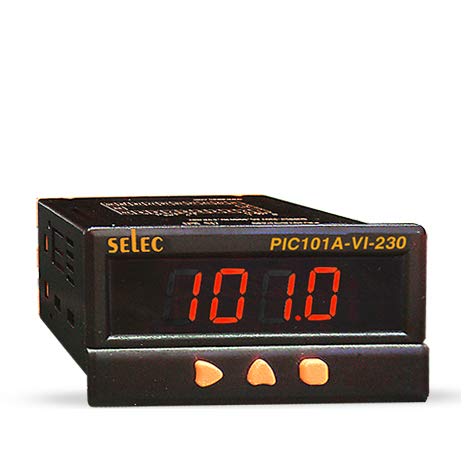
Сүрөт 1: Алдыңкы view of the Selec Make Process Indicator PIC101A-VI-230, showing the digital display and control buttons.
2. Коопсуздук маалыматы
Жарааттарды же аппаратты бузууну болтурбоо үчүн ар дайым төмөнкү коопсуздук чараларын сактаңыз:
- Ensure the power supply matches the device's specifications (230V AC).
- Do not operate the device in environments exceeding specified temperature and humidity ranges.
- Монтаждоо жана тейлөөнү квалификациялуу кызматкерлер гана аткарышы керек.
- Туташтыруудан же техникалык тейлөөдөн мурун электр кубатынан ажыратыңыз.
- Avoid exposing the device to direct sunlight, excessive dust, or corrosive gases.
3. Продукт бүтүп калдыview
3.1. Негизги өзгөчөлүктөрү
- Тtage/Current Input: 0-10V DC, 0-20mA, 4-20mA DC.
- 4-digit, 7-segment LED single display.
- Compact dimensions: 48(W) x 96(H) x 76(D)mm.
- Панелди орнотуу.
- Supply Voltage: 230V AC, ± 20%, 50/60 Hz.
3.2. Өлчөмдөр
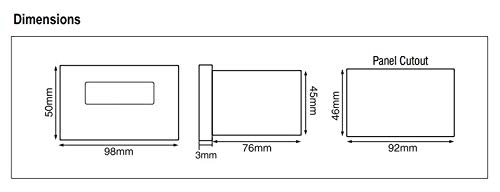
Figure 2: Dimensional drawing of the PIC101A-VI-230, including front, side, and panel cutout viewмиллиметр менен өлчөө менен с.
4. Орнотуу жана орнотуу
4.1. Монтаждоо
The PIC101A-VI-230 is designed for panel mounting. Ensure the panel cutout dimensions match the specifications provided in Figure 2 (46mm x 92mm). Secure the device firmly using the provided mounting clamps.
4.2. Wiring and Terminal Connections
Refer to the wiring diagram below for correct terminal connections. Ensure all connections are secure and properly insulated to prevent short circuits or electrical hazards.
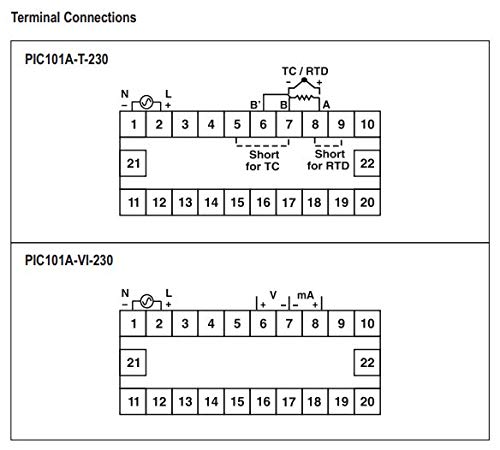
Figure 3: Terminal connection diagram for the PIC101A-VI-230, showing power input (N, L), and voltage/current input terminals (V, mA).
- Power Supply (230V AC): Connect Neutral (N) to terminal 1 and Live (L) to terminal 2.
- Тtage киргизүү: Connect the positive (+) voltage input to terminal 6 and the negative (-) to terminal 7.
- Учурдагы киргизүү: Connect the positive (+) current input to terminal 8 and the negative (-) to terminal 9.
5. Иштөө нускамалары
5.1. Күйгүзүү
Once all connections are made, apply 230V AC power to the device. The 4-digit LED display will illuminate and show the measured process value.
5.2. Display and Input Specifications
The device displays the input value on its 4-digit, 7-segment LED display. The input type (Voltage or Current) and range are configured internally. For the PIC101A-VI-230, the inputs are 0-10V DC, 0-20mA, and 4-20mA DC.
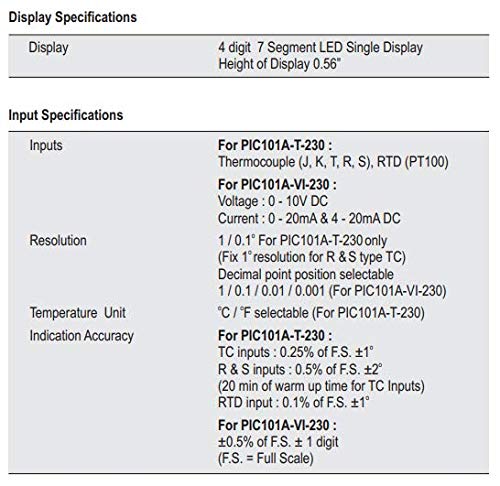
Figure 4: Detailed specifications for the display and input types, including resolution and indication accuracy for the PIC101A-VI-230 model.
5.3. Баскыч функциялары
The front panel features control buttons for potential calibration or setting adjustments. Specific functions may vary based on the internal configuration. Refer to the device's internal programming guide for detailed button operations if available.
6. Техникалык тейлөө
The Selec Make Process Indicator is designed for minimal maintenance. However, regular checks can ensure optimal performance and longevity.
- Тазалоо: Дисплейди тазалоо үчүн жумшак, кургак чүпүрөктү колдонуңуз жанаasinг. Абразивдүү тазалагычтарды же эриткичтерди колдонбоңуз.
- Туташуу текшерүүлөрү: Periodically inspect all wiring connections for looseness or corrosion.
- Экологиялык шарттар: Зыяндын алдын алуу үчүн иштөө чөйрөсү белгиленген температуранын жана нымдуулуктун чегинде сакталышын камсыз кылыңыз.
7. Кыйынчылыктарды
Бул бөлүмдө сиз кабылышы мүмкүн болгон жалпы маселелерди чечүү жолдору каралган.
| Көйгөй | Мүмкүн себеп | Чечим |
|---|---|---|
| Дисплей бош | No power supply; Incorrect wiring; Blown fuse (internal) | Check power connections (230V AC); Verify wiring according to Figure 3; Contact support if fuse is suspected. |
| Туура эмес окуу | Incorrect input wiring; Sensor malfunction; Calibration required | Verify input wiring (Voltage/Current); Check sensor functionality; Refer to calibration procedures if applicable. |
| Дисплейде "Ката" көрсөтүлөт | Input out of range; Internal error | Ensure input signal is within specified range (0-10V DC, 0-20mA, 4-20mA DC); Power cycle the device; Contact support if error persists. |
8. Техникалык шарттар
8.1. Display Specifications
- Дисплей: 4 digit, 7 Segment LED Single Display
- Height of Display: 0.56"
8.2. Input Specifications (PIC101A-VI-230)
- Тtage: 0 - 10V туруктуу ток
- Учурдагы: 0 - 20mA & 4 - 20mA DC
- Чечим: 1 / 0.1 / 0.01 / 0.001 (Decimal point position selectable)
- Көрсөткүчтүн тактыгы: ±0.5% of F.S. ± 1 digit (F.S. = Full Scale)
Figure 5: Table detailing display and input specifications, including resolution and accuracy.
8.3. Auxiliary Supply Specifications
- Supply Voltage: 230V AC, ± 20%, 50/60 Hz
- Энергияны керектөө: 5 VA max@ 230 V AC
8.4. Экологиялык мүнөздөмөлөр
- Иштөө температурасы: 0…50°C (32…122°F)
- Сактоо температурасы: -20…75°C (-4…167°F)
- Нымдуулук (конденсацияланбаган): 95% RH
8.5. Механикалык мүнөздөмөлөр
- Монтаждоо: Панел
- Weight (PIC101A-VI-230): 195 гр
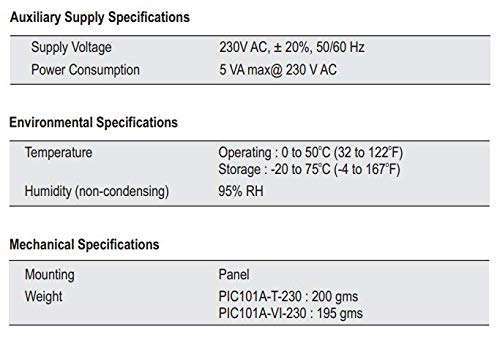
Figure 6: Table summarizing auxiliary supply, environmental, and mechanical specifications for the process indicator.
8.6. Input Sensor Range (For PIC101A-T-230 Model)
Note: The following table is primarily for the PIC101A-T-230 model (Thermocouple/RTD input). For the PIC101A-VI-230, refer to the Voltage/Current input ranges specified in section 8.2.
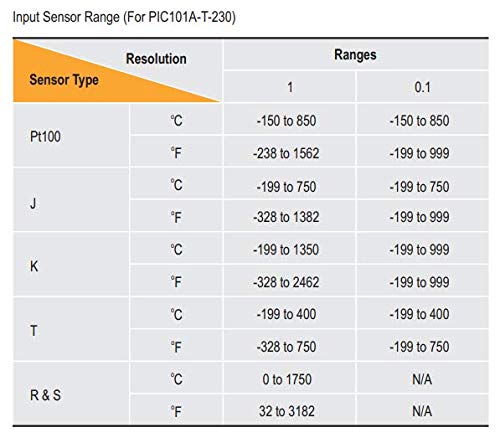
Figure 7: Table showing input sensor ranges and resolutions for various thermocouple and RTD types (primarily for PIC101A-T-230 model).
9. Кепилдик жана колдоо
9.1. Кепилдик маалыматы
Кепилдиктин конкреттүү маалыматтары, адатта, продукттун таңгагында же өндүрүүчүнүн расмий веб-сайтында берилет website. Please retain your purchase receipt for warranty claims. The manufacturer warrants this product against defects in materials and workmanship under normal use for a specified period from the date of purchase.
9.2. Техникалык колдоо
For technical assistance, troubleshooting beyond this manual, or service inquiries, please contact Selec Make customer support. Contact information can usually be found on the product packaging or the official Selec webсайт.


