Introduction
The SANWA Multi Device Bluetooth Keyboard with Touchpad (Model GSKBBT066) is designed for versatile use across various operating systems and devices. This compact, rechargeable keyboard features a built-in touchpad, multi-device switching capabilities, and convenient shortcut keys, enhancing productivity and entertainment experiences.
Жайгашуу
1. Баскычтопту заряддоо
Before initial use, fully charge the keyboard. Connect the provided USB charging cable to the keyboard's charging port and a USB power source. A full charge typically takes approximately 2 hours and provides up to 30 hours of constant use.

Image: The SANWA Bluetooth keyboard connected via USB cable to a wall adapter for charging.
2. Түзмөктөр менен жупташтыруу
The keyboard supports connection to up to three Bluetooth devices simultaneously. Use the dedicated pairing buttons to switch between connected devices.
- Баскычтоп кубатталып, күйгүзүлгөнүн текшериңиз.
- басыңыз Fn key and one of the device selection keys (1, 2, же 3) simultaneously to select a channel. The corresponding LED will blink.
- басыңыз Таб key labeled 'Pairing' to enter pairing mode. The selected channel's LED will blink rapidly.
- On your device (laptop, tablet, smartphone), enable Bluetooth and search for available devices.
- Select 'SANWA GSKBBT066' from the list of found devices.
- Жупташтыруу процессин аяктоо үчүн экрандагы көрсөтмөлөрдү аткарыңыз.
- Жупташтырылган түзмөктөр арасында которулуу үчүн жөн гана басыңыз Fn + 1, Fn + 2, же Fn + 3.

Image: A close-up of the keyboard showing the 'Fn' key, 'Tab' (Pairing) key, and the device selection LEDs (1, 2, 3).
Video: An instructional video demonstrating the features and usage of the SANWA Bluetooth Rechargeable Keyboard with Touchpad.
Иштөө нускамалары
Keyboard Layout and Typing
The keyboard features a standard QWERTY layout with comfortable pantograph scissor-structure keys, designed for sensitive response and reduced typing noise. The layout is optimized for efficient typing.

Сүрөт: жогорудан төмөнгө view of the SANWA Bluetooth keyboard, showcasing анын толук макети.

Image: Close-up of the keyboard keys, illustrating the pantograph scissor-structure for comfortable typing.
Жарлык баскычтары
The keyboard includes 20 practical shortcut keys for quick access to various functions and media controls. These keys are typically activated by pressing the Fn key in combination with the corresponding function key (F1-F12) or dedicated media keys.
- F1: Brightness Down
- F2: Brightness Up
- F3: Издөө функциясы
- F4: Тапшырма View
- F5: Switch to Desktop
- F6: Колдонмолорду которуштуруу
- F7: Үнсүз
- F8: Көлөмү -
- F9: Көлөм +
- F10: Мурунку ыр
- F11: Ойнотуу/Тыныгуу
- F12: Кийинки ыр
- Dedicated keys for Virtual Keyboard, Input Language Switch, and Open Browser.
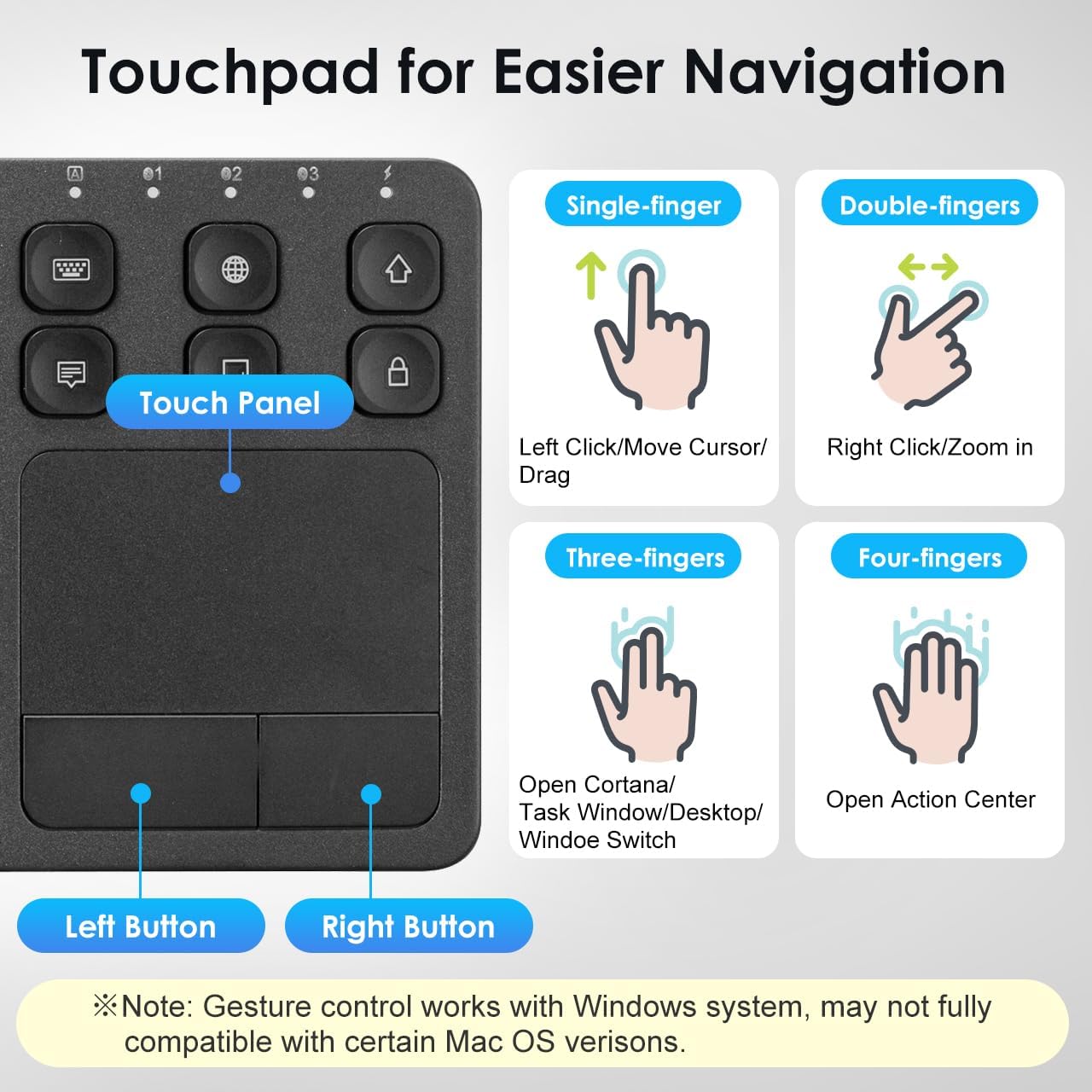
Image: The keyboard layout with icons indicating the functions of the shortcut keys.
Touchpad Functionality and Gestures (Windows System)
The integrated multi-touch touchpad provides effortless navigation. It supports various finger gestures, primarily optimized for Windows systems. Note that gesture compatibility may vary with certain macOS versions.

Сүрөт: деталдуу view of the touchpad and its gesture guide.
| Жаңсоо | Функция |
|---|---|
| Single-finger tap/drag | Left Click / Move Cursor / Drag |
| Эки бармак менен таптоо | Оң чыкылдатуу |
| Эки манжа менен чымчым | Чоңойтуу / Кичирейтүү |
| Эки манжалуу жылдыруу | Page Up / Page Down |
| Үч манжа менен таптоо | Open Cortana / Task Window / Desktop / Window Switch |
| Төрт манжа менен таптоо | Аракет борборун ачуу |
Шайкештик
The SANWA Bluetooth Keyboard with Touchpad is broadly compatible with a range of operating systems and devices, making it a versatile tool for various computing needs.
- Операциялык системалар: Windows 13/11/10/8.1/8/7/XP/Vista/98/2000/Me, macOS 10.12-10.15, Android 7.0-10, iPad OS13, iOS13 and later versions.
- Шайкеш түзмөктөр: Desktop computers, laptops, cell phones, tablets, Mac, iPad, iPhone, Android TV BOX, Smart TVs, HTPC.
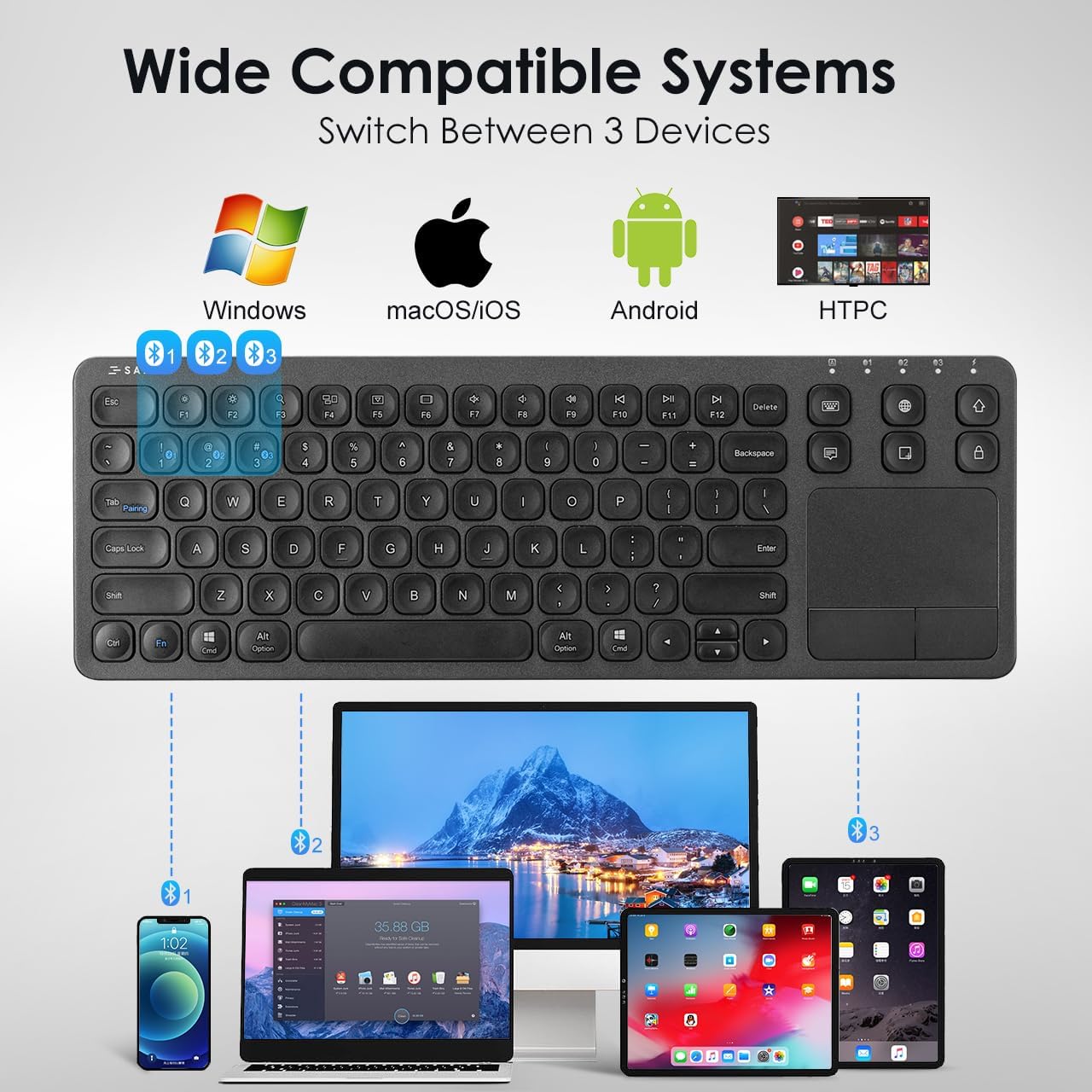
Image: The keyboard shown connected to a smartphone, laptop, and tablet, demonstrating multi-device compatibility.
Заряддоо жана батарея маалымат
The keyboard is equipped with a built-in rechargeable Lithium Polymer battery. To ensure optimal performance and longevity, adhere to the following guidelines:
- Заряддоо убактысы: Толук кубаттоо үчүн болжол менен 2 саат.
- Иш убактысы: Up to 30 constant hours on a full charge.
- Энергияны үнөмдөө: The keyboard features an auto-sleep function after a period of inactivity to conserve battery. Press any key to wake it up.
- Заряддоо көрсөткүчү: Refer to the keyboard's LED indicators for charging status.
Image: The SANWA Bluetooth keyboard connected via USB cable to a wall adapter for charging, with text indicating 30 hours work time and 2 hours full charge.
Кароо жана тейлөө
To maintain the performance and appearance of your SANWA keyboard, follow these simple care instructions:
- Тазалоо: Use a soft, dry, lint-free cloth to clean the keyboard and touchpad. For stubborn dirt, slightly dampчүпүрөктү суу же жумшак тазалоо эритмеси менен жууп салыңыз. Катуу химиялык заттардан же абразивдүү материалдардан алыс болуңуз.
- Сактагыч: Клавиатураны күн нурунан жана экстремалдык температурадан алыс, салкын, кургак жерде сактаңыз.
- Суюктуктардан алыс болуңуз: Do not expose the keyboard to liquids. In case of accidental spills, power off the keyboard immediately and allow it to dry completely before reuse.
- Этияттык менен мамиле кылуу: Баскычтопту түшүрүүдөн же катуу соккулардан сактаныңыз.
Проблемаларды чечүү
If you encounter issues with your SANWA Bluetooth Keyboard, refer to the following common problems and solutions:
| Көйгөй | Чечим |
|---|---|
| Keyboard does not connect or pair. | Ensure the keyboard is charged and powered on. Verify Bluetooth is enabled on your device. Re-enter pairing mode on the keyboard and try pairing again. Ensure no other devices are interfering with the Bluetooth signal. |
| Typing is unresponsive or delayed. | Check battery level and charge if necessary. Ensure the keyboard is within the effective Bluetooth range (up to 32.8ft). Reconnect the Bluetooth connection. |
| Touchpad is not working correctly. | Ensure your device's operating system fully supports touchpad gestures. Some macOS versions may have limited gesture compatibility. Clean the touchpad surface. Restart the keyboard and device. |
| Keyboard frequently disconnects or goes to sleep. | The keyboard has an auto-sleep function to save power. Press any key to wake it up. Ensure the keyboard is not too far from the connected device. Some users report that the sleep function cannot be disabled, which is a design characteristic. |
| Two-finger scrolling is jumpy or unpredictable. | This can be a known characteristic for some users, especially with certain iPadOS versions. Consider using the arrow keys for navigation if scrolling is inconsistent. |
Продукт спецификациялары
| Өзгөчөлүк | Деталь |
|---|---|
| Бренд | САНВА |
| Модель номери | GSKBT066 |
| Байланыш технологиясы | Bluetooth |
| Keyboard Description | Көп функционалдуу |
| Өзгөчө өзгөчөлүк | Touchpad, shortcuts, ultra-thin |
| Түс | Кара |
| Продукциянын өлчөмдөрү | 14.72"L x 5.08"W x 0.69"H (37.39 x 12.90 x 1.75 см) |
| Элемент Салмагы | 15.4 унция (436.54 грамм) |
| Батареялар | 1 Литий Полимердик батарейка (кошулган) |
| Өндүрүүчү | SANWA SUPPLY |

Image: A diagram illustrating the length, width, and thickness of the ultra-slim keyboard.
Кепилдик жана колдоо
For warranty information, technical support, or customer service inquiries, please refer to the official SANWA webсайтка же сатуучуга кайрылыңыз. Кепилдик дооматтар үчүн сатып алуу дүмүрчөгүңүздү сактаңыз.


