Introduction
This manual provides detailed instructions for the setup, operation, maintenance, and troubleshooting of your Maxxter Digital Alarm Clock with Integrated Wireless Charging Function. Please read this manual thoroughly before using the device to ensure proper functionality and safety.
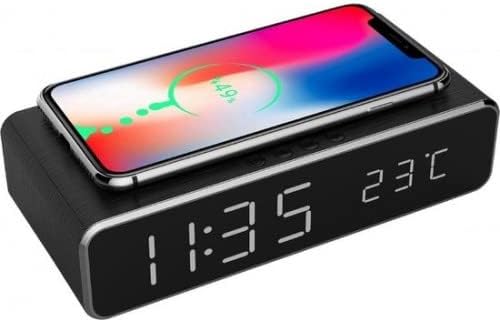
Image: The Maxxter Digital Alarm Clock, black in color, featuring a large LED display showing "11:35" and "23°C". A smartphone is placed on top of the clock, indicating wireless charging with a green charging animation and "49%".
Негизги өзгөчөлүктөрү
- Көп функциялуу түзмөк: Combines fast wireless charging, alarm clock, temperature display, calendar display, and night light.
- Зымсыз кубаттоо: Built-in module for easy charging of compatible smartphones (e.g., iPhone 8/X series, Samsung Galaxy S6/S7/S8/S9 series, Note 8/9, Sony Xperia, LG, Nokia, Microsoft Lumia).
- Чоң LCD дисплей: Clear LED display for time, date, and temperature.
- Кош ойготкуч функциясы: Allows setting two separate alarms.
- Убакыт форматтары: 12 сааттык жана 24 сааттык убакыт форматтарын колдойт.
- Кубат булагы: Electric with cord.
Орнотуу колдонмосу
1. таңгактан чыгаруу
Бардык компоненттерди таңгактан кылдаттык менен алып салыңыз. Төмөнкү нерселердин бар экенин текшериңиз:
- Maxxter Digital Alarm Clock
- USB кабель (150 см)
- Колдонуучунун Колдонмосу (бул документ)
2. Power Connection
- Берилген USB кабелин ойготкучтун арткы жагындагы кубат киргизүү портуна туташтырыңыз.
- USB кабелинин экинчи учун шайкеш келген USB кубат адаптерине (кошулмада жок) же кубаттуу USB портуна сайыңыз.
- Дисплей күйүп, түзмөктүн күйүп турганын көрсөтөт.
3. Баштапкы орнотуулар
Upon first power-on, you may need to set the time and date. Refer to the "Operating Instructions" section for details on setting time, date, and temperature units.
Иштөө нускамалары
1. Убакыт жана дата орнотуу
Specific buttons for time/date setting are usually located on the back or top of the device. Look for buttons labeled "SET", "MODE", or similar. The general procedure is:
- Press the "MODE" or "SET" button to enter time setting mode. The hour digits will typically flash.
- Use the "+" or "-" buttons (or arrow keys) to adjust the hour.
- Press "MODE" or "SET" again to move to minute setting, then adjust minutes.
- Repeat for year, month, and day settings.
- Орнотуу режиминен чыгуу үчүн акыркы жолу "MODE" же "SET" баскычын басыңыз.
2. Сигналдарды коюу
The device supports two separate alarms. Look for "ALARM 1" and "ALARM 2" buttons or a dedicated "ALARM SET" button.
- Press the "ALARM SET" button (or "ALARM 1" / "ALARM 2" button) to enter alarm setting mode for the desired alarm. The alarm hour will flash.
- Adjust the hour using "+" or "-" buttons.
- Press "ALARM SET" again to move to minute setting, then adjust minutes.
- Some models allow setting alarm sound or snooze duration. Follow on-screen prompts if available.
- Press "ALARM SET" to confirm and exit.
- To activate/deactivate an alarm, there is usually a dedicated switch or button next to the alarm setting buttons.
3. Wireless Charging Function
The top surface of the alarm clock is equipped with a wireless charging pad.
- Ойготкуч сааттын күйгүзүлгөнүн текшериңиз.
- Place your Qi-compatible smartphone centrally on the charging pad.
- The phone's screen should indicate that charging has begun. The alarm clock may also show a charging indicator.
- If charging does not start, reposition the phone or ensure it is Qi-compatible and not obstructed by a thick case.
Compatible Devices for Wireless Charging:
- iPhone 8/8 Plus/X/Xs/Xs Max/Xr
- Samsung Galaxy S6/S6 Active/S6 Edge/S6 Edge Plus/S7/S7 Active/S7 Edge/S8/S8 Active/S8 Plus/S9/S9 Plus/Note 8/Note 9
- Sony Xperia Z3V/Z4V/XZ2/XZ3
- LG G2/G3/G6/G6 Plus/G7/Lucid 2/Lucid 3/Optimus F5/Optimus G Pro/Optimus it L-05E/Spectrum 2/Vu 2/Vu 3/V30/V30Plus
- Nokia 8 Sirocco, Microsoft Lumia 1520/735/830/920/928/930/950
- And other Qi-enabled devices.
4. Температураны чагылдыруу
The alarm clock displays the ambient temperature. The unit (Celsius or Fahrenheit) can usually be switched by pressing a specific button (e.g., "TEMP" or a combination of "SET" and "+").
Техникалык тейлөө
1. Тазалоо
To clean the device, use a soft, dry cloth. Do not use abrasive cleaners, solvents, or strong chemicals, as these may damage the surface or electronic components. Ensure the device is unplugged before cleaning.
2. Сактоо
If storing the device for an extended period, unplug it from the power source and store it in a cool, dry place away from direct sunlight and extreme temperatures.
Проблемаларды чечүү
| Көйгөй | Мүмкүн себеп | Чечим |
|---|---|---|
| Дисплей бош же күйбөйт. | Электр кубаты жок же байланыш үзүлгөн. | Ensure the USB cable is securely connected to both the alarm clock and the power source. Check if the power source is active. |
| Зымсыз кубаттоо иштебейт. | Phone not positioned correctly, phone not Qi-compatible, or thick phone case. | Reposition the phone centrally on the charging pad. Verify your phone supports Qi wireless charging. Remove thick phone cases. |
| Ойготкуч угулбайт. | Ойготкуч иштетилген эмес же үнү өтө төмөн. | Ensure the alarm is set and activated (check alarm icon on display). Increase alarm volume if adjustable. |
| Убакыт/дата туура эмес. | Not set correctly or power interruption. | Reset the time and date following the "Setting Time and Date" instructions. |
Техникалык шарттар
| Өзгөчөлүк | Деталь |
|---|---|
| Бренд | Макстер |
| Модель номери | ACT-DACW-01 |
| Дисплей түрү | Digital LED |
| Power Source | Электр зымы менен |
| Материал | Акрилонитрил бутадиен стирол (ABS) |
| Өзгөчөлүктөр | Wireless Charging, Alarm Clock, Temperature Display, Calendar Display |
| Түс | Кара |
| Өлчөмдөрү (пакет) | 24.6 x 16.5 x 4.5 см |
| Салмагы (пакет) | 320 г |
Кепилдик жана колдоо
For warranty information and technical support, please refer to the documentation provided with your purchase or contact Maxxter customer service. Keep your proof of purchase for warranty claims.
Note: Software updates are not applicable for this device as per available information.


