1. Киришүү
This manual provides detailed instructions for the setup, operation, and maintenance of your Philips NeoPix Ultra 2 projector. Designed for a captivating True Full HD 1080p experience, this projector integrates smart features and versatile connectivity options for home entertainment.

Figure 1: Philips NeoPix Ultra 2 Projector
2. Кутуда эмне бар
Upon unboxing your Philips NeoPix Ultra 2, ensure all the following items are present:
- Philips NeoPix Ultra 2 Projector
- Philips Smart Remote with AirMote features
- Power Cable with various plug adapters
- Ыкчам баштоо колдонмосу (бул санариптик колдонмодо камтылган эмес)
Video 1: Unboxing the Philips NeoPix Ultra 2 Projector. This video demonstrates the contents of the product packaging, including the projector unit, remote control, and power accessories.
3. Орнотуу
3.1 Кубат туташтыруу
- Connect the power cable to the 'DC' port on the projector.
- Электр кабелинин экинчи учун ылайыктуу розеткага сайыңыз.
3.2 Initial Placement and Focus
Place the projector on a stable, flat surface. For optimal picture quality, ensure the projector is positioned directly in front of your projection surface. The projector supports projection sizes up to 100 inches (255cm) diagonally.

Figure 2: Projector in use, demonstrating flexible placement.
Adjust the focus manually using the focus ring located on the projector lens until the image is sharp and clear.
3.3 Негизги таштарды оңдоо
The NeoPix Ultra 2 features automatic and manual keystone correction to eliminate crooked and distorted images. This ensures a perfectly proportioned picture even if the projector is not perfectly aligned with the screen.
- Автоматтык негизги ташты оңдоо: The projector uses internal gyroscopes to automatically adjust the image.
- Кол менен ачкычты оңдоо: Access the settings menu to fine-tune the 4-corner correction for precise adjustments.

Figure 3: Digital Keystone and 4-Corner Correction capabilities.
4. Проекторду иштетүү
4.1 Philips Operating System (OS)
The projector runs on a Philips OS, providing a user-friendly interface for accessing various functions and applications. Navigate using the included Smart Remote with AirMote features.

Figure 4: Home screen displaying built-in applications.
4.2 Алдын ала орнотулган Тиркемелер
The projector comes with several streaming and utility applications pre-installed, including ExpressVPN, Firefox, File Manager, Netflix, Prime Video, YouTube, and VLC. These apps allow direct access to online content and local media files.
4.3 Медиа ойноткуч
Utilize the built-in media player to access videos, audio, and images from internal storage (16GB) or connected USB/MicroSD devices.
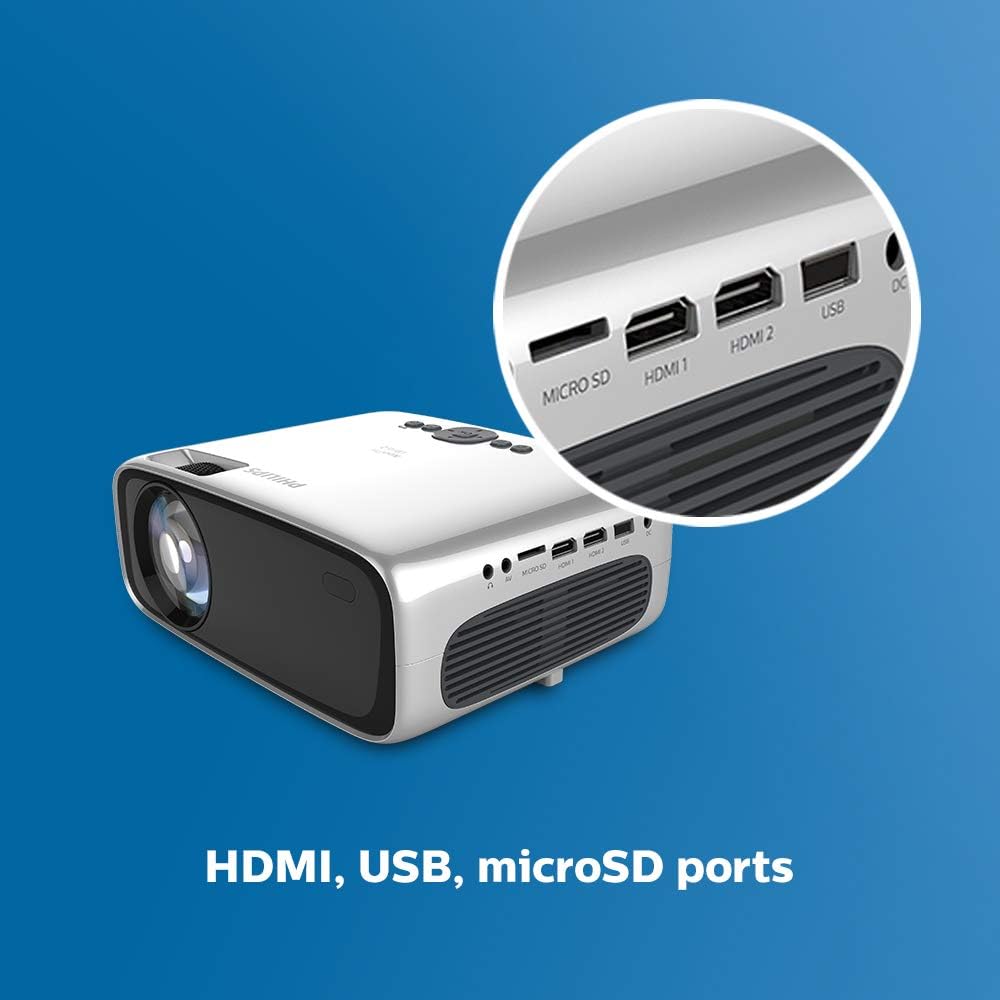
Figure 5: Built-in Media Player interface.
4.4 Экранды чагылдыруу
The NeoPix Ultra 2 supports Wi-Fi screen mirroring, allowing you to cast content directly from compatible smartphones, tablets, or laptops. This feature is ideal for sharing photos, videos, or presentations wirelessly.
5. Байланыш
The projector offers a wide range of connectivity options:
- HDMI (x2): For connecting high-definition sources like gaming consoles, Blu-ray players, or laptops.
- USB (x1): For playing media from USB drives or connecting peripherals.
- VGA (x1): For connecting older computers or devices.
- MicroSD (x1): For playing media directly from a MicroSD card.
- AV (x1): For connecting analog video and audio sources.
- 3.5 мм аудио чыгышы (x1): For connecting external headphones or powered speakers.
- Wi-Fi: For internet access, streaming apps, and screen mirroring.
- Bluetooth: For connecting wireless audio devices like speakers or headphones.

Figure 6: Connectivity ports on the Philips NeoPix Ultra 2.
6. Сүрөт жана үн
6.1 Сүрөттүн сапаты
The Philips NeoPix Ultra 2 delivers True Full HD 1080p resolution, ensuring sharp and vibrant images. The powerful LED light source provides rich, vivid colors and has an impressive lifespan of up to 30,000 hours, equivalent to 20 years with an average usage of 4 hours per day.

Figure 7: True Full HD 1080p projection up to 65 inches.
Оптималдуу үчүн viewing, it is recommended to use the projector in darker environments. While it can project up to 100 inches, the best picture quality is often achieved at smaller sizes, such as the recommended 65 inches, in a dark room.
6.2 Үн өзгөчөлүктөрү
Equipped with booming 2x15W stereo speakers, the projector offers surround sound and bass boost for an immersive audio experience. For private listening or enhanced audio, connect external headphones or powered speakers via the 3.5mm audio jack or Bluetooth.
Video 2: Philips NeoPix Ultra 2 Product Video. This video highlights the key features and benefits of the projector, including its smart OS, connectivity, and image quality.
7. Техникалык тейлөө
- Линзаны тазалоо: Gently clean the projector lens with a soft, lint-free cloth. Avoid abrasive materials or harsh chemicals.
- Вентиляция: Ensure the projector's ventilation openings are clear and unobstructed to prevent overheating.
- Сактагыч: Колдонулбаганда, проекторду салкын, кургак жерде, тике күн нурунан жана экстремалдык температурадан алыс сактаңыз.
8. Кыйынчылыктарды
- Сүрөт жок: Check all cable connections (HDMI, VGA, etc.) and ensure the correct input source is selected on the projector.
- бүдөмүк сүрөт: Adjust the focus ring on the lens. If the image is distorted, use the keystone correction feature.
- Үн жок: Verify the volume settings on both the projector and the connected source. Check audio output settings and ensure external speakers/headphones are properly connected if used.
- Wi-Fi/Bluetooth Connection Issues: Ensure the projector is within range of the network/device. Restart the projector and your router/Bluetooth device if problems persist.
9. Техникалык шарттар
| Өзгөчөлүк | Деталь |
|---|---|
| Бренд | Philips |
| Модель номери | NPX642/INT |
| Display Resolution | 1920 x 1080 (True Full HD) |
| Жарык булагы | LED (up to 30,000 hours lifespan) |
| Байланыш технологиясы | HDMI (x2), USB (x1), VGA (x1), MicroSD (x1), Wi-Fi, Bluetooth |
| Өзгөчө өзгөчөлүк | Built-In Media Player, Android TV dongle, Google Cast, Google Assistant |
| Динамик түрү | Stereo (2x15W) |
| Продукциянын өлчөмдөрү | 8.6 x 6.6 x 3.5 дюйм |
| Элемент Салмагы | 2.2 фунт |
| Түс | Кара |
10. Кепилдик жана колдоо
For warranty information and technical support, please refer to the documentation provided with your product at the time of purchase or visit the official Philips support webсайт. Кепилдик дооматтар үчүн сатып алганыңыздын далилин сактаңыз.


