Introduction
This manual provides detailed instructions for the operation and maintenance of your TOPTECH Audio Fully Amplified Portable Speaker, Model Jet-15. This high-quality, portable speaker is designed to deliver powerful and clear audio with versatile connectivity options and dynamic LED lighting, suitable for various indoor and outdoor events.

Figure 1: TOPTECH Audio Jet-15 Portable Speaker
Пакеттин мазмуну
Төмөндө тизмеленген нерселердин баары пакетиңизге камтылганын текшериңиз:
- 1 x TOPTECH Audio Jet-15 Speaker
- 1 x Динамик стенд
- 1 x заряддоо адаптери
- 1 x Зымдуу микрофон
- 1 x Алыстан башкаруу
- 1 х Колдонуучунун колдонмосу (бул документ)
- 1 x Кепилдик картасы
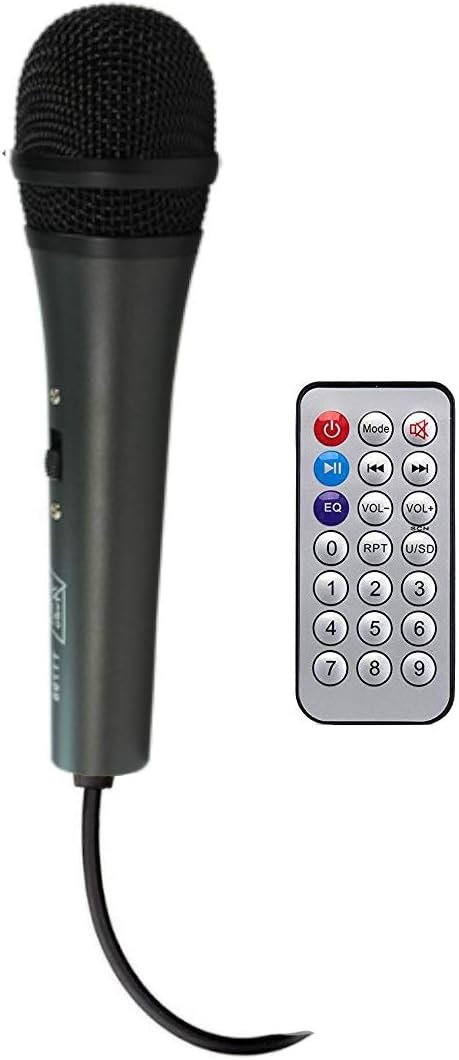
Figure 2: Included Wired Microphone and Remote Control

Figure 3: TOPTECH Audio Jet-15 Speaker on Stand
Видео 1: Бүттүview of TOPTECH Audio Jet-15 features and package contents.
Жайгашуу
- Пакеттен чыгаруу: Бардык компоненттерди таңгактан кылдаттык менен алып салыңыз.
- Speaker Stand Assembly: Extend the legs of the speaker stand until they are fully open and stable. Secure the speaker onto the top pole of the stand. Ensure the speaker is balanced and securely placed.
- Кубат туташуу: Connect the charging adapter to the speaker's power input and then to a suitable power outlet. The speaker can operate while charging.
- Баштапкы төлөм: Батареянын оптималдуу иштөө мөөнөтү үчүн динамикти биринчи жолу колдонуудан мурун толук заряддоо сунушталат.
Иштөө нускамалары
Башкаруу панелиview

Figure 4: Speaker Control Panel
The control panel on the rear of the speaker provides access to all primary functions. Key controls include:
- Үндү көзөмөлдөө: Жалпы чыгаруу көлөмүн тууралайт.
- Бас/Жогору жыштыктарды башкаруу элементтери: Fine-tune the audio's low and high frequencies.
- Эхо башкаруу: Микрофон үчүн жаңырык эффектин тууралайт.
- Микрофон киргизүү: Зымдуу микрофонду туташтырыңыз.
- Aux Киргизүү: 3.5 мм аудио кабели аркылуу тышкы аудио түзмөктөрдү туташтыруу.
- USB/SD карта уячалары: For playing media directly from storage devices.
- Кубат которгучу: Динамикти күйгүзөт/өчүрөт.
- Жарык өчүргүч: Controls the LED light feature.
Bluetooth Жупташтыруу
- Turn on the speaker using the Power Switch.
- The speaker will automatically enter Bluetooth pairing mode, indicated by a flashing Bluetooth indicator.
- Мобилдик түзмөгүңүздө (смартфон, планшет ж.б.) Bluetooth иштетип, жеткиликтүү түзмөктөрдү издеңиз.
- Select "TOPTECH Jet-15" (or similar name) from the list of devices.
- Жупташкандан кийин динамик ырастоо үнүн чыгарат жана Bluetooth индикатору өчүп токтойт.
- Эми сиз аудиону түзмөгүңүздөн динамикке зымсыз агылта аласыз.
Микрофонду колдонуу
- Connect the wired microphone to the "MIC IN" port on the control panel.
- Adjust the microphone volume and echo using the dedicated knobs on the control panel.
- Ensure the microphone is switched on if it has an independent power switch.
LED жарык башкаруу
The speaker features a multi-colored LED woofer that can be controlled via a dedicated switch on the control panel or the remote control. Toggle the switch to turn the lights on or off, or to cycle through different light modes if available.
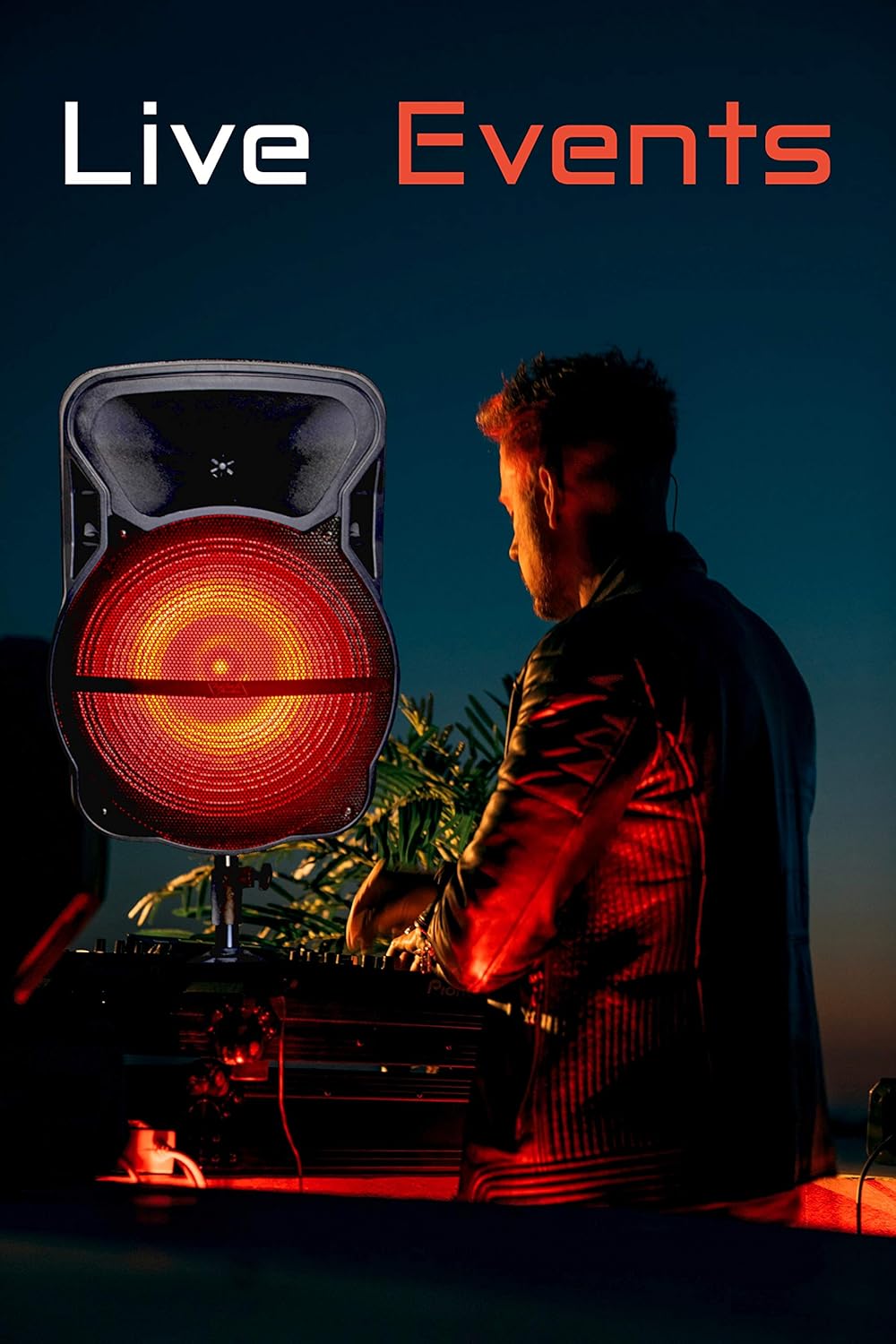
Figure 5: Speaker with Red LED Lights Activated
Заряддоо жана батареянын иштөө мөөнөтү
The Jet-15 speaker is equipped with a built-in rechargeable, high-capacity Li-ion battery. To charge the speaker, connect the provided charging adapter to the speaker's power input and a wall outlet. The charging indicator light will typically show the charging status.
A full charge provides up to 4.5 hours of non-stop music playback at maximum volume. Battery life may vary depending on volume levels and usage patterns.
Техникалык тейлөө
- Тазалоо: Динамиктин сыртын тазалоо үчүн жумшак, кургак чүпүрөктү колдонуңуз. Абразивдүү тазалагычтарды же эриткичтерди колдонбоңуз.
- Сактагыч: Динамикти түз күн нурунан жана өтө температурадан алыс салкын, кургак жерде сактаңыз.
- Батареяга кам көрүү: Батареянын иштөө мөөнөтүн узартуу үчүн, бат-баттан батарейканы толук зарядсыздандырбаңыз. Узак убакыт колдонулбаса да, динамикти үзгүлтүксүз заряддап туруңуз.
- Суу таасири: Бул динамик суу өткөрбөйт. Суунун же ашыкча нымдуулуктун таасиринен алыс болуңуз.
Проблемаларды чечүү
| Көйгөй | Мүмкүн себеп | Чечим |
|---|---|---|
| Күч жок | Battery is drained; Power switch is off; Power cable is not connected. | Charge the speaker; Turn on the power switch; Ensure power cable is securely connected. |
| Үн жок | Volume is too low; Incorrect input mode selected; Device not paired (Bluetooth); Microphone not connected/on. | Increase volume; Select correct input (Bluetooth/Aux/USB); Re-pair Bluetooth device; Check microphone connection and power. |
| Bluetooth ажыратуу | Түзмөк колдонуу аймагынан тышкары; тоскоолдук; Батареянын заряды аз. | Move device closer to speaker; Avoid obstacles; Charge the speaker. |
| LED жарыктары иштебейт | Light switch is off; Malfunction. | Toggle the light switch on the control panel or remote; Contact customer support if issue persists. |
Техникалык шарттар
| Өзгөчөлүк | Деталь |
|---|---|
| Бренд | Топтех |
| Модел | Jet-15 |
| Вуфердин өлчөмү | 15 дюйм |
| Power Source | Батарея менен иштейт |
| Чыгуу Wattage | 2200 Ватт |
| Байланыш технологиясы | Bluetooth, Aux |
| Аудио киргизүү | Bluetooth, Aux |
| Каналдардын саны | 2 |
| Батареянын иштөө мөөнөтү (максималдуу үн) | 4.5 саатка чейин |
| Түс | Кызыл |
| Шайкеш түзмөктөр | Смартфон |
| Монтаж түрү | Freestanding, Inside Mount, Outside Mount |
| UPC | 689259337442 |
| ASIN | B08J6PW7ND |
| Дата биринчи жеткиликтүү | 16-сентябрь, 2020-жыл |
Кепилдик жана колдоо
Your TOPTECH Audio Jet-15 speaker comes with a standard manufacturer's warranty. Please refer to the included Warranty Card for specific terms and conditions, including warranty period and coverage details.
For technical support, troubleshooting assistance, or warranty claims, please contact TOPTECH Audio customer service. Contact information can typically be found on the Warranty Card or the official TOPTECH Audio webсайт.
Онлайн ресурстар: For additional support and product information, visit the official TOPTECH Audio store on Amazon: TOPTECH Audio Store


