Introduction
This manual provides essential information for setting up, operating, maintaining, and troubleshooting your HP 240 G7 Laptop, Model 1S5F1PA#ACJ. Please read this guide thoroughly to ensure proper use and to maximize the lifespan of your device.

Сүрөт: алдыңкы view of the HP 240 G7 Laptop with the screen displaying the Windows operating system desktop.
Пакеттин мазмуну
Verify that the following items are included in your product package:
- HP 240 G7 Laptop (Model 1S5F1PA#ACJ)
- AC кубат адаптери жана электр шнуры
- Документтер (Ыкчам баштоо колдонмосу, Кепилдик маалыматы)
Продукт бүттүview
Familiarize yourself with the physical features and ports of your HP 240 G7 Laptop.
Сол тараптын компоненттери

Image: Left side of the laptop, illustrating the various ports and connectors.
- AC кубат туташтыргычы: Кубат адаптерин туташтыруу үчүн.
- RJ-45 (Ethernet) порту: Зымдуу тармак байланыштары үчүн.
- HDMI 1.4b Port: Тышкы дисплейлерге же проекторлорго туташуу үчүн.
- USB 3.1 Gen 1 порттору (x2): Жогорку ылдамдыктагы USB түзмөктөрүн туташтыруу үчүн.
- Наушник/микрофон айкалыштырылган уяча: For connecting a headset or external audio devices.
Оң тараптын компоненттери
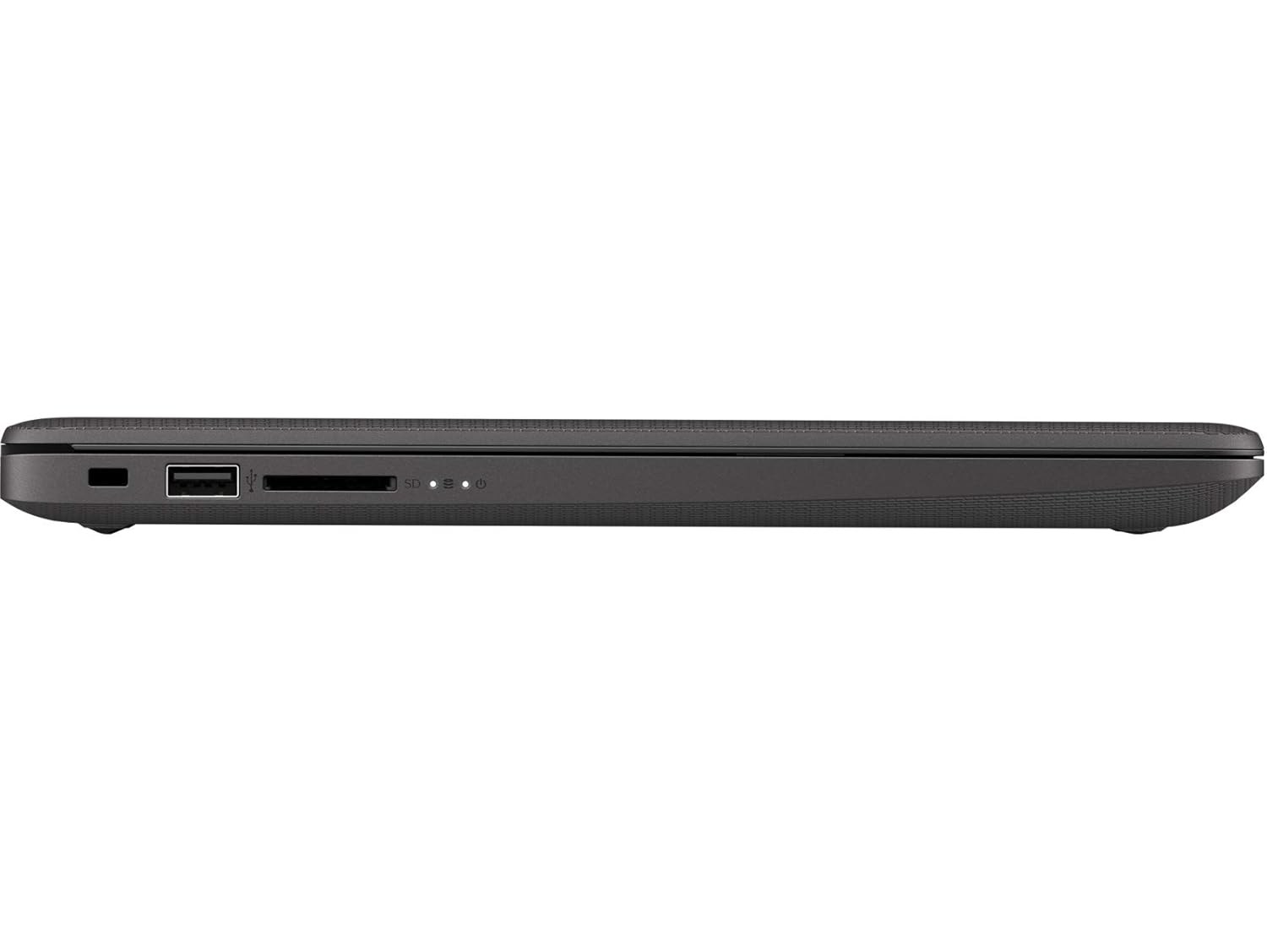
Image: Right side of the laptop, illustrating the USB port and media card reader.
- Коопсуздук кулпу слоту: For attaching a security cable.
- USB 2.0 порт: Стандарттык USB түзмөктөрүн туташтыруу үчүн.
- Multi-Format Digital Media Reader: SD, SDHC жана SDXC эстутум карталарын колдойт.
Жогорку жана арткы Views

Сүрөт: жогорудан төмөнгө view of the laptop with the lid closed, showing the HP logo.

Сүрөт: бурчтуу view of the laptop's back, highlighting the textured finish and HP logo.
The top cover features the HP logo. The back of the laptop is designed for durability and aesthetics.
Жайгашуу
- Туташуу кубаты: Plug the AC power adapter into the laptop's AC power connector and then into a wall outlet.
- Баштапкы күйгүзүү: Open the laptop lid and press the power button. The laptop will begin its initial boot sequence.
- Операциялык системаны орнотуу: Windows 10 Pro орнотуусун аяктоо үчүн экрандагы көрсөтмөлөрдү, анын ичинде тилди тандоону, тармакка туташууну жана колдонуучу аккаунтун түзүүнү аткарыңыз.
Иштеп жатат
Power Management
- Күйгүзүү: Баскычтоптун палубасында жайгашкан кубат баскычын басыңыз.
- Өчүрүү: Баштоо баскычын чыкылдатып, андан кийин Кубат > Өчүрүү.
- Уйку режими: Click the Start button, then Power > Sleep, or close the laptop lid.
Баскычтоп жана сенсордук такта
- Баскычтоп: Use the integrated keyboard for typing. Function keys (F1-F12) provide shortcuts for various system functions when pressed with the Fn key.
- Сенсордук такта: The touchpad supports multi-touch gestures for navigation, scrolling, and zooming. Refer to Windows settings for customization.
Байланыш
- Wi-Fi: Connect to wireless networks via the Realtek RTL8822CE 802.11a/b/g/n/ac (2x2) Wi-Fi adapter. Access Wi-Fi settings through the Windows taskbar.
- Bluetooth: Pair Bluetooth 5 compatible devices such as headphones or mice. Manage Bluetooth devices in Windows settings.
- Тышкы дисплейлер: Connect an external monitor or projector using the HDMI 1.4b port. Press Windows баскычы + P to manage display modes.
Техникалык тейлөө
- Тазалоо: Бир аз жумшак, түксүз кездемени колдонуңуз dampened with water or a screen cleaner to clean the display and exterior surfaces. Avoid harsh chemicals.
- Батареяга кам көрүү: To prolong battery life, avoid extreme temperatures. Periodically allow the battery to discharge partially before recharging.
- Программалык камсыздоо жаңыртуулары: Оптималдуу аткарууну жана коопсуздукту камсыздоо үчүн Windows жаңыртууларын жана HP драйверинин жаңыртууларын дайыма текшерип, орнотуп алыңыз.
- Маалыматтын камдык көчүрмөсү: Дайыма маалыматтын жоголушун алдын алуу үчүн тышкы дискке же булут сактагычка маанилүү маалыматтардын камдык көчүрмөсүн сактоо.
Проблемаларды чечүү
Бул бөлүмдө HP 240 G7 ноутбугуңуз менен кездешиши мүмкүн болгон жалпы көйгөйлөр каралат.
System Performance Issues
- Жай аткаруу: If the system feels slow, check for background applications consuming resources. Ensure sufficient free space on the hard drive. Consider upgrading RAM if performance remains an issue for your usage.
- Laptop Not Booting: Ensure the power adapter is securely connected and the battery has sufficient charge. Try performing a hard reset by holding the power button for 15 seconds. If the issue persists, contact HP Support.
Дисплей жана графика
- Whitish/Dull Screen: Adjust display brightness and contrast settings in Windows. Ensure display drivers are up to date. Note that the display resolution is 1366 x 768, which may appear less sharp compared to higher-resolution screens.
- Дисплей жок: If the screen is black, try connecting an external monitor to verify if the issue is with the laptop's internal display. Restart the laptop.
Ашыкча ысып кетүү
- Ашыкча ысык: Ensure the laptop's vents are not obstructed. Use the laptop on a hard, flat surface to allow for proper airflow. Avoid operating in direct sunlight or hot environments. If a specific area, like the palm rest, feels excessively hot, this could indicate internal component heat. Ensure all system drivers and BIOS are updated.
Кошумча жардам алуу үчүн, HP колдоо бөлүмүнө кайрылыңыз webсайтка же кардарларды тейлөөгө кайрылыңыз.
Техникалык шарттар
| Өзгөчөлүк | Деталь |
|---|---|
| Модель аты | HP 240 G7 |
| Элемент моделинин номери | 1S5F1PA#ACJ |
| Процессор | Intel Core i3-1005G1 (1.2 GHz base, up to 3.4 GHz with Intel Turbo Boost, 4 MB L3 Cache, 2 Cores) |
| RAM | 4 ГБ DDR4-2666 SDRAM (1 x 4 ГБ) |
| Сактагыч | 1 TB 5400 RPM SATA HDD |
| Дисплей | 14-inch Diagonal, HD (1366 x 768), Anti-glare, 220 Nits, 45% NTSC |
| Графика | Intel UHD графикасы |
| Операция системасы | Windows 10 Pro |
| Зымсыз байланыш | Realtek RTL8822CE 802.11a/b/g/n/ac (2x2) Wi-Fi and Bluetooth 5 Combo |
| Порттар | 2x USB 3.1 Gen 1, 1x USB 2.0, 1x HDMI 1.4b, 1x RJ-45, 1x Headphone/Microphone Combo, 1x AC Power, 1x Multi-Format Digital Media Reader |
| Өлчөмдөрү (W x D x H) | 33.5 x 23.4 x 1.99 см |
| Салмагы | 1.52 кг |
| Батарея | Lithium Battery, 4.9 Watt Hours |
Кепилдик жана колдоо
Your HP 240 G7 Laptop comes with a standard manufacturer's warranty. Please refer to the warranty documentation included in your package for specific terms and conditions.
Техникалык колдоо, драйверлерди жүктөп алуу же тейлөө боюнча суроолор үчүн, расмий HP колдоо кызматына кайрылыңыз website or contact HP customer service. You can find more information and resources on the Amazonдагы HP дүкөнү or the main HP webсайт.