1. Киришүү
This manual provides detailed instructions for the installation, operation, and maintenance of your LUMI PRO Universal PANNING Motorized TV Wall Mount, model PLB-M03G. This electric wall mount is designed to automatically move your TV, offering optimal viewing angles with the convenience of remote control.
The PLB-M03G allows your television to swing out up to 90 degrees, enabling you to find the perfect viewing position from various locations within your room. Its innovative design includes a learn mode function, allowing integration with your existing TV remote for seamless control.
2. Коопсуздук маалыматы
Please read all instructions carefully before installation and use. Failure to do so may result in personal injury or property damage. Keep this manual for future reference.
- Ensure the wall structure can support the combined weight of the mount and your television.
- Тоонун максималдуу салмак сыйымдуулугунан ашпаңыз.
- Use only the provided mounting hardware. If any parts are missing or damaged, contact customer support.
- Орнотуу учурунда балдарды жана үй жаныбарларын алыс кармаңыз.
- Орнотууну өзгөртүүгө аракет кылбаңыз.
- Ensure all cables are properly managed to prevent pinching or damage during movement.
3. Продукциянын өзгөчөлүктөрү
- Күчтүү мотор: Engineered for stable, strong, and durable performance.
- Кабелдик башкаруу: Integrated system to elegantly conceal cables attached to the display.
- Built-In Level Adjustment: Ensures precise and perfect positioning of your television.
- Programmable Memory Settings: Allows for presetting favorite viewing positions for ease of use and ideal angle recall.
- Automatic Panning: TV automatically swings out up to 90 degrees with remote control.
4. Пакеттин мазмуну
Сураныч, орнотууну баштоодон мурун бардык компоненттер бар экендигин текшериңиз:
- Motorized TV Wall Mount Assembly
- Remote Controller
- Монтаждоочу аппараттык комплект (бурамалар, анкерлер, шайбалар, бөлгүчтөр)
- Кубаттуу адаптер
- Instruction Manual
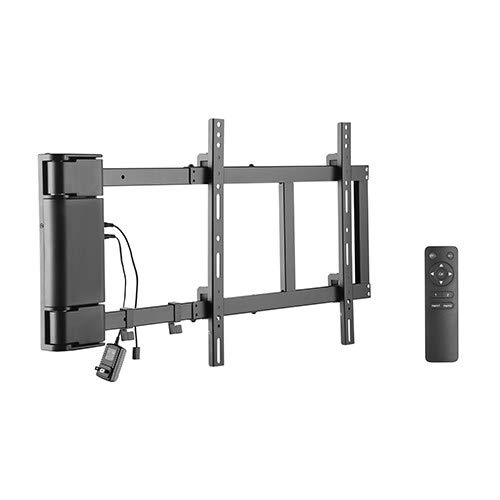
Figure 4.1: The LUMI PRO Motorized TV Wall Mount (PLB-M03G) and its accompanying remote control. The image displays the main mount assembly, including the motorized arm and the separate handheld remote.
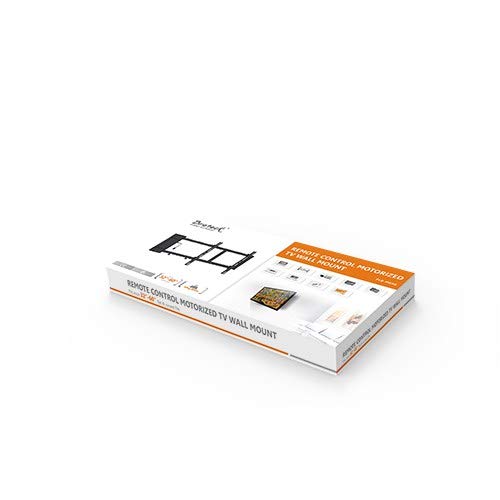
Figure 4.2: The retail packaging for the LUMI PRO Motorized TV Wall Mount. The box features an image of the mount and highlights key features, indicating a complete product package.
5. Орнотуу жана орнотуу
Professional installation is recommended for optimal safety and performance. Ensure you have the necessary tools (drill, stud finder, level, screwdriver) before starting.
5.1 Дубалды даярдоо
- Locate suitable wall studs or use appropriate anchors for concrete/brick walls.
- Mark the desired mounting height and position on the wall. Use a level to ensure accuracy.
5.2 Mount Assembly and Wall Attachment
- Attach the wall plate of the mount to the marked positions using the provided screws and anchors. Ensure it is securely fastened and level.
- Assemble any necessary components of the motorized arm as per the detailed diagrams in the included paper manual.
5.3 Сыналгы кронштейнинин тиркемеси
- Attach the TV brackets to the back of your television using the appropriate VESA screws and spacers. Ensure the brackets are centered and securely tightened.
- Carefully lift the TV and hook the TV brackets onto the mount's arms. Secure the TV to the mount using the safety screws or locking mechanisms.
5.4 Кабель туташтыруу
- Connect the power adapter to the motorized mount and plug it into a power outlet.
- Route all TV and mount cables through the integrated cable management system to ensure they are tidy and protected during movement.
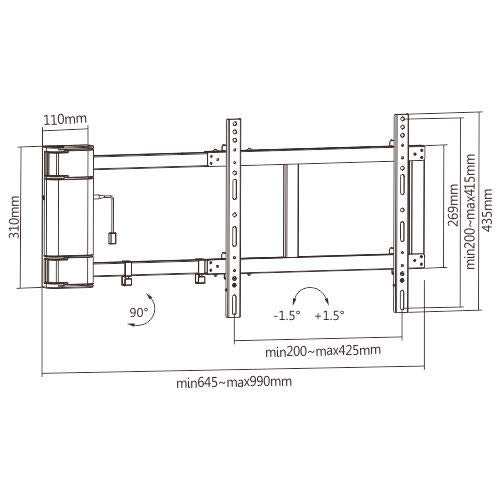
Figure 5.1: Technical drawing illustrating the dimensions of the LUMI PRO Motorized TV Wall Mount. Key measurements such as height (310mm), width (min 645mm - max 990mm), and VESA compatibility ranges (min 200mm - max 425mm horizontal, min 200mm - max 415mm vertical) are shown, along with the 90-degree panning capability.
6. Иштөө нускамалары
The PLB-M03G mount is designed for intuitive operation using the included remote control.
6.1 Негизги кыймыл
- басыңыз 'OUT' button on the remote to extend the TV from the wall.
- басыңыз 'IN' button to retract the TV towards the wall.
- The mount will automatically stop at its fully extended or retracted positions.
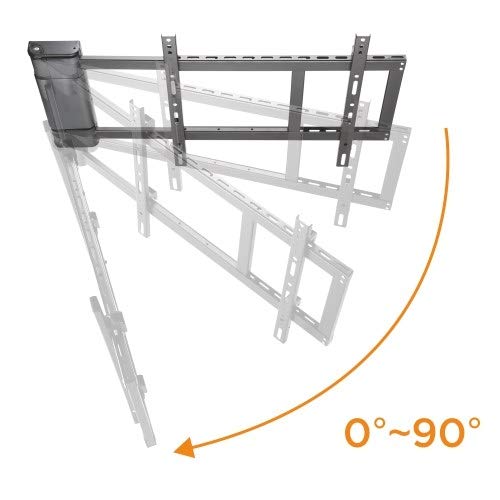
Figure 6.1: Illustration demonstrating the 0 to 90-degree panning motion of the LUMI PRO Motorized TV Wall Mount. The image shows the mount extending and rotating, highlighting its ability to adjust the viewing angle significantly.
6.2 Программалануучу эстутум орнотуулары
The mount features programmable memory settings to store your preferred viewпозициялар.
- Move the TV to your desired position using the 'OUT' or 'IN' buttons.
- Press and hold one of the numbered memory buttons (e.g., 'M1', 'M2') on the remote until you hear a beep or see an indicator light flash, confirming the position is saved.
- Сакталган позицияны кайра чакырып алуу үчүн, жөн гана тиешелүү эс тутум баскычын басыңыз.
6.3 Learn Mode Function (for TV Remote Integration)
The PLB-M03G can learn commands from your existing TV remote control.
- Refer to the specific instructions in the detailed paper manual for entering 'learn mode'.
- Follow the prompts to program the mount to respond to specific buttons on your TV remote for 'IN' and 'OUT' movements.
7. Техникалык тейлөө
Regular maintenance ensures the longevity and safe operation of your motorized TV wall mount.
- Тазалоо: монтажды жумшак, кургак чүпүрөк менен сүртүңүз. Абразивдүү тазалагычтарды же эриткичтерди колдонбоңуз.
- Текшерүү: Мезгил-мезгили менен бардык бурамалар менен байланыштарды текшерип туруңуз, алар бекем бойдон калууда.
- Кабелдик башкаруу: Ensure cables are not pinched or frayed, especially during movement. Adjust if necessary.
- Мотордун иштеши: Listen for any unusual noises during operation. If you notice anything abnormal, discontinue use and refer to the troubleshooting section or contact support.
8. Кыйынчылыктарды
If you encounter issues with your motorized TV wall mount, refer to the following common problems and solutions:
| Көйгөй | Мүмкүн себеп | Чечим |
|---|---|---|
| Mount does not move. | No power; Remote control battery low/dead; Remote not paired. | Check power connection; Replace remote batteries; Refer to manual for remote pairing instructions. |
| Mount moves erratically or stops. | Obstruction; Overload; Loose connection. | Check for obstructions; Ensure TV weight is within limits; Verify all connections are secure. |
| Алыстан башкаруу жооп бербей жатат. | Battery issue; Remote out of range; Interference. | Replace batteries; Move closer to the mount; Reduce potential interference sources. |
| Орнотуудан кийин сыналгы түз эмес. | Initial installation not level; Adjustment needed. | Use the built-in level adjustment feature to fine-tune the TV's horizontal position. |
Бул чечимдерди колдонуу аракетинен кийин көйгөй чечилбесе, кардарларды колдоо кызматына кайрылыңыз.
9. Техникалык шарттар
| Өзгөчөлүк | Спецификация |
|---|---|
| Бренд | LUMI |
| Модель номери | PLB-M03G |
| Монтаж түрү | Дубалга орнотуу |
| Кыймыл түрү | Swivel (Motorized Panning) |
| Материал | Металл |
| Максималдуу шайкеш өлчөмү | Up to 60 Inches (TV size) |
| Panning Angle | 90 градуска чейин |
| Деңгээлди тууралоо | Built-in, +/- 1.5 degrees |
| Кабель башкаруу | Ооба |
10. Кепилдик жана колдоо
Your LUMI PRO Universal PANNING Motorized TV Wall Mount (PLB-M03G) comes with a 3 жылдык кепилдик сатып алынган күндөн тартып. Бул кепилдик өндүрүш кемчиликтерин камтыйт жана нормалдуу колдонууда буюмдун материалдык жана жасалгалоо кемчиликтери жок экенин камсыз кылат.
For warranty claims, technical support, or any inquiries regarding your product, please contact LUMI customer service through the official brand website or your point of purchase. Please have your model number (PLB-M03G) and proof of purchase ready when contacting support.


