1. Киришүү
This manual provides essential information for the safe and effective use of your ProForm Sport 3.0 Treadmill. Please read all instructions thoroughly before assembly and operation. Retain this manual for future reference.
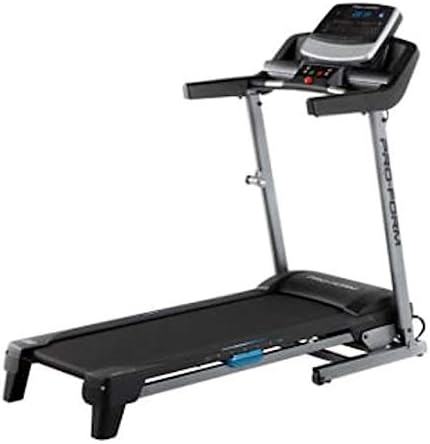
Image: The ProForm Sport 3.0 Treadmill, showcasing its overall design and console.
2. Коопсуздук боюнча маанилүү маалымат
To reduce the risk of serious injury, read the following important precautions before using the treadmill:
- Кандайдыр бир көнүгүү программасын баштаардан мурун доктурга кайрылыңыз.
- The treadmill is designed to support a maximum user weight of 125 килограмм (275 фунт).
- Recommended for users 15 жаш жана андан улуулар.
- Always attach the коопсуздук ачкычы to your clothing before starting the treadmill. The treadmill will stop if the safety key is disengaged.
- Иш учурунда балдарды жана үй жаныбарларын чуркоо жолунан алыс кармаңыз.
- Чуркоо жолун тегиз жерге коюңуз, анын артында кеминде 2 метр (6.5 фут) жана эки тарабында 0.5 метр (1.6 фут) бош орун калтырыңыз.
- Тийиштүү көнүгүү кийимин жана спорттук бут кийимди кийиңиз.
- Эгерде анын кубат шнуру же сайгычы бузулган болсо же ал туура иштебесе, чуркоо жолун иштетпеңиз.
3. Монтаждоо боюнча нускамалар
The ProForm Sport 3.0 Treadmill requires assembly. Please refer to the separate assembly guide included with your product for detailed, step-by-step instructions. Ensure all components listed in the assembly guide are present before beginning. A tool kit is included to assist with assembly.
The treadmill features a Space Saver design, allowing it to be folded for storage after use. Follow the assembly guide for instructions on how to properly fold and unfold the treadmill.
4. Иштөө нускамалары

Сүрөт: Жакын план view of the ProForm Sport 3.0 Treadmill console.
4.1 Күйгүзүү жана өчүрүү
- Connect the power cord to a grounded outlet. The treadmill operates on 9Vcc 2.0A.
- Locate the main power switch, usually near the front of the treadmill base, and flip it to the 'ON' position.
- To power off, flip the main power switch to 'OFF' and unplug the power cord.
4.2 Console Overview
The console features a 5-inch Multi-Color Display that shows workout metrics such as speed, incline, time, distance, and heart rate. It includes an audio port compatible with two 2-inch speakers for entertainment during your workout.
4.3 Машыгууну баштоо
- Бутуңузду каптал рельстерге коюп, чуркоо тилкесинин куруна кадам таштаңыз.
- тиркөө коопсуздук ачкычы clip to your clothing. Insert the safety key into its designated slot on the console.
- Press the 'START' button on the console. The belt will begin to move at a low speed.

Image: A user engaging in a workout on the ProForm Sport 3.0 Treadmill.
4.4 Ылдамдыкты жана жантайыңкылыкты жөндөө
- колдонуу Санариптик ылдамдыкты көзөмөлдөө buttons (usually '+' and '-') to adjust the belt speed from 0 - 10 MPH.
- колдонуу Digital Incline Control buttons to adjust the incline from 0% - 10%.
- Quick speed and incline buttons may also be available for rapid adjustments.
4.5 Алдын ала коюлган программаларды колдонуу
The treadmill includes 16 Pre-set Training Programs. Select a program from the console. The treadmill will automatically adjust speed and incline according to the program's profileЭкрандагы көрсөтмөлөрдү аткарыңыз.
4.6 Жүрөктүн кагышын көзөмөлдөө
The treadmill is equipped with an EKG Pulse Sensor. To monitor your heart rate, grasp the metal contacts on the handlebars firmly with both hands. Your heart rate will be displayed on the console after a few seconds.
5. Техникалык тейлөө
Үзгүлтүксүз тейлөө сиздин чуркоо жолуңуздун узак мөөнөттүү жана оптималдуу иштешин камсыз кылат.
- Тазалоо: Консольду жана башка беттерди жарнама менен сүртүңүзamp ар бир колдонуудан кийин кездеме. Абразивдүү тазалагычтарды же эриткичтерди колдонуудан алыс болуңуз.
- Белдик текшерүү: Periodically check the walking belt for wear and tear. Ensure the belt is centered and properly tensioned. Refer to the assembly guide for belt adjustment procedures.
- Майлоо: The walking belt may require lubrication over time. Consult your assembly guide or manufacturer's recommendations for the correct lubricant and application frequency.
- Компонентти текшерүү: Regularly inspect all nuts, bolts, and moving parts for tightness and proper function. Tighten any loose fasteners.
6. Кыйынчылыктарды
If you experience issues with your treadmill, refer to the following common problems and solutions:
| Көйгөй | Мүмкүн себеп | Чечим |
|---|---|---|
| Чуркоо тилкеси күйбөйт. | Power cord not plugged in; main power switch off; circuit breaker tripped. | Ensure power cord is securely plugged in. Turn main power switch to 'ON'. Check household circuit breaker. |
| Кур кыймылдабайт. | Safety key not inserted; motor overload; belt misalignment. | Insert the safety key fully. Reduce user weight if exceeding capacity. Refer to assembly guide for belt alignment. |
| Жүрөктүн кагышын так эмес өлчөө. | Hands not firmly on sensors; dry hands; interference. | Ensure firm, consistent contact with EKG pulse sensors. Moisten hands slightly if dry. Avoid electronic interference. |
| Иш учурунда адаттан тыш ызы-чуу. | Бош калган тетиктер; курдун сүрүлүүсү; мотордогу көйгөй. | Check and tighten all visible bolts and screws. Lubricate belt if necessary (refer to manual). If noise persists, contact support. |
7. Техникалык шарттар
| Модель номери | Спорт 3.0 |
| Мотор күчү | 2.5 HP |
| Максималдуу Колдонуучу Салмагы | 125 кг (275 фунт) |
| Ылдамдык диапазону | 0 - 10 MPH (Digital Control) |
| Эңкейүү диапазону | 0 - 10% (Digital Control) |
| Running белдик өлчөмдөрү | 16 x 50 дюйм (болжол менен 40.6 x 127 см) |
| Дисплей түрү | 5-inch Multi-Color LCD |
| Алдын ала коюлган программалар | 16 |
| Амортизация системасы | ProShoxTM Plus |
| Frame Material | Steel Alloy |
| Продукциянын өлчөмдөрү (L x W x Y) | 170 x 70 x 30 см (болжол менен 67 x 27.5 x 11.8 дюйм) |
| Продукт Салмагы | 50 кг (110 фунт) |
| Power талап | 9Vcc 2.0A (Cable Eléctrico) |
| Камтылган компоненттер | Power cable, Tool kit, Space Saver system, ProShoxTM Plus cushioning, Safety key braking system |
8. Кепилдик жана колдоо
For information regarding your product's warranty, please refer to the warranty card included with your purchase or visit the official ProForm website. If you require technical assistance, replacement parts, or have questions not covered in this manual, please contact ProForm customer support directly.
Extended protection plans may be available for purchase separately. Please consult your retailer for details on available extended warranty options.


