1. Киришүү
Продукт бүттүview
The AfterShokz OpenMove are bone conduction headphones designed for comfort and situational awareness. They transmit audio through your cheekbones, leaving your ears open to ambient sounds. The headphones feature Bluetooth 5.0 connectivity and multiple EQ modes to optimize your listening experience for various activities.

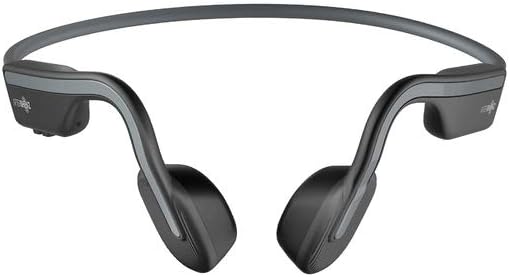
1-сүрөт: бурчтуу view of the AfterShokz OpenMove bone conduction headphones in slate grey, showcasing their lightweight, open-ear design.
Пакеттин мазмуну
Пакетиңизде бардык буюмдар бар экенин текшериңиз:
- AfterShokz OpenMove Headphones
- USB-C заряддоо кабели
- Кулакчалар
- Dedicated Pouch
- User Manual (English version)
2. Орнотуу
Наушниктерди заряддоо
Before initial use, fully charge your headphones to ensure optimal battery performance.
- Connect the USB-C charging cable to the charging port located on the headphones.
- Кабелдин экинчи учун USB кубат адаптерине (кошумча эмес) же компьютердин USB портуна туташтырыңыз.
- The LED indicator will illuminate to show the charging status. A complete charge typically takes approximately 2 hours.
Bluetooth түзмөгү менен жупташуу
Follow these steps to connect your headphones to your smartphone, tablet, or other Bluetooth-enabled device:
- Наушниктердин өчүрүлгөнүн текшериңиз.
- Press and hold the power button for 5-7 seconds until the LED indicator flashes red and blue alternately. This indicates the headphones are in pairing mode.
- Түзмөгүңүздө Bluetooth иштетиңиз жана жеткиликтүү түзмөктөрдү издеңиз.
- Select "OpenMove by AfterShokz" from the list of detected devices.
- Ийгиликтүү жупташтырылгандан кийин, LED индикатору көк түскө айланат.
3. Иштөө нускамалары
Наушник башкаруу элементтери
The AfterShokz OpenMove headphones feature intuitive controls for managing audio playback and calls.

2-сүрөт: деталдуу view of the control buttons located on the right transducer arm, including volume and multi-function controls.
| Баскыч/Функция | Акция |
|---|---|
| Кубат баскычы | Press and hold to Power On/Off; Single press to Play/Pause audio; Single press to Answer/End Call. |
| Үнүн жогорулатуу (+) | Single press to Increase Volume; Long press to skip to Next Track. |
| Үнүн азайтуу (-) | Single press to Decrease Volume; Long press to go to Previous Track. |
| Multi-function Button (often combined with power) | Double press to Activate Voice Assistant; Triple press to Change EQ Mode. |
EQ режимдери
The OpenMove headphones offer three distinct equalizer modes to optimize audio for different content and listening environments.
- Стандарттык режим: This mode is suitable for general outdoor listening, providing a balanced audio experience.
- Үн режими: Designed to enhance human voices, making it ideal for listening to audiobooks, podcasts, and radio broadcasts.
- Earplug Mode: When used with the included earplugs, this mode provides a more immersive listening experience. It is suitable for noisy environments such as airplanes or trains, or for enjoying movies and games at home.
Наушник тагынуу
For optimal sound quality and comfort, position the headphones correctly.
Сүрөт 3: Алдыңкы view of the AfterShokz OpenMove headphones, illustrating how the band rests behind the head and the transducers sit on the cheekbones.
Position the transducers on your cheekbones, just in front of your ears. The flexible band should rest comfortably behind your head. Ensure a snug fit for optimal sound transmission and clarity.
4. Техникалык тейлөө
Тазалоо
Наушниктериңиздин узак мөөнөттүү жана гигиенасын сактоо үчүн:
- Наушниктерди жумшак менен сүртүңүз, гamp кездеме.
- Do not use harsh chemicals or abrasive cleaners, as these can damage the materials.
- Ensure the charging port is completely dry before connecting the charging cable.
Сактагыч
When not in use, store your headphones properly:
- Store the headphones in the dedicated pouch provided to protect them from dust, scratches, and minor impacts.
- Avoid storing the headphones in environments with extreme temperatures (very hot or very cold) or high humidity.
5. Кыйынчылыктарды
Жалпы маселелер жана чечимдер
If you encounter any problems with your AfterShokz OpenMove headphones, refer to the table below for potential solutions.
| Маселе | Мүмкүн чечим |
|---|---|
| Кулакчындар күйбөйт. | Charge the headphones fully. Ensure the charging cable is securely connected. |
| Наушниктен үн чыкпайт. | Ensure the headphones are powered on and successfully paired with your device. Check the volume level on both the headphones and your connected device. |
| Түзмөк менен жупташтыруу мүмкүн эмес. | Ensure the headphones are in pairing mode (LED flashing red and blue). Turn off and then on Bluetooth on your device. Try restarting both the headphones and your device. |
| Үн сапаты начар же үнү төмөн. | Adjust the position of the transducers on your cheekbones for a better fit. Experiment with different EQ modes. Ensure there are no obstructions between the headphones and your device. |
| Наушник заряддалбай жатат. | Verify that the USB-C charging cable is properly connected to both the headphones and a working power source. Try a different USB port or power adapter. |
6. Техникалык шарттар
Техникалык мүнөздөмөлөр
Detailed technical specifications for the AfterShokz OpenMove headphones:
| Өзгөчөлүк | Спецификация |
|---|---|
| Модель номери | AFT-EP-000022 |
| Динамик түрү | Сөөк өткөргүчтөрү |
| Frequency Response | 20Гц - 20,000Гц |
| Сезимталдуулук | 100 ± 3дБ |
| Микрофондун сезгичтиги | -40дБ ± 3дБ |
| Bluetooth версиясы | 5.0 |
| Колдоого алынган Profiles | A2DP, AVRCP, HSP, HFP |
| Зымсыз диапазон | 10 метрге чейин (33 фут) |
| Батареянын иштөө мөөнөтү | 6 саатка чейин |
| Заряддоо убактысы | Болжол менен 2 саат |
| Салмагы | 29 грамм (1.02 унция) |
| Сууга туруктуулук деңгээли | Суу өткөрбөйт |
| Байланыш технологиясы | Зымсыз (Bluetooth) |
| Камтылган компоненттер | Headphones, USB-C Cable, Earplugs, Pouch |
7. Кепилдик жана колдоо
Кепилдик маалымат
For detailed information regarding the product warranty, including terms, conditions, and duration, please refer to the official AfterShokz website or the warranty card included with your purchase. It is recommended to retain your proof of purchase for warranty claims.
Кардарларды колдоо
If you encounter any issues or have questions not addressed in this manual, please visit the AfterShokz support page on their official website. You can also contact their customer service team for further assistance.


