1. Киришүү
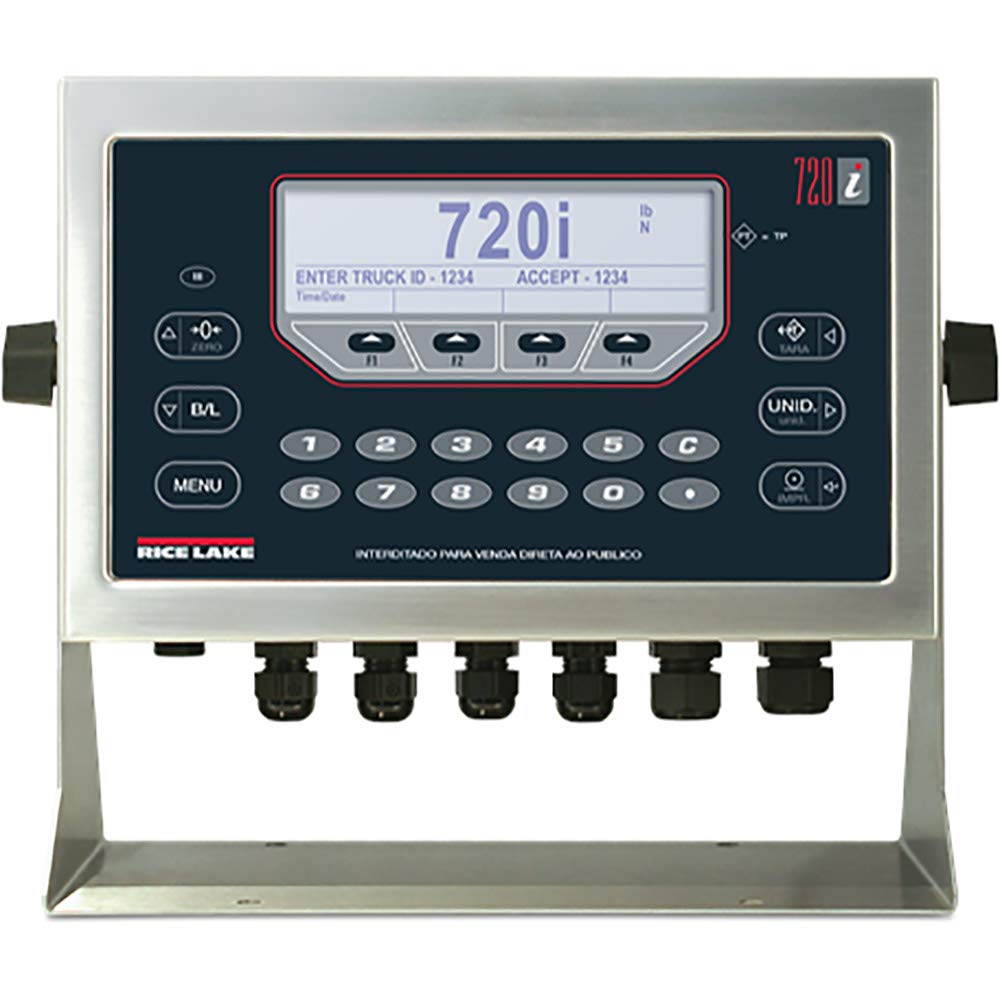
This manual provides comprehensive instructions for the installation, operation, and maintenance of the Rice Lake 720i Universal Indicator. The 720i is a programmable weight indicator/controller designed for industrial applications requiring batch formulation, inventory management, and traceability. It features a robust NEMA Type 4X/IP66 stainless steel enclosure and a user-friendly operator keypad.
Please read this manual thoroughly before operating the device to ensure proper function and safety.
2. Коопсуздук маалыматы
Ар дайым төмөнкү коопсуздук чараларын сактаңыз:
- Ensure the power supply (85-260VAC) matches the device requirements.
- Do not open the enclosure unless instructed by qualified personnel.
- Protect the device from extreme temperatures and moisture beyond its NEMA Type 4X/IP66 rating.
- Тейлөө же орнотуу процедураларын аткаруудан мурун электр кубатын өчүрүңүз.
3. Продукт бүтүп калдыview жана компоненттер
The Rice Lake 720i Universal Indicator is housed in a durable stainless steel enclosure, designed for harsh industrial environments. Key features include:
- Дисплей: 5.3 in x 1.5 in LCD display for clear data visualization.
- Баскычтоп: 22-key membrane panel with tactile feedback for precise input.
- Байланыш: Two full duplex serial ports for peripheral equipment integration.
- Internal Channels: Eight channels on the CPU board for versatile applications.
- Корпусу: NEMA Type 4X/IP66 rated stainless steel for protection against dust and water.
4. Орнотуу жана орнотуу
4.1 Пакеттен чыгаруу
Carefully remove the 720i indicator from its packaging. Inspect for any signs of damage during transit. Retain all packaging materials for future transport or storage.
4.2 Монтаждоо
The 720i indicator can be mounted in universal or panel-mount enclosure styles. Ensure the mounting surface is stable and capable of supporting the device's weight (approximately 9.5 pounds). Refer to the specific mounting kit instructions for detailed steps.
4.3 Электр байланыштары
- Электр камсыздоо: Connect the indicator to an 85-260VAC power source. Ensure proper grounding.
- Жүктөлгөн клетка байланыштары: Connect load cells to the appropriate terminals. The 720i supports eight channels on its CPU board.
- Сериялык порттор: Utilize the two full duplex serial ports for connecting peripheral devices such as printers, remote displays, or computers.
Абайлаңыз: All electrical connections should be performed by a qualified technician to prevent damage to the unit or personal injury.
5. Иштөө нускамалары
The 720i indicator features a 22-key membrane keypad for operation. The LCD display provides real-time data and operator prompts.
5.1 Негизги тараза
- Күйгүзүү: Turn on the indicator. The display will show a self-test sequence, then the current weight.
- Нөлдөө: басыңыз НӨЛ button to set the display to zero when the scale is empty.
- Тартуу: Place an empty container on the scale. Press the ТАРА button to subtract the container's weight. The display will show zero.
- Тараза: Place the item to be weighed on the scale. The display will show the net weight.
5.2 Batching Operations
The 720i supports configurable batch engine or ProAction software for batching. Refer to the software manual for detailed programming instructions.
- Use the numeric keypad (0-9) and C (Clear) button for data entry.
- Follow on-screen prompts for entering batch parameters, such as "ENTER TRUCK ID" or "ACCEPT".
- The МЕНЮ button provides access to advanced settings and batch configurations.
5.3 Бирдикти которуу
басыңыз UNID button to cycle through available weight units (e.g., pounds (lb), kilograms (kg), Newtons (N)).
6. Техникалык тейлөө
6.1 Тазалоо
Дат баспас болоттон жасалган корпусту жарнама менен тазалоого болотamp cloth and mild detergent. Avoid abrasive cleaners or solvents that could damage the display or keypad membrane.
6.2 Калибрлөө
Periodic calibration is essential for maintaining accuracy. Refer to the technical service manual or contact authorized service personnel for calibration procedures.
6.3 Текшерүү
Regularly inspect all cables and connections for wear or damage. Ensure the enclosure seals are intact to maintain the NEMA Type 4X/IP66 rating.
7. Кыйынчылыктарды
| Көйгөй | Мүмкүн себеп | Чечим |
|---|---|---|
| Indicator does not power on. | Электр менен камсыздоо жок же туташуу бузук. | Check power cable and source. Ensure correct voltage (85-260VAC). |
| Туура эмес салмак көрсөткүчтөрү. | Needs calibration, damaged load cell, or unstable environment. | Perform calibration. Inspect load cells and connections. Ensure stable operating conditions. |
| Ариптакта жооп бербей жатат. | Keypad membrane damage or internal fault. | Clean keypad surface. If problem persists, contact technical support. |
| Дисплей ката жөнүндө билдирүүнү көрсөтөт. | System error or overload. | Refer to the specific error code in the technical manual. Remove any overload. |
For issues not listed here, please contact Rice Lake technical support.
8. Техникалык шарттар
- Модел: 720i
- Бөлүмдүн номери: 115448
- Корпусу: NEMA Type 4X/IP66, Stainless Steel
- Дисплей: 5.3 in x 1.5 in LCD
- Баскычтоп: 22 баскычтуу мембраналык панел, тактилдик сезим
- Сериялык порттор: 2 толук дуплекс
- CPU Board Channels: 8
- Кубат киргизүү: 85-260VAC
- Продукциянын өлчөмдөрү: 10.5 x 5.25 x 9.66 дюйм
- Элемент Салмагы: 9.5 фунт
- Шайкештик: ROHS Compliant, NTEP
9. Кепилдик жана колдоо
For warranty information, please refer to the documentation provided with your purchase or visit the official Rice Lake website. Technical support can be reached through the contact information available on the Rice Lake webсайт.
Райс көлүнүн тараза системалары
www.ricelake.com


