1. Продукт бүтүп калдыview
The Vetroo 120mm ARGB & PWM Cooling Fans are designed to provide efficient cooling and vibrant lighting for your computer system. This 3-pack includes high-performance fans with a controller hub, offering both Addressable RGB (ARGB) synchronization and Pulse Width Modulation (PWM) fan speed control.
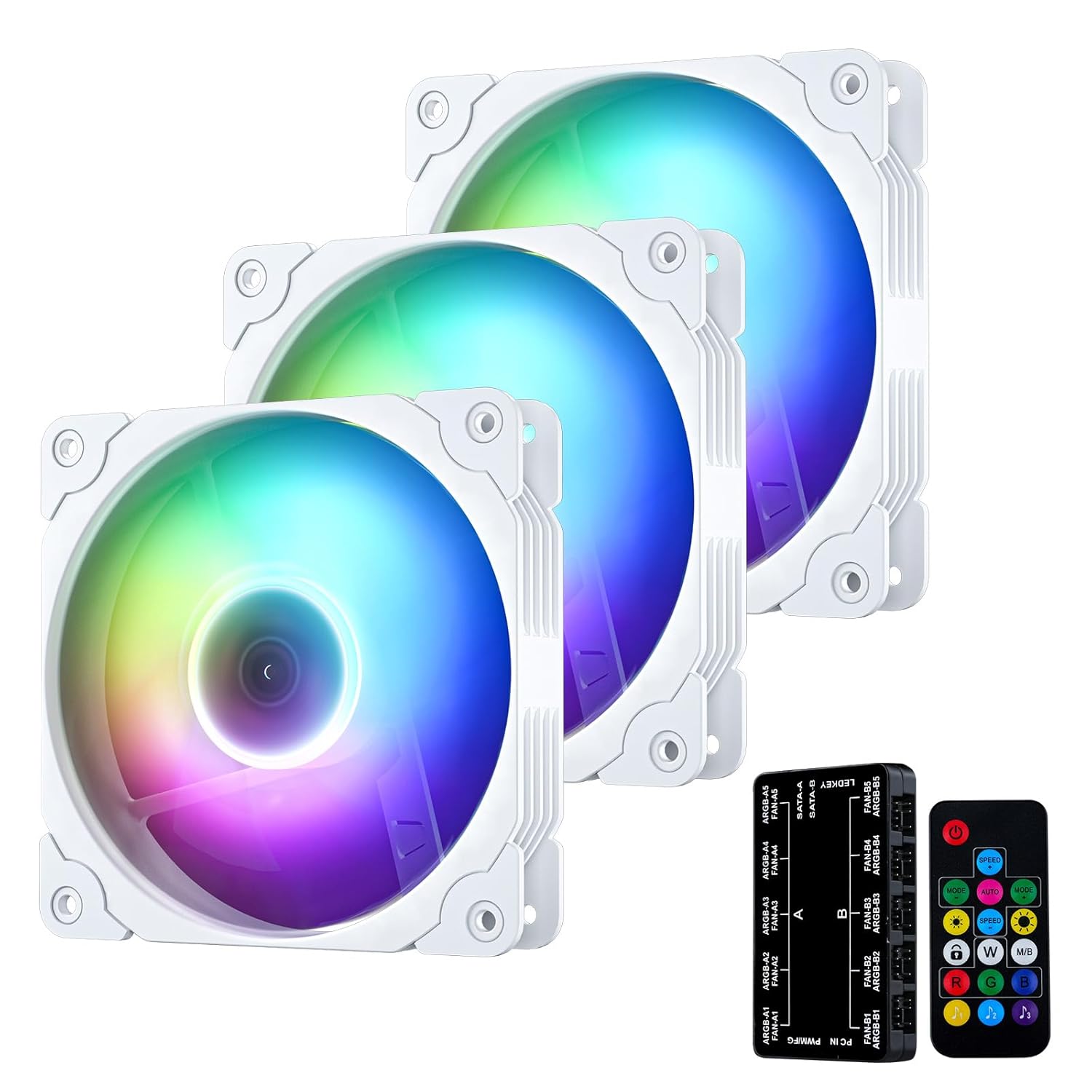
Image 1.1: Vetroo 3-Pack 120mm ARGB & PWM Cooling Fans, including the fans, controller hub, and remote control.
Негизги өзгөчөлүктөр төмөнкүлөрдү камтыйт:
- ARGB Sync: The RGB lighting can be synchronized with the motherboard via a 5V 3-Pin port, allowing for customizable lighting effects.
- PWM Support: Fans automatically adjust speed based on chassis temperature, optimizing cooling efficiency and reducing power consumption.
- Better Airflow: Nine fan blades are engineered to deliver high air volume, ensuring optimal cooling and system stability.
- Тынч операция: Eight vibration-damping rubber pads minimize noise and turbulence for a quieter computing experience.
- Узак өмүр: Wear-resistant hydraulic bearings contribute to quiet operation and an extended lifespan of up to 50,000 hours.

Сүрөт 1.2: Жакын пландан view of the nine-blade fan design, optimized for high airflow.

Image 1.3: An illuminated Vetroo fan showcasing its Addressable RGB lighting capabilities.
2. Пакеттин мазмуну
Төмөндө тизмеленген нерселердин баары пакетиңизге камтылганын текшериңиз:
- Vetroo 120mm ARGB & PWM Cooling Fans (3 units)
- Controller Hub
- Алыстан башкаруу
- Монтаждоо бурамалар
- Cables for connection (PWM, ARGB, SATA power)

Image 2.1: All components included in the Vetroo 3-pack fan kit.
3. Орнотуу колдонмосу
Follow these steps to properly install and connect your Vetroo cooling fans:
- Күйөрмандарды орнотуу: Securely attach the fans to your PC case using the provided mounting screws. Ensure proper airflow direction (intake or exhaust) as desired for your system.
- Connecting Fans to Controller Hub: Connect each fan's 4-pin PWM cable and 3-pin ARGB cable to the corresponding ports on the controller hub. The controller supports up to 10 fans.
- Connecting Controller Hub to Motherboard:
- Connect the controller hub's PWM cable to a 4-pin fan header on your motherboard (e.g., CPU_FAN or SYS_FAN). This allows the motherboard to control fan speeds.
- Connect the controller hub's 5V 3-pin ARGB cable to a compatible 5V Addressable RGB header on your motherboard. Note: Do NOT connect to a 12V RGB header, as this may damage the LEDs.
- Powering the Controller Hub: Connect the SATA power cable from your power supply unit (PSU) to the SATA power input on the controller hub. The controller requires SATA power for operation.
- Алыстан башкарууну орнотуу: The included remote control is pre-paired with the controller hub. Ensure the controller is powered on to use the remote.

Image 3.1: Detailed connection diagram for the Vetroo fan system, illustrating connections to the motherboard and power supply.

Image 3.2: Vetroo fans properly installed within a PC case, demonstrating their aesthetic integration and lighting.
4. Иштөө нускамалары
Once installed, you can control your Vetroo fans and lighting using either your motherboard's software or the included remote control.
4.1 Желдетүүчү ылдамдыкты көзөмөлдөө (PWM)
The fans support PWM, allowing for dynamic speed adjustment based on system temperature. This can be managed through your motherboard's BIOS settings or dedicated fan control software.

Image 4.1: Explanation of PWM smart control, showing dynamic speed adjustment between 800 to 1300 RPM for quiet operation and maximized airflow.
4.2 RGB жарыкты башкаруу
ARGB жарыктандыруусун эки жол менен башкарууга болот:
- Энелик плата программасы: If connected to a compatible 5V 3-pin ARGB header, use your motherboard's RGB software (e.g., ASUS Aura Sync, MSI Mystic Light Sync, Gigabyte RGB Fusion) to customize lighting effects, colors, and synchronization with other components.
- Алыстан башкаруу: Use the provided remote control to adjust lighting effects, colors, and brightness. The remote also allows switching between motherboard control and remote control modes.

Image 4.2: Functions of the remote controller, including power, speed adjustment, mode selection, luminosity, monochromatic shortcuts, and music modes.
5. Техникалык тейлөө
To ensure optimal performance and longevity of your Vetroo cooling fans, follow these simple maintenance guidelines:
- үзгүлтүксүз тазалоо: Periodically clean the fan blades and housing to prevent dust buildup, which can impede airflow and increase noise. Use compressed air or a soft, dry cloth.
- Байланыштарды текшерүү: Ensure all cables (PWM, ARGB, SATA power) remain securely connected to the fans, controller hub, and motherboard.
- Тоскоолдуктарды болтурбоо: Make sure there are no cables or other components obstructing the fan blades' rotation.
The hydraulic bearings are designed for long-term, maintenance-free operation, providing a service life of up to 50,000 hours.
6. Кыйынчылыктарды
If you encounter issues with your Vetroo cooling fans, refer to the following common problems and solutions:
| Көйгөй | Мүмкүн себеп | Чечим |
|---|---|---|
| Күйөрмандар айланбайт | No power to controller hub; Loose PWM cable; Faulty fan. | Ensure SATA power cable is securely connected to the controller and PSU. Check PWM cable connection to motherboard. Test individual fans if possible. |
| RGB жарыктандыруу иштебей жатат же түстөрү туура эмес | Incorrect ARGB header (12V instead of 5V); Loose ARGB cable; Software conflict; Remote control issue. | Verify ARGB cable is connected to a 5V 3-pin header. Check cable connections. Restart motherboard RGB software. Try using the remote control to switch modes. |
| Fans are too loud | High fan speed setting; Dust buildup; Obstruction. | Adjust fan speed settings in BIOS or motherboard software. Clean fan blades. Ensure no cables are hitting the fan blades. |
| Вентилятордун ылдамдыгын көзөмөлдөөгө болбойт | PWM cable not connected; Motherboard header not configured for PWM. | Ensure PWM cable is securely connected to a 4-pin PWM header. Check motherboard BIOS settings to confirm the header is set to PWM mode. |
If the issue persists after trying these solutions, please contact Vetroo customer support for further assistance.
7. Техникалык шарттар
Detailed technical specifications for the Vetroo 120mm ARGB & PWM Cooling Fans:
| Өзгөчөлүк | Спецификация |
|---|---|
| Модель номери | IB120 |
| Fan өлчөмдөрү | 125mm x 125mm x 25mm (approx. 4.92"L x 0.98"W x 4.92"H) |
| Продукциянын өлчөмдөрү (упаковка) | 14.13 x 10.43 x 2.72 дюйм |
| Элемент Салмагы | 5.29 унция |
| Fan Speed | 800 - 1300 RPM (PWM менен башкарылат) |
| Аба агымы | 35.2 CFM (МАКСИМАЛДУУ) |
| Ызы-чуу деңгээли | 32 дБ |
| Подшипник түрү | Гидравликалык подшипник |
| Өмүр | 50,000 саат |
| Power Connector | 4-Pin (Сеул) |
| RGB туташтыргычы | 5V 3-Pin ARGB |
| Тtage | 12 вольт (ток) |
| Ватtage | 1.92 ватт |
| Материал | Rubber (vibration pads) |
| Шайкеш түзмөктөр | Gaming Console (PC) |
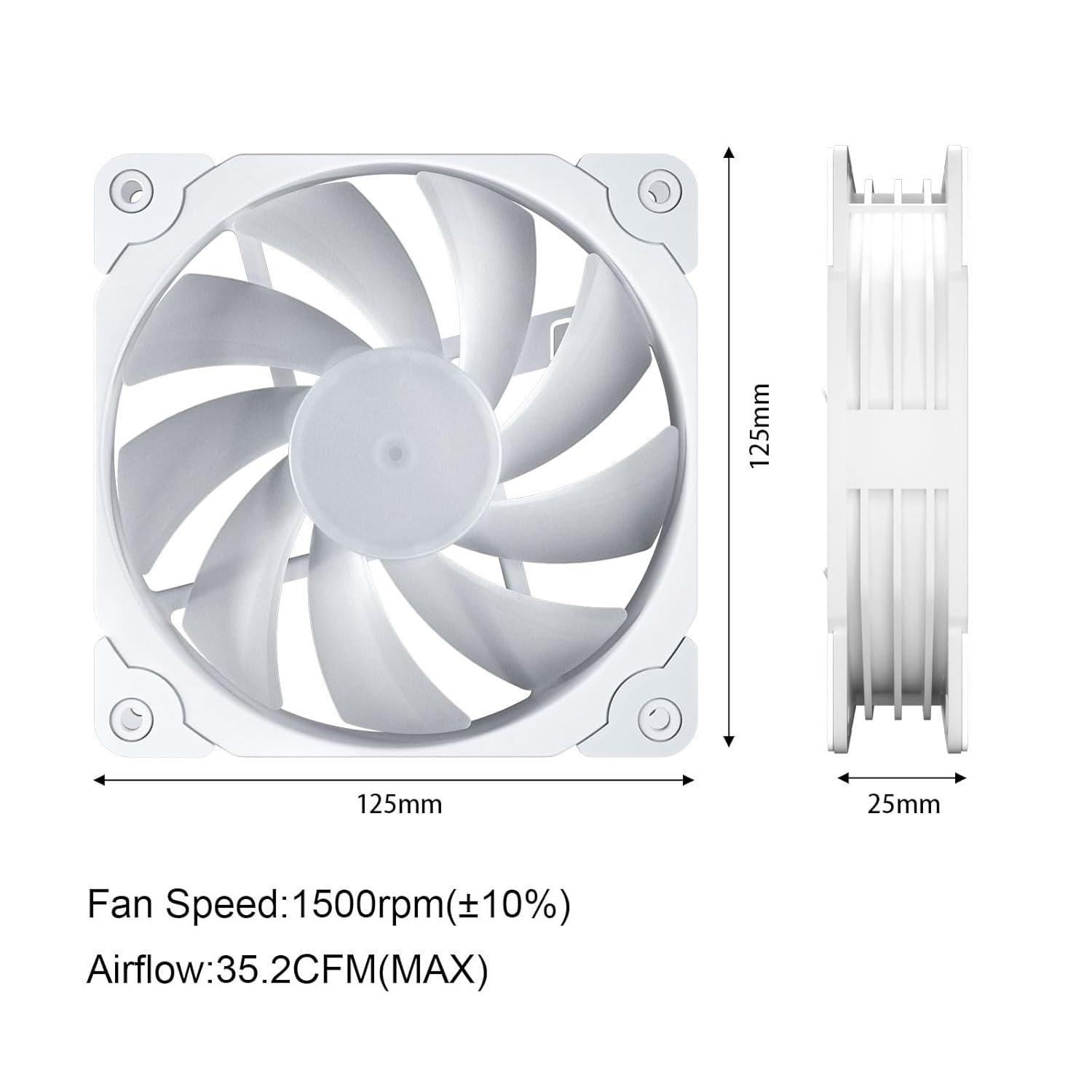
Image 7.1: Dimensional drawing of the Vetroo 120mm fan, including fan speed and airflow ratings.
8. Кепилдик жана колдоо
Vetroo products are manufactured to high-quality standards. For warranty information and customer support, please refer to the official Vetroo webсайтка же сатуучуга кайрылыңыз.
Расмий Колдонуучу колдонмосу (PDF) да жүктөп алуу үчүн жеткиликтүү: Колдонуучунун колдонмосун жүктөп алуу (PDF)


