Продукт бүттүview
The IPEGA PG-9193 is a compact and versatile wireless gamepad designed for a wide range of gaming platforms. It supports Nintendo Switch, PlayStation 3, Android devices (version 6.0 and above), Steam, and PC (Windows 7 and above). Its mini size makes it highly portable, and it features six-axis motion sensing and vibration feedback for an immersive gaming experience. The ergonomic design ensures comfortable handling during extended play sessions.

Сүрөт: Жогорку view of the IPEGA PG-9193 Wireless Gamepad, showing the D-pad on the left, action buttons (Y, X, B, A) on the right, and 'SELECT' and 'START' buttons in the center. The gamepad is yellow with white buttons.

Сүрөт: бурчтуу view of the IPEGA PG-9193 Wireless Gamepad, highlighting its compact size and button layout. The yellow casing and white buttons are clearly visible.
Пакеттин мазмуну
Пакетти ачкандан кийин, төмөндө көрсөтүлгөн нерселердин бардыгы бар экенин жана жакшы абалда экендигин текшериңиз:
- 1x IPEGA PG-9193 Wireless Mini Controller
- 1x Micro USB Cable (for charging)
- 1x Lanyard
- 1x Колдонуучунун колдонмосу (бул документ)

Image: All items included in the package: the yellow PG-9193 controller, a yellow lanyard, a white Micro USB charging cable, and the printed user manual.
Орнотуу жана туташуу
Контроллерди заряддоо
Before first use, fully charge the controller. Connect the supplied Micro USB cable to the charging port on the controller and the other end to a USB power source (e.g., computer USB port, USB wall adapter). The charging time is approximately 2 hours.
Түзмөктөр менен жупташтыруу
The PG-9193 controller connects via Bluetooth 3.0. The transmission distance is up to 8 meters.
- Контроллер жетиштүү заряддалганын текшериңиз.
- Turn on the controller (specific power-on method not detailed in provided data, assume standard button press).
- On your device (Nintendo Switch, Android, PC, PS3), navigate to the Bluetooth settings.
- Издөө available Bluetooth devices. The controller should appear as "PG-9193" or similar.
- Select the controller to pair. Once paired, the indicator light on the controller will confirm connection.
Иштөө нускамалары
Негизги башкаруу элементтери
The controller features a D-pad (cross key) and standard action buttons (Y, X, B, A), along with SELECT and START buttons.
Switching D-pad Functionality
By default, the cross key (D-pad) functions as the left 3D joystick. To switch the cross key to its standard D-pad function, simultaneously press the Y жана X баскычтарын 2 секунда басыңыз.
Атайын ачкыч айкалыштары
- басуу down key of the cross key жана ТАНДОО key simultaneously is equivalent to the ҮЙ негизги функция.
- басуу ТАНДОО жана START keys simultaneously is equivalent to pressing the ZL жана ZR keys on a standard controller.
Six-Axis and Vibration Function
The controller supports six-axis motion sensing and vibration feedback, enhancing the gaming experience. These functions are automatically enabled when supported by the game and connected device.

Image: A yellow IPEGA PG-9193 controller being used with a yellow Nintendo Switch Lite console, demonstrating its compatibility and compact size during gameplay.

Image: Two IPEGA PG-9193 controllers, one yellow and one green, being held by hands, illustrating multi-player use with a Nintendo Switch Lite console in the background.
Техникалык тейлөө
- Контроллерди жумшак, кургак чүпүрөк менен сүртүп, таза кармаңыз.
- Контроллерди экстремалдык температурага, тике күн нуруна же жогорку нымдуулукка дуушар кылуудан алыс болуңуз.
- Контроллерди ажыратпаңыз, анткени бул кепилдикти жокко чыгарат жана зыян келтириши мүмкүн.
- Физикалык зыяндын алдын алуу үчүн, колдонулбай турган учурда контроллерди коопсуз жерде сактаңыз.
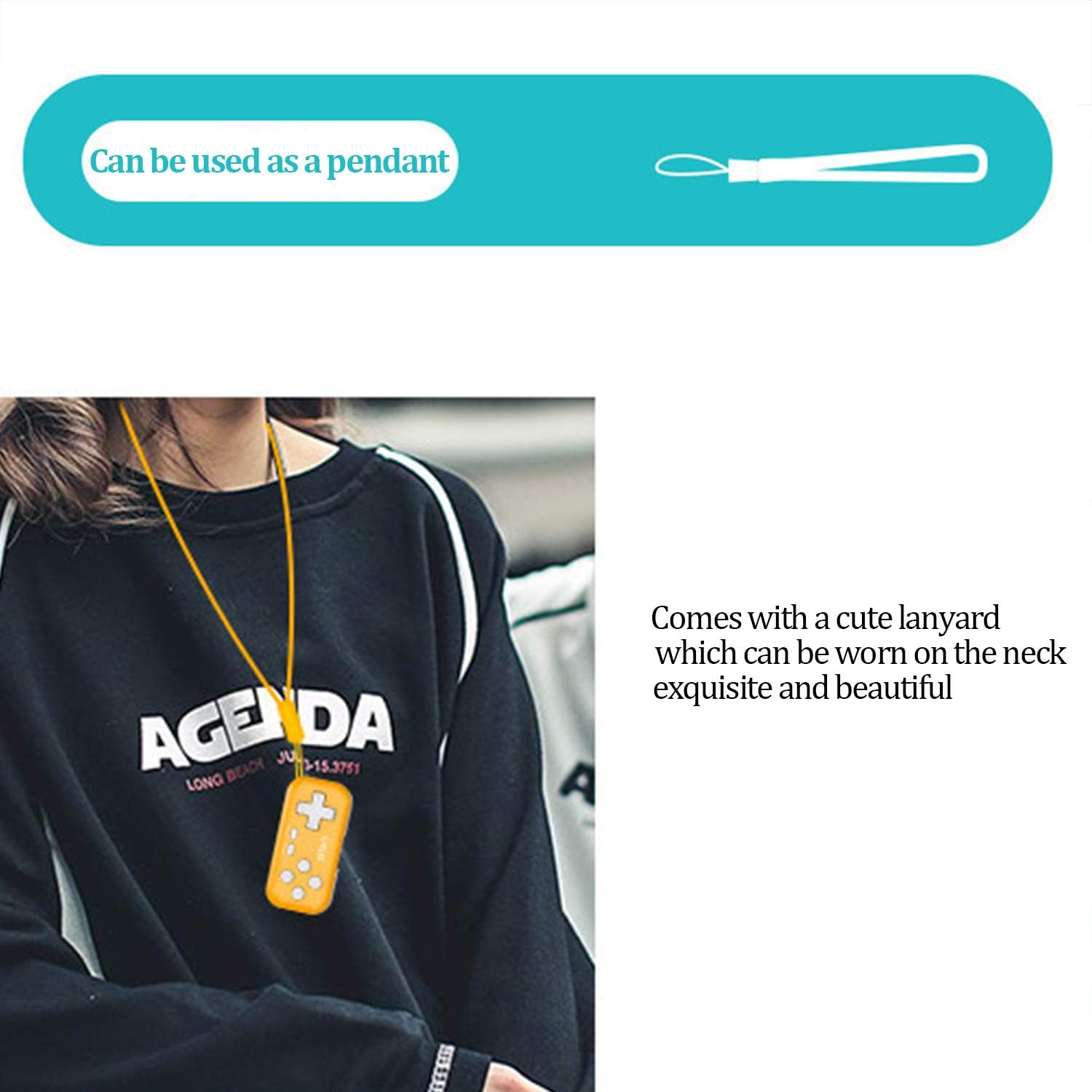
Image: The IPEGA PG-9193 controller shown with its included lanyard, demonstrating how it can be worn or carried for convenience and to prevent loss.
Проблемаларды чечүү
Контроллер туташпай жатат
- Контроллердин толук заряддалганын текшериңиз.
- Түзмөгүңүздө Bluetooth иштетилгенин текшериңиз.
- Move the controller closer to the device to ensure it is within the 8-meter transmission range.
- Түзмөгүңүздүн Bluetooth жөндөөлөрүнөн контроллерди ажыратып, кайра жупташтырып көрүңүз.
- Restart both the controller and the device.
Баскычтар жооп бербейт
- Check if the controller is properly connected to your device.
- Сиз ойноп жаткан оюн тышкы контроллерлорду колдой турганын текшериңиз.
- If the D-pad is not functioning as expected, remember to switch its mode by pressing Y+X for 2 seconds if it's in joystick mode.
- Recharge the controller, as low battery can affect performance.
Техникалык шарттар
| Working Voltage | DC 3.7V |
| Иштөө агымы | <15мА |
| Тынч агым | <10уА |
| Үзгүлтүксүз колдонуу убактысы | Болжол менен 8 саат |
| Киргизүү көлөмүtage/Current | DC 5V/500mA |
| Заряддоо убактысы | Болжол менен 2 саат |
| Bluetooth версиясы | BT 3.0 |
| Өткөрмө аралык | ≤8 метр |
| Батарея сыйымдуулугу | 130mAh |
| Күтүү убактысы | 30 күн (толугу менен кубатталганда) |
| Өлчөмдөрү (L x W x Y) | 6.99 x 3.3 x 0.99 см (2.75 x 1.30 x 0.39 дюйм) |
| Салмагы | 49.9 г (1.76 унция) |
| Шайкеш платформалар | Nintendo Switch, PS3, Android (6.0+), Steam, PC (Win 7+) |
Кепилдик жана колдоо
The product typically comes with an 18-month worry-free product warranty. For any issues or support inquiries, please refer to the contact information provided by your retailer or the official IPEGA support channels.
For further assistance, please visit the official IPEGA website or contact customer service through the platform where the product was purchased.


