1. Киришүү
This manual provides detailed instructions for the setup, operation, and maintenance of your Epson PowerLite 982W LCD Projector. Designed for classroom and educational environments, this projector delivers bright, clear images and offers versatile connectivity options. Please read this manual thoroughly before using the projector to ensure optimal performance and safety.
2. Кутуда эмне бар
Төмөндө тизмеленген нерселердин баары пакетиңизге камтылганын текшериңиз:
- PowerLite 982W 3LCD WXGA Classroom Projector with Dual HDMI
- Электр кабели
- VGA кабели
- Проектор алыстан башкаруу
- Батарея
- Программа CD
- Колдонуучунун Колдонмосу (бул документ)
- Кепилдик картасы
3. Продукт бүтүп калдыview
Familiarize yourself with the physical components and controls of your Epson PowerLite 982W projector.

Сүрөт 3.1: Алдыңкы View. This image displays the front of the projector, highlighting the main projection lens and the large ventilation grille on the left side. The Epson logo is prominently featured above the lens.
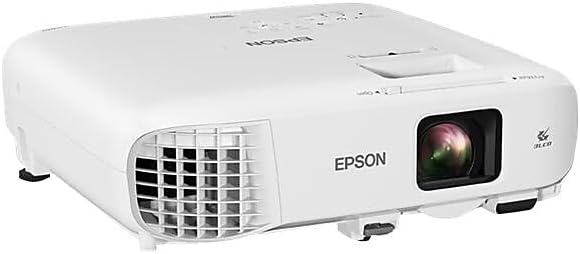
3.2-сүрөт: Бурчтуу View. An angled perspective of the projector, providing a view of both the top panel and the front lens area. This view helps in understanding the overall compact design.

Сүрөт 3.3: Жогорку Башкаруу панели. This image shows the top surface of the projector, featuring the control panel with various buttons for navigation, source selection, menu access, and power. The focus and zoom rings are also visible near the lens opening.

Figure 3.4: Rear Connectivity Panel. The rear panel of the projector is shown, detailing the comprehensive array of input and output ports, including HDMI, VGA, USB, Audio In/Out, Video, and LAN connections.
4. Орнотуу нускамалары
Proper setup ensures optimal projection quality and longevity of your device.
4.1 Орнотуу жана орнотуу
The PowerLite 982W is designed for versatile placement, including ceiling mounting, as commonly seen in classroom installations. Ensure the projector is securely mounted and positioned to project onto your screen or wall without obstruction.
4.2 Түзмөктөрүңүздү туташтыруу
Проектор бир нече туташуу параметрлерин сунуштайт:
- HDMI: Connect devices like laptops, Blu-ray players, or streaming devices using an HDMI cable to either HDMI1 or HDMI2 port.
- VGA (Компьютер): Use a VGA cable to connect to a computer's VGA output. There are two VGA input ports (Computer1, Computer2) and one VGA output port (Monitor Out).
- USB: Connect USB devices for display or control.
- LAN: Тармакка туташуу жана башкаруу үчүн.
- Аудио: Separate audio input (Audio1, Audio2, Mic) and output ports are available for external audio systems.
Ensure all cables are securely connected to prevent signal loss.
4.3 Күйгүзүү
- Электр шнурын проекторго жана розеткага туташтырыңыз.
- Press the power button on the projector's control panel or the remote control. The projector will emit a beeping sound and begin its warm-up sequence.
- Wait for the projector to fully warm up and display the input source.
Video 4.1: Projector Installation and Basic Operation. This video demonstrates the Epson PowerLite 982W projector mounted in a classroom setting. It shows the physical controls on the projector, the various input ports, and the use of the remote control to power on the device and select input sources. The video also illustrates the projection quality on a screen with ambient lighting.
5. Иштөө нускамалары
Learn how to effectively use your projector for presentations and media display.
5.1 Булакты тандоо
Киргизүү булактарынын ортосунда которулуу үчүн:
- Press the 'Source Search' button on the remote control or the 'Source' button on the projector's control panel.
- Use the arrow keys to navigate through the available sources (HDMI1, HDMI2, Computer1, Computer2, Video, USB Display, LAN).
- Press 'Enter' to select the desired source. The projector will search for a signal from the selected input.
5.2 Сүрөттү тууралоо
- Фокус: Сүрөттү курчутуу үчүн фокустук шакекти линзага айландырыңыз.
- Чоңойтуу: Adjust the zoom ring to enlarge or reduce the image size.
- Негизги ташты оңдоо: Use the keystone correction buttons on the control panel or remote to correct trapezoidal distortion if the projector is not perfectly perpendicular to the screen.
- Түс режими: Select different color modes (e.g., Dynamic, Presentation, Cinema) from the menu to optimize image quality for various content types and ambient lighting conditions.
5.3 Өркүндөтүлгөн функциялар
- Moderator Function: Connects up to 50 devices, allowing multiple users to share content from laptops or mobile devices.
- Бөлүнгөн экран мүмкүнчүлүгү: Display content from two different sources side-by-side simultaneously.
- Зымсыз проекция: Project wirelessly from compatible laptops and mobile devices (PC, Mac, Chromebook, iOS, Android).
6. Негизги өзгөчөлүктөрү
The Epson PowerLite 982W projector is equipped with several features to enhance your viewing and presentation experience:
- Utilizes 3 LCD panels and 4,200 lumens of color and white brightness for vivid images.
- Provides WXGA resolution (1280 x 800) for a bright, wide-screen experience.
- Features a long lamp life of up to 17,000 hours in ECO mode.
- Includes optical zoom for clear, sharp images without digital distortion.
- Supports connectivity for up to 50 devices to display a variety of content or compare students' work side-by-side.
7. Техникалык тейлөө
Проекторуңуздун узак мөөнөттүү иштешин жана оптималдуу иштешин камсыз кылуу үчүн үзгүлтүксүз техникалык тейлөө жүргүзүү керек.
- Линзаны тазалоо: Линзаны оптикалык беттерге арналган жумшак, мамыксыз чүпүрөк менен акырын сүртүңүз. Абразивдүү тазалоочу каражаттарды колдонбоңуз.
- Аба чыпкасын тазалоо: Periodically clean or replace the air filter to prevent dust buildup, which can affect cooling and image quality. Refer to the full user manual for specific instructions on filter access.
- Lamp Алмаштыруу: The projector features a long-life lamp. When replacement is necessary, a notification will appear. Always use genuine Epson replacement lamps.
- Сактагыч: Проекторду узак убакыт бою колдонбогон учурда, аны салкын, кургак, чаңдан жана өтө жогорку температурадан корголгон жерде сактаңыз.
8. Кыйынчылыктарды
Эгерде сиз проекторуңуз менен көйгөйлөргө туш болсоңуз, төмөнкү кеңири таралган чечимдерди караңыз:
- Сүрөт көрсөтүлгөн жок:
- Проектордун күйгүзүлгөнүн жана киргизүү булагы туура тандалганын текшериңиз.
- Проектор менен баштапкы аппараттын ортосундагы бардык кабелдик байланыштарды (HDMI, VGA) текшериңиз.
- Verify that the source device (e.g., laptop) is outputting a signal.
- Сүрөт бүдөмүк:
- Проектор объективиндеги фокус шакегин тууралаңыз.
- Проекциялоочу беттин тегиз жана проектор тийиштүү аралыкта жайгашканын текшериңиз.
- Сүрөт бурмаланган (трапеция формасы):
- Use the keystone correction function on the projector or remote control to adjust the image shape.
- Үн жок:
- Проектордогу жана булак түзмөгүндөгү үн жөндөөлөрүн текшериңиз.
- Ensure audio cables are correctly connected if using separate audio inputs.
- Ашыкча ысып кетүү эскертүүсү:
- Проектордун желдетүү тешиктери бүтөлүп калбаганын текшериңиз.
- Clean or replace the air filter if it is dirty.
For more complex issues, consult the full user manual or contact Epson support.
9. Техникалык шарттар
| Өзгөчөлүк | Деталь |
|---|---|
| Продукциянын өлчөмдөрү | 11.1 x 12.1 x 3.5 дюйм |
| Элемент Салмагы | 6.83 фунт |
| Элемент моделинин номери | 982 Вт |
| Өндүрүүчү | Epson корпорациясы |
| Display Resolution | 1280 x 800 (WXGA) |
| Байланыш технологиясы | HDMI, USB, VGA, LAN |
| Сунушталган Колдонуулар | Class Room, Education |
| Өзгөчө өзгөчөлүк | UHE (Ultra High Efficiency lamp) |
| Lamp Life (ECO Mode) | 17,000 саатка чейин |
10. Кепилдик жана колдоо
Your Epson PowerLite 982W projector comes with a warranty. Please refer to the included Warranty Card in your product package for specific terms and conditions. For technical support, service, or additional information, please visit the official Epson support webсайтка же кардарларды тейлөө бөлүмүнө кайрылыңыз.


