Introduction
The DOOGEE S40 Pro is a rugged smartphone designed for durability and performance in challenging environments. It features a 5.45-inch display, Android 10, a 4650mAh battery, and dual rear cameras. This manual provides essential information for setting up, operating, maintaining, and troubleshooting your device.

Сүрөт: алдыңкы жана арткы view DOOGEE S40 Pro бекем телефонунун, көрсөтүүasinанын бекем дизайны жана камера модулу.
1. Орнотуу
1.1 Кутудан чыгаруу жана Пакеттин мазмуну
Carefully unbox your DOOGEE S40 Pro. Verify that all standard accessories are included in the package.

Image: Contents of the DOOGEE S40 Pro package, including the phone, power adapter, USB cable, user manual, and warranty information.
- DOOGEE S40 Pro смартфону
- Кубаттуу адаптер
- USB кабели
- User Manual
- Кепилдик картасы
1.2 SIM картаны жана SD картаны орнотуу
The DOOGEE S40 Pro supports dual SIM cards and an expandable SD card for additional storage. Locate the SIM tray on the side of the device.
- Use the provided SIM ejector tool to open the SIM card tray.
- Carefully place your Nano-SIM cards and/or microSD card into the designated slots on the tray. Ensure the gold contacts are facing down.
- Аспаптын корпусуна туура келгенче, лотокту акырын кайра телефонго түртүңүз.
1.3 Алгачкы заряддоо
Биринчи колдонуудан мурун, аппаратты толук заряддоо сунушталат.
- USB кабелин кубат адаптерине туташтырыңыз.
- Plug the USB cable into the charging port of the phone.
- Кубат адаптерин розеткага сайыңыз.
- Экранда кубаттоо индикатору пайда болот. Батареянын сүрөтчөсү толгонго чейин телефонду кубаттаңыз.
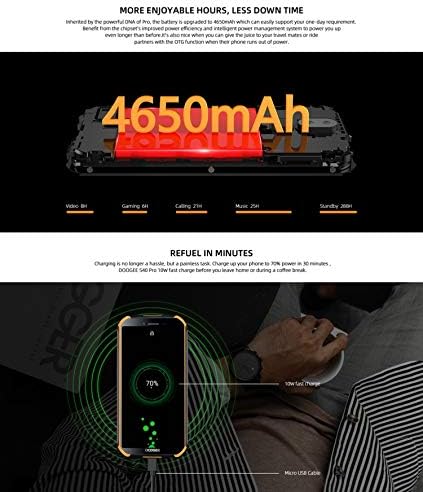
Image: The DOOGEE S40 Pro connected to a charger, showing the charging animation and battery percentage.
1.4 Күйгүзүү/өчүрүү
- Күйгүзүү үчүн: DOOGEE логотиби пайда болгонго чейин Кубат баскычын (оң жагында жайгашкан) басып, кармап туруңуз.
- Өчүрүү үчүн: Кубат параметрлеринин менюсу пайда болгонго чейин Кубат баскычын басып, кармап туруңуз. "Өчүрүү" дегенди тандап, ырастаңыз.
- Кайра баштоо үчүн: Кубат параметрлеринин менюсунан "Кайра баштоо" тандап, ырастаңыз.
2. Иштөө нускамалары
2.1 Негизги навигация
The DOOGEE S40 Pro operates on Android 10.0 and uses a touchscreen for navigation.
- таптаңыз: Бир нерсени тандоо же тиркемени ачуу үчүн экранга бир жолу тийип коюңуз.
- Серпүү: Барактарды же тизмелерди жылдыруу үчүн манжаңызды экрандын үстүнөн сүйрөңүз.
- Чымчып-кичирейтүү: Place two fingers on the screen and move them apart or together to zoom in or out.
- Узак басуу: Кошумча параметрлерге кирүү же сүрөтчөлөрдү жылдыруу үчүн элементти басып кармап туруңуз.
2.2 Чалуулар жана билдирүүлөр
- Чалууларды жасоо: Телефон колдонмосун ачып, номерди киргизип, чалуу сөлөкөтүн таптаңыз.
- Чалууларды кабыл алуу: Swipe up to answer or down to decline an incoming call.
- Кабарларды жөнөтүү: Open the Messages app, tap the new message icon, enter the recipient and message, then tap send.
2.3 Камераны колдонуу
The S40 Pro features dual rear cameras (13MP Sony primary sensor + 2MP portrait camera) and a front camera for selfies.

Image: Diagram highlighting the AI Rear Dual Camera setup on the DOOGEE S40 Pro, showing the 13MP Sony sensor and 2MP portrait camera, along with example сүрөттөр.
- Үй экраныңыздан же колдонмо суурмасынан Камера колдонмосун ачыңыз.
- Камераны которуштуруу сүрөтчөсүн колдонуп, алдыңкы жана арткы камераларды которуштуруу.
- Сүрөткө тартуу үчүн жапкычты басыңыз.
- Explore different modes like Portrait, Video, and Panorama.
2.4 Манжа изи менен ачуу
The device includes a rear-mounted fingerprint sensor for quick and secure unlocking.

Image: Illustration of the fingerprint unlock feature on the DOOGEE S40 Pro, showing a finger interacting with the rear-mounted sensor.
- барыңыз Орнотуулар > Коопсуздук жана жайгашкан жер > Манжа изи.
- Манжа изиңизди каттоо үчүн экрандагы нускамаларды аткарыңыз.
- Once registered, simply place your finger on the sensor to unlock the phone.
2.5 NFC жана Google Pay
The DOOGEE S40 Pro supports NFC (Near Field Communication) for convenient data transmission and mobile payments like Google Pay.

Image: Visual representation of NFC functionality for Google Pay and data transmission, and the 3.5mm headphone jack on the DOOGEE S40 Pro.
- To enable NFC: барыңыз Орнотуулар > Туташкан түзмөктөр > NFC жана аны күйгүзүңүз.
- Google Pay: Ensure Google Pay is set up with your payment methods. Tap your phone to compatible terminals for contactless payments.
2.6 Байланыш
- Wi-Fi: Зымсыз тармактар аркылуу туташыңыз Орнотуулар > Тармак жана интернет > Wi-Fi.
- Bluetooth: аркылуу Bluetooth түзмөктөрү менен жупташтыруу Орнотуулар > Туташкан түзмөктөр > Bluetooth.
- USB: Connect to a computer using the provided USB cable for file которуу же заряддоо.
- 3.5 мм гарнитура уячасы: Plug in wired headphones for audio.
3. Техникалык тейлөө
3.1 Rugged Features and Durability
The DOOGEE S40 Pro is built to withstand harsh conditions, featuring IP68 water and dust resistance and MIL-STD-810G certification for drops and extreme temperatures.

Image: The DOOGEE S40 Pro submerged in water, dropped onto concrete, and surviving a fall, illustrating its IP68 and MIL-STD-810G durability.
- Сууга туруктуулук (IP68): Can withstand submersion up to 1.5 meters for 30 minutes. Ensure all port covers are securely closed before exposure to water.
- Dust Resistance (IP68): Чаңдын киришинен толук корголгон.
- Drop Resistance (MIL-STD-810G): 1.2 метрге чейинки бийиктиктен катуу беттерге кулап түшүүгө туруштук берүү үчүн иштелип чыккан.
- Температура каршылык: Operates in extreme temperatures from -55°C to 70°C.

Image: The DOOGEE S40 Pro shown in extreme cold (-55°C) and hot (70°C) environments, highlighting its robust temperature tolerance.
3.2 Аппаратыңызды тазалоо
To clean your DOOGEE S40 Pro:
- Экранды жана денени жумшак, түксүз чүпүрөк менен сүртүңүз.
- өжөр кир үчүн, dampкездемени бир аз суу менен сүртүңүз. Катуу химиялык заттардан же абразивдүү материалдардан алыс болуңуз.
- If the device has been exposed to saltwater, rinse it thoroughly with fresh water and dry it completely before charging.
3.3 Программалык камсыздоо жаңыртуулары
Оптималдуу иштөөнү жана коопсуздукту камсыз кылуу үчүн программалык камсыздоонун жаңыртууларын үзгүлтүксүз текшерип туруңуз.
- барыңыз Орнотуулар > Система > Системаны жаңыртуу.
- Follow the on-screen prompts to download and install any available updates. Ensure your device has sufficient battery and a stable internet connection during updates.
4. Кыйынчылыктарды
| Көйгөй | Мүмкүн чечим |
|---|---|
| Түзмөк күйбөйт. | Ensure the battery is charged. Connect to a charger and wait a few minutes before attempting to power on again. If unresponsive, try a forced restart by holding the Power button for 10-15 seconds. |
| Батарея бат эле түгөнөт. | Check for background apps consuming power. Reduce screen brightness. Disable Wi-Fi, Bluetooth, or GPS when not in use. Perform a software update. |
| Wi-Fi'га туташпай жатат. | Wi-Fi иштетилгенин текшериңиз. Роутериңизди жана телефонуңузду өчүрүп күйгүзүңүз. Тармакты унутуп, кайра туташыңыз. |
| Телефон жай иштеп жатат же жооп бербей жатат. | Close unnecessary background apps. Clear cache. Restart the device. If issues persist, consider a factory reset (back up data first). |
| Камера иштебей жатат. | Restart the phone. Clear the Camera app's cache and data in Settings > Apps. Ensure no other app is using the camera. |
5. Техникалык шарттар
Key technical specifications for the DOOGEE S40 Pro:
- Модель аты: S40 Pro
- Операция системасы: Android 10.0
- Дисплей: 5.45 inches, LCD, 1440 x 720 resolution
- RAM: 4 ГБ
- Ички сактагыч: 64 ГБ (microSD аркылуу кеңейтүүгө болот)
- Батарея: 4650mAh
- Арткы камера: Dual Back Cameras (13MP Sony primary + 2MP portrait)
- Алдыңкы камера: Ооба
- Процессор: Octa Core (CPU speed: 1.8 GHz, CPU model: Snapdragon)
- Байланыш: 4G Cellular, Wi-Fi, Bluetooth, USB, GPS, NFC
- Өзгөчөлүктөр: Touchscreen, Fingerprint Sensor, 3.5mm Headphone Jack
- Узактыгы: IP68 Water & Dust Resistant, MIL-STD-810G Drop Resistant
- Түсү: Кара
- Кутуда эмне бар: Адаптер, USB кабели
6. Кепилдик жана колдоо
For warranty information and customer support, please refer to the warranty card included in your product package or visit the official DOOGEE webсайт. Кепилдик дооматтар үчүн сатып алганыңыздын далилин сактаңыз.
- Официалдуу Webсайт: www.doogee.cc (Эскертүү: Бул толтургуч URL, refer to your product's specific documentation for the correct support webсайт.)
- Кардарларды тейлөө: Contact details may be found on the official webсайтына же кепилдик картаңызга кайрылыңыз.


