1. Киришүү
Thank you for choosing the ERAY Rechargeable LED Torch. This manual provides essential information for the safe and effective operation, maintenance, and troubleshooting of your device. Please read it thoroughly before use and retain it for future reference.

Image: The ERAY Rechargeable LED Torch, a powerful and versatile lighting device.
2. Продукт бүтүп калдыview
2.1 Негизги өзгөчөлүктөрү
- 6 жарык режимдери: Features front light with 3 brightness levels (High-Low-SOS) and side flood light with 3 brightness levels (High-Low-Red & Blue Flash Light) for diverse lighting needs.
- Жогорку кубаттуулуктагы батарея: Equipped with a 10800mAh rechargeable battery, providing up to 10 hours of continuous use in high brightness mode.
- USB чыгышы: Functions as a power bank with a USB output port to charge mobile devices in emergency situations.
- Гуманизацияланган дизайн: Includes a comfortable handle and a detachable shoulder strap for easy portability. Can be mounted on a tripod or bicycle holder for hands-free operation.
- Туруктуу жана суу өткөрбөйт: Constructed from high-quality metal alloy and ABS material, offering skid-proof, explosion-proof, and shockproof properties. IPX4 waterproof rating ensures reliability in outdoor environments.
- Long Irradiation Distance: Provides long-range visibility with an irradiation distance of up to 2600 feet (800m).
- Ар тараптуу колдонуу: Ideal for outdoor camping, hiking, fishing, walking, car inspection, and emergency situations.
2.2 Пакеттин мазмуну
Сураныч, бардык буюмдар бар экенин текшерүү үчүн пакетти текшериңиз:
- 1x ERAY Rechargeable LED Torch Lantern
- 1x USB кабели
- 1x погон
- 1x Колдонуучунун колдонмосу

Image: The ERAY LED Torch, USB cable, and shoulder strap included in the package.
2.3 Продукт диаграммасы
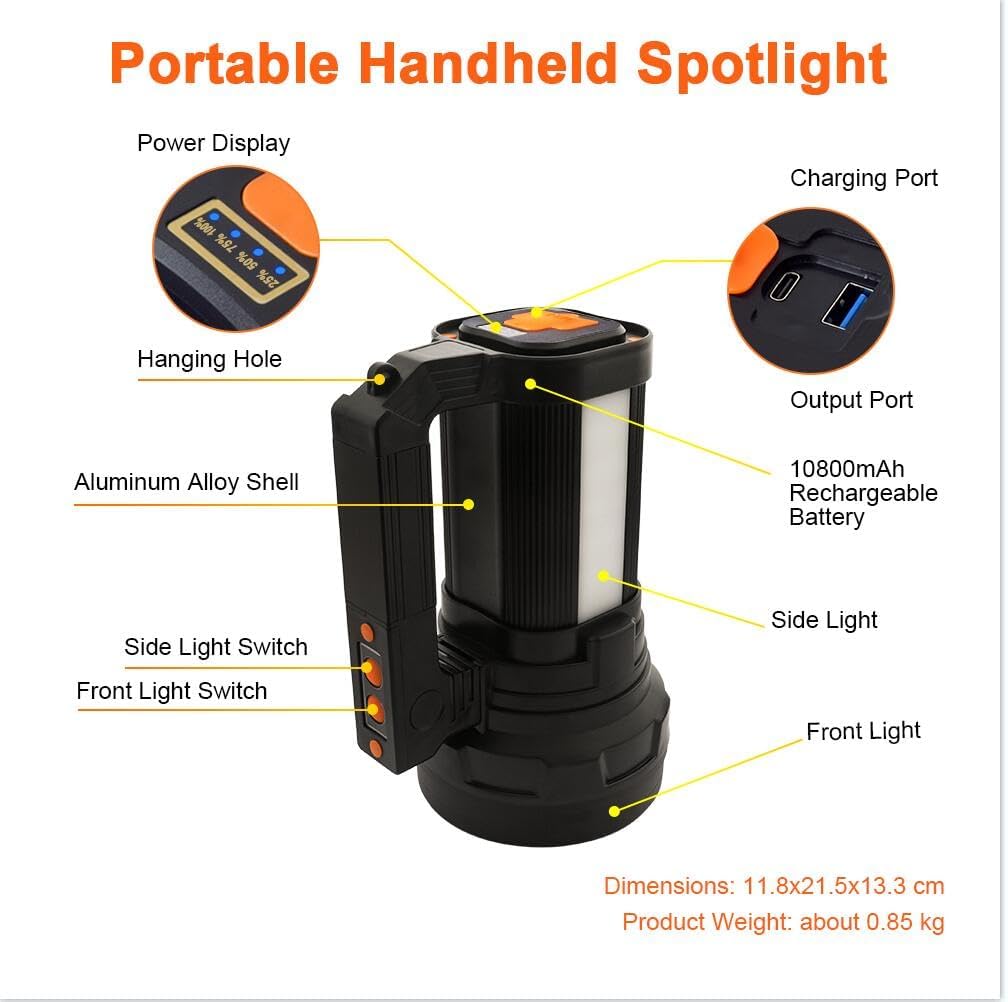
Image: Labeled diagram of the ERAY LED Torch showing components like Power Display, Charging Port, Output Port, Hanging Hole, Aluminum Alloy Shell, Side Light Switch, Front Light Switch, Side Light, and Front Light.
Familiarize yourself with the components:
- Power Display: Indicates remaining battery percentage.
- Заряддоо порту: For recharging the torch.
- Output Port (USB): Тышкы түзмөктөрдү кубаттоо үчүн.
- Асма тешик: For attaching to a hook or tripod.
- Алюминий эритмеси: Durable outer casing.
- Капталдагы жарык өчүргүч: Controls the side floodlight modes.
- Алдыңкы жарык өчүргүч: Controls the main spotlight modes.
- Каптал жарык: Provides wide-angle illumination.
- Алдыңкы жарык: Provides focused, long-distance illumination.
3. Орнотуу
3.1 Алгачкы заряддоо
Before first use, fully charge the ERAY LED Torch. This ensures optimal battery performance and longevity.
- Locate the Charging Port on the device.
- Connect the provided USB cable to the Charging Port and plug the other end into a compatible USB power adapter (not included) or a computer USB port.
- The Power Display will show the charging progress (25%, 50%, 75%, 100%).
- Once the display shows 100%, the torch is fully charged. Disconnect the cable.

Image: The ERAY LED Torch connected via USB cable for charging, with a mobile phone also charging from its USB output, demonstrating its power bank function.
4. Иштөө нускамалары
4.1 Жарык режим
The ERAY LED Torch offers 6 distinct lighting modes, controlled by separate switches for the front and side lights.
Front Light Modes (Spotlight)
колдонуу Алдыңкы жарык өчүргүч бул режимдер аркылуу айлануу үчүн:
- Жогорку жарыктык: For maximum illumination and long-distance visibility.
- Төмөн жарыктык: For energy saving or closer range tasks.
- SOS жарк режими: Шашылыш сигнал берүү үчүн.

Image: Illustration showing the three front light modes: High Brightness, Low Brightness, and SOS Flash Mode, with estimated lighting times.
Side Floodlight Modes
колдонуу Side Light Switch бул режимдер аркылуу айлануу үчүн:
- Жогорку жарыктык: For wide-area illumination.
- Төмөн жарыктык: For ambient lighting or extended use.
- Red & Blue Flash Light: For emergency warning or signaling.

Image: Illustration showing the three side light modes: High Brightness, Low Brightness, and Emergency Light (Red & Blue Flash), with estimated lighting times.
4.2 Power Bank функциясы
The ERAY LED Torch can serve as a portable power bank to charge your mobile devices.
- Locate the USB Output Port on the bottom of the torch.
- Connect your device's charging cable to the USB Output Port.
- The torch will begin charging your device.
- Monitor your device's charging status. Disconnect once charging is complete or if the torch's battery is low.
5. Техникалык тейлөө
5.1 Тазалоо
- Wipe the torch with a soft, damp кездеме. Абразивдүү тазалагычтарды же эриткичтерди колдонбоңуз.
- Ensure the charging and output ports are free from dust and debris.
5.2 Сактоо
- Store the torch in a cool, dry place away from direct sunlight and extreme temperatures.
- If storing for extended periods, charge the battery to approximately 50% every 3-6 months to maintain battery health.
5.3 Батареяга кам көрүү
- Батареяны бат-баттан толук кубаттап калуудан алыс болуңуз.
- Батареяны отко же жогорку температурага чыгарбаңыз.
- Эгерде батарейка бузулган же шишип кеткендей көрүнсө, колдонууну дароо токтотуп, жергиликтүү эрежелерге ылайык туура жок кылыңыз.

Image: The ERAY LED Torch being splashed with water, demonstrating its IPX4 waterproof rating.
6. Кыйынчылыктарды
If you encounter issues with your ERAY LED Torch, please refer to the table below for common problems and solutions.
| Көйгөй | Мүмкүн себеп | Чечим |
|---|---|---|
| Torch does not turn on | Low battery; Switch malfunction | Charge the torch fully; Ensure switches are pressed firmly. |
| Жарык күңүрт же бүлбүлдөп турат | Low battery; LED issue | Recharge the torch; If problem persists, contact customer support. |
| Torch not charging | Faulty cable/adapter; Dirty charging port | Try a different USB cable and adapter; Clean the charging port gently. |
| Power банк функциясы иштебей жатат | Torch battery too low; Device cable issue | Ensure torch has sufficient charge; Try a different charging cable for your device. |
7. Техникалык шарттар
| Өзгөчөлүк | Деталь |
|---|---|
| Бренд | Эрай |
| Модель номери | E135 |
| Продукциянын өлчөмдөрү | 23 x 16 x 13.3 см |
| Элемент Салмагы | 890 г |
| Батарея сыйымдуулугу | 10800mAh литий-ион (кошулган) |
| Жарык булагы түрү | LED |
| Жарык агымы | 13000 Lumen |
| Нурлануу аралык | 800 метрге чейин (2600 фут) |
| Суу өткөрбөйт рейтинги | IPX4 |
| Материал | Металл эритмеси жана ABS |
| Тtage | 5 вольт |
8. Кепилдик жана колдоо
ERAY products are manufactured to high-quality standards. For information regarding warranty coverage, please refer to the warranty card included with your purchase or contact the retailer where you purchased the product. If you require technical assistance or have questions not covered in this manual, please contact ERAY customer support through the official webсайт же сатып алуу платформаңыз.


