Introduction
Thank you for choosing the BENGOO KM-1 Wireless Gaming Mouse. This manual provides detailed instructions on how to set up, operate, and maintain your mouse to ensure optimal performance and longevity. The KM-1 mouse features a lightweight honeycomb shell, 2.4G wireless technology, adjustable DPI settings, and customizable RGB lighting, designed for a comfortable and responsive gaming experience.
Пакеттин мазмуну
- BENGOO KM-1 зымсыз оюн чычкан
- USB кабыл алгыч
- USB заряддоо кабели
Жайгашуу
1. Чычканды туташтыруу
- Адатта чычкандын астыңкы жагындагы бөлүмдө сакталган USB кабыл алгычын табыңыз.
- USB кабыл алгычты компьютериңиздеги (PC, ноутбук, Mac) жеткиликтүү USB портуна сайыңыз.
- Turn on the mouse using the ON/OFF switch located on the underside. The mouse will automatically connect to the receiver.
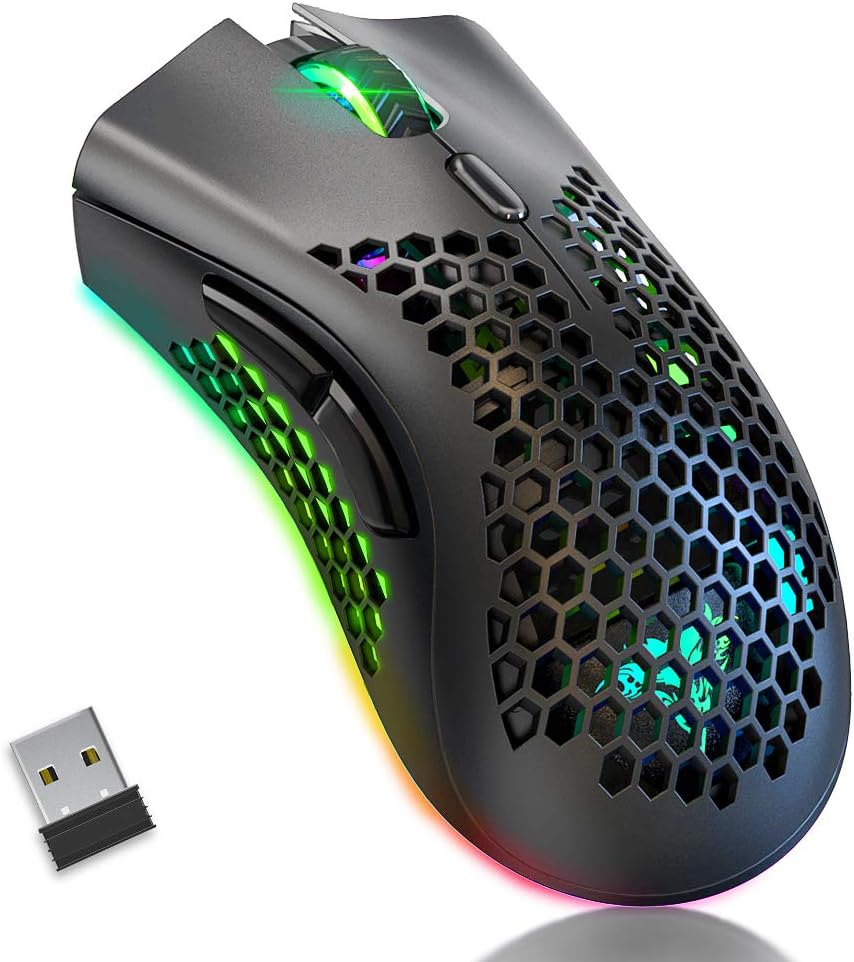
Image: The BENGOO KM-1 Wireless Gaming Mouse shown alongside its compact USB receiver, ready for connection.
The 2.4G wireless technology provides a stable connection with a range of up to 10 meters, ensuring no delays or interference during use.
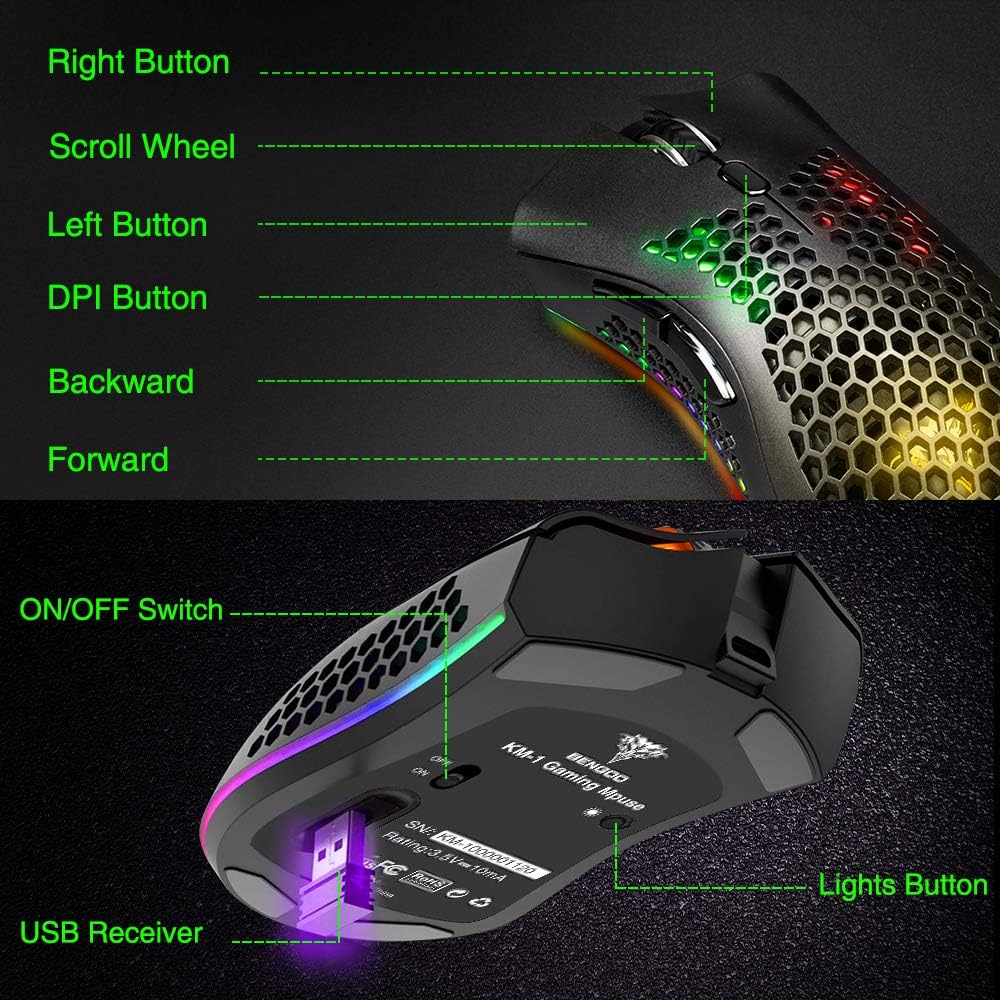
Image: A visual representation illustrating the 10-meter wireless operating range of the mouse from a computer.
2. Чычканды заряддоо
The KM-1 mouse is rechargeable. When the battery is low, the mouse cursor may move slowly, unstably, or stop moving. Connect the included USB charging cable to the mouse and a USB power source to charge. The mouse can be used while charging.
Image: The BENGOO KM-1 mouse connected to a USB cable, indicating its rechargeable capability.
Иштөө нускамалары
1. Баскыч функциялары
The KM-1 mouse is equipped with six programmable buttons for enhanced control:
- Сол баскыч: Стандарттык сол чыкылдатуу функциясы.
- Оң баскыч: Стандарттык оң баскычты чыкылдатуу функциясы.
- Жылдыруу дөңгөлөгү: Scrolls pages up and down; can also be pressed for middle-click functionality.
- DPI баскычы: Чычкандын сезгичтигин (DPI) тууралайт.
- Алга баскычы: Алга карай жылдырат web браузерлер же file изилдөөчүлөр.
- Артка баскычы: Артка карай багыт алат web браузерлер же file изилдөөчүлөр.

Image: A detailed diagram highlighting and labeling each of the six buttons on the BENGOO KM-1 Wireless Gaming Mouse.
2. DPI тууралоо
The mouse features 3 adjustable DPI (Dots Per Inch) settings for precise control. Press the DPI button to cycle through the following sensitivities:
- 800 DPI
- 1600 DPI
- 3200 DPI

Image: A visual demonstrating the adjustable DPI settings (800-1600-3200) for the BENGOO KM-1 mouse, allowing users to customize cursor speed.
3. RGB жарыкты башкаруу
The KM-1 mouse features Chroma RGB lighting. To activate the lights, ensure the mouse is turned on. Press the LED button (located on the underside near the ON/OFF switch) repeatedly to cycle through different lighting effects:
- Радуга режими
- Агым режими
- Дем алуу режими
- Pure Mode (Solid Color)
- Жарыктар өчүк

Image: A display of the various RGB lighting modes available on the BENGOO KM-1 mouse, including Rainbow, Stream, Breathing, and Pure modes.
4. Эргономикалык дизайн
The mouse features a lightweight honeycomb shell design, which provides a comfortable grip and promotes airflow, keeping the palm cool during extended use. This design contributes to a soft feeling and excellent gaming experience.

Сүрөт: жакын план view of the BENGOO KM-1 mouse, emphasizing its unique lightweight honeycomb shell design.
Техникалык тейлөө
Тазалоо
Чычканыңызды тазалоо үчүн жумшак, кургак чүпүрөктү колдонуңуз. Өжөр кир үчүн бир азampen the cloth with water. Avoid using harsh chemicals or abrasive materials, as these can damage the mouse's surface or internal components. Ensure no liquid enters the honeycomb perforations.
Батареяга кам көрүү
To prolong battery life, avoid fully discharging the mouse frequently. Charge the mouse when the low battery indicator appears or when performance degrades. Store the mouse in a cool, dry place when not in use for extended periods.
Проблемаларды чечүү
- Чычкан жооп бербей жатат:
- USB кабыл алгычтын иштеген USB портуна бекем сайылганын текшериңиз.
- Check if the mouse is turned on using the ON/OFF switch.
- Charge the mouse if the battery is low.
- Чычкандын кабыл алгычтан 10 метрлик зымсыз аралыкта экенин текшериңиз.
- Cursor moves slowly or erratically:
- This often indicates a low battery. Charge the mouse fully.
- Чычкан сенсорунун таза жана таштандылардан таза экенин текшериңиз.
- DPI жөндөөсүн тууралап көрүңүз.
- RGB жарыктары иштебейт:
- Чычкан күйгүзүлгөнүн текшериңиз.
- Press the LED button to cycle through the lighting modes.
- Батареянын деңгээлин текшериңиз.
- Шайкештик маселелери:
- The mouse is compatible with Windows (98/2000/ME/NT/XP/VISTA/7/8/10/11) and macOS. No specific drivers are required.
If you encounter issues not listed here, please refer to the manufacturer's support resources.
Техникалык шарттар
| Өзгөчөлүк | Деталь |
|---|---|
| Бренд | BENGOO |
| Модел | КМ-1 |
| Байланыш технологиясы | 2.4G Wireless, USB (for charging) |
| Кыймылды аныктоо | Оптикалык |
| Жөнгө салынуучу DPI | 800 / 1600 / 3200 |
| Buttons | 6 (Сол, Оң, Айдоо дөңгөлөк, DPI, Алга, Артка) |
| Өзгөчөлүктөр | Lightweight Honeycomb Shell, RGB LED Lights, Rechargeable, Ergonomic Design |
| Шайкештик | Windows, macOS |
| Элемент Салмагы | 12.3 унция |
| Продукциянын өлчөмдөрү | 13.78 x 13.78 x 7.87 дюйм |
| Power Source | Батарея менен иштейт |
Кепилдик жана колдоо
For warranty information and customer support, please refer to the documentation included with your product or visit the official BENGOO webсайт. Кепилдик дооматтары үчүн сатып алуу дүмүрчөгүңүздү сактаңыз.
Расмий продукт Videos
No relevant official product videos with 'creator_type':'Seller' were found in the provided data to embed in this manual.


