Introduction
This manual provides detailed instructions for the UBeesize LED Video Light Kit, a versatile lighting solution designed for photography, video recording, game streaming, and online conferencing. Learn how to set up, operate, and maintain your light kit for optimal performance.
Кутуда эмне бар
The UBeesize LED Video Light Kit includes the following components:
- 2 x LED Panel Lights
- 2 x Жөнгө салынуучу штатив стенддери
- 2 x Universal Ball Heads
- 5 x Color Filters (2 Pcs each)
- 1 x Video Light Manual
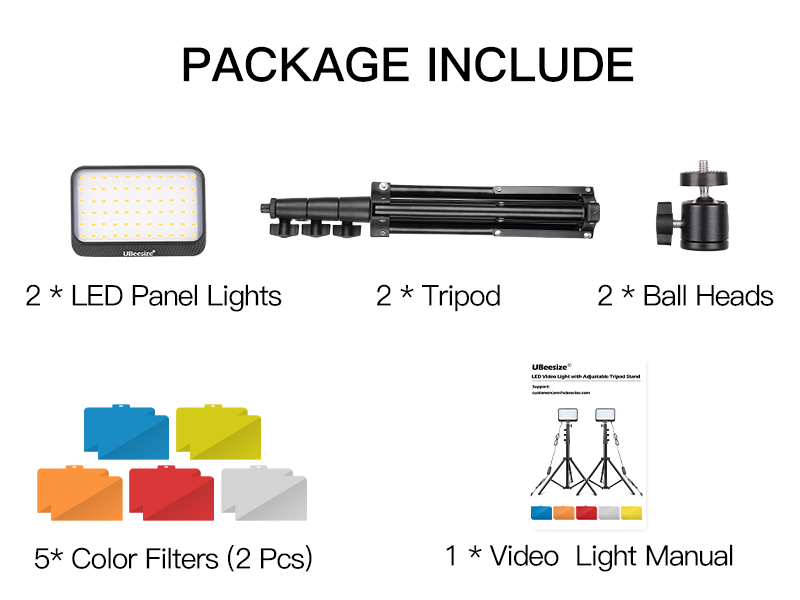
Figure 1: Included components of the UBeesize LED Video Light Kit.
Жайгашуу
- Штатив стендин чогултуу: Extend the tripod legs to a stable position. Loosen the adjustment knobs on the stand to extend the height as desired, then tighten to secure. The tripod can extend from 23.62 inches to 57.68 inches.
- LED панелин тиркөө: Screw the universal ball head onto the top of the tripod stand. Then, attach the LED panel light to the ball head.
- Панел бурчту тууралоо: Use the universal ball head to adjust the LED panel 180° for various shooting angles. The ball head also allows for 360° rotation.
- Туташуу кубаты: Plug the USB cable from the LED panel into a compatible USB power source. A wall plug (5V 2A) is recommended for continuous lighting.

Figure 2: Adjustable height and angle of the LED panel on the tripod stand.

Figure 3: Connecting the USB power cable to the light panel.
Иштеп жатат
- Күйгүзүү/өчүрүү: Use the inline remote control on the USB cable to turn the light kit on or off.
- Жарыктыкты жөндөө: The remote control features up and down buttons to adjust the brightness level from 10% to 100%.
- Apply Color Filters: Slide one of the included color filters (red, orange, white, blue) into the designated slot on the LED panel to achieve various photography requirements and visual effects.
- Колдонуу сценарийлери: The versatile design is ideal for tabletop or low-angle shooting, video conferencing, game streaming, YouTube content creation, product photography, and makeup application.

Figure 4: Brightness control buttons on the inline remote.

5-сүрөт: Мисamples of lighting effects using various color filters.

Figure 6: The light kit is suitable for diverse applications.
Техникалык тейлөө
To ensure the longevity and optimal performance of your UBeesize LED Video Light Kit, follow these maintenance guidelines:
- Тазалоо: Use a soft, dry cloth to wipe down the LED panels and tripod stands. Avoid abrasive cleaners or solvents that could damage the surfaces.
- Сактагыч: When not in use, disassemble the light kit and store it in a cool, dry place away from direct sunlight and excessive moisture.
- Колдонуу: Handle the light panels and tripod stands with care to prevent accidental drops or impacts, which could damage internal components or the exterior.
Проблемаларды чечүү
If you encounter any issues with your UBeesize LED Video Light Kit, refer to the following common troubleshooting tips:
- Жарык күйбөйт: Ensure the USB cable is securely plugged into both the LED panel and the power source. Verify that the power source (e.g., wall adapter, computer USB port) is functioning correctly.
- Жаркылдаган жарык: Check the power connection. Ensure the power source provides stable 5V 2A output. Try a different USB port or wall adapter.
- Жарыктык маселелери: Use the up/down buttons on the inline remote to adjust brightness. If the light remains dim, ensure the power source is sufficient.
- Штативдин туруксуздугу: Ensure all tripod leg locks are securely tightened after adjusting height. Place the tripod on a flat, stable surface.
Техникалык шарттар
| Өзгөчөлүк | Деталь |
|---|---|
| Продукциянын өлчөмдөрү | 17.12 x 2.75 x 10.43 дюйм |
| Элемент Салмагы | 3.39 фунт |
| Элемент моделинин номери | TCB001 |
| Power Source | USB (5V 2A recommended) |
| Байланыш технологиясы | USB |
| Tripod бийиктиги | 23.62-57.68" |
| Panel Adjustability | 180° tilt, 360° rotation |
Кепилдик жана колдоо
For warranty information or technical support, please refer to the contact details provided on the product packaging or visit the official UBeesize webсайт. Кепилдик дооматтары үчүн сатып алуу дүмүрчөгүңүздү сактаңыз.


