Introduction
This manual provides comprehensive instructions for the Elekpia Universal Remote Control, designed as a direct replacement for your original remote for all ONN Roku TVs. This remote offers seamless control of your television and features dedicated buttons for popular streaming services like Netflix, Sling, Hulu, and VUDU.
Please read this manual carefully to ensure proper setup and operation of your new remote control.
Жайгашуу
1. Батареяны орнотуу
The Elekpia Universal Remote Control requires two (2) AAA alkaline batteries (not included) for operation. Follow these steps to install the batteries:
- Пульттун артындагы батарея отсегин табыңыз.
- Батарея бөлүкчөсүнүн капкагын ачуу үчүн ылдый жылдырыңыз.
- Оң (+) жана терс (-) терминалдары бөлүмдүн ичиндеги белгилер менен туура дал келишин камсыз кылып, эки AAA батарейкасын салыңыз.
- Батарея бөлүкчөсүнүн капкагын бекем чыккыча ордуна жылдырыңыз.
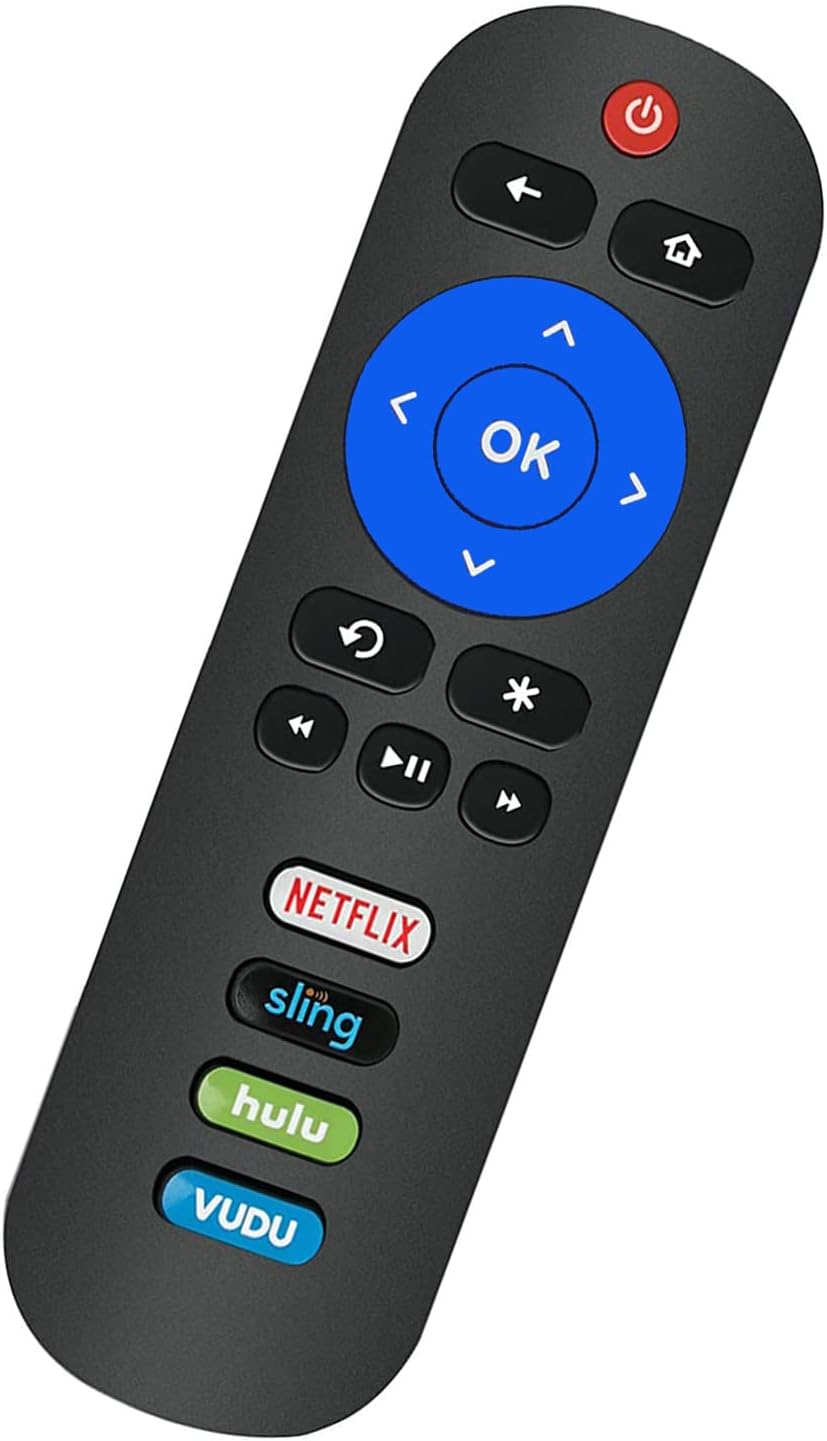
Image: Back of the remote control with the battery compartment visible.
2. Баштапкы колдонуу (программалоо талап кылынбайт)
This remote control is pre-programmed to work with all ONN Roku TVs. No programming or pairing is needed. Once the batteries are installed, the remote is ready for immediate use with your compatible ONN Roku TV.
Маанилүү эскертүү: This remote control operates via Infrared (IR) technology and is specifically designed for ONN Roku TVs. It иштебейт with Roku sticks, Roku players, Roku boxes, or any other non-TV Roku devices. It also lacks a pairing button, voice function, and headphone jack.
Иштөө нускамалары
Familiarize yourself with the buttons on your Elekpia Universal Remote Control:

Сүрөт: алдыңкы view of the Elekpia remote control, displaying all control buttons.
- Кубат баскычы (⏻): Turns your ONN Roku TV on or off.
- Арткы баскыч (←): Мурунку экранга же менюга кайтат.
- Үй баскычы (⌂): Navigates to the Roku Home screen.
- Багыттоочу панель (өйдө, ылдый, сол, оң): Used to navigate through menus and select options.
- OK баскычы: Confirms a selection or opens an item.
- Instant Replay Button (↻): Видеонун акыркы бир нече секундун кайра көрсөтөт.
- Asterisk Button (∗): Accesses options or settings within an app or menu.
- Артка түрүү (⏮), Play/Pause (⏸), Fast Forward (⏭): Стандарттык медиа ойнотууну башкаруу.
- Үнүн жогорулатуу/төмөндөтүү (🔊 / 🔉): Телевизордун үнүн тууралайт.
- Үнсүз баскычы (🔇): Телевизордун үнүн өчүрөт же ачат.
- Dedicated App Buttons (Netflix, Sling, Hulu, VUDU): Directly launch the corresponding streaming application.

Сүрөт: каптал view of the remote control, showing the volume and mute buttons located on the side.
Техникалык тейлөө
- Батареяны алмаштыруу: Replace batteries when the remote's response becomes sluggish or stops working. Always replace both batteries at the same time with new AAA alkaline batteries. Do not mix old and new batteries, or different types of batteries.
- Тазалоо: Пультту тазалоо үчүн аны жумшак, кургак чүпүрөк менен сүртүңүз. Суюк тазалоочу каражаттарды, чачыраткычтарды же абразивдүү материалдарды колдонбоңуз, анткени алар пульттун бетине же ички компоненттерине зыян келтириши мүмкүн.
- Сактагыч: Пультту салкын, кургак, күндүн түз тийген нурунан жана өтө жогорку температурадан алыс жерде сактаңыз. Эгерде пульт көпкө колдонулбаса, агып кетүүнүн алдын алуу үчүн батарейкаларды алып салуу сунушталат.
- Колдонуу: Avoid dropping the remote control or subjecting it to strong impacts, which can cause internal damage.
Проблемаларды чечүү
| Көйгөй | Мүмкүн болгон себеп / Чечим |
|---|---|
| Пульт жооп бербей жатат. |
|
| Remote works for some functions but not others. |
|
| Remote does not work with my Roku device. | This remote is specifically designed for ONN Roku TVs (televisions with Roku built-in). It is туура келбейт with standalone Roku streaming sticks, Roku players, Roku boxes, or Roku gaming consoles. |
Техникалык шарттар
- Модел: Elekpia-ONN-RK
- Продукциянын өлчөмдөрү: 5.5 x 1.5 x 0.6 дюйм (13.97 x 3.81 x 1.52 см)
- Элемент Салмагы: 1.76 унция (50 грамм)
- Электр камсыздоо: 2 x 1.5V AAA щелочтуу батарейкалар (кошулган эмес)
- Байланыш технологиясы: Инфракызыл (IR)
- Шайкеш түзмөктөр: All ONN Roku TVs (e.g., models 100012585, 100012584, 100012586, 100012587, 100012589, 100018971, 100012590, 100005844, 3226000855, 3226000858, 100007147, 100005395, 100005397, 100005396, 100012588)
- Өзгөчөлүктөр: Universal compatibility with ONN Roku TVs, dedicated streaming service buttons.
Кепилдик маалымат
Specific warranty details for the Elekpia Universal Remote Control are typically provided by the seller or manufacturer at the time of purchase. Please refer to your purchase documentation or contact the retailer from whom you purchased this product for information regarding warranty coverage and terms.
Колдоо
If you encounter any issues or have questions regarding your Elekpia Universal Remote Control that are not addressed in this manual, please contact the seller or the manufacturer directly for assistance. Provide your product model number (Elekpia-ONN-RK) and details of your issue for faster support.
For general inquiries, you may also refer to the product listing page where you purchased the item for additional resources or frequently asked questions.


