1. Продукт бүтүп калдыview
Пurline WS015 is a versatile weather station designed to provide detailed and current information regarding indoor and outdoor environmental conditions. This device monitors temperature, humidity, and offers a weather forecast. It also includes a digital clock with an alarm function and a calendar display.
Equipped for both indoor and outdoor use, the WS015 features a clear digital LCD display with animated symbols for weather forecasting. It stores maximum and minimum readings and tracks temperature trends over the past 12 hours. The main unit can also function as a USB charging hub for other devices.
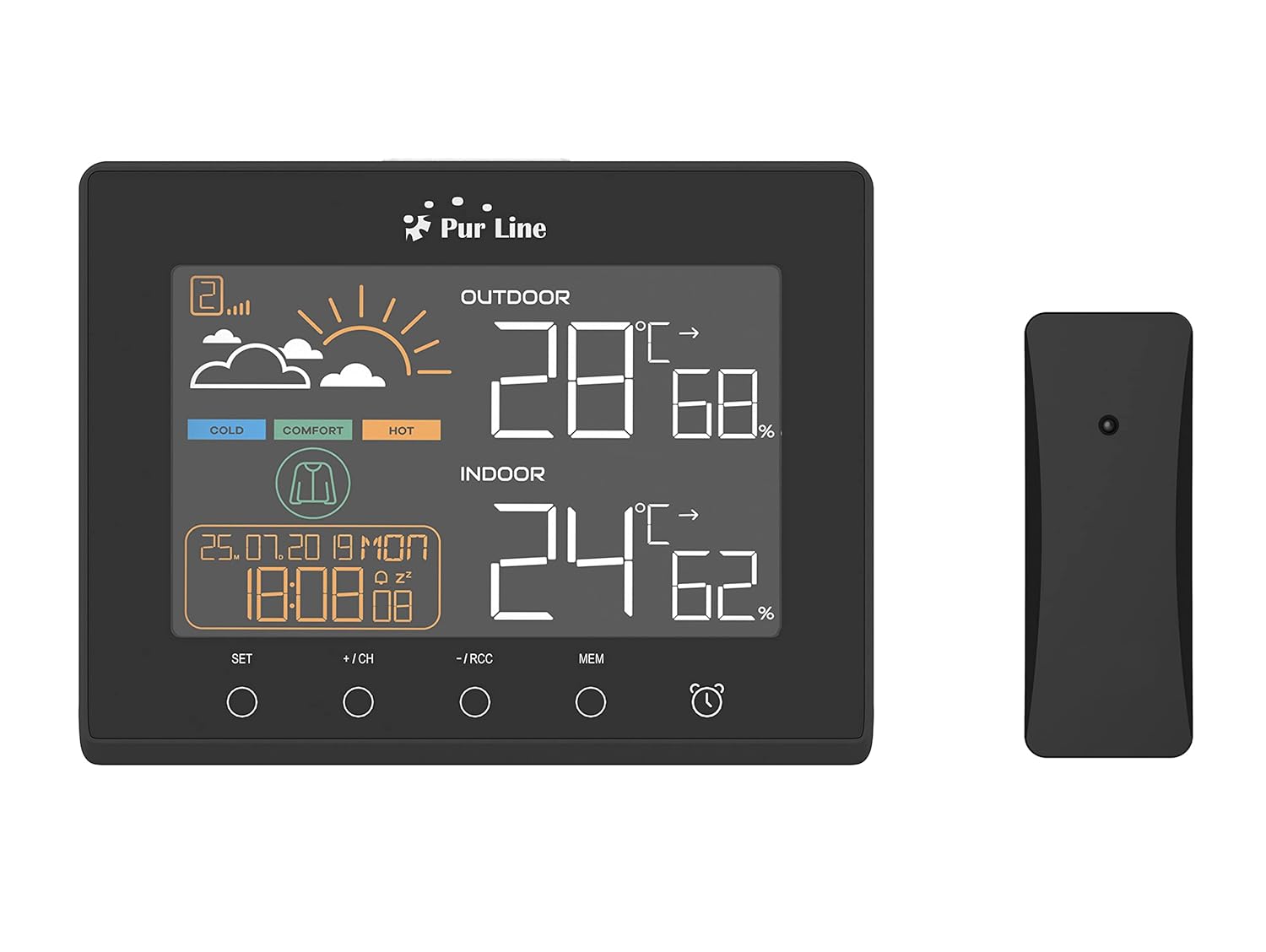
Фронт view of the PUR LINE WS015 Weather Station display unit and its wireless outdoor sensor.
2. Орнотуу нускамалары
2.1. Пакеттен чыгаруу жана компоненттер
Carefully remove all components from the packaging. Ensure you have the main display unit and the wireless outdoor sensor.
2.2. Негизги блокту кубаттоо
The main unit requires 3 AAA batteries (not included) or can be powered via a USB connection. To install batteries:
- Негизги блоктун артындагы батарея бөлүкчөсүнүн капкагын ачыңыз.
- Туура полярдуулукту (+/-) сактоо менен 3 AAA батарейкасын салыңыз.
- Батарея уясынын капкагын жабыңыз.
Alternatively, connect the main unit to a USB power source using a compatible USB cable (not included).
2.3. Сырткы сенсорлорду жайгаштыруу
The outdoor sensor is splash-proof (IP rated) but should be placed in a sheltered location to protect it from direct rain and prolonged sunlight, which can affect temperature readings. Ensure the sensor is within effective transmission range of the main unit (typically up to 30 meters in open air).
2.4. Баштапкы синхрондоштуруу
Once both the main unit and the outdoor sensor are powered, they should automatically synchronize. If synchronization does not occur, press the 'CH' button on the main unit to initiate a search for the sensor. Ensure the sensor is close to the main unit during initial setup.

Арткы view of the PUR LINE WS015 Weather Station, showing the battery compartment and stand.
3. Иштөө нускамалары
3.1. Display Overview
ЖК дисплей төмөнкү маалыматтарды көрсөтөт:
- Тышкы температура жана нымдуулук: Readings from the wireless sensor.
- Имараттын температурасы жана нымдуулугу: Негизги блоктун ички сенсорлорунун окуулары.
- Аба ырайы: Animated symbols indicating predicted weather conditions.
- Убакыт жана дата: Учурдагы убакыт, күн жана дата.
- Комфорт деңгээлинин көрсөткүчү: Based on indoor temperature and humidity.
- Температура тенденциясы: Arrows indicating rising, falling, or stable temperature over the last 12 hours.

Жакын план view of the PUR LINE WS015 Weather Station display, showing outdoor and indoor temperature, humidity, time, date, and weather forecast symbols.
3.2. Баскыч функциялары
The main unit features several control buttons:
- ЖӨНДӨӨ: Enters setting mode for time, date, and alarm. Confirms settings.
- +/CH: Increases values during setting. In normal mode, cycles through outdoor sensor channels or initiates sensor search.
- -/RCC: Decreases values during setting. In normal mode, manually initiates RCC (Radio Controlled Clock) signal reception.
- MEM: Displays maximum and minimum temperature/humidity records. Press again to clear records.
- Ойготкуч сүрөтчөсү: Ойготкуч функциясын иштетет же өчүрөт.
3.3. Убакыт жана дата орнотуу
- басып, кармап туруңуз SET убакыт дисплейси жаркылдаганга чейин баскычты басыңыз.
- колдонуу + or - саатты тууралоо үчүн баскычтарды басыңыз, анан басыңыз SET ырастоо жана мүнөттөргө жылдыруу үчүн.
- Мүнөт, жыл, ай жана күн үчүн кайталаңыз.
- Басыңыз SET орнотуу режиминен чыгуу үчүн.
3.4. Ойготкучту орнотуу
- басыңыз Ойготкуч сүрөтчөсү button once to display the alarm time.
- басып, кармап туруңуз Ойготкуч сүрөтчөсү ойготкуч убактысы жаркылдаганга чейин баскычты басыңыз.
- колдонуу + or - buttons to adjust the alarm hour, then press the Ойготкуч сүрөтчөсү button to confirm and move to minutes.
- мүнөткө кайталаъыз.
- басыңыз Ойготкуч сүрөтчөсү button to exit setting mode. Press it again in normal mode to toggle the alarm on/off.
3.5. USB Charging Outputs
The main unit is equipped with USB outputs that allow you to charge compatible electronic devices. Simply connect your device's USB charging cable to the USB port on the side of the weather station.

The PUR LINE WS015 Weather Station with two smartphones connected to its USB charging outputs.
4. Техникалык тейлөө
4.1. Тазалоо
To clean the weather station and sensor, use a soft, damp кездеме. Абразивдүү тазалагычтарды же эриткичтерди колдонбоңуз, алар дисплейге зыян келтириши мүмкүн же вasing. Ensure no liquid enters the device openings.
4.2. Батареяны алмаштыруу
When the display becomes dim or readings are inconsistent, it may be time to replace the batteries in the main unit and/or the outdoor sensor. Follow the battery installation steps outlined in Section 2.2 for the main unit. For the outdoor sensor, open its battery compartment, replace the old batteries with new ones of the correct type, and close the compartment securely.
5. Кыйынчылыктарды
Жалпы маселелер жана чечимдер
- Негизги блокто дисплей жок:
- Батареялар туура салынганын жана түгөнбөгөнүн текшериңиз.
- Ensure the USB power cable (if used) is securely connected.
- Outdoor Readings Not Displaying or Incorrect:
- Check the batteries in the outdoor sensor.
- Ensure the outdoor sensor is within range of the main unit and free from major obstructions.
- басыңыз +/CH button on the main unit to re-initiate sensor search.
- Relocate the outdoor sensor to a more suitable position, away from direct sunlight or heat sources.
- Time Not Synchronizing (RCC):
- Ensure the unit is placed away from electronic interference.
- Manually initiate RCC signal reception by pressing the -/RCC баскычы.
- Ойготкуч угулбайт:
- Verify that the alarm function is activated (alarm icon visible on display).
- Check that the alarm time is set correctly.
6. Техникалык шарттар
- Модел: WS015
- Өндүрүүчү: Purline
- Өлчөмдөрү (У x Т x Б): 17 x 3 x 13 см (болжол менен)
- Кубат булагы (Негизги блок): 3 x AAA batteries (not included) or USB
- Кубат булагы (тышкы сенсор): Batteries (type not specified, typically AAA or AA)
- Материал: Пластик
- Байланыш: Wireless (sensor), USB (charging outputs)
- Өзгөчөлүктөр: Programmable alarm, Max/Min memory, Temperature trend, Weather forecast, USB charging outputs
- Дисплей түрү: Санарип LCD
7. Кепилдик жана колдоо
Information regarding product warranty and specific support contacts is not available in this document. For warranty claims or technical assistance, please refer to the documentation provided at the time of purchase or contact your retailer or the manufacturer directly.


