Introduction
This manual provides detailed instructions for the installation, operation, and maintenance of your GOAOFOEOI 1080P WiFi Full Metal Case Wired Home Security Camera. Please read this manual thoroughly before using the product to ensure proper functionality and safety. This camera system is designed for outdoor use, offering robust surveillance with advanced features like two-way audio, motion detection, and night vision.

Image: Two GOAOFOEOI 1080P WiFi Full Metal Case Wired Home Security Cameras with their respective power adapters.
Продукт өзгөчөлүктөрү
- Full Metal Case & Weatherproof: Constructed with a durable full metal housing for efficient heat dissipation and enhanced safety. The camera is IP65 waterproof, designed to withstand temperatures from -4°F to 140°F (-20°C to 60°C), making it suitable for various outdoor weather conditions.
- Smart Motion Detection & Real-time Alerts: Customize monitoring areas to reduce false alarms. Receive real-time alerts and immediate notifications on your device. Snapshots and 10-second video clips are automatically saved to an SD card or cloud storage. The camera utilizes a US-based server for quick response and low latency.
- Secure Storage Options & Alexa Compatibility: Supports micro SD cards up to 128GB (not included) for local storage. A 30-day free cloud service is available upon initial connection. Data and privacy are protected by robust financial encryption technology. Seamlessly integrate with Amazon Alexa to display the live camera feed on compatible Echo Show devices.
- High-Definition Clarity & Night Vision: Experience crystal-clear 1080P Full HD visuals with a 120° wide-angle view and a powerful 2MP lens. Advanced infrared LED lights provide night vision up to 40 feet in darkness. Note: Compatible with 2.4GHz Wi-Fi networks only (not 5.0GHz).
- Two-Way Communication & Remote Accessibility: Features a built-in noise cancellation speaker and microphone for clear two-way audio. Communicate with family members, delivery personnel, or address unexpected visitors remotely. Multiple accounts can support simultaneous video viewing, keeping you connected to your home.

Image: The GOAOFOEOI security camera mounted outdoors, demonstrating its weather resistance and durable metal casing in rainy conditions.
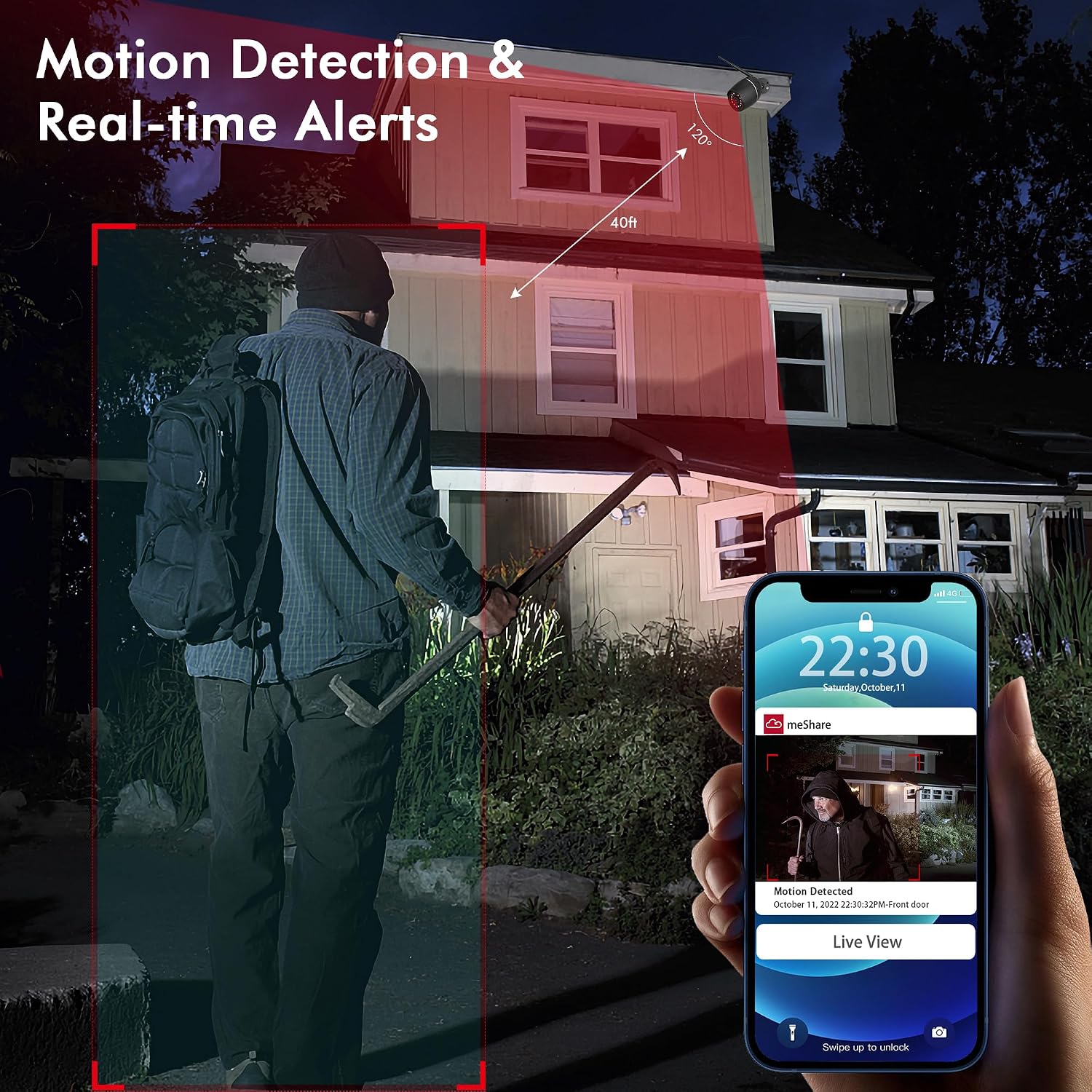
Image: A smartphone screen showing a motion detection alert from the GOAOFOEOI security camera, with a person highlighted in a red box indicating the monitored area.

Image: The GOAOFOEOI security camera positioned next to an Amazon Echo Show, demonstrating its compatibility with Alexa for viewтүз эфирдеги берүүлөрдү көрүү.

Сүрөт: Бөлүнүү view illustrating the camera's 1080P HD clarity in both daytime and infrared night vision, showing a clear view up to 40 feet in darkness.

Image: A person interacting with a delivery driver at their front door using the two-way audio feature of the GOAOFOEOI security camera, as seen on a smartphone.
Пакеттин мазмуну
Пакетиңизде бардык буюмдар бар экенин текшериңиз:
- Security Camera (x2)
- Mounting Kit (x2)
- Кубат менен камсыздоо (x2)
- Антенна (x2)
- Operation Instruction Manual (x1)

Image: A person installing the GOAOFOEOI security camera on an exterior wall, alongside a visual representation of the package contents.
Орнотуу колдонмосу
- Орнотууга даярданыңыз: Choose a suitable outdoor location for your camera, ensuring it is within range of your 2.4GHz Wi-Fi network. The camera requires a plug-in power source.
- Колдонмону жүктөп алыңыз: Издөө the recommended control app (e.g., 'meShare' as indicated in some product reviews) on your smartphone's app store (iOS or Android) and install it.
- Камераны күйгүзүү: Connect the camera to the power supply using the provided adapter. The camera will power on and enter pairing mode.
- Колдонмого түзмөк кошуу: Open the app and follow the on-screen instructions to add a new device. This typically involves scanning a QR code on the camera or its packaging, and then connecting the camera to your 2.4GHz Wi-Fi network by entering your Wi-Fi password.
- Камераны орнотуу: Once the camera is successfully connected and functioning, use the provided mounting kit to securely attach the camera to your chosen wall or surface. Adjust the camera angle for optimal viewing coverage (120° wide-angle).
- Micro SD картаны орнотуу (милдеттүү эмес): If you wish to use local storage, insert a micro SD card (up to 128GB, not included) into the designated slot on the camera. Refer to the app for formatting the SD card if necessary.
Иштөө нускамалары
- Live View: Open the app on your smartphone to access the live video feed from your camera. You can view the 1080P Full HD stream in real-time.
- Эки тараптуу аудио: Use the microphone and speaker icons within the app to engage in two-way communication. Press and hold the microphone button to speak, and release to listen.
- Кыймылды аныктоо эскертүүлөрү: Configure motion detection zones and sensitivity settings within the app. When motion is detected, you will receive instant notifications on your smartphone, along with snapshots and short video clips.
- ReviewЖаздыруулар: Access recorded video clips and snapshots through the app. Recordings are stored on your installed micro SD card or in the cloud (if subscribed to cloud service).
- Alexa интеграциясы: Enable the camera's skill in the Alexa app. You can then use voice commands (e.g., "Alexa, show me the front door camera") to view the live feed on compatible Amazon Echo Show devices.
- Үй-бүлөлүк бөлүшүү: The app supports sharing camera access with multiple accounts, allowing family members to view түз эфир бир эле учурда.
Техникалык тейлөө
- Тазалоо: Periodically clean the camera lens with a soft, dry cloth to ensure clear image quality. Avoid using harsh chemicals or abrasive materials.
- Аба ырайын коргоо: While the camera is IP65 weatherproof, ensure its mounting location provides adequate protection from extreme weather conditions to prolong its lifespan.
- Программалык камсыздоонун жаңыртуулары: Regularly check the app for available firmware updates. Keeping your camera's firmware up-to-date ensures optimal performance, security, and access to new features.
- Электр камсыздоо: Ensure the power connection is secure and protected from water exposure.
Проблемаларды чечүү
- Камера оффлайн: Check the power connection and ensure your Wi-Fi network is active and stable. Verify the camera is within range of your 2.4GHz Wi-Fi router. Restart the camera and your router if necessary.
- Сүрөттүн сапаты начар: Ensure the camera lens is clean. Check your Wi-Fi signal strength in the app; a weak signal can affect video quality.
- Кыймылды аныктоо иштебей жатат: Verify that motion detection is enabled in the app and that the detection zones are correctly configured. Adjust sensitivity settings if needed. Ensure there are no obstructions blocking the camera's view.
- Эки тараптуу аудио көйгөйлөр: Check the volume settings on your smartphone and within the app. Ensure there is no excessive background noise interfering with the audio.
- SD Card Not Recording/Recognized: Ensure the SD card is inserted correctly and is not full. Try formatting the SD card through the app or on a computer. Use a compatible micro SD card (up to 128GB).
- Alexa Integration Problems: Ensure the camera's skill is enabled in the Alexa app and that your Alexa device is properly linked to your camera account.
Техникалык шарттар
| Өзгөчөлүк | Спецификация |
|---|---|
| Модель аты | GO-WIFICAM01 |
| Video Resolution | 1080P Full HD (2MP) |
| Viewбурч | 120 градус |
| Түнкү көрүү диапазону | Up to 40 Feet (Infrared LEDs) |
| Байланыш | 2.4 ГГц Wi-Fi (IEEE 802.11b/g/n) |
| Power Source | Corded Electric (Plug-in Power) |
| Аба ырайына каршылык | IP65 суу өткөрбөйт |
| Иштөө температурасы | -4°F – 140°F (-20°C – 60°C) |
| Сактагыч параметрлери | Micro SD картасы (128 ГБ чейин, кошулган эмес), булут сактагычы |
| Аудио | Ызы-чууну жокко чыгаруу менен эки тараптуу аудио |
| Материал | Full Metal Case |
| Шайкештик | Amazon Alexa, мобилдик колдонмо |
| Монтаж түрү | Дубалга орнотуу |
| Элемент Салмагы | 2.21 pounds (per camera) |
| UPC | 789605570360 |
Кепилдик жана колдоо
For warranty information and detailed support, please refer to the product packaging or contact the manufacturer directly through their official webсайт. Сатып алуу квитанциясын кепилдик дооматтары үчүн сатып алуунун далили катары сактаңыз.
For technical assistance or further inquiries, please reach out to GOAOFOEOI customer support. Contact details are typically available on the product's official webсайтында же мобилдик тиркемеде.


