Introduction
This manual provides detailed instructions for the setup, operation, and maintenance of your BUFFBEE Glow Alarm Clock HRS-BLACK. Please read this manual thoroughly before using the product to ensure proper function and longevity.
Продукт бүттүview
The BUFFBEE Glow Alarm Clock is a versatile device combining a digital alarm clock, FM radio, and a 7-color night light. It is designed to enhance your sleep and wake-up experience with customizable features.
Негизги өзгөчөлүктөрү:
- 3-ин-1 Функциясы: Digital alarm clock, FM radio, and night light.
- 7 түстүү түнкү жарык: Adjustable with 5 brightness levels.
- Кош ойготкучтар: Set two independent alarms with choice of FM radio, built-in beep, or bird sounds.
- Жөнгө салынуучу дисплейдин күңүрттүгү: 0-100% brightness control for the time display.
- Жарыктанган баскычтар: For easy operation in low light conditions.
- Уктоочу таймер: Quick nap setting from 10 to 120 minutes.
- Auto-Off Sleep Timer: Automatically turns off night light and FM radio after a set duration.
- USB кубаттоо порту: For charging external electronic devices.
- Кубат параметрлери: AC powered with AAA battery backup (batteries not included).
Пакеттин мазмуну:
- 1 x BUFFBEE Glow Alarm Clock
- 1 х кубат адаптери
- 1 x User Manual
Компоненттин идентификациясы:
Көбүрөөк маалымат алуу үчүн төмөндөгү сүрөттү караңызview of the alarm clock's buttons and display.

Сүрөт: алдыңкы view of the BUFFBEE Glow Alarm Clock, showing the digital time display, alarm indicators, and control buttons on the top panel. The top edge features a light strip.
Жайгашуу
1. Кубат туташуу:
- Connect the provided power adapter to the DC input port on the back of the alarm clock.
- Адаптерди кадимки эле розеткага сайыңыз.
2. Battery Backup (Optional):
Электр энергиясы учурунда үзгүлтүксүз иштөө үчүн utages, install 3 AAA batteries (not included) into the battery compartment on the bottom of the unit. The clock will maintain time and alarm settings, and the alarm will still function, but the display and night light may be limited to conserve power.

Сүрөт: Арткы view of the alarm clock showing the power input and battery compartment, alongside a power adapter and three AAA batteries (not included).
3. Баштапкы убакытты коюу:
- When first powered on, the display will show a default time.
- басып, кармап туруңуз УБАКЫТТЫ ОРНОТУУ button (usually located on the top panel) until the hour digits flash.
- колдонуу +/- саатты тууралоо үчүн баскычтар (же окшош навигация баскычтары).
- Басыңыз УБАКЫТТЫ ОРНОТУУ Саатты ырастоо жана мүнөттү жөндөө үчүн кайра басыңыз.
- колдонуу +/- мүнөттөрдү тууралоо үчүн баскычтар.
- Басыңыз УБАКЫТТЫ ОРНОТУУ дагы бир жолу ырастоо жана убакыт орнотуу режиминен чыгуу.
- 12 сааттык жана 24 сааттык форматтын ортосунда которулуу үчүн, басыңыз 12/24H button (if available, often combined with time set or a dedicated button).
Иштөө нускамалары
1. Ойготкучтарды коюу (1-ойготкуч жана 2-ойготкуч):
Саат эки көз карандысыз ойготкучту колдойт.
- басыңыз 1-ДАБЛ баскычы (же 2-ДАБЛ) once to display the current alarm time.
- басып, кармап туруңуз 1-ДАБЛ (же 2-ДАБЛ) button until the hour digits flash.
- колдонуу +/- саатты тууралоо үчүн баскычтар.
- басыңыз АЛАРМ саатты ырастоо жана мүнөттүк жөндөөлөргө өтүү үчүн кайра баскычын басыңыз.
- колдонуу +/- мүнөттөрдү тууралоо үчүн баскычтар.
- басыңыз АЛАРМ button again to select the alarm sound: FM radio, built-in beep, or bird sounds. Use +/- опциялар аркылуу айлануу.
- басыңыз АЛАРМ Ойготкучту ырастоо жана иштетүү үчүн баскычты дагы бир жолу басыңыз. Дисплейде ойготкучтун сүрөтчөсү пайда болот.
- To turn off an active alarm, press the corresponding АЛАРМ button. The alarm icon will disappear.
2. Тындыруу функциясы:
Ойготкуч чыкканда чоң баскычты басыңыз SNOOZE / LIGHT button on top to temporarily silence the alarm for 9 minutes. The alarm will sound again after the snooze period.
3. Night Light Operation:
The alarm clock features a 7-color night light with adjustable brightness.

Image: The alarm clock shown with its top light strip illuminated in various colors, demonstrating the 7-color night light feature.
- басыңыз ЖАРЫК button (often combined with SNOOZE or a dedicated button) to turn the night light on/off.
- When the night light is on, press the ЖАРЫК 7 жеткиликтүү түстөр арасында айлануу үчүн баскычты кайра-кайра басыңыз.
- To adjust the brightness, use the +/- buttons while the night light is active. There are 5 brightness levels.
4. FM радиосу:
Орнотулган FM радиосу сизге сүйүктүү радиостанцияларыңызды угууга мүмкүндүк берет.
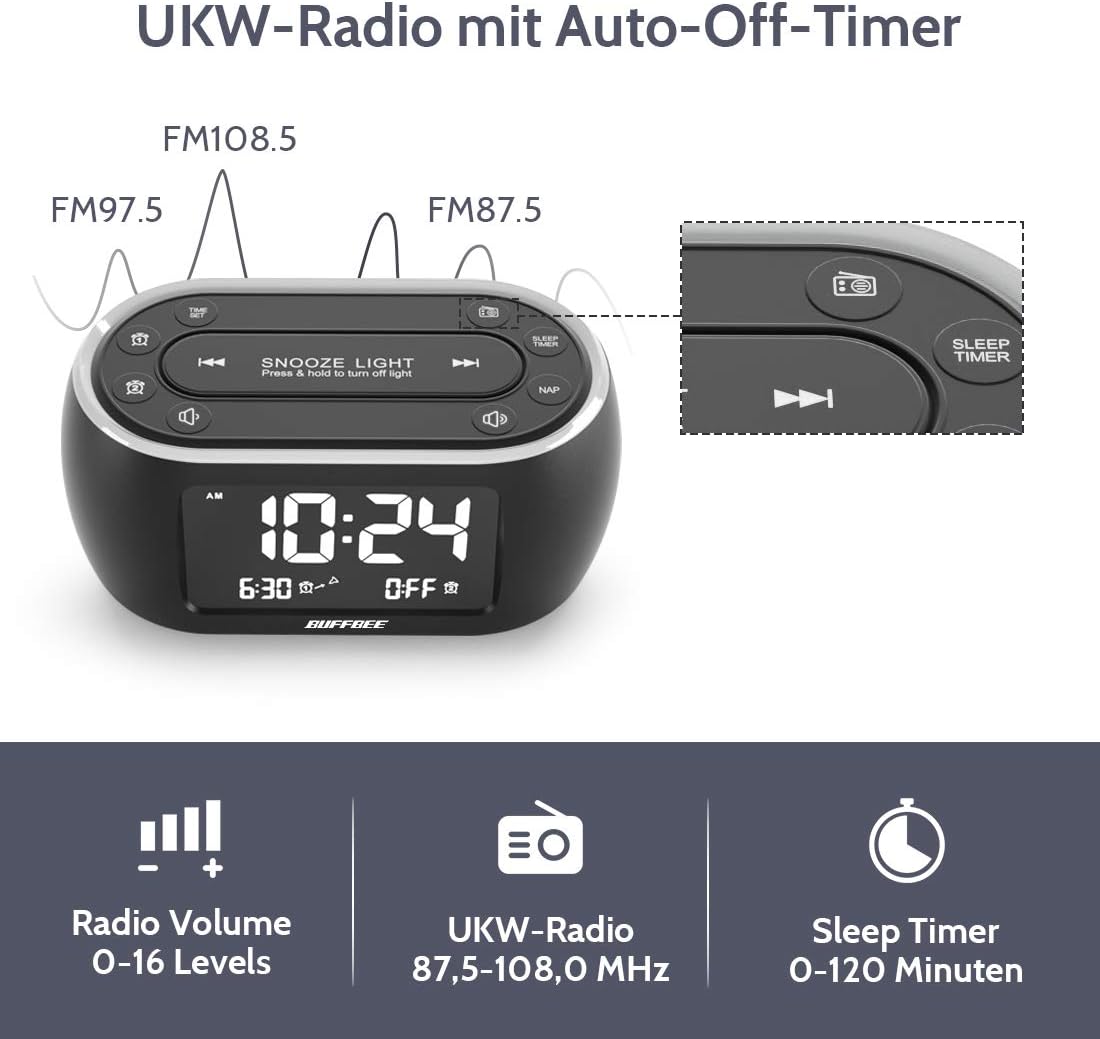
Image: The alarm clock display showing FM radio frequencies (FM108.5, FM97.5, FM87.5) and icons for radio volume and sleep timer.
- басыңыз РАДИО button to turn the FM radio on/off.
- басыңыз SCAN button (or similar) to automatically scan and save available FM stations.
- колдонуу АЛГА/КИЙИНКИ buttons to navigate through saved stations or manually tune.
- Үнүн колдонуп, үнүн жөндөңүз VOLUME +/- buttons. The volume can be set from 0 to 16 levels.
5. Nap Timer:
The nap timer allows for quick, short sleep periods without affecting regular alarm settings.
- басыңыз NAP button. The display will show the default nap time (e.g., 10 minutes).
- басыңыз NAP button repeatedly to cycle through preset nap durations (e.g., 10, 20, 30, 60, 90, 120 minutes).
- The nap timer will start automatically after selection.
- To cancel the nap timer, press the NAP button until "OFF" is displayed.
6. Auto-Off Sleep Timer:
Set a timer for the night light and/or FM radio to automatically turn off after a specified duration.
- While the night light or FM radio is active, press the УЙКУ ТАЙМЕРИ баскычы.
- басыңыз УЙКУ ТАЙМЕРИ button repeatedly to cycle through available durations (e.g., 15, 30, 60, 90, 120 minutes, or OFF).
- The selected duration will be displayed, and the timer will begin. The night light and/or FM radio will turn off automatically when the timer expires.
7. Display Dimmer:
Adjust the brightness of the main time display from 0% to 100%.

Image: Six different views of the alarm clock display, illustrating the range of brightness from very dim to fully bright, and also showing the night light dimmer.
арналганын колдонуңуз DIMMER терүү же DIMMER +/- buttons (if available) to adjust the display brightness to your preference. This allows for comfortable viewар кандай жарык абалында.
8. USB заряддоо порту:
A USB port is located on the back of the unit for charging small electronic devices.

Image: The alarm clock with a smartphone plugged into its side USB port, indicating the charging function.
Connect your device's USB charging cable to the port. The clock must be powered by the AC adapter for the USB charging function to work.
Техникалык тейлөө
To ensure the longevity and optimal performance of your BUFFBEE Glow Alarm Clock, follow these maintenance guidelines:
- Тазалоо: Wipe the unit with a soft, dry cloth. Do not use abrasive cleaners, waxes, or solvents as they may damage the surface.
- Күч: Always disconnect the power adapter from the wall outlet before cleaning or if the unit will be unused for an extended period.
- Курчап турган чөйрө: Keep the alarm clock away from direct sunlight, heat sources, and excessive moisture.
- Батареяны алмаштыруу: If using battery backup, replace AAA batteries annually or when the battery indicator suggests low power. Ensure correct polarity when inserting new batteries.
Проблемаларды чечүү
If you encounter issues with your BUFFBEE Glow Alarm Clock, refer to the following common problems and solutions:
| Көйгөй | Мүмкүн себеп | Чечим |
|---|---|---|
| Сааттын дисплейи бош же жыпылыктап турат. | No power or loose connection. Low battery backup. | Ensure the power adapter is securely plugged into the clock and the wall outlet. Check if AAA batteries are installed correctly and have sufficient charge. |
| Ойготкуч угулбайт. | Alarm not activated. Alarm volume too low. | Verify that the alarm icon is displayed. Check the alarm volume setting. Ensure the correct alarm time is set. |
| FM радиосун кабыл алуу начар. | Weak signal. Antenna not extended. Interference. | Extend the FM antenna fully. Try repositioning the clock. Perform an auto-scan for stations again. |
| Түнкү жарык иштебей жатат. | Жарык функциясы өчүрүлгөн. | Press the LIGHT button to turn it on. Check if the brightness is set to 0%. |
| USB кубаттоо иштебей жатат. | Clock not connected to AC power. Device not compatible. | Ensure the clock is powered by the AC adapter. Check if your device is compatible with standard USB charging. |
Техникалык шарттар
| Өзгөчөлүк | Деталь |
|---|---|
| Бренд | BUFFBEE |
| Модель номери | HRS-BLACK |
| Өлчөмдөрү (L x W x Y) | 12 x 3.81 x 6 см (4.72 x 1.5 x 2.36 дюйм) |
| Салмагы | 330 грамм (0.73 фунт) |
| Power Input | AC 100-240V, 50/60Hz |
| Батареянын камдык көчүрмөсү | 3 x AAA батарейкалар (киргизилген эмес) |
| Дисплей түрү | Санарип |
| Дисплей жарыктыгы | 0-100% жөнгө салынат |
| Түнкү жарык түстөр | 7 түс |
| Night Light Brightness | 5 деңгээли жөнгө салынат |
| FM радиосунун жыштыгы | 87.5-108.0 МГц |
| Ойготкучтун үнү | 0-16 денгээлдери жөнгө салынат |
| Өзгөчөлүктөр | Ambient light, Dual Alarm, Nap Timer, Sleep Timer, USB Charging Port |
Кепилдик жана колдоо
BUFFBEE products are designed for reliability and performance. For specific warranty information, please refer to the documentation included with your purchase or contact BUFFBEE customer support.
If you require technical assistance or have questions regarding your BUFFBEE Glow Alarm Clock, please visit the official BUFFBEE website or contact their customer service department. Contact details are typically found on the product packaging or the manufacturer's webсайт.


