Introduction
This manual provides comprehensive instructions for the safe and efficient operation of your InFocus IN119BB Multimedia Projector. Please read this manual thoroughly before using the projector and retain it for future reference.
The InFocus IN119BB projector is designed for versatile use, offering a very long lamp life, high brightness, and extensive connectivity options. Its compact and lightweight design ensures ease of portability and installation.
Коопсуздук маалыматы
Өрттүн, электр шокунун же жаракаттын алдын алуу үчүн ар дайым төмөнкү коопсуздук чараларын сактаңыз:
- Желдетүүчү тешиктерди жаппаңыз.
- Проекторду жамгырга же нымдуулукка дуушар кылбаңыз.
- Бардык тейлөөлөрдү квалификациялуу тейлөө кызматкерлерине тапшырыңыз.
- l болгондо проектордун объективине түз кароодон качыңызamp күйүк.
- Электр шнурунун туура жерге туташтырылышын камсыз кылыңыз.
Продукт бүттүview
Компоненттер жана башкаруу элементтери
Familiarize yourself with the main components and controls of your InFocus IN119BB projector.

1-сүрөт: Бурчтуу view of the InFocus IN119BB projector, showing the lens, ventilation grilles, and top panel controls.

2-сүрөт: Фронт view of the InFocus IN119BB projector, highlighting the main projection lens.

3-сүрөт: Жогортон ылдый бурчтуу view of the InFocus IN119BB projector, showing the control panel layout.

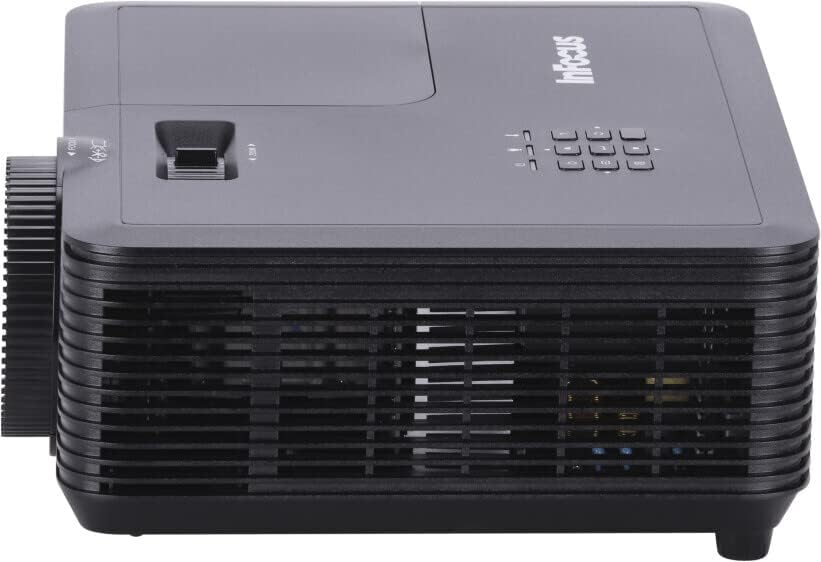
4-сүрөт: Side view of the InFocus IN119BB projector, illustrating its compact profile.
5-сүрөт: Арткы view of the InFocus IN119BB projector, displaying all available input and output ports including HDMI, VGA, S-Video, and audio connections.
Жайгашуу
Жайгаштыруу
Choose a stable, flat surface for the projector. Ensure adequate ventilation around the unit. For optimal image quality, position the projector perpendicular to the projection surface.
Туташуу кубаты
- Электр шнурунун проектордун кубат киресине туташтырыңыз.
- Plug the other end of the power cord into a grounded electrical outlet (240V recommended).
Киргизүү булактарын туташтыруу
The IN119BB projector supports multiple input sources:
- HDMI: Use an HDMI cable to connect your computer, Blu-ray player, or other HDMI-enabled device to either HDMI 1 or HDMI 2 port.
- VGA: Connect your computer's VGA output to the VGA IN port using a VGA cable.
- S-Video: For older video sources, connect an S-Video cable to the S-VIDEO port.
- Аудио: Connect external audio devices to the AUDIO IN port. Audio output is available via the AUDIO OUT port.
Иштөө нускамалары
Күйгүзүү/өчүрүү
- To power on, press the Power button on the projector or remote control. The power indicator light will turn blue.
- To power off, press the Power button twice. The projector will enter a cooling down cycle before shutting down completely.
Сүрөттү тууралоо
- Фокус: Объективдеги фокус шакекти сүрөт так жана тунук болгонго чейин айлантыңыз.
- Чоңойтуу: Adjust the zoom lever next to the lens to change the image size.
- Негизги ташты оңдоо: Эгерде сүрөт трапеция формасында көрүнсө, сүрөттү квадраттап тууралоо үчүн OSD менюсундагы keystone коррекция функциясын колдонуңуз.
Киргизүү булагын тандоо
Press the "Source" button on the projector's control panel or remote control to cycle through available input sources (HDMI 1, HDMI 2, VGA, S-Video).
Экрандагы дисплей (OSD) менюсу
Press the "Menu" button to access the OSD menu. Use the arrow keys to navigate and the "Enter" button to select options. Adjust settings such as brightness, contrast, color, and aspect ratio.
Техникалык тейлөө
Lamp Алмаштыруу
лamp life of the IN119BB is very long, but eventually, it will need replacement. When the lamp индикатор күйүп же сүрөт күңүрт болуп калса, l ны алмаштырууга убакыт келдиamp. Refer to the detailed lamp replacement guide in the full user manual for specific steps.
Проекторду тазалоо
- Объектив: Оптикалык линзалар үчүн атайын жасалган жумшак, түксүз кездемени колдонуңуз. Абразивдүү тазалагычтарды колдонбоңуз.
- Casing: Проекторду сүртүңүз casing жумшак менен, гamp кездеме. Катуу химиялык заттарды колдонуудан алыс болуңуз.
- Аба чыпкалары: Regularly check and clean the air filters to ensure proper ventilation and prevent overheating.
Проблемаларды чечүү
| Көйгөй | Мүмкүн себеп | Чечим |
|---|---|---|
| Сүрөт көрсөтүлгөн жок | Power cord disconnected; Incorrect input source selected; Lamp маселе. | Check power connection; Select correct input source; Replace lamp зарыл болсо. |
| Сүрөт бүдөмүк | Линза фокустан чыгып кеткен; Проектор экранга өтө жакын/алыс. | Adjust focus ring; Reposition projector. |
| Проектор ысып кетти | Бөгөттөлгөн желдетүү; Кир аба чыпкасы. | Ensure clear ventilation; Clean air filter. |
Техникалык шарттар
| Өзгөчөлүк | Деталь |
|---|---|
| Модель номери | IN119BB |
| Дисплей технологиясы | DLP |
| Native Resolution | 1280 x 800 (WUXGA) |
| Жарыктык | 3500 Lumens |
| Байланыш | HDMI (x2), VGA In, VGA Out, S-Video, Audio In, Audio Out, RS232 |
| Электр камсыздоо | 240В, 267Вт |
| Продукциянын өлчөмдөрү (L x W x Y) | 23.62 x 31.24 x 10.67 см |
| Продукт Салмагы | 2.6 кг (5.5 фунт) |
| Форма фактору | Portable |
| Сунушталган колдонуу | Үй кинотеатры |
Кепилдик жана колдоо
For warranty information and technical support, please visit the official InFocus webсайтка же кардарларды тейлөөгө кайрылыңыз. Сатып алганыңыздын далили катары сатып алуу дүмүрчөгүңүздү сактаңыз.
Онлайн колдоо: www.infocus.com/support


