VOCOO Digital Kitchen Timer
Модель: 5260
Колдонуучунун инструкциясы
Introduction
Thank you for choosing the VOCOO Digital Kitchen Timer. This device is designed for precise time management in various settings, including cooking, studying, fitness, and more. Featuring a large LED display, adjustable volume, and magnetic backing, it offers ease of use and versatility for all ages.

Сүрөт: алдыңкы view of the VOCOO Digital Kitchen Timer, displaying "08:24" on its large LED screen. The timer is white with a black display area.
Коопсуздук маалыматы
- Keep the device away from water and excessive moisture to prevent damage.
- Do not expose the timer to extreme temperatures or direct sunlight for prolonged periods.
- Handle with care; avoid dropping or subjecting the device to strong impacts.
- Батареялар полярдуулук белгилерине ылайык туура салынганын текшериңиз.
- Батареяларды балдар жетпеген жерде сактаңыз.
Пакеттин мазмуну
Пакетти ачкандан кийин, бардык буюмдар бар экенин жана жакшы абалда экендигин текшериңиз:
- 1 x VOCOO Digital Kitchen Timer (Model 5260)
- 3 x AAA батареялары (алдын ала орнотулган же өзүнчө камтылган)
- 1 х Колдонуучунун колдонмосу (бул документ)
Продукт бүттүview
The VOCOO Digital Kitchen Timer features a sleek design with intuitive controls. Key components include:
- Чоң LED дисплей: Shows time clearly.
- Айлануучу терүү: Used for setting minutes and seconds.
- Баштоо/токтотуу баскычы: Integrated into the display, press to start or pause.
- Магниттик колдоо: Allows attachment to metal surfaces.
- Тайгаланбаган төшөмөлөр: Provide stability on flat surfaces.
- Үндү которуштуруу: Located on the back, for adjusting alarm volume (Loud, Soft, Mute).
- Жарыктык которуштуруу: Located on the back, for adjusting display brightness (Bright, ECO).

Image: A person's hands holding the VOCOO Digital Kitchen Timer, highlighting its compact and ergonomic design for easy handling.
Жайгашуу
1. Батареяны орнотуу
The timer requires three AAA batteries. These are typically included. If not, or if replacing, follow these steps:
- Locate the battery compartment cover on the back of the timer.
- Капкакты жылдырыңыз.
- Insert three AAA batteries, ensuring the correct polarity (+/-) as indicated inside the compartment.
- Батарея уясынын капкагын бекем жабыңыз.
2. Баштапкы күйгүзүү
Once batteries are installed, the timer should automatically power on and display "00:00". If not, check battery installation.
3. Магниттик тиркеме
The timer features powerful magnets on its back, allowing it to be securely attached to any iron surface, such as a refrigerator or oven. Ensure the transparent film on the silicone pads is removed for stronger magnetic adhesion.
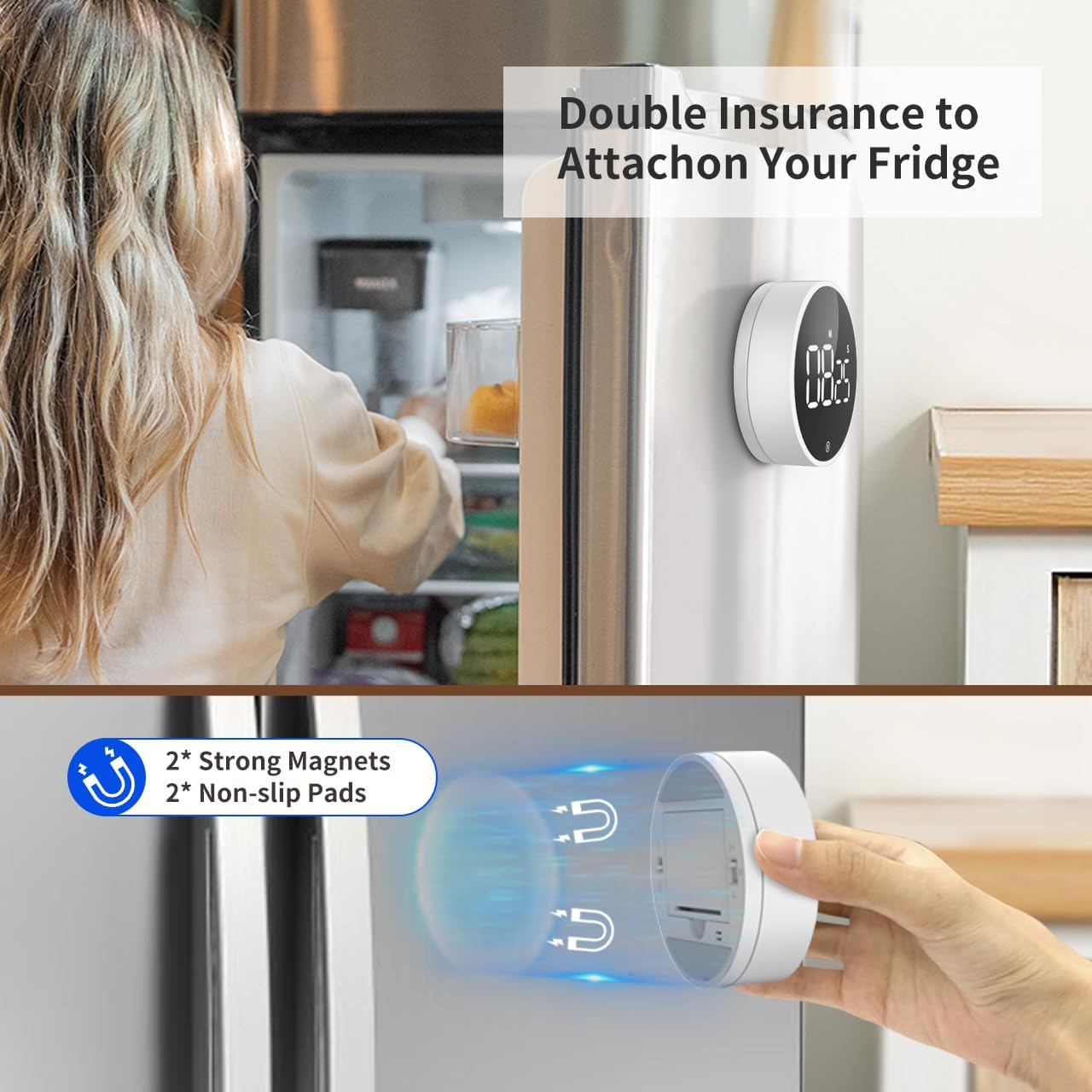
Image: The VOCOO Digital Kitchen Timer magnetically attached to the side of a refrigerator, demonstrating its convenient placement.

Сүрөт: деталдуу view of the back of the timer, illustrating the two strong magnets and two non-slip silicone pads designed for secure attachment.
Иштөө нускамалары
1. Setting Time (Countdown Mode)
Артка эсептөө убактысын коюу үчүн:
- Ensure the display shows "00:00". If not, press and hold the front button to reset it.
- Rotate the outer dial clockwise to increase the time.
- Rotate slowly to adjust seconds.
- Rotate quickly to adjust minutes.
- The maximum countdown time is 99 minutes and 55 seconds.
2. Starting and Pausing the Timer
Once the desired time is set, press the front button (the large circular area on the display) once to start the countdown. To pause the timer, press the button again. Pressing it a third time will resume the countdown.
3. Таймерди баштапкы абалга келтирүү
To reset the timer to "00:00" at any point, press and hold the front button for approximately 3 seconds.
4. Count-Up Mode (Stopwatch)
To use the timer as a stopwatch:
- Ensure the display shows "00:00". If not, press and hold the front button to reset it.
- Press the front button once to start counting up from "00:00".
- Press the button again to pause the count-up.
- Press and hold the button to reset the stopwatch to "00:00".

Image: Illustration of the two counting modes: Count-up (stopwatch) from 00:00 to 99:55, and Countdown from 99:55 to 00:00. Examples show the timer used during exercise and baking.
5. Сигнализациянын үнүн жөндөө
On the back of the timer, locate the volume switch. You can select from three alarm levels:
- Катуу: Approximately 80-90dB, suitable for noisy environments.
- Жумшак: Approximately 60-75dB, for quieter settings.
- Үнсүз: The numbers will blink on the display to indicate time is up without an audible alarm, ideal for silent environments like libraries or meetings.

Image: The timer's volume settings are illustrated, showing a loud setting (80-90dB) for a kitchen environment, a soft setting (60-75dB) for a quiet home, and a mute setting where numbers blink, suitable for an office or classroom.
6. Дисплейдин жарыктыгын тууралоо
Also on the back of the timer, there is a switch to adjust the display brightness:
- Жаркын: For optimal visibility in well-lit conditions.
- ЭКО: A dimmer setting to conserve battery life, suitable for low-light conditions.
The timer automatically enters power-saving mode 5 seconds after being paused or stopped. Press the front button to reactivate the display.
Техникалык тейлөө
Тазалоо
To clean the timer, wipe it gently with a soft, dry, or slightly damp кездеме. Абразивдүү тазалагычтарды колдонбоңуз же аппаратты сууга салбаңыз.
Батареяны алмаштыруу
When the display dims significantly or the timer stops responding, it's time to replace the batteries. Follow the battery installation steps outlined in the "Setup" section.
Сактагыч
If storing the timer for an extended period, it is recommended to remove the batteries to prevent leakage and potential damage to the device.
Проблемаларды чечүү
| Көйгөй | Мүмкүн себеп | Чечим |
|---|---|---|
| Таймер күйбөй жатат. | Батареялар өлүп калган же туура эмес орнотулган. | Батареяларды алмаштырыңыз же туура полярдуулукту камсыз кылыңыз. |
| Дисплей күңүрт. | ECO brightness mode is selected or batteries are low. | Switch to "Bright" mode on the back. Replace batteries if still dim. |
| Сигнализация чырылдабай жатат. | Mute volume mode is selected. | Switch to "Loud" or "Soft" mode on the back. |
| Timer does not stick to surface. | Transparent film on silicone pads not removed or surface is not iron. | Remove the transparent film. Ensure the surface is magnetic (iron/steel). |
| Time setting is too sensitive. | Rapid rotation of the dial. | Rotate the dial more slowly for precise second adjustments. Rotate quickly for minute adjustments. |
Техникалык шарттар
| Өзгөчөлүк | Деталь |
|---|---|
| Модель номери | 5260 |
| Өлчөмдөр | 3.07"D x 3.07"W x 1.06"H (7.8 x 7.8 x 2.7 CM) |
| Салмагы | 4.2 унция (120 грамм) |
| Материал | Акрилонитрил бутадиен стирол (ABS) |
| Max Count Time | 99 мүнөт 55 секунд |
| Power Source | 3 x AAA Батареялар (кошулган) |
| Сигнализациянын үн деңгээли | Loud (80-90dB), Soft (60-75dB), Mute (blinking digits) |
| Дисплей жарыктыгы | Bright, ECO |
| Өзгөчөлүктөрү | Magnetic Backing, Non-slip Pads, Memory Function |
Кепилдик жана колдоо
Кепилдик маалымат
VOCOO products are manufactured with high-quality materials and undergo strict quality control. For specific warranty details, please refer to the product packaging or contact VOCOO customer support. Typically, electronic devices come with a limited warranty covering manufacturing defects.
Кардарларды колдоо
If you encounter any issues or have questions regarding your VOCOO Digital Kitchen Timer, please contact our customer support team. You can usually find contact information on the product packaging, the official VOCOO webсайты же сатып алуу платформасы аркылуу.
When contacting support, please have your product model number (5260) and purchase details ready to assist in a quicker resolution.


