1. Киришүү
This manual provides detailed instructions for the SoundPEATS Q True Wireless Earbuds. Please read thoroughly to ensure proper use and optimal performance of your device.

Figure 1.1: SoundPEATS Q True Wireless Earbuds and Charging Case.
Видео 1.1: Расмий продукт бүттүview of SoundPEATS Q wireless earbuds.
2. Кутуда эмне бар
- SoundPEATS Q True Wireless Earbuds
- Заряддоо кутусу
- USB-C заряддоо кабели
- User Manual
- Кулактын учтары (S/M/L өлчөмдөрү)

Figure 2.1: Included components with the SoundPEATS Q Earbuds.
3. Продукт бүтүп калдыview
3.1 Кулакчындын компоненттери
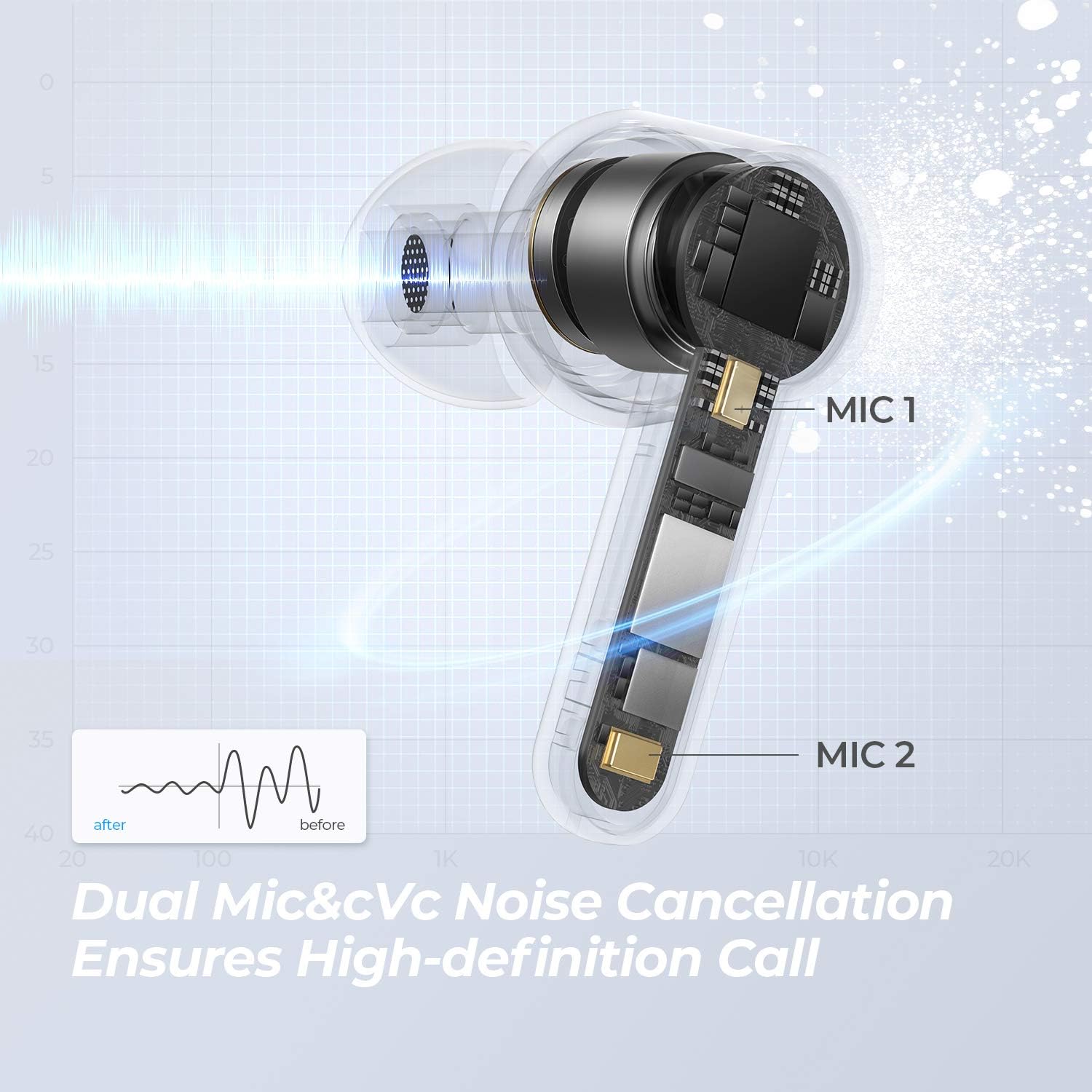
Figure 3.1: Internal structure of the SoundPEATS Q earbud, featuring a 10mm driver and dual microphones for clear audio and calls.
3.2 Заряддоо кутусу

Figure 3.2: Earbuds in their charging case, ready for connection.
4. Орнотуу
4.1 Баштапкы жупташтыруу
- Open the charging case lid. Both earbuds will automatically enter TWS pairing mode. The LED on the main earbud will flash white and red, while the second earbud's LED will remain white.
- Түзмөгүңүздө (мисалы, смартфондо, планшетте) Bluetooth'ду иштетиңиз.
- Select "SOUNDPEATS Q" from the Bluetooth device list to connect.
Figure 4.1: Earbuds in pairing mode, ready to connect to a device via Bluetooth.
Video 4.1: Visual guide on how to pair the SoundPEATS Q earbuds with your device.
5. Иштөө нускамалары
5.1 Сенсордук башкаруу
The SoundPEATS Q earbuds feature sensitive touch controls for convenient operation:
- Музыканы ойнотуу/тындыруу: Double tap the Multifunction Button on either earbud.
- Answer/Hang Up Phone Call: Double tap the Multifunction Button on either earbud.
- Көлөмдү азайтуу: Single tap the left Multifunction Button.
- Көлөмүн жогорулатуу: Single tap the right Multifunction Button.
- Мурунку трек: Long press the left Multifunction Button for 1.5 seconds.
- Кийинки трек: Long press the right Multifunction Button for 1.5 seconds.
- Үн Жардамчысын жандыруу: Triple tap the Multifunction Button on either earbud.

Figure 5.1: Touch control area on the earbud.
Video 5.1: Demonstrating touch controls for music playback, calls, and voice assistant.
5.2 Бир/Эки режим
The earbuds support both single and twin modes, allowing you to use either earbud independently or both together for a stereo experience. The latest Bluetooth 5.0 transmission and MC-Sync TrueWireless Mirroring technology ensure a stable connection.
6. Заряддоо
6.1 Корпусун заряддоо
The charging case can be charged via USB-C cable or wirelessly:
- USB-C заряддоо: Берилген USB-C кабелин корпустагы заряддоо портуна туташтырыңыз.
- Зымсыз кубаттоо: Place the charging case on a compatible Qi wireless charging pad.
The LED indicator on the charging case will flash slowly while charging and will stay on white when fully charged.

Figure 6.1: Wireless charging of the SoundPEATS Q case.

Figure 6.2: USB-C charging port and total playtime indication.
6.2 Earbud Battery Life
A single charge provides approximately 7 hours of music playback. The charging case offers an additional two recharges, extending the total listening time to 21 hours.
Video 6.1: Visual guide on how to charge the SoundPEATS Q earbuds and case.
7. Техникалык тейлөө
7.1 Сууга туруктуулук
The SoundPEATS Q earbuds are IPX5 water-resistant, meaning they can withstand splashes of water and sweat. They are suitable for workouts and outdoor activities but should not be submerged in water.
8. Кыйынчылыктарды
8.1 Заводдук абалга кайтаруу
If you experience pairing issues or other malfunctions, you can perform a factory reset:
- Эки гарнитураны тең заряддоо кутусуна салыңыз.
- Ensure the case lid is open and the earbuds are in the charging state.
- Clear the pairing record for "SOUNDPEATS Q" from your device's Bluetooth list.
- Long press the button inside the charging case for 10 seconds until the LED light of the charging case flashes white twice, indicating a successful reset.
Video 8.1: Visual guide on how to perform a factory reset for the SoundPEATS Q earbuds.
9. Техникалык шарттар
| Өзгөчөлүк | Спецификация |
|---|---|
| Модель аты | SoundPEATS Q |
| Bluetooth версиясы | 5.2 |
| Аудио драйверинин өлчөмү | 10мм |
| Микрофондор | 4-Mic (Dual Mic for each earbud) |
| Жалпы ойноо убактысы | 21 саатка чейин (заряддоо кутусу менен) |
| Earbud Playtime | 7 саатка чейин (бир кубаттоо) |
| Заряддоо түрү | USB-C, зымсыз кубаттоо |
| Суу каршылык | IPX5 |
| Башкаруу түрү | Touch Control |
| Single/Twin Mode | Колдоого алынган |
| Продукциянын өлчөмдөрү | 2.07 x 2.07 x 0.85 дюйм |
| Элемент Салмагы | 1.6 унция |
10. Кепилдик жана колдоо
For warranty information, technical support, or further assistance, please refer to the official SoundPEATS webсайтына кириңиз же алардын кардарларды тейлөө кызматына түз кайрылыңыз. Чоо-жайын, адатта, тиркелген колдонуучу колдонмосунан же продуктунун таңгагынан тапса болот.


